
You are using an out of date browser. It may not display this or other websites correctly.
You should upgrade or use an alternative browser.
You should upgrade or use an alternative browser.
PS3 PS3 jailbreak
- Thread starter jahvk
- Start date

ifrit05
Forum Noob
NOR firmware models take a fair bit of time to patch (all models after CECHAxx/Bxx/Cxx/Exx/Gxx and some Super Slims). Just let it finish.
EDIT: I was to hasty with the reply, seems like it can't reach the server to get the patch. Make sure you are not behind a DNS/Proxy and maybe use an Ethernet cable if you're not already doing so?
EDIT: I was to hasty with the reply, seems like it can't reach the server to get the patch. Make sure you are not behind a DNS/Proxy and maybe use an Ethernet cable if you're not already doing so?
NOR firmware models take a fair bit of time to patch (all models after CECHAxx/Bxx/Cxx/Exx/Gxx and some Super Slims). Just let it finish.
EDIT: I was to hasty with the reply, seems like it can't reach the server to get the patch. Make sure you are not behind a DNS/Proxy and maybe use an Ethernet cable if you're not already doing so?
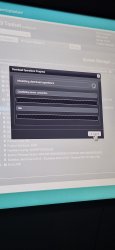
I tried using ethernet cable/connection. It still stuck on the same thing
ifrit05
Forum Noob
You went to correct site right? https://www.ps3toolset.com/bgtoolset/
If so, try clearing cache/cookies/history from the web browser settings.
If so, try clearing cache/cookies/history from the web browser settings.
You went to correct site right? https://www.ps3toolset.com/bgtoolset/
If so, try clearing cache/cookies/history from the web browser settings.
I tried doing that. The https website " this page cannot be displayed" so i went to http website instead. I cleared cache/cookies and history but it still doesnt work

Coldheart2236
Moderator
Some more useful information from the General Information drop-down on the PS3 Toolset main page:
The Flash Player 9 browser plugin must be enabled to use the PS3 Toolset.
If ever you disabled it permanently in the current user profile, you may need to log in as another user or create a new profile to be able to use any of the tools in this project.
Set time via the Internet, making sure the daylight savings toggle, if relevant, is adjusted correctly. You could also create a new user profile just for the purpose of applying the exploit, so that all browser settings are their default, including the Flash 9 plugin. Make sure cookies and Javascript are both enabled in the browser.It is highly recommended that you adjust the console's System Time settings properly to avoid any time related issues with the browser and/or the Flash Player plugin.
Last edited:
Some more useful information from the General Information drop-down on the PS3 Toolset main page:
Set time via the Internet, making sure the daylight savings toggle, if relevant, is adjusted correctly. You could also create a new user profile just for the purpose of applying the exploit, so that all browser settings are their default, including the Flash 9 plugin. Make sure cookies and Javascript are both enabled in the browser.
Okay thanks! I will try it later when I get back home. I'll let you know
Coldheart2236
Moderator
Hi Pau, welcome to PSX-Place. I edited your message to include an English translation. In future posts would you please also do the same - Google Translate (what I used) is fine"Hola, soy Pau de España. Estoy interesado en la scene de PS3. Muchas gracias por aceptarme en el foro."
"Hi, I'm Pau from Spain. I'm interested in the PS3 scene. Thank you so much for accepting me on the forum."

Some more useful information from the General Information drop-down on the PS3 Toolset main page:
Set time via the Internet, making sure the daylight savings toggle, if relevant, is adjusted correctly. You could also create a new user profile just for the purpose of applying the exploit, so that all browser settings are their default, including the Flash 9 plugin. Make sure cookies and Javascript are both enabled in the browser.
Hey, I created new profile. Made sure cookies and javascript are on. Cleared everything. Set page to blank. Went to ps3toolset. But no flash 9 plugin option popped up. It's still stuck
Also I have ethernet plugged in and Time and date is correct


GuilloteTesla
Moderator
I turned on my ps3. Now I cant even go to the website.
Because you didn't put the correct address: https://www.ps3toolset.com/bgtoolset/

Using http or https shouldn't matter. Just type ps3toolset.com should redirect.
Its an SSL error you have.
What firmware version do you have?
Just tested here and the site works.
If your clock is correct, I would suggest using recovery to rebuild database
I have system software version 4.76
And just typing ps3toolset.com worked
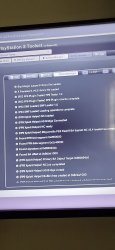
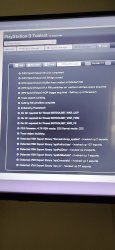
Heres is the log screenshots
Edit: the server wont let me upload the rest. I will try again
I will share the rest as a link as I cannot upload them
https://docs.google.com/document/d/164wbscflyNC8V-E0gzlKWWrrqVoKZDK6W7duXlSE6GI/edit?usp=drivesdk
Attachments
Last edited by a moderator:

esc0rtd3w
Developer
I would try 4.76 again, then if don't work, update to 4.82+
Here is 4.82 link
https://archive.midnightchannel.net/SonyPS/Firmware/download/152d950c365ede4130c53ceb18dcd43b/CEX_CRC[322643FE]_FW[v4.82]_PS3UPDAT.PUP
Or just update to 4.92 over internet or pup
Here is 4.82 link
https://archive.midnightchannel.net/SonyPS/Firmware/download/152d950c365ede4130c53ceb18dcd43b/CEX_CRC[322643FE]_FW[v4.82]_PS3UPDAT.PUP
Or just update to 4.92 over internet or pup
Similar threads
-

-
-
PS3 Bgtoolset stuck at initializing download operations
- Started by Toasty442
- Replies: 3