
NiHuShu
Member
Yes but for me ISOs without Dummy just don't workDummy file is NOT NEEDED for iso. There is no laser to make it read easier.

Yes but for me ISOs without Dummy just don't workDummy file is NOT NEEDED for iso. There is no laser to make it read easier.

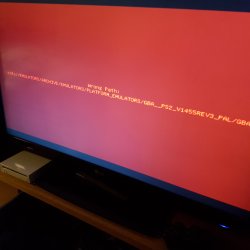 I think I may have gotten a Gameboy Adanve emulator to work.. . But I'm not 100% yet.
Well what should i do then?i follow all the steps above and i get that error i postedDummy file is NOT NEEDED for iso. There is no laser to make it read easier.
Yeah I've discovered this some time ago. I'm not sure where should it beView attachment 11228 I think I may have gotten a Gameboy Adanve emulator to work.. . But I'm not 100% yet.
Everything I've tested that fails just give me a black screen after booting the elf. This time, I get an error message. But not a ps3 error message, I think the elf needs to be in a certain directory structure to boot correctly.


Its just struck me....
We're trying to run emulators inside an emulator....
Ha
Is the BIOS in the same forlder as the ELF file (in your iso) ?
The BIOS file is indeed in the same folder... That was my first guess, bios is in the wrong place...
@NiHuShu, when i load up PicoDrive and select the "load game" option, there is no cdfs:/ to choose...
Only options are for the hdd and memory cards...
I will check tomorrow on my PS2 under which conditions red screen happens.
AFAIK, there is no CD/DVD support in Picodrive.
How can ROMs be loaded? @NiHuShus first post shows games running... So there must be a way of accessing the "disc" where i copied my ROMs into
You need to copy games to MC to play them.

Coincidence?View attachment 11228 I think I may have gotten a Gameboy Adanve emulator to work.. . But I'm not 100% yet.
Everything I've tested that fails just give me a black screen after booting the elf. This time, I get an error message. But not a ps3 error message, I think the elf needs to be in a certain directory structure to boot correctly.
 Maybe a coincidence... But what a birthday gift if it can work
i test your iso without any modifiction but when start shortcut the console reboot what is the reason please????I made some minor changes to your ISO
Download: http://www.mediafire.com/file/w9eb3fy33x7z1dm/PS2_Emulators.iso

Take the ISO image of Emulators V1.iso from the first message in this thread.@NiHuShu i cant get this to work. i follow every step but when i try to run it i get a black screen then it quits to the xmb with the error 80028F17
wheres that emulatorsv1 link?can u share it please thank youTake the ISO image of Emulators V1.iso from the first message in this thread.
Add your ROM files to the ISO image.
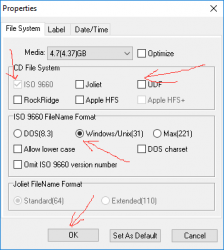
In the UltraISO, set the properties of the configuration image as in the picture and click OK.View attachment 11409
Save the image and convert according to the standard scheme via the PS2 Classics GUI.


