
PS3 PS3 Slim only gives image in safe mode

robertaso

Member
Hello everyone, some months ago i got a PS3 Slim from a friend (CECH-3001B), the last time he used it was working, but now every time i turn it on, the initial PS3 sound can be heard, but a only a black screen shows. I tried cleaning it, took everything apart, but still nothing, tried to change the input mode by holding the power button until it beeps two times, but it still shows the black screen, tried with HDMI and the AV cable too, with three different tvs.

The only way that shows me image, it's in recovery mode, but it doesn't matter which option i choose, when the PS3 reboots, it still shows no image at all. Already tried restarting system, restore default settings, system update, restore PS3 system, but none of them worked, i could update it normally, could see the percentage and everything, when the update ended, it still gives me no image.

I decided to replace the hard drive, i had the update screen, downloaded the last update and everything. When the update ended and the system restarted, the damn black screen appeared again, idk what i can do now, tried everything.

The restore PS3 system rebooted my PS3, and a sony logo appeared very lightly on the screen, and when i press buttons, i can hear the sound when you move between the xmb menu, but that sony logo it's still on the screen.
 
Last edited by a moderator:
I've had this happen a few times myself, would it be possible to make the video settings file locked as read-only with cfw permissions before updates?
 
No, because xRegistry.sys lies on FAT16 or FAT32 partition. MS filesystems not supporting *nix permissions, only basic attributes like read only ;) which are not respected by CellOS anyway.
You can try yourself, use PS3HDH to mount dev_flash2 and do:
Code:
sudo apt update
sudo apt install fatattr
sudo fatattr +r ${HOME}/ps3/storage/hdd/dev_flash2/etc/xRegistry.sys
 
Last edited:
Did you try resetting the video settings?

Follow this video:

yeah, like i said in the post, already tried that but nothing :(

No, because xRegistry.sys lies on FAT16 or FAT32 partition. MS filesystems not supporting *nix permissions, only basic attributes like read only ;) which are not respected by CellOS anyway.
You can try yourself, use PS3HDH to mount dev_flash2 and do:
Code:
sudo apt update
sudo apt install fatattr
sudo fatattr +r ${HOME}/ps3/storage/hdd/dev_flash2/etc/xRegistry.sys
i'm sorry, what does this work for?
 
Last edited by a moderator:
yeah, like i said in the post, already tried that but nothing :(


i'm sorry, what does this work for?

It might take a few goes before safe mode returns a usable signal over hdmi, it took me 3-5 goes on my last update from dex to d-pex, just keep holding the power button down until it bleeps then take your finger off, you'll know if you held it down too long because it'll power off again an do the same cycle again.
 
It might take a few goes before safe mode returns a usable signal over hdmi, it took me 3-5 goes on my last update from dex to d-pex, just keep holding the power button down until it bleeps then take your finger off, you'll know if you held it down too long because it'll power off again an do the same cycle again.
i tried a lot of times, i don't understand why it doesnt give any image, mostly because safe mode does work fine, i tried updating the console again with hfw but still nothing
 
i tried a lot of times, i don't understand why it doesnt give any image, mostly because safe mode does work fine, i tried updating the console again with hfw but still nothing

You could maybe do the display settings menu blind if you can remember the button press sequence after it boots, a video tutorial so you can time yourself along to it.
 
Last edited:
You could maybe do the display settings menu blind if you can remember the button press sequence after it boots, a video tutorial so you can time yourself along to it.
unfortunately i have formatted everything on the console in safe mode so i just hear the initial sound and then nothing, the only way i can navigate through options is when i restore ps3 system but i dont know what i'm choosing
 
unfortunately i have formatted everything on the console in safe mode so i just hear the initial sound and then nothing, the only way i can navigate through options is when i restore ps3 system but i dont know what i'm choosing

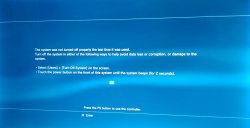
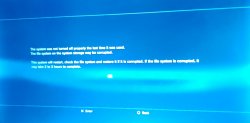
If the console crashes it shows the two following screens first, you'll need to pair the controller or plug it in via usb.
You should be able to crash the console by flicking the rear power switch instead of the front standby/on button.
 

Attachments

  • IMG_20250718_192327~2.jpg
    IMG_20250718_192327~2.jpg
    180.8 KB · Views: 27
  • IMG_20250718_192357~2.jpg
    IMG_20250718_192357~2.jpg
    208.2 KB · Views: 27
If the console crashes it shows the two following screens first, you'll need to pair the controller or plug it in via usb.
You should be able to crash the console by flicking the rear power switch instead of the front standby/on button.
made it crash but no success still, i seem to navigate through options but maybe they are the first installation process, i don't know what to do
 

Similar threads

Back
Top