
Introduction
Good day folks decided to write about this side hobby in order to keep a record for myself, educational purposes or if someone wants to do their own build. This might take a minute to read so enjoy.
IF YOU PLAN ON CREATING SOMETHING SIMILAR USING THIS NOT TOO DETAILED GUIDE I CANNOT BE HELD RESPONSIBLE FOR ANY SHORT-CIRCUITING, DESTRUCTION OF YOUR CONSOLE, EXPLOSIONS, FIRES, ELECRICUTION, CUTTING FINGERS OFF WITH ANGLE GRINDER, ETC. PLEASE DO YOUR OWN RESEARCH AND PREPARE ACCORDINGLY. Otherwise feel free to comment or use/edit the diagrams provided.
So after cleaning out my storage I found my old PS3 Slim all dusty. Dusted it off plugged it in and turned it on, surprisingly started without issue everything works. So I definitely was not going to use it having a good decent PC and all so from this point I had 2 options:
1. Throw it out
2. Modify the thing and learn something in the process
As any sensible person would I picked option 2 and it also had sentimental value. Regardless I took it apart and felt that it needs a better cooling system and maybe a new PSU. Some might say "why would you attach a PC PSU to it if the old one was fine?" my response, why not.
I will separate the process into parts labelled 1, 2, 3 etc.
The Real Hero's
These are the folks that provided the guides and information that made this little project possible so credit to them and if you want to recreate this project strongly recommend reading their work first.
blckbear_ from PSX-Place for his tutorial on Fully working PS3 ATX Power Supply Mod::
https://www.psx-place.com/threads/tutorial-fully-working-atx-psu-mod.22214/
Naked_Snake1995 from PSX-Place for his tutorial on how to use the ATX PSU:
http://www.psx-place.com/threads/tutorial-connect-atx-power-supply-to-ps3.17180/
Mr.Dutch from ps3hax.net for all the research he has done regarding the PS3's PSU:
https://web.archive.org/web/20141023220831/http://www.ps3hax.net/showthread.php?t=58231&page=2
psdevwiki writers for all the information and pictures that they have collected and made available for us to use:
http://www.psdevwiki.com/ps3/Power_Supply
1. PC PSU
Starting with the PSU I followed the work of Naked_Snake1995 & blckbear_ props to them, their threads are referenced above. I'm no tech-savvy person when it comes to this so I will just provide how I went about doing it and some diagrams.
My goal was to connect the PS3 to the PSU without the need to jump start it with a paper clip, so in practice it should turn on when you press the on/off button. So browsing the internet I come across Naked_Snake1995 & blckbear_ who provide in-depth information on how to do this.
Taking a 24 pin connector that I literally blowtorched of off an old motherboard I marked the 24 pin squares with a marker in their respective colour so yellow, black, green, purple, etc to keep track. After which I spent 3 weeks researching what parts were needed and drawing-up diagrams on how to wire everything correctly.
The mains things I used are:
PS3 Slim
- Motherboard number JSD-001
- Optocoupler soldered from the PS3's power supply
2 Resistors (220ohms & 390ohms)
Extra wires
The optocoupler I used was soldered out of the PS3's power supply (my version was 2561B) and its responsible for that on/off operation which was attached to both a 220 ohm and 390 ohm resistor going to the green wire on the PSU. Again not a tech-savvy person this kinda makes sense in my head and from reading blckbear_'s thread so please check their thread first before diving head first into my diagrams.


Using a 500w PSU I hooked it up to a tv, turned it on (Standing nearby with a fire extinguisher on the ready) and boom! There was no explosion but it started-up without issue.
2. Custom Cooling Bracket
As for the cooling I decided to go a bit further so instead of cutting a hole in the PS3's case and calling it a day I tried to figure out a way on how to attach those PC cooling towers on to the CPU & GPU. The goal here was to create a system that would look as such; 1 – motherboard, 2 – support bracket, and 3 – coolers, similar to how PC's do it, simple and easy to use. I came across a number of issues that complicated the process, first I wanted to use one big cooler but then realised that there was a height difference between the CPU & GPU so I would need to weld a plate to the cooling unit and that would simply not do.
So, I decided to use 2 separate smaller cooling towers one for the CPU & one for the GPU but I came across the issue of needing to attach 2 cooling units close to each but thankfully I found slim cooling towers for PC online for about €8 each. However the reason I chose these tower coolers was not only because of their slim profile but also due to them having latches meaning that I did not have to screw these coolers to anything a simple AM4 upper bracket would keep it in place. Furthermore the base of the cooler that comes into contact with the CPU/GPU was 35x45mm on these towers, a little too small compared to the needed 41x41mm but checking into the delidding aspect of the PS3 it turned out that the silver squares are just heatsinks and the real processor is underneath so I guess you don't have to cover the entire processor, a 45x35mm base should suffice in theory and each processor will have its cooling unit which should be more than enough.
Now I had the general measurements for the future coolers and the goal of creating a support bracket for them that can be attached directly to the motherboard which had an AM4 bracket built-in or at least AM4 latches. To securely screw on the custom bracket to the motherboard I planned on using the M6 holes located around the CPU & GPU that on the original design are used to press the processors into the metal plate under the cooling fan.
To create this bracket, I knew someone with a 3D printer and all I needed now was the ability to 3D model. (Insert Eye of the Tiger and training montage) After 2 weeks I managed to learn the basics of FreeCAD and moved on to modelling the bracket. After another 3 weeks of errors, getting the needed measurements and the destruction of multiple 3D printed test versions I came to this result (image below) which turned out decent. The cooling towers are firmly held in place and overall it turned out not as bad as I expected. I might make a few minor adjustments if required however. The bracket is specifically made and tested on motherboard version JSD-001 I have not tested it on other versions.


3. Connect PC fans to PS3 motherboard
The next stage now is soldering a connector together that will be able to connect the motherboard to the PC cooling fans on the PS3 cooling towers. For this I will use the 3-pin connector that comes with the built-in PS3 Slim fan(Note that it is slightly different when compared to a standard PC 3 pin connector), cut it off and solder two connectors that support a PC fan. You can find diagrams on PS Dev.

WARNING: Make sure to check the amps your PS3 fan needs and make sure the PC fans do not exceed that amperage. E.g. My PS3 fan specs is 12 volts and 1.6amps. My PC fans need 12 volts but each fan needs 0.3 amps.
4. Version 1.0
With everything ready (for the most part) now I need to attach the support bracket to the mother board but I also wanted to keep those metal plates that support the motherboard the ones it is sandwiched between. No issue with the bottom thin sheet but the top had to be modified so that I could attach the cooling bracket to it, solution? I introduced it to the angle grinder and sliced a gap big enough for the cooling bracket. I wish I had a bandsaw for a cleaner result but beggars cant be chooser.

I put it together and forgot about the blue ray drive which sadly doesn't fit in the PS3 Slim case with the cooling bracket nevertheless I never planned to use it as part of this first build anyway. The next stage is to put on the thermal paste, attach the fans and start it up.
Overall even without the blue ray drive I did not see any issues the console turns on fans work and by the looks of it multiMAN is able to control the fan speed. (I wish I could turn off the fans just for a second to confirm this but multiMAN doesnt have that option.)
Keeping track of the cooling temps I made a small table below. I took the temps on psdevwiki as the average specifically for the CECH25xx model, same as mine, you can check them out HERE.
Note: The entire time the fan speed was set to 24% and I used some Chinese off-brand thermal paste
Correction the fans are constantly set to max speed but not sure why the PWM wire seems to be unable to control the speed of the fans.
Connecting the PWM directly to the fans will not be enough for the PS3. PC fans are incompatible with PS3 fan controls, although it is possible that they can be made compatible by directing the signal from the PS3 through a raspberry Pi that can decipher the signal into something the fans can understand but that requires a bit of programming know-how.
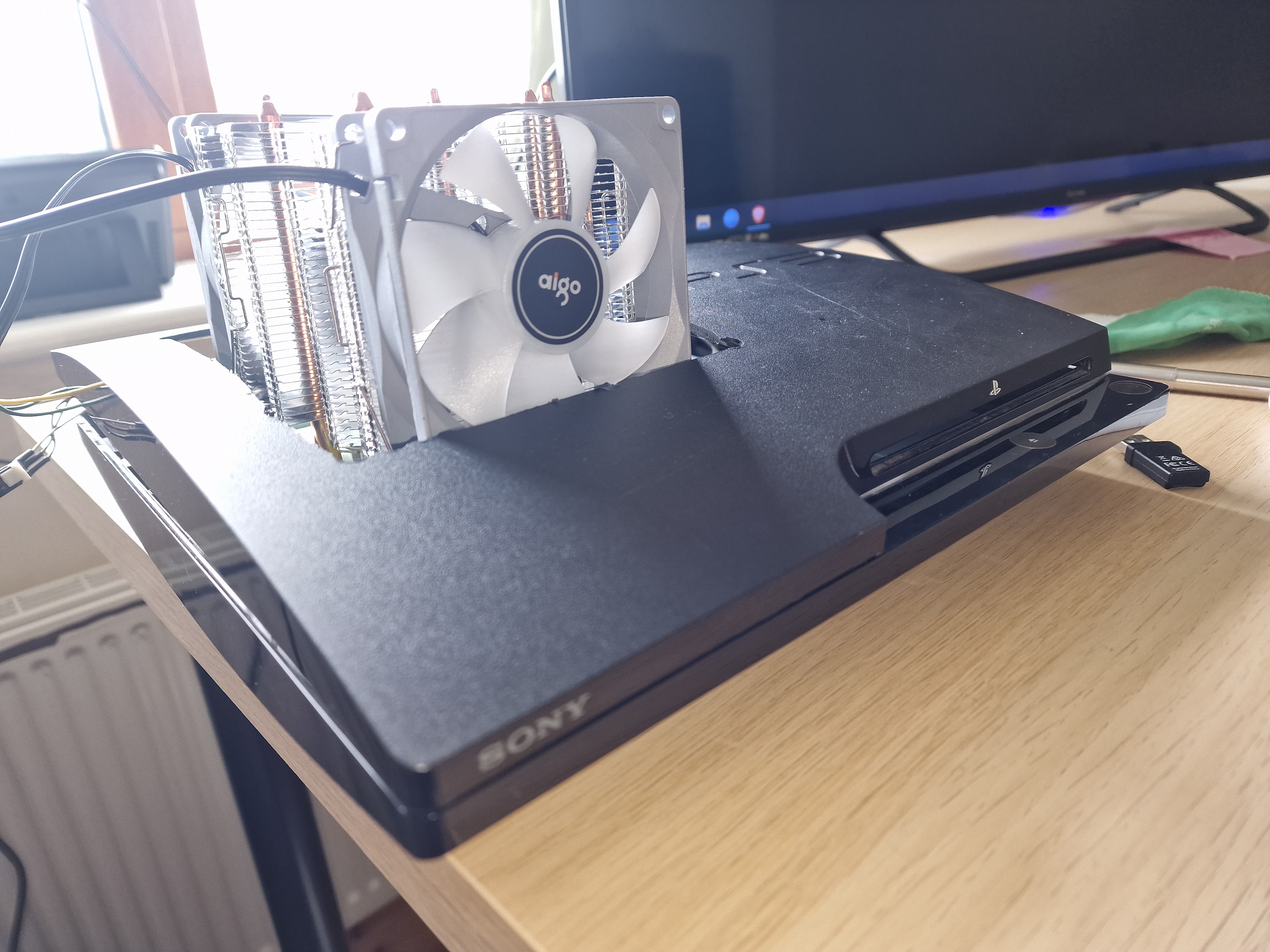


This will conclude version 1 of this console until I get my hands on more building materials to make a case.
The End
Sadly this will completely conclude this custom build. After trying to figure out why the fan PWM wire doesn't work and how this can be adjusted the ground and 12volt wire made contact. After looking up online I believe this caused the short-circuiting of the Syscon chip.
I will go through what I did manage to achieve below and the shame is I was almost finished with the internal modifications.
I purchased two aluminium sheets, size 300x300mm and 2mm thickness, it was the cheapest option for me anyway. (WARNING: I strongly recommend to get brass panels rather than aluminium because it is much easier to use solder in joining brass together or at the very least get mild steel.) Then I cut it to size and drilled holes in order for it to act as a base on which the PS3 motherboard could lay on. I 3D printed standoffs and screwed them on to the base plate to keep the motherboard 5mm above. Below the CPU and GPU I reused the pressure pads that are located in the same place in the original console.


The process of attaching the heatsink bracket did not change. I used a countersunk screw this time and 3D printed a few additions for the the 4 countersunk screws to make the whole thing look neater. (Check out the images below)


I would continue with the idea of using a 24pin PC connector but I wanted a smaller power supply, browsing online I found a 150w Pico PSU. Which would be an interesting addition since my model of the PS3 slim used at most about 85w. As for where to attach it, the PS3 slim motherboard has quite a big gap near the prongs big enough for an M8 screw to fit in. 3D printing a case for the 24 pin connector with a thread and drilling a hole in the base plate right below that gap I could securely screw on the case which would hold the 24 pin connector and the Pico PSU safely above the motherboard. Due to the weight of the Pico PSU I feared it bending the thin case so I planned on putting a few small plastic feet that are used to prevent noise when moving furniture under the Pico. Furthermore the area where the Pico PSU would be was flat with no resistors or chips sticking out so the plastic feet were suitable.
(The original prongs on the motherboard were removed due to being too tall.)

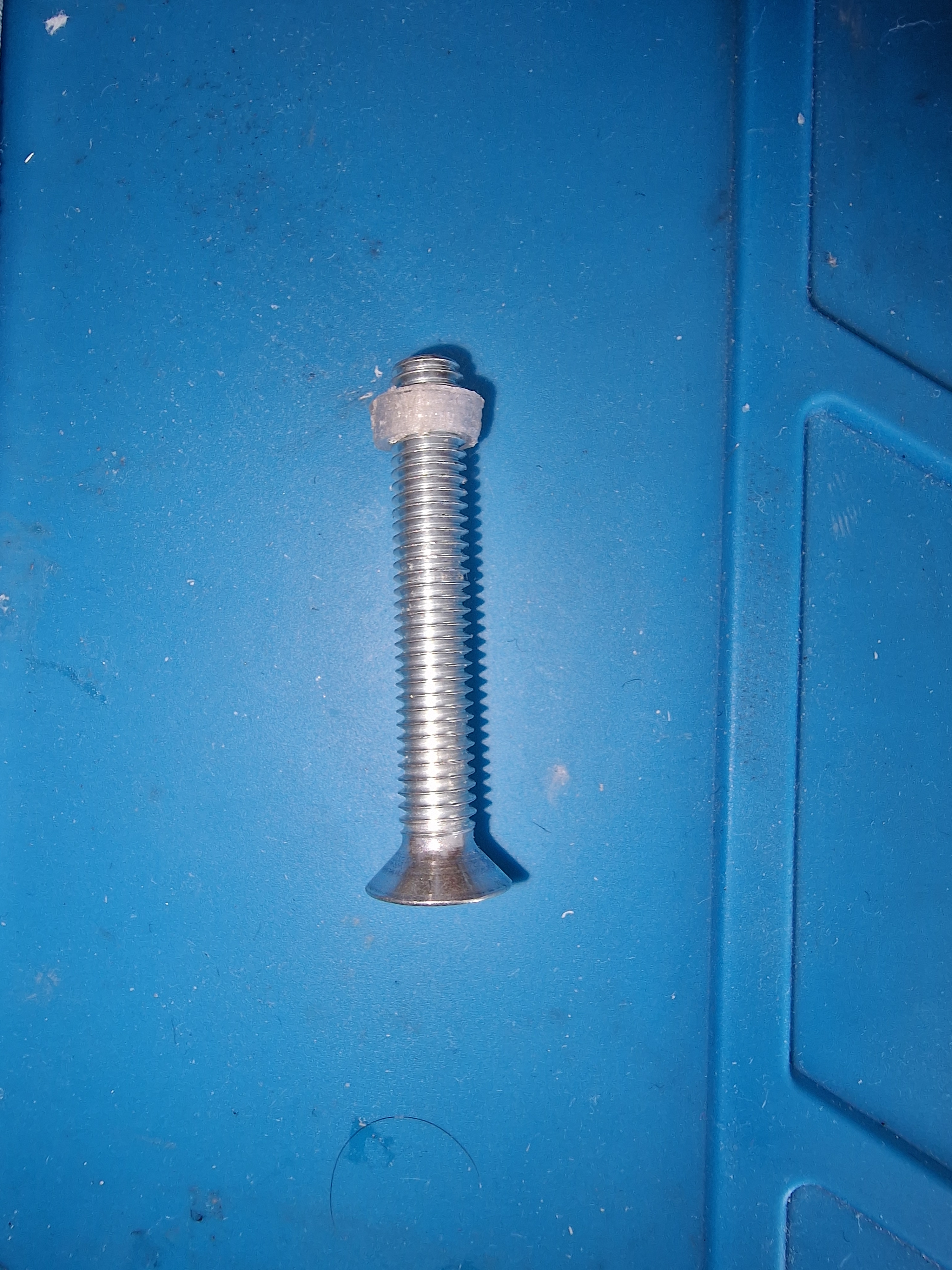
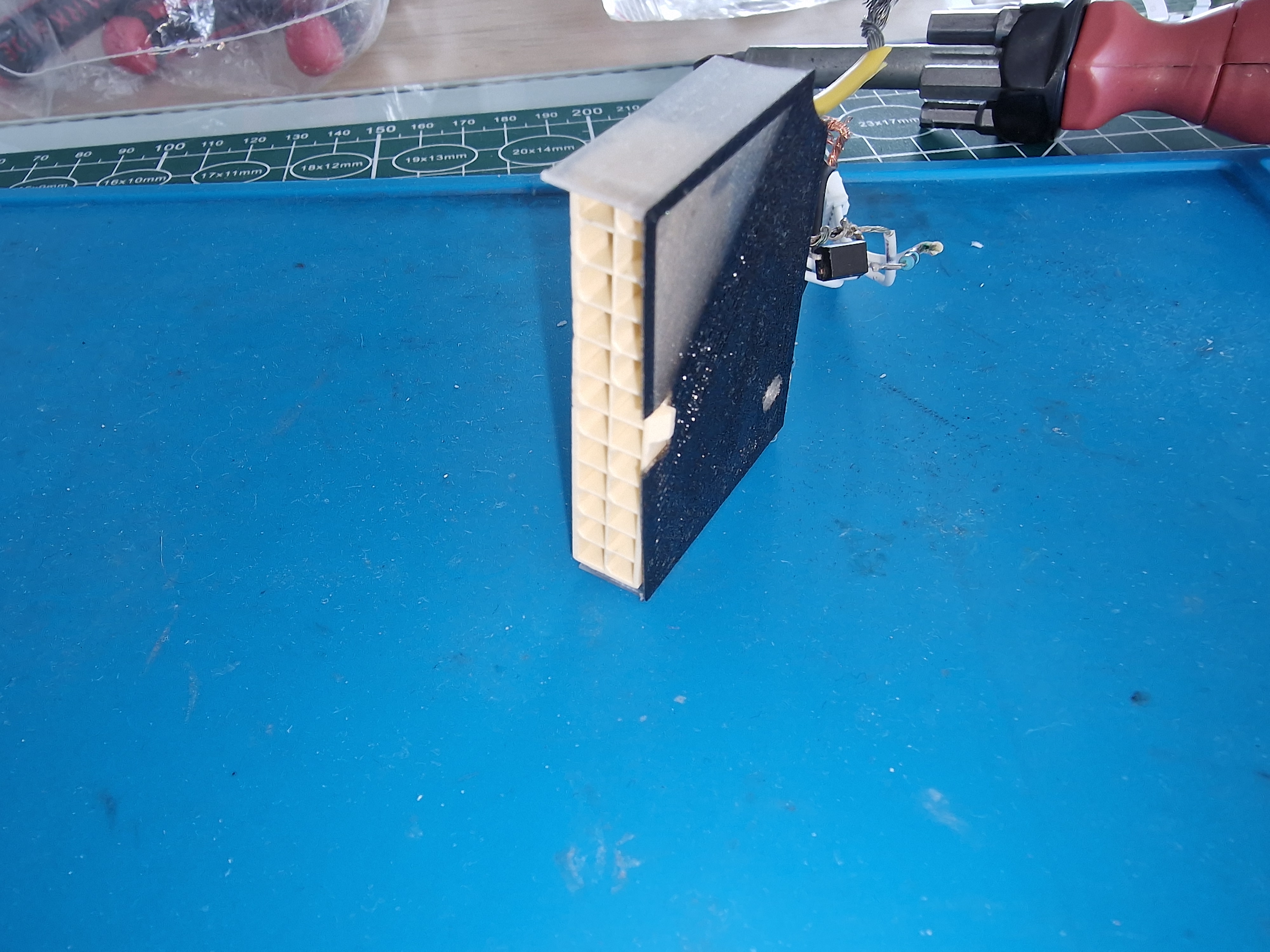

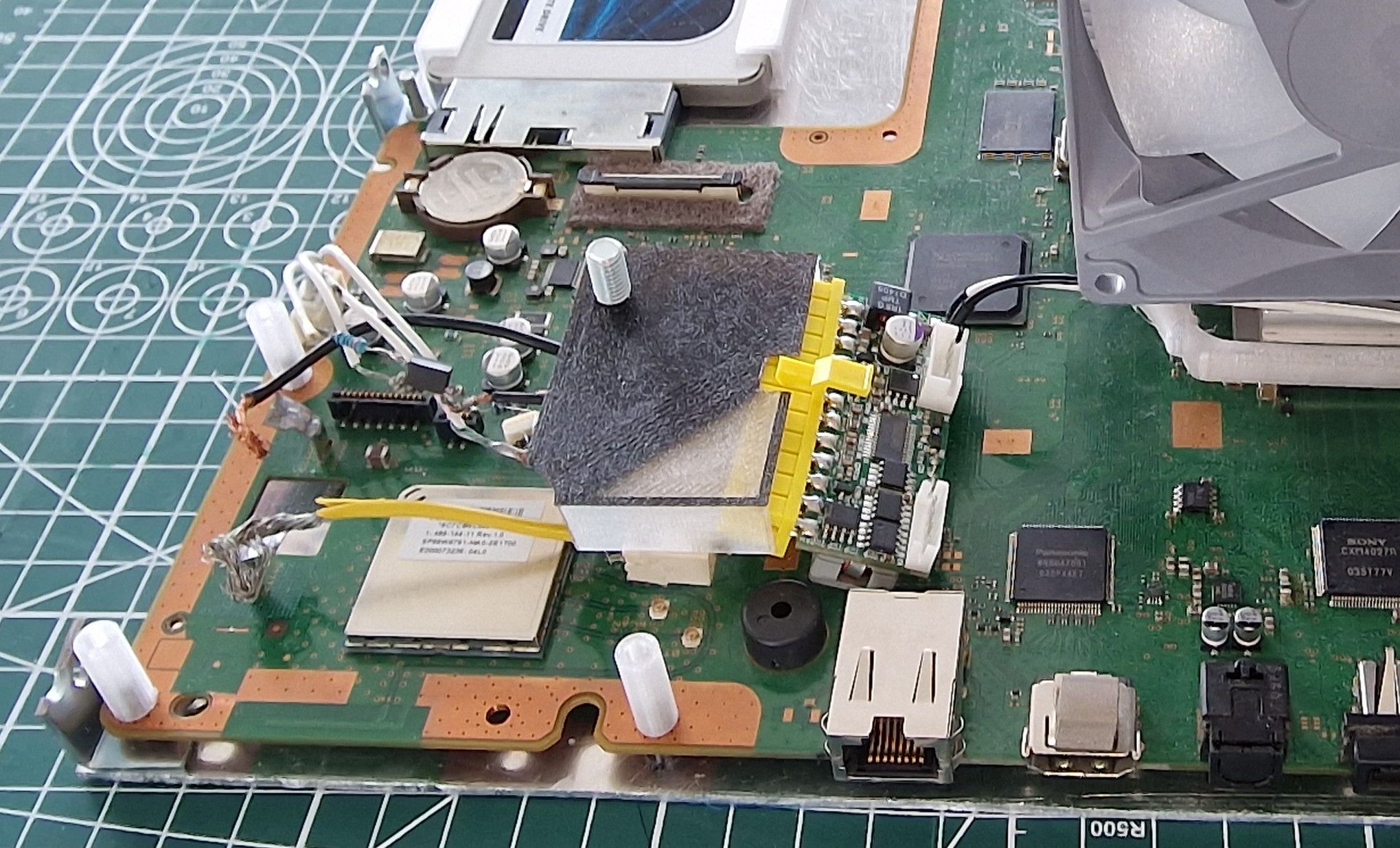

I took some creative liberty with the fan connectors by attaching a red and blue LED that would light up the inside of the console and since I mostly used transparent filament when 3D printing it probably would of looked nice. They would of been taped to the top part of the case with electrical tape. The soldering process went well and the end result was quite good but I essentially shot myself in the foot by using wobbly single connectors rather than the 3 pin male connector housing. The images below should paint a clearer picture but essentially the pins made contact which caused the whole system to short-circuit.


The motherboard would be secured with 3D printed threads with gaps on both ends so that I could screw the top part as well. (Again image below should make a bit more sense)

Images below show the end result from all sides.


Overall this is as far as I got and it was almost done, true shame. Nevertheless, it was a very good experience. All I could say is that unless you are someone who needs serious air cooling for your system, such as overclocking, or your system is prone to overheating I do not see anyone actually using this mod still maybe someone else can make this a reality in the not too distant future.
If anyone wants to 3D print the bracket for their own project please find the STL file attached. I recommend that the bracket is kept 4mm above the motherboard in order to avoid damage.
Just in terms of compatibility the bracket is for PS3 slim motherboard JTP-001, JSD-001 and SUR-001 but (BIG BUT) it might be compatible with all PS3 Slim motherboard versions that includes DYN-001, & KTE-001. All Fat (nor) models DIA-001, DIA-002, VER-001. All Fat (nand) models COK-001, COK-002, COK-002W & SEM-001. I am basing this on the images I found of all the motherboards on psdevwiki, the support holes appear similar in design, PLEASE DO NOT TAKE THIS AS CONFIRMATION I HAVE NO IDEA IF THEY WILL ACTUALLY FIT.
Good day folks decided to write about this side hobby in order to keep a record for myself, educational purposes or if someone wants to do their own build. This might take a minute to read so enjoy.
IF YOU PLAN ON CREATING SOMETHING SIMILAR USING THIS NOT TOO DETAILED GUIDE I CANNOT BE HELD RESPONSIBLE FOR ANY SHORT-CIRCUITING, DESTRUCTION OF YOUR CONSOLE, EXPLOSIONS, FIRES, ELECRICUTION, CUTTING FINGERS OFF WITH ANGLE GRINDER, ETC. PLEASE DO YOUR OWN RESEARCH AND PREPARE ACCORDINGLY. Otherwise feel free to comment or use/edit the diagrams provided.
So after cleaning out my storage I found my old PS3 Slim all dusty. Dusted it off plugged it in and turned it on, surprisingly started without issue everything works. So I definitely was not going to use it having a good decent PC and all so from this point I had 2 options:
1. Throw it out
2. Modify the thing and learn something in the process
As any sensible person would I picked option 2 and it also had sentimental value. Regardless I took it apart and felt that it needs a better cooling system and maybe a new PSU. Some might say "why would you attach a PC PSU to it if the old one was fine?" my response, why not.
I will separate the process into parts labelled 1, 2, 3 etc.
The Real Hero's
These are the folks that provided the guides and information that made this little project possible so credit to them and if you want to recreate this project strongly recommend reading their work first.
blckbear_ from PSX-Place for his tutorial on Fully working PS3 ATX Power Supply Mod::
https://www.psx-place.com/threads/tutorial-fully-working-atx-psu-mod.22214/
Naked_Snake1995 from PSX-Place for his tutorial on how to use the ATX PSU:
http://www.psx-place.com/threads/tutorial-connect-atx-power-supply-to-ps3.17180/
Mr.Dutch from ps3hax.net for all the research he has done regarding the PS3's PSU:
https://web.archive.org/web/20141023220831/http://www.ps3hax.net/showthread.php?t=58231&page=2
psdevwiki writers for all the information and pictures that they have collected and made available for us to use:
http://www.psdevwiki.com/ps3/Power_Supply
1. PC PSU
Starting with the PSU I followed the work of Naked_Snake1995 & blckbear_ props to them, their threads are referenced above. I'm no tech-savvy person when it comes to this so I will just provide how I went about doing it and some diagrams.
My goal was to connect the PS3 to the PSU without the need to jump start it with a paper clip, so in practice it should turn on when you press the on/off button. So browsing the internet I come across Naked_Snake1995 & blckbear_ who provide in-depth information on how to do this.
Taking a 24 pin connector that I literally blowtorched of off an old motherboard I marked the 24 pin squares with a marker in their respective colour so yellow, black, green, purple, etc to keep track. After which I spent 3 weeks researching what parts were needed and drawing-up diagrams on how to wire everything correctly.
The mains things I used are:
PS3 Slim
- Motherboard number JSD-001
- Optocoupler soldered from the PS3's power supply
2 Resistors (220ohms & 390ohms)
Extra wires
The optocoupler I used was soldered out of the PS3's power supply (my version was 2561B) and its responsible for that on/off operation which was attached to both a 220 ohm and 390 ohm resistor going to the green wire on the PSU. Again not a tech-savvy person this kinda makes sense in my head and from reading blckbear_'s thread so please check their thread first before diving head first into my diagrams.
Using a 500w PSU I hooked it up to a tv, turned it on (Standing nearby with a fire extinguisher on the ready) and boom! There was no explosion but it started-up without issue.
2. Custom Cooling Bracket
As for the cooling I decided to go a bit further so instead of cutting a hole in the PS3's case and calling it a day I tried to figure out a way on how to attach those PC cooling towers on to the CPU & GPU. The goal here was to create a system that would look as such; 1 – motherboard, 2 – support bracket, and 3 – coolers, similar to how PC's do it, simple and easy to use. I came across a number of issues that complicated the process, first I wanted to use one big cooler but then realised that there was a height difference between the CPU & GPU so I would need to weld a plate to the cooling unit and that would simply not do.
So, I decided to use 2 separate smaller cooling towers one for the CPU & one for the GPU but I came across the issue of needing to attach 2 cooling units close to each but thankfully I found slim cooling towers for PC online for about €8 each. However the reason I chose these tower coolers was not only because of their slim profile but also due to them having latches meaning that I did not have to screw these coolers to anything a simple AM4 upper bracket would keep it in place. Furthermore the base of the cooler that comes into contact with the CPU/GPU was 35x45mm on these towers, a little too small compared to the needed 41x41mm but checking into the delidding aspect of the PS3 it turned out that the silver squares are just heatsinks and the real processor is underneath so I guess you don't have to cover the entire processor, a 45x35mm base should suffice in theory and each processor will have its cooling unit which should be more than enough.
Now I had the general measurements for the future coolers and the goal of creating a support bracket for them that can be attached directly to the motherboard which had an AM4 bracket built-in or at least AM4 latches. To securely screw on the custom bracket to the motherboard I planned on using the M6 holes located around the CPU & GPU that on the original design are used to press the processors into the metal plate under the cooling fan.
To create this bracket, I knew someone with a 3D printer and all I needed now was the ability to 3D model. (Insert Eye of the Tiger and training montage) After 2 weeks I managed to learn the basics of FreeCAD and moved on to modelling the bracket. After another 3 weeks of errors, getting the needed measurements and the destruction of multiple 3D printed test versions I came to this result (image below) which turned out decent. The cooling towers are firmly held in place and overall it turned out not as bad as I expected. I might make a few minor adjustments if required however. The bracket is specifically made and tested on motherboard version JSD-001 I have not tested it on other versions.
3. Connect PC fans to PS3 motherboard
The next stage now is soldering a connector together that will be able to connect the motherboard to the PC cooling fans on the PS3 cooling towers. For this I will use the 3-pin connector that comes with the built-in PS3 Slim fan(Note that it is slightly different when compared to a standard PC 3 pin connector), cut it off and solder two connectors that support a PC fan. You can find diagrams on PS Dev.
WARNING: Make sure to check the amps your PS3 fan needs and make sure the PC fans do not exceed that amperage. E.g. My PS3 fan specs is 12 volts and 1.6amps. My PC fans need 12 volts but each fan needs 0.3 amps.
4. Version 1.0
With everything ready (for the most part) now I need to attach the support bracket to the mother board but I also wanted to keep those metal plates that support the motherboard the ones it is sandwiched between. No issue with the bottom thin sheet but the top had to be modified so that I could attach the cooling bracket to it, solution? I introduced it to the angle grinder and sliced a gap big enough for the cooling bracket. I wish I had a bandsaw for a cleaner result but beggars cant be chooser.
I put it together and forgot about the blue ray drive which sadly doesn't fit in the PS3 Slim case with the cooling bracket nevertheless I never planned to use it as part of this first build anyway. The next stage is to put on the thermal paste, attach the fans and start it up.
Overall even without the blue ray drive I did not see any issues the console turns on fans work and by the looks of it multiMAN is able to control the fan speed. (I wish I could turn off the fans just for a second to confirm this but multiMAN doesnt have that option.)
Keeping track of the cooling temps I made a small table below. I took the temps on psdevwiki as the average specifically for the CECH25xx model, same as mine, you can check them out HERE.
Activity | CPU | RSX |
Coldboot | 32C | 28C |
Idle in XMB for 30 minutes | 34C | 31C |
Idle in MultiMAN for 30 minutes | 37C | 33C |
Playing Black Ops for 2 hours | 39C | 35C |
Connecting the PWM directly to the fans will not be enough for the PS3. PC fans are incompatible with PS3 fan controls, although it is possible that they can be made compatible by directing the signal from the PS3 through a raspberry Pi that can decipher the signal into something the fans can understand but that requires a bit of programming know-how.
This will conclude version 1 of this console until I get my hands on more building materials to make a case.
The End
Sadly this will completely conclude this custom build. After trying to figure out why the fan PWM wire doesn't work and how this can be adjusted the ground and 12volt wire made contact. After looking up online I believe this caused the short-circuiting of the Syscon chip.
I will go through what I did manage to achieve below and the shame is I was almost finished with the internal modifications.
I purchased two aluminium sheets, size 300x300mm and 2mm thickness, it was the cheapest option for me anyway. (WARNING: I strongly recommend to get brass panels rather than aluminium because it is much easier to use solder in joining brass together or at the very least get mild steel.) Then I cut it to size and drilled holes in order for it to act as a base on which the PS3 motherboard could lay on. I 3D printed standoffs and screwed them on to the base plate to keep the motherboard 5mm above. Below the CPU and GPU I reused the pressure pads that are located in the same place in the original console.
The process of attaching the heatsink bracket did not change. I used a countersunk screw this time and 3D printed a few additions for the the 4 countersunk screws to make the whole thing look neater. (Check out the images below)
I would continue with the idea of using a 24pin PC connector but I wanted a smaller power supply, browsing online I found a 150w Pico PSU. Which would be an interesting addition since my model of the PS3 slim used at most about 85w. As for where to attach it, the PS3 slim motherboard has quite a big gap near the prongs big enough for an M8 screw to fit in. 3D printing a case for the 24 pin connector with a thread and drilling a hole in the base plate right below that gap I could securely screw on the case which would hold the 24 pin connector and the Pico PSU safely above the motherboard. Due to the weight of the Pico PSU I feared it bending the thin case so I planned on putting a few small plastic feet that are used to prevent noise when moving furniture under the Pico. Furthermore the area where the Pico PSU would be was flat with no resistors or chips sticking out so the plastic feet were suitable.
(The original prongs on the motherboard were removed due to being too tall.)
I took some creative liberty with the fan connectors by attaching a red and blue LED that would light up the inside of the console and since I mostly used transparent filament when 3D printing it probably would of looked nice. They would of been taped to the top part of the case with electrical tape. The soldering process went well and the end result was quite good but I essentially shot myself in the foot by using wobbly single connectors rather than the 3 pin male connector housing. The images below should paint a clearer picture but essentially the pins made contact which caused the whole system to short-circuit.
The motherboard would be secured with 3D printed threads with gaps on both ends so that I could screw the top part as well. (Again image below should make a bit more sense)
Images below show the end result from all sides.
Overall this is as far as I got and it was almost done, true shame. Nevertheless, it was a very good experience. All I could say is that unless you are someone who needs serious air cooling for your system, such as overclocking, or your system is prone to overheating I do not see anyone actually using this mod still maybe someone else can make this a reality in the not too distant future.
If anyone wants to 3D print the bracket for their own project please find the STL file attached. I recommend that the bracket is kept 4mm above the motherboard in order to avoid damage.
Just in terms of compatibility the bracket is for PS3 slim motherboard JTP-001, JSD-001 and SUR-001 but (BIG BUT) it might be compatible with all PS3 Slim motherboard versions that includes DYN-001, & KTE-001. All Fat (nor) models DIA-001, DIA-002, VER-001. All Fat (nand) models COK-001, COK-002, COK-002W & SEM-001. I am basing this on the images I found of all the motherboards on psdevwiki, the support holes appear similar in design, PLEASE DO NOT TAKE THIS AS CONFIRMATION I HAVE NO IDEA IF THEY WILL ACTUALLY FIT.
Attachments
Last edited:

 . Any chance you can provide the STL file for the cpu/gpu bracket? Also what material is the bracket printed out of and did you run into any warping issues from heat? I am looking into trying something similar for a ps3 overclock build.

