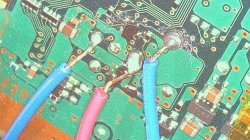
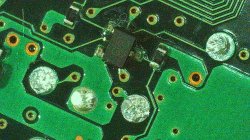
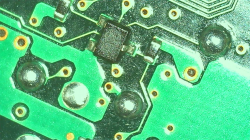
PS3-HW ps3 syscon uart points soldering

excel__kun

Member
Hello psx-place, i have this ylod'ed full bc cechb ps3 imported from japan and i wanted to check it's errorlog, but i have a problem that's making go insane, no matter what i did i can't get the syscon script to auth into the console used shorter wires, long wires tinned and not tinned nothing seems to work, what's making go mad is the fact that i did a successful syscon reading from a superslim with a dead rsx before, so why this time this phat mother doesn't want to work, is my soldering bad i don't know, here is some pictures from my microscope (i am getting a better one later) i suck at soldering 2.jpg i suck at soldering 1.jpg
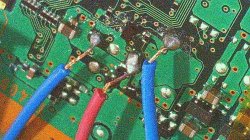
(maybe i burned the syscon chip is there any signs for that ? )
and thank you all very much

someone might ask who can this retard who can't solder a wire to a point as big as his head do a bga reball, well that depends, if it only has the 1002 error then what i am going to do is remove the nec tokens, undervolt the rsx and do the extrenal psu mod, if it 3034 error then i am taking apart my 40nm slim, go to a console repair shop, tell them to replace the chips then do the rest of the things myself, like training the syscon and such.
 
Last edited by a moderator:
no offense to your work but you need to practice your soldering skills brah

first of all, as a rule of thumb, the exposed wire without insulation should be as long as big the soldering point is. you never let exposed wire hanging out

second, for the love of god use solder only as necessary, the red wire is sitting on a mountain of cold solder. use a braid and clean all your solder joints, use a good amount of flux and only tin the iron, then tack the cable to the testpoints. also take GND from the edge of the motherboard whenever possible

third, when all else fails, lord il palazzo should be able to intervene
 
Hey,

I just worked on a CECHA unit (same model line as your CECHB, just a variant), and I managed to get it talking over UART – maybe this helps you out.

So, here's how I wired it:

I connected TX, RX, and GND from the FTDI adapter like usual, but I also added a second GND wire from one of the THT holes (left) near the UART Pins of the board directly to the copper ground plane on the PS3 mainboard (that outer copper ring that wraps around the whole PCB).

Yes, it looks a bit messy afterwards – not easy to clean up – but electrically, it works.

Then there's the DIAG pin. I connected it to GND as well – at first just tied it to the normal UART GND.
Important: make sure your FTDI is set to 3.3V or 3V, not 5V.

With that setup, I was able to start CRX and got an Auth and could enter the mode where you can edit configuration data – I believe it's called Internal Mode or something similar. That got me through the first steps.

Then, after I got the "SCOPEN" error, I had to rewire a bit:

I built a kind of Y-connection where DIAG and the UART-GND are joined together and then both go to the mainboard ground (again, that copper band around the board).

After that change, CRXF worked too – I could edit the checksums and read out the error log, which is essential for toggling between internal and external mode.

Now, to be clear:
This was my first time doing this, and I have no idea if that's the correct or cleanest method – but it worked for me. If you're stuck, this might be worth a try.

Let me know if you need more details or photos – I'll gladly help out. This isn't a perfect guide, but maybe it points you in the right direction.

And yeah — don't forget to swap TX/RX if you're not getting a signal.

Also: Not to be a dick but that soldering looks not good. For Reference: The exposed Copper Wire shouldnt be longer than in the photo. Its also not that bad if you touch the isolation a little bit. Make sure your iron is about 360 degree celsius and use some flux like Amtech NC 559. Also: Dont use a small pointed tip, better a "wide" one so the heat can transfer better.
upload_2025-4-24_20-6-43.png
 
Just to add to previous reply. Less is more when soldering. Just having enough to coat the end of wire and small dot of solder on connection to motherboard will suffice. You should prep all solder spots and wires, then just hold or tape wire into place on solder point and hold iron just until the solder melts across both points, then release. Having a micro soldering station helps quite a bit honestly, but can be done with standard size tips.

But yes, remove the wires and clean up area with alcohol and toothbrush/qtips and then start over.

Edit: Also, always keep your tip clean with brass sponge or damp (wet) sponge. I prefer brass sponge most times. When not using iron (for when off, not using), put a small amount of solder (while hot) on tip to help prevent oxidation when not in use.
 
no offense to your work but you need to practice your soldering skills brah

first of all, as a rule of thumb, the exposed wire without insulation should be as long as big the soldering point is. you never let exposed wire hanging out

second, for the love of god use solder only as necessary, the red wire is sitting on a mountain of cold solder. use a braid and clean all your solder joints, use a good amount of flux and only tin the iron, then tack the cable to the testpoints. also take GND from the edge of the motherboard whenever possible

third, when all else fails, lord il palazzo should be able to intervene
Hey,

I just worked on a CECHA unit (same model line as your CECHB, just a variant), and I managed to get it talking over UART – maybe this helps you out.

So, here's how I wired it:

I connected TX, RX, and GND from the FTDI adapter like usual, but I also added a second GND wire from one of the THT holes (left) near the UART Pins of the board directly to the copper ground plane on the PS3 mainboard (that outer copper ring that wraps around the whole PCB).

Yes, it looks a bit messy afterwards – not easy to clean up – but electrically, it works.

Then there's the DIAG pin. I connected it to GND as well – at first just tied it to the normal UART GND.
Important: make sure your FTDI is set to 3.3V or 3V, not 5V.

With that setup, I was able to start CRX and got an Auth and could enter the mode where you can edit configuration data – I believe it's called Internal Mode or something similar. That got me through the first steps.

Then, after I got the "SCOPEN" error, I had to rewire a bit:

I built a kind of Y-connection where DIAG and the UART-GND are joined together and then both go to the mainboard ground (again, that copper band around the board).

After that change, CRXF worked too – I could edit the checksums and read out the error log, which is essential for toggling between internal and external mode.

Now, to be clear:
This was my first time doing this, and I have no idea if that's the correct or cleanest method – but it worked for me. If you're stuck, this might be worth a try.

Let me know if you need more details or photos – I'll gladly help out. This isn't a perfect guide, but maybe it points you in the right direction.

And yeah — don't forget to swap TX/RX if you're not getting a signal.

Also: Not to be a dick but that soldering looks not good. For Reference: The exposed Copper Wire shouldnt be longer than in the photo. Its also not that bad if you touch the isolation a little bit. Make sure your iron is about 360 degree celsius and use some flux like Amtech NC 559. Also: Dont use a small pointed tip, better a "wide" one so the heat can transfer better. View attachment 45895
Just to add to previous reply. Less is more when soldering. Just having enough to coat the end of wire and small dot of solder on connection to motherboard will suffice. You should prep all solder spots and wires, then just hold or tape wire into place on solder point and hold iron just until the solder melts across both points, then release. Having a micro soldering station helps quite a bit honestly, but can be done with standard size tips.

But yes, remove the wires and clean up area with alcohol and toothbrush/qtips and then start over.

Edit: Also, always keep your tip clean with brass sponge or damp (wet) sponge. I prefer brass sponge most times. When not using iron (for when off, not using), put a small amount of solder (while hot) on tip to help prevent oxidation when not in use.
i want to thank all of you for helping me and posting your great tips for soldering, i did what you said to me and cleaned the points usng solder wick, is my cleaning good ?is my cleaning good.jpg
 
I found a video which may help you.

At around 4:00 Mins he explains it. I know there is another tutorial from Liam but it didn't worked for me that way. On the Video I linked that's how I did it. Was easier for me to do it that way.
 
yeah that looks good, now solder the cables again and follow @jw0710 suggestions.
HAIL IL PLATAZO
I found a video which may help you.

At around 4:00 Mins he explains it. I know there is another tutorial from Liam but it didn't worked for me that way. On the Video I linked that's how I did it. Was easier for me to do it that way.
thank you very much for the video, but i actually watched a while back and tried to do the same as it but sadly it didn't work

how's my new work ?
my new solder points.png
 
Last edited by a moderator:
i gave up on trying to get the syscon to be read, also looking how much should i buy to get the trantalizur pcb either from ebay or getting it assembled by pcbway cost as much as a ps3 slim in my currency, so i am looking for someone with send in service to get frankstained for me, i will provide the 40nm rsx (sending a slim motherboard) and i will ship only the motherboard to cut costs, is there anybody who does that and how much is it ?
 

Similar threads

Back
Top