
UPDATE 04-02-2020
These tools have been superseded by the BG Toolset
** www.** ** www.ps3xploit.net > Domain no Longer owned by team** (NEW URL = http://ps3toolset.com) > Domain no Longer owned by team** (NEW URL = http://ps3toolset.com > Domain no Longer owned by team** (NEW URL = http://ps3toolset.com)/bgtoolset/
UPDATE (OCT. 11 2018) - With the release of OFW 4.83 portions of PS3Xploit have been patched, The team is looking at workarounds, STAY ON 4.82, DO NOT UPDATE TO 4.83 AT THIS TIME:
IMPORTANT UPDATE (MARCH-2019) v3.0.1 was released providing support for 4.84 HFW (a new hybrid firmware that restores PS3Xploit for 4.84 OFW user's (See Link to HFW)
dI will start this off with NO you can not jailbreak your PS3 SuperSlim Console's (seems to be a popular question), however that does not mean the Ps3Xploit Team, (bguerville, esc0rtd3w, habib & W), has not been hard at work, with this new release of Ps3Xploit v2.0.. In this release all the tools (IDPS Dumper, Flash Dumper & Flash Writer) have seen significant improvements and now performing the task such as installing a Custom Firmware on your 4.82 OFW PS3 (with flash writer) has been made even easier and very stable thanks to the team's new checks implemented and progression of the exploit. The Flash and IDPS dumper are also much improved. All the details are provided below please read all the spoiler and tabs before asking any questions.
These tools have been superseded by the BG Toolset
** www.** ** www.ps3xploit.net > Domain no Longer owned by team** (NEW URL = http://ps3toolset.com) > Domain no Longer owned by team** (NEW URL = http://ps3toolset.com > Domain no Longer owned by team** (NEW URL = http://ps3toolset.com)/bgtoolset/
IMPORTANT UPDATE (MARCH-2019) v3.0.1 was released providing support for 4.84 HFW (a new hybrid firmware that restores PS3Xploit for 4.84 OFW user's (See Link to HFW)
dI will start this off with NO you can not jailbreak your PS3 SuperSlim Console's (seems to be a popular question), however that does not mean the Ps3Xploit Team, (bguerville, esc0rtd3w, habib & W), has not been hard at work, with this new release of Ps3Xploit v2.0.. In this release all the tools (IDPS Dumper, Flash Dumper & Flash Writer) have seen significant improvements and now performing the task such as installing a Custom Firmware on your 4.82 OFW PS3 (with flash writer) has been made even easier and very stable thanks to the team's new checks implemented and progression of the exploit. The Flash and IDPS dumper are also much improved. All the details are provided below please read all the spoiler and tabs before asking any questions.
-STLcardsWS
PS3Xploit 2.0 Tools Now LIVE!!
-
Included Tools- 4.XX IDPS DUMPER
- 4.XX FLASH DUMPER (USB Edition)
- 4.XX FLASH DUMPER (HDD Edition)
- 4.82 NOR/NAND WRITER (USB Edition)
- 4.82 NOR/NAND WRITER (HDD Edition)
Ps3Xploit Tools Changelogsv2.0
- Freeze issues - Fixed
- Occasional bad dumps - Fixed
- No beeps & shutdown. Replaced by a graceful ROP chain exit & return to browser. This gives the opportunity to the user to dump after patching & validate the dump with littlebalup's py checker. As long as the user does not shutdown/restart, it's still possible to recover from bad patching.
- Support for usb port 0,1,6 + sd/cf/ms cards.
- Multi firmware support on all dumpers (4.10+) & DEX support on 4.81.
- HDD editions for all dumpers & flash writer where a picture file placeholder is used for read/write operations.
- Javascript refactoring for performance & efficiency.
- **ps3xploit.com >Domain no Longer owned by team** (ps3xploit.me =new) will host the 2.0 update, no need for 3rd party sites.
v1.0 (Thanksgiving 2017 Release)
- Supports Direct OFW to CFW patching for All Phat and 2xxx Slim (minver 3.56 Dec 2010 and lower)
- the NOR/NAND writer will just copy 3Mb of CoreOS data to both ros0 & ros1 in the flash memory.
- There is only one version released for 4.82. The same hex patch file can be used on nor & nand.
- It's as safe as possible, with a check for usb device & patch file making the exploit hang instead of corrupting flash if file is not found.
- In case of corruption (extremely rare but could always happen), it's only a partial brick because no per console info ever gets erased so a hardware flasher could still be used if ever a recovery reboot was impossible
-
Frequency Asked Questions
Will this jailbreak my SuperSlim?
- NO,The Flasher Writer Tool is not Supported on the SuperSlim and a some very late Slim models, Howeever, PS3Xploit has a strong possiablity to eventually evolve into a HEN style exploit (that aspect will take some additional development.)
Which PS3Xploits Tools are Compatible with my PS3 Console?
-
Flash Writer Model Compatibility (PHAT):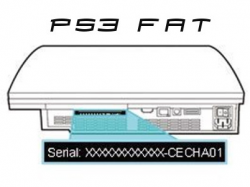
Check this sticker on the back of your PS3 to view your PS3 Model.
- CECH-A01 (NAND)
- B (NAND)
- C (NAND)
- E (NAND)
- G (NAND)
- H (NOR)
- J (NOR)
- K (NOR)
- L (NOR)
- M (NOR)
- P (NOR)
- Q (NOR)
All DUMPER (FLASH/IDPS) & FLASH WRITER TOOLS are Supported for this model.
-
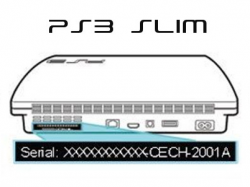
Check this sticker on the back of your PS3 to view your PS3 Model.
***IMPORTANT***
You must pay very close attention to your PS3 SLIM Models depending on when the PS3 SLIM was manufactured will determine if your console can install CFW (Flasher Writer Compatibility).
For the 25XX series or even if your unsure about any of the models it is reccomnded you run the minverchk PUP >> (DOWNLOAD) & (How to use Minverchk) its a simply utility that show the factory installed firmware on your ps3 and for the CECH-25XX model if the utility shows 3.56 or lower you are compatible but if it shows 3.60 and higher that means your are NOT compatible to use the Flash Writer (CFW enabler for 4.82 CFW)
-
Flash Writer Model Compatibility (SLIM):
- 20XX NOR
- 21XX NOR
- 25XX NOR (3.56 minver. and Lower)
-
NOT COMPATIBLE (SLIM):
- 25XX NOR (3.60 and Higher)
- 3XXX NOR
All DUMPER (FLASH/IDPS) TOOLS are Supported for this model.
-
Flash Writer Model Compatibility (SLIM):
-
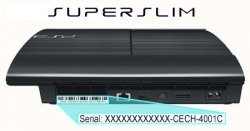
Check this sticker on the back of your PS3 to view your PS3 Model.
-
FLASH WRITER NOT COMPATIBLE (SUPERSLIM):
- 4XXXA EMMC
- 4XXXB NOR
- 4XXXC NOR
All DUMPER (FLASH/IDPS) TOOLS are Supported for this model.
-
FLASH WRITER NOT COMPATIBLE (SUPERSLIM):
Where can i find official info and details?
- Official Website (Exploit Hosting / Info) @ ** http://www.**ps3xploit.com >Doma...no Longer owned by team** (ps3xploit.me =new)
- Official Ps3Xploit Forum (Support/News/Info): @ http://www.psx-place.com/forums/PS3Xploit/
- Due to the lack of proper checks after exiting the ROP chain, it is possible in some cases to obtain a success message despite an operation failure. For instance, if you choose a path where no device is plugged in, a dumper page will still display a success message despite the fact the dump save could not work. This limitation has already been addressed, the added operation checks will be part of an update to these PS3Xploit tools which will be released in the coming weeks, that update will be final, no more will come after it
-
FLASH Dumper's Help
-
PS3 4.xx NAND/NOR/EMMC FLASH DUMPER v2.0All PS3 models supported
All 4.10+ CEX CFW/OFW supported
4.81 DEX CFW/OFW supported
IMPORTANT NOTES:
- It's essential not to flood the browser memory with junk before running the exploit. The reason for this is that due to javascript core memory usage limitations we are scanning several times a small range of browser memory (a few Mb) to find some essential data in RAM, if the memory is flooded then the range to scan becomes much larger & the probabilities that our data is found in the smaller range decrease dramatically....
- So in short, never use the browser or use a homepage you cancel before running the exploit!
- It is recommended to set your homepage temporarily to the exploit page you wish to use to ensure there is no memory flooding messing with the exploit initialization stage.
- Open the browser & browse to the **ps3xploit.com >Domain no Longer owned by team** (ps3xploit.me =new) website, go to the page of the exploit you need. Set the current page as browser homepage. Don't launch the exploit initialization. Close the browser.
- Open the browser. The exploit page will load automatically. Choose your dump path option.
- Press the exploit initialization button & wait until initialization succeeds. If it fails, follow the refresh/reload instructions on screen.
- Trigger the exploit by pressing the dump button.
- On success, validate your dump with the py checker tool.
-
PS3 4.xx NAND/NOR/EMMC FLASH DUMPER - HDD EDITION v2.0
All PS3 models supported
All 4.10+ CEX CFW/OFW supported
4.81 DEX CFW/OFW supported
IMPORTANT NOTES:
- It's essential not to flood the browser memory with junk before running the exploit. The reason for this is that due to javascript core memory usage limitations we are scanning several times a small range of browser memory (a few Mb) to find some essential data in RAM, if the memory is flooded then the range to scan becomes much larger & the probabilities that our data is found in the smaller range decrease dramatically....
- So in short, never use the browser or use a homepage you cancel before running the exploit!
- It is recommended to set your homepage temporarily to the exploit page you wish to use to ensure there is no memory flooding messing with the exploit initialization stage.
- Open the browser & browse to the **ps3xploit.com >Domain no Longer owned by team** (ps3xploit.me =new) website, go to the page of the exploit you need. Set the current page as browser homepage. Don't launch the exploit initialization. Close the browser.
- Open the browser. The exploit page will load automatically. Download the dump.jpg placeholder file to your PS3 System Storage using the provided link as instructed on screen.
- Press the exploit initialization button & wait until initialization succeeds. If it fails, follow the refresh/reload instructions on screen.
- Trigger the exploit by pressing the dump button.
- On success, retrieve the dump file from the PS3 XMB Photo section, rename it appropriately to dump.hex or whatever & validate your dump with the py checker tool.
Usage Tips:
- Try using a LAN connection or a solid WiFi connection during exploitation. A weak signal can cause problems.
- If the exploit takes more than 5 minutes to work, reload page, browser, or restart console and try again.
- ]If you are using a LAN connection and experience network issues, make sure all cables to router are in working order.
-
-
-
PS3 OFW 4.82 NAND/NOR FLASH WRITER v2.0WARNING: USE ONLY THE PROVIDED flash_482.hex AS IS. DON'T PATCH IT OR MODIFY IT OR YOU WILL BRICK *****
***** IMPORTANT DETAILS BELOW -- AVOIDING A BRICK *****
-
Verify flash_482.hex file on a flash drive and in the selected USB slot!
- flash_482.hex MD5: d05be52f8d21700052fbd1fc0174acae
- DO NOT USE ON CFW (Custom Firmware) (Only Supports OFW)
- DO NOT USE ON PS3 Models 3xxx/4xxx (aka late Slim or Superslim models), you would brick those consoles.
- ON SLIM 2xxx Consoles, always use MinVerChck PUP to ensure that the minimum installable firmware version is < 3.60, if ever the minimum version is >3.56, using the flash writer would partially brick your console!
- USE ONLY ON 4.82 OFW
IMPORTANT NOTES:
- It's essential not to flood the browser memory with junk before running the exploit. The reason for this is that due to ps3 javascript core memory usage limitations we are scanning several times a small range of browser memory (a few Mb) to find some essential data in RAM, if the memory is flooded due to previous browsing then the range to scan becomes much larger & the probabilities that our data is found in the smaller range decrease dramatically..
- So in short, never use the browser or use a homepage you cancel before running the exploit!
- It is recommended to set your homepage temporarily to the exploit page you wish to use to ensure there is no memory flooding messing with the exploit initialization stage.
Steps:
For best results with flash writer, here are the recommended steps.
- Install OFW 4.82 twice on the console you wish to flash to avoid the potential corruption error during CFW installation.
- Open the browser & browse to the **ps3xploit.com >Domain no Longer owned by team** (ps3xploit.me =new) website, go to the page of the exploit you need. Set the current page as browser homepage. Don't launch the exploit initialization. Close the browser.
- Open the browser. The exploit page will load automatically. Choose your path option.
- Press the exploit initialization button & wait until initialization succeeds. If it fails, follow the refresh/reload instructions on screen.
- Trigger the exploit by pressing the patch button.
- On success, load the **ps3xploit.com >Domain no Longer owned by team** (ps3xploit.me =new) flash dumper, dump the flash memory & validate it with py checker tool. Do NOT restart the console if ever the validation tool gives you errors/warnings on both ros0 & ros1 or you risk to partially brick your console. Report your problem instead.
- When you are satisfied with the dump validation, restart your console & install a 4.82 CFW.
-
Verify flash_482.hex file on a flash drive and in the selected USB slot!
-
PS3 OFW 4.82 NAND/NOR FLASH WRITER - HDD EDITION v2.0WARNING: USE ONLY THE PROVIDED flash_482.jpg AS IS. DON'T PATCH IT OR MODIFY IT OR WILL BRICK *****
***** IMPORTANT DETAILS BELOW -- AVOIDING A BRICK *****
- YOU
-
Download flash_482.jpg file to PS3 System Storage!
- flash_482.jpg MD5: d05be52f8d21700052fbd1fc0174acae
- DO NOT USE ON CFW (Custom Firmware) (Only Supports OFW)
- DO NOT USE ON PS3 Models 3xxx/4xxx (aka SuperSlims / Late Slim models), you would brick those consoles.
- ON SLIM 2xxx Consoles, always use MinVerChck PUP to ensure that the minimum installable firmware version is < 3.60, if ever the minimum version is >3.56, using the flash writer would partially brick your console!
- USE ONLY ON 4.82 OFW
IMPORTANT NOTES:
- It's essential not to flood the browser memory with junk before running the exploit. The reason for this is that due to ps3 javascript core memory usage limitations we are scanning several times a small range of browser memory (a few Mb) to find some essential data in RAM, if the memory is flooded due to previous browsing then the range to scan becomes much larger & the probabilities that our data is found in the smaller range decrease dramatically..
- So in short, never use the browser or use a homepage you cancel before running the exploit!
- It is recommended to set your homepage temporarily to the exploit page you wish to use to ensure there is no memory flooding messing with the exploit initialization stage.
For best results with flash writer, here are the recommended steps.
- Install OFW 4.82 twice on the console you wish to flash to avoid the potential corruption error during CFW installation.
- Open the browser & browse to the **ps3xploit.com >Domain no Longer owned by team** (ps3xploit.me =new) website, go to the page of the exploit you need. Set the current page as browser homepage. Don't launch the exploit initialization. Close the browser.
- Open the browser. The exploit page will load automatically. Download the patch file flash_482.jpg to your PS3 System Storage using the provided link on screen.
- Press the exploit initialization button & wait until initialization succeeds. If it fails, follow the refresh/reload instructions on screen.
- Trigger the exploit by pressing the patch button.
- On success, load the **ps3xploit.com >Domain no Longer owned by team** (ps3xploit.me =new) flash dumper, dump the flash memory & validate it with py checker tool. Do NOT restart the console if ever the validation tool gives you errors/warnings on both ros0 & ros1 or you risk to partially brick your console. Report your problem instead.
- When you are satisfied with the dump validation, restart your console & install a 4.82 CFW.
Usage Tips:
- Try using a LAN connection or a solid WiFi connection during exploitation. A weak signal can cause problems.
- If the exploit takes more than 5 minutes to work, reload page, browser, or restart console and try again.
- ]If you are using a LAN connection and experience network issues, make sure all cables to router are in working order.
-
-
PS3 4.xx IDPS DUMPER v2.0
All PS3 models supported
All 4.10+ CEX CFW/OFW supported
4.81 DEX CFW/OFW supported
IMPORTANT NOTES:
- It's essential not to flood the browser memory with junk before running the exploit. The reason for this is that due to javascript core memory usage limitations we are scanning several times a small range of browser memory (a few Mb) to find some essential data in RAM, if the memory is flooded then the range to scan becomes much larger & the probabilities that our data is found in the smaller range decrease dramatically....
- So in short, never use the browser or use a homepage you cancel before running the exploit!
- It is recommended to set your homepage temporarily to the exploit page you wish to use to ensure there is no memory flooding messing with the exploit initialization stage.
- Open the browser & browse to the **ps3xploit.com >Domain no Longer owned by team** (ps3xploit.me =new) website, go to the page of the exploit you need. Set the current page as browser homepage. Don't launch the exploit initialization. Close the browser.
- Open the browser. The exploit page will load automatically. Choose your dump path option.
- Press the exploit initialization button & wait until initialization succeeds. If it fails, follow the refresh/reload instructions on screen.
- Trigger the exploit by pressing the dump button.
- On success, check your idps dump with an hex editor.
Source Code & Downloads:
NOR/NAND/EMMC/IDPS 4.xx Dumpers v2.0 Update
NOR/NAND 4.82 Flash Writer v2.0 Update
flash_482.hex (already included in the Flash Writer 2.0 archive) MD5: d05be52f8d21700052fbd1fc0174acae
MinVerChck PUP
IMPORTANT UPDATE (MARCH-2019) v3.0.1 was released providing support for 4.84 HFW (a new hybrid firmware that restores PS3Xploit for 4.84 OFW user's (See Link to HFW)
Exploits now hosted @ **ps3xploit.com >Domain no Longer owned by team** (ps3xploit.me =new)
Official Support Forum: psx-place.com/forums/PS3Xploit/
NOR/NAND 4.82 Flash Writer v2.0 Update
flash_482.hex (already included in the Flash Writer 2.0 archive) MD5: d05be52f8d21700052fbd1fc0174acae
MinVerChck PUP
IMPORTANT UPDATE (MARCH-2019) v3.0.1 was released providing support for 4.84 HFW (a new hybrid firmware that restores PS3Xploit for 4.84 OFW user's (See Link to HFW)
Exploits now hosted @ **ps3xploit.com >Domain no Longer owned by team** (ps3xploit.me =new)
Official Support Forum: psx-place.com/forums/PS3Xploit/
Last edited:







