QCMA Issues

@pinky, ive heard there is an Offline method for HEN Payload for PS4 5.05 via Browser Cache, but i cant tell for sure as my PS4 is mainly stock.

I just learned of the sandisk connect which is supposed to work offline. I've never tried this method before, but I think I understand how it works.

the ps4 will be my last scene, and in that, I'm not even a contributor. lol I've stayed stock on my switch. :)
 
I haven't been in the homebrew scene since my ps2 free mcboot days, but im interested in putting h-encore on my ps vita which is running 3.68 firmware; problem is, I want to make a backup of my ps vita game files with qcma (if possible) BEFORE I attempt it all, but I keep getting a "update your firmware if you want to backup your stuff"

I tried doing this on a usb connection, but there was no attempt at registering the device, no matter which packaged driver I used from qcma; so I tried connecting by wifi, registered the number, got a connection, but still got the "update your firmware" message; is there a way for me to bypass this, and backup my stuff without installing anything, or should I go through with the h-encore thing?
 
there may be a dns you can access for 3.68. there's probably one, considering there's one for 3.60 and another for 3.65. it should trick the system into thinking you're up-to-date. I'm not sure if vita blocker will work or if there's an option for spoofing the firmware in qcma options.
 
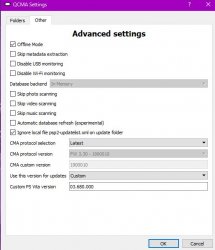
it took a while, but I got it. I installed qcma and made sure to select the libusbk driver during install. Then I made sure to configure the following
vitaaaaa.JPG

after this, I made sure to turn off the wifi in my ps vita, then restarted it; then I plugged it in via usb, and went to the vita cma app, copy content, and voila, it works; im going to make both a system backup, and manual backups of my games
 
glad you got it sorted. I had forgotten about enabling airplane mode as it's been ages since I was on 3.20/3.18. :-P
 
Back
Top