
You are using an out of date browser. It may not display this or other websites correctly.
You should upgrade or use an alternative browser.
You should upgrade or use an alternative browser.

PS3 [Release] PS1 and PS2 Emulator Mods 20\10\2024
- Thread starter mrjaredbeta
- Start date
Kevstah2004
Member
https://www.mediafire.com/file/t6pvtxuu4xfdo6e
The PS2 logo should show up corrupted but the PS1 logo is correct, you can't use both on the same iso for the main executable.
I made it for American region bios but it works on both ps3 bios since their region free NTSC even though netemu classes itself as a Japanese bios, I can upload a European PAL iso also if it makes a difference to the framerate idk.
The PS2 logo should show up corrupted but the PS1 logo is correct, you can't use both on the same iso for the main executable.
I made it for American region bios but it works on both ps3 bios since their region free NTSC even though netemu classes itself as a Japanese bios, I can upload a European PAL iso also if it makes a difference to the framerate idk.
Last edited:
Kevstah2004
Member
It crashed still
PS3 or PCSX2? the netemu bios still requires fastboot to function under PCSX2.
I'm switching debugging to the Play! emulator instead now, it seems recently they've added magicgate support for the ps2 arcade memory cards / secrurity dongles whilst the pcsx2 team are still scared of the Sony crabs clamping down.
There is an unofficial pcsx2 build that supports hdd magicgate for python script arcade games but it still no memory card support as far as i'm aware.
I've found the official pcsx2 build does sign & encrypt in kelfbinder hdd elf but it can't decrypt them.
Play! will run bios images but they have to be extracted to the rom0 folder.
Last edited:
Kevstah2004
Member
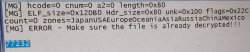
More testing showed that dvdelf.bin, decrypted kelf as well as dirtykelf fail to run under the ps3 bioses as it uses a developer or arcade SECRMAN module, you need to replace it with a retail unit SECRMAN, you get this error when trying to run the decrypted osdmain.elf from the hdd installed with kelfbinder which I believe is it attempting to run the encrypted MBR.XLF from the HDD.
Netemu will read/write from mass & hdd but Netemu isn't fed any mounting points for them.
The FMCB 1.8b installers seemed to designed with only usb in mind, it fails when launched from memory card or cdvd or it's just poor emulation issuses causing TLB miss errors, the Play! emulator won't run a secondary .ELF from cd via uLE at all :-( just the first .ELF it's given.
Also Magicgate data doesn't seem to be included on .VM2 or .PS2 saves only encrypted .VME PS2Classic?
dev_hdd0/game/PS2U10000/USRDIR/SAVEDATA/SCEVMC0.VME
dev_hdd0/game/PS2U10000/USRDIR/SAVEDATA/SCEVMC1.VME
is mirrored to
dev_hdd0/savedata/vmc/SCEVMC0.VME
dev_hdd0/savedata/vmc/SCEVMC0.BAK
dev_hdd0/savedata/vmc/SCEVMC1.VME
dev_hdd0/savedata/vmc/SCEVMC1.BAK
Netemu will read/write from mass & hdd but Netemu isn't fed any mounting points for them.
The FMCB 1.8b installers seemed to designed with only usb in mind, it fails when launched from memory card or cdvd or it's just poor emulation issuses causing TLB miss errors, the Play! emulator won't run a secondary .ELF from cd via uLE at all :-( just the first .ELF it's given.
Also Magicgate data doesn't seem to be included on .VM2 or .PS2 saves only encrypted .VME PS2Classic?
dev_hdd0/game/PS2U10000/USRDIR/SAVEDATA/SCEVMC0.VME
dev_hdd0/game/PS2U10000/USRDIR/SAVEDATA/SCEVMC1.VME
is mirrored to
dev_hdd0/savedata/vmc/SCEVMC0.VME
dev_hdd0/savedata/vmc/SCEVMC0.BAK
dev_hdd0/savedata/vmc/SCEVMC1.VME
dev_hdd0/savedata/vmc/SCEVMC1.BAK
Attachments
Last edited:
Kevstah2004
Member
PS2_Netemu
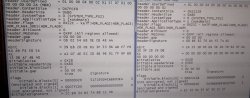
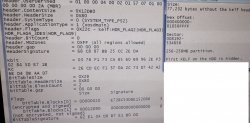
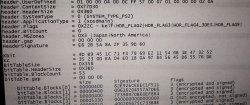
HDD KELF Magicgate for fsck.elf & osdmain.elf
not sure it differs for PS2_Softemu or other bioses or HDDs.
I was using the fake 40GB drive image created with pcsx2 & uLE formatted.
Update: Also here is the extra hidden MBR kelf in the MBR partition?
found in hexeditor opening the dev9hdd.raw as hdd/floppy disk with 512 sector.
dev_hdd0/game/PS2U10000/USRDIR/INSTALL/IMAGE.DAT? can be 10GB?
This was the one pcsx2 was complaining about in the debugger log from my previous post:
https://www.psx-place.com/attachments/img_20250930_000900-2-jpg.46714/
IMAGE.DAT: KELF
Shows the region as 3?
4GB seems to be the smallest HDD you can make in pcsx2, if you run IMAGE.DAT as dev9hdd.raw it gets formatted as a 4GB HDD if you don't touch the size preset.
When you run SOCOM II U.S. Navy SEALS it creates a 512MB partition for the Downloadable maps as
PP.SCUS-97275...SOCOM_II
after you enable HDD under options it also creates a save file on memory card 1.
OPSM US PS2 Demo 87 SCUS-97340 contains the
"After Hours" map, which gets installed into the HDD partition as RUN/MP63.CDB, it's the smallest disc of the set with HDD content, the iso is around 1GB.
Demo 90 contains all three Downloadable maps.
HDD KELF Magicgate for fsck.elf & osdmain.elf
not sure it differs for PS2_Softemu or other bioses or HDDs.
I was using the fake 40GB drive image created with pcsx2 & uLE formatted.
Update: Also here is the extra hidden MBR kelf in the MBR partition?
found in hexeditor opening the dev9hdd.raw as hdd/floppy disk with 512 sector.
dev_hdd0/game/PS2U10000/USRDIR/INSTALL/IMAGE.DAT? can be 10GB?
This was the one pcsx2 was complaining about in the debugger log from my previous post:
https://www.psx-place.com/attachments/img_20250930_000900-2-jpg.46714/
IMAGE.DAT: KELF
Shows the region as 3?
4GB seems to be the smallest HDD you can make in pcsx2, if you run IMAGE.DAT as dev9hdd.raw it gets formatted as a 4GB HDD if you don't touch the size preset.
When you run SOCOM II U.S. Navy SEALS it creates a 512MB partition for the Downloadable maps as
PP.SCUS-97275...SOCOM_II
after you enable HDD under options it also creates a save file on memory card 1.
OPSM US PS2 Demo 87 SCUS-97340 contains the
"After Hours" map, which gets installed into the HDD partition as RUN/MP63.CDB, it's the smallest disc of the set with HDD content, the iso is around 1GB.
Demo 90 contains all three Downloadable maps.
Attachments
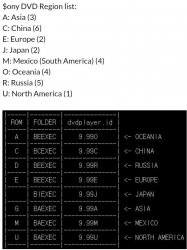
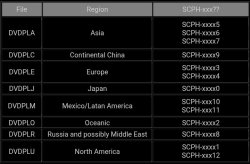
Last edited:
Kevstah2004
Member
HDDOSD & FHDB both working on Netemu & Softemu bios.
Netemu requires you to put the xmodules on the memory card along with dev9 modules, run a uLE/wLE iso via fastboot unmount turn off fastboot an run the unsigned FHDB elf, this will run the HDDOSD OSD from the HDD an bypass the XPARAM2 error.
I'm working on embedding the updated HDDOSD files to rom0: now instead of pfs: .
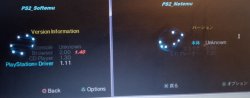
As you can see Softemu gets it's browser updated from 1.40 to 2.00, I'm not sure where it's pulling the string text value for the browser though.
Also the language selection is limited to just English & Japanese in the Netemu bios.
PS1ID = CDPlayer
PS1VER = PlayStation Driver
Netemu requires you to put the xmodules on the memory card along with dev9 modules, run a uLE/wLE iso via fastboot unmount turn off fastboot an run the unsigned FHDB elf, this will run the HDDOSD OSD from the HDD an bypass the XPARAM2 error.
I'm working on embedding the updated HDDOSD files to rom0: now instead of pfs: .
As you can see Softemu gets it's browser updated from 1.40 to 2.00, I'm not sure where it's pulling the string text value for the browser though.
Also the language selection is limited to just English & Japanese in the Netemu bios.
PS1ID = CDPlayer
PS1VER = PlayStation Driver
Attachments
Last edited:
Kevstah2004
Member
It could be that the text was just removed it netemu.
Yeah i'm not sure if the id isn't just embedded into the actual OSDSYS file it's self, I couldn't find anything in the PS2Ident sourcecode for the browser.
If I repackage the bios we won't have to worry about the MBR kelf decryption either, i've tried multiple hacked & decrypted kelfs into the hdd image but nothing nothing works unlike that premade decrypted polyviewer image carlos made a few years back.
Mystyqblaze347
Member
Is it possible for the ps2emu.self to have temps, fps, clock rate, overclock, some gfx mods, time display, ram use? These would be awesome is so. Bummer if I have to use other emu's if want other stuff as it defeats the purpose of an A01, to a degree.
Kevstah2004
Member
dvdplayer update is still present in softemu idk about netemu.
I got a bit further with softemu OSDSYS replacement on netemu, I placed the fully softemu extracted bios on the root of mc0: instead of rom0: an replaced all rom0: paths in softemu OSDSYS with mc0: it now gets stuck on rom0:UDNL .
I guess rom0:UDNL is still needed in order to load the memory card modules from rom0: with IOPBTCONF in EELOAD otherwise the memory card can't actually mount it's contents, I changed it back to rom0: an now it hangs waiting for a disc to be inserted which I think is a problem with it not loading the cdvd module properly otherwise it'd load uLE from the disc without fastboot on PS2Logo, PS2BBL seemed to have the same problem with it not understanding the insert/eject cdvd commands but still auto loads OPL fine, I nees to check softemu with PS2BBL to confirm it's not just a pcsx2 issuse.
I got a bit further with softemu OSDSYS replacement on netemu, I placed the fully softemu extracted bios on the root of mc0: instead of rom0: an replaced all rom0: paths in softemu OSDSYS with mc0: it now gets stuck on rom0:UDNL .
I guess rom0:UDNL is still needed in order to load the memory card modules from rom0: with IOPBTCONF in EELOAD otherwise the memory card can't actually mount it's contents, I changed it back to rom0: an now it hangs waiting for a disc to be inserted which I think is a problem with it not loading the cdvd module properly otherwise it'd load uLE from the disc without fastboot on PS2Logo, PS2BBL seemed to have the same problem with it not understanding the insert/eject cdvd commands but still auto loads OPL fine, I nees to check softemu with PS2BBL to confirm it's not just a pcsx2 issuse.

ANDREAS777
Member
hello guys, amazing work!
i have a few questions, is it possible to have savestates on ps1 games? some old titles have no memorycard/save support, so that would help greatly
another thing, is it possible to create analogue support for games that dont support it (like crash bandicoot 1) by just converting the d-pad to the left analogue?
and have each game have its own config
This would turn the ps3 into the best sony emulator EVER
i forgot to add one last thing (not as important if savestates can be implemented but still)
is it possible for ps1classic games to have individual, game-linked memory cards, similar to ps2classic titles?
i have multiple virtual ps1 memory cards that are full, and my little brothers also play the same games as me and they sometimes messup my savefiles since they are too young and not techsavy to swap memory cards, and even for me its tedious to always swap the memory cards
i have a few questions, is it possible to have savestates on ps1 games? some old titles have no memorycard/save support, so that would help greatly
another thing, is it possible to create analogue support for games that dont support it (like crash bandicoot 1) by just converting the d-pad to the left analogue?
and have each game have its own config
This would turn the ps3 into the best sony emulator EVER
i forgot to add one last thing (not as important if savestates can be implemented but still)
is it possible for ps1classic games to have individual, game-linked memory cards, similar to ps2classic titles?
i have multiple virtual ps1 memory cards that are full, and my little brothers also play the same games as me and they sometimes messup my savefiles since they are too young and not techsavy to swap memory cards, and even for me its tedious to always swap the memory cards
Last edited by a moderator:
Kevstah2004
Member
Nothing much to report, but i've found browser 2.0 stays dominant over opentuna, you can't unload it by disconnecting the hdd an backing out of the corrupted memory card, maybe if you remove the hdd whilst uLE is running, then use uLE to run rom0:osdsys to unload it???
You can however unload osdmenu from opentuna with the hdd disconnected on bios boot using the decrypted hosdsys.elf, it seems to reboot osdsys from rom0:osdsys as a fail safe on softemu at least.
uyjulian seems to be currently working on a ELF with it all embedded, using the last osdsys japan bios 2.20 files, I got the outputted .c file but I have no way yet of compiling it back into a ELF.
You can however unload osdmenu from opentuna with the hdd disconnected on bios boot using the decrypted hosdsys.elf, it seems to reboot osdsys from rom0:osdsys as a fail safe on softemu at least.
uyjulian seems to be currently working on a ELF with it all embedded, using the last osdsys japan bios 2.20 files, I got the outputted .c file but I have no way yet of compiling it back into a ELF.
Last edited:
Kevstah2004
Member
Y-Fix Par Code Finder
PALPAR Code Generator
I can't link them here, you'll have to use a search engine to grab them.
The codes for video mode / resolution, Axis, aspect ratio often occupy the same address block if not less than 500 address away from one another, once you have a general idea using the tools above it shouldn't be too hard to find the others using a ps1 emulator to search / debug the values.
PALPAR Code Generator
I can't link them here, you'll have to use a search engine to grab them.
The codes for video mode / resolution, Axis, aspect ratio often occupy the same address block if not less than 500 address away from one another, once you have a general idea using the tools above it shouldn't be too hard to find the others using a ps1 emulator to search / debug the values.
Kevstah2004
Member
Yep the PS3 is flakey, for instance Netemu doesn't support higher than 480p because the Mechacon is forced to RGB instead of Component with v6.12 whilst Softemu uses v6.02 or v5.04? an can output 1080i, PAL bios supports 576p NTSC doesn't.
There are a handful of later ps1 3d titles that supported widescreen, like TOCA.
I think it must of became a more popular addition after dual shock was added to platinum re-releases.
The ps1 ps3 emulator uses the modified psp bios.
There are a handful of later ps1 3d titles that supported widescreen, like TOCA.
I think it must of became a more popular addition after dual shock was added to platinum re-releases.
The ps1 ps3 emulator uses the modified psp bios.
Last edited:
Similar threads
-

-
 PS3 New PS1/PS2 Emulation Features for PS3 CFW user's + Evilnat's 4.91.2-BETA 12
- Started by STLcardsWS
- Replies: 14
-
 PS3 ps2classic.exe for PS2 multidisc PKGs
- Started by mrjaredbeta
- Replies: 21
-
 PS3 [RELEASE] ps2_emu, gxemu and netemu modded by Kozarovv (FAN control, CELL/RSX Temps, FPS indicator)
- Started by Predator0808
- Replies: 40