PS4 [Release[ PS2-FPKG 0.6 by Jabu - New tool to convert PS2 games for PS4

Status
Not open for further replies.
Hello, I have a question. If the config files mention a specific emulator can you still use it with any other emulator? In specific it mentions psychonauts v2 would that still work with jak v2?
Depends games, if game have own emu, that better use that emu then
 
Depends games, if game have own emu, that better use that emu then
Is there any place to get the others aside from ripping them from their games? The game in question is Suikoden 3, I tried it with Jak V2 without the config file and it didn't work so well.
 
Last edited by a moderator:
Is there any place to get the others aside from ripping them from their games? The game in question is Suikoden 3, I tried it with Jak V2 without the config file and it didn't work so well.
no. the files are copyrighted so it is against our rules to link or share.
 
Hello, I have a question. If the config files mention a specific emulator can you still use it with any other emulator? In specific it mentions psychonauts v2 would that still work with jak v2?
Sometimes. Some Commands only work with some emulators. Examples:
Code:
"--ee-context-switch-cycles="
and

jaks and higher
Code:
--vif-ignore-invalid-cmd=1
--vif1-ignore-cmd-ints=1

way, way, waaaay too many more to count. Trial and error. I can personally say I've dug into most of them and man, this is NOT an easy emulator to get the hang of. After over 10k tests personally since 2018, I still barely know what most of the hundred plus CLI commands do.
 
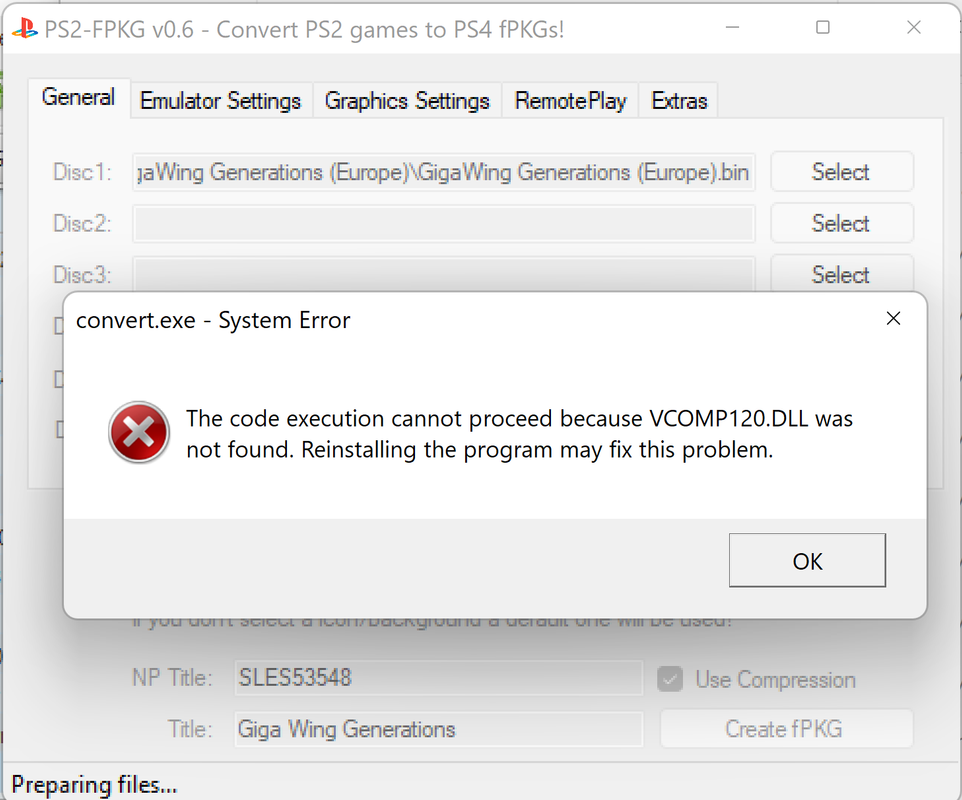
Even with vcredist x64.

The code execution cannot proceed because MSVCR120.dll was not found. Reinstalling the program may fix this problem.
The code execution cannot proceed because VCOMP120.dll was not found. Reinstalling the program may fix this problem.
The code execution cannot proceed because MSVCP120.dll was not found. Reinstalling the program may fix this problem.
etc... until I press ok a bunch of times and then it starts creating the fPKG without popup.

I need that Cartoon Network Racing :(

There is ltrly WHOLE TOPIC FOR FIXES:
https://www.psx-place.com/threads/r...onfiguration-on-ps4.16131/page-74#post-284581
 
Last edited:
Adding a way to change the touch pad from start to make the options button start because playing Japanese games have different controls
for circle and triangle so a option to change control buttons would be a very helpful feature to add in future
 
is this a problem?
ps2tops4.png
 
error converting game (dragon ball budokai tenkaichi 3)

Log: [Debug] 2020-12-13 20:18:19 Create image Process started.
[Error] Format of the param file is not valid. (sce_sys/param.sfo, unexpected Content ID)
[Error] Format of the param file is not valid. (sce_sys/param.sfo, unexpected Title ID)
[Warn] The required file is missing (sce_sys/pronunciation.xml). The created package will not be imported into GEMS.
[Error] 2020-12-13 20:18:19 Create image Process finished with error(s).

same problem please help
 
same problem please help
I too am having this issue. I've Looked all over the place for a Fix, to no avail.
I have all the possible C++ Studio Redists. available for download already on my PC, and have repaired them all, and ran SFC /Scannow in CMD Prompt, no errors...
It seems to be the PNG that is causing this stubborn issue, if you do not add a Background nor Icon image it will create the fPKG without error...
READ HERE FOR FIX: I have been able to work around this issue, by creating the fPKGs through Releases · xXxTheDarkprogramerxXx/PS3Tools · GitHub, and then using Releases · pearlxcore/PS4-PKG-Tool · GitHub to Extract the proper 512 x 512 image, and rename it to icon0.png and place it in the "png" folder (located in the "stuff" directory of Jabus tool) of the tools directory and then create the fPKGs, without error and with the proper boxart image, drawn from within the games data files.
I have been filtering through these 2 programs because, Darkprogrammers tool does not seem to save the config. settings nor auto-apply custom configs, but is generating the proper Boxart image for me to use with Jabu's tool. I hope someone reading this finds this information helpful! I hope to see update v.7 soon, that addresses' and fixes this issue. Thank all of you devs so much for making all this possible!

 
i receive this error every time i try to use any version of ps2fkpg...

[Debug] 2022-09-11 10:42:06 Create image Process started.
[Error] Format of the param file is not valid. (sce_sys/param.sfo, unexpected Content ID)
[Error] Format of the param file is not valid. (sce_sys/param.sfo, unexpected Title ID)
[Warn] The required file is missing (sce_sys/pronunciation.xml). The created package will not be imported into GEMS.
[Error] 2022-09-11 10:42:07 Create image Process finished with error(s).

anyone have any idea how to fix this? i have seen many people have the same error and some saying create a new account. ive tried this and also tried another laptop. I have used only windows 10 machines and have no access to others. any ideas to help would be amazing. thanks.
 
any idea how to get rid of this error? it won't let me add custom pic icons. It creates the pkg but with a default PS2 icon for the pkg
ps2ps4-error.png
 
I too am having this issue. I've Looked all over the place for a Fix, to no avail.
I have all the possible C++ Studio Redists. available for download already on my PC, and have repaired them all, and ran SFC /Scannow in CMD Prompt, no errors...
It seems to be the PNG that is causing this stubborn issue, if you do not add a Background nor Icon image it will create the fPKG without error...
READ HERE FOR FIX: I have been able to work around this issue, by creating the fPKGs through Releases · xXxTheDarkprogramerxXx/PS3Tools · GitHub, and then using Releases · pearlxcore/PS4-PKG-Tool · GitHub to Extract the proper 512 x 512 image, and rename it to icon0.png and place it in the "png" folder (located in the "stuff" directory of Jabus tool) of the tools directory and then create the fPKGs, without error and with the proper boxart image, drawn from within the games data files.
I have been filtering through these 2 programs because, Darkprogrammers tool does not seem to save the config. settings nor auto-apply custom configs, but is generating the proper Boxart image for me to use with Jabu's tool. I hope someone reading this finds this information helpful! I hope to see update v.7 soon, that addresses' and fixes this issue. Thank all of you devs so much for making all this possible!

For some reason the pkg made with PS2 Classics does not appear in PKG tool. made sure it's scanning the right folder.
So i tried just replacing the icon0.png and pic1.png in stuff\png with my own, rather than specifying them in the app, and had the same error.
 
Status
Not open for further replies.
Back
Top