vitaRTCW

PS VITA / PS TV [RELEASE] vitaRTCW - Return to Castle Wolfenstein port for PSVITA/PSTV v.0.9

vitaRTCW v.0.5

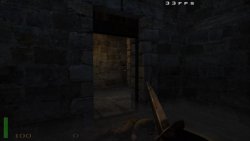
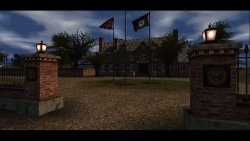
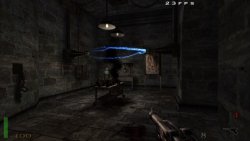
E6LcUzTWYAMMp9L.jpg E6LcUqYWUA4X2G0.jpg E6LcUgTWUAIDipA.jpg

  • A port of Return to Castle Wolfenstein for PSVITA/PSTV based on iortcw.
    World War II rages and nations fall. SS head Himmler has Hitler's full backing to twist science and the occult into an army capable of annihilating the Allies once and for all. Battling alone, you're on an intense mission to pierce the black heart of the Third Reich and stop Himmler -- or die trying. Fighting in advanced team-based multiplayer mode, you'll wage your own WWII in an all-out Axis vs. Allies contest for frontline domination.

    Powered by the Quake III Arena engine, the Wolfenstein universe explodes with the kind of epic environments, A.I., firepower and cinematic effects that only a game created by true masters can deliver. The dark reich's closing in. The time to act is now. Evil prevails when good men do nothing.

    Changelog v.0.5:
    - Updated to latest vitaGL usage.
    - Added a check for libshacccg.suprx existence on boot.
    - Added aim assist feature for single player derived from the Android port.
    - Fixed fog rendering, now renders as intended.​


  • Controls:
    Cross = Jump
    Square = Reload
    Circle = Open doors/Activate objects
    Triangle = Change weapon
    L Trigger = Aim/Use Binocular
    R Trigger = Shoot
    Left Analog/DPad Arrows = Move player
    Right Analog = Aim
    Touch = Precision Aim​

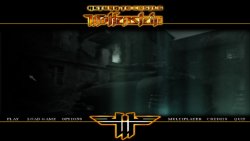
  • E6LcU8pWUBIOj3Q.jpg

    How to install:
    - Install libshacccg.suprx (https://samilops2.gitbook.io/vita-troubleshooting-guide/shader-compiler/extract-libshacccg.suprx)
    - Install the vpk and data files (if manually installing data files, extract the zip folder in ux0:data)
    - Move pak0.pk3, sp_pak1.pk3 and sp_pak2.pk3 and all the mp_*.pk3 files from your RTCW files (Tested with Steam data files) to ux0:data/iortcw/main.
    - [OPTIONAL] If you want to install translations in Italian/French/Spanish/German, grab the relative files from here: https://github.com/iortcw/iortcw/releases/tag/1.51c and overwrite all files in ux0:data/iortcw/main.​

  • Notes: vitaRTCW is still not stable:
    - Framerate is unstable, in certain circumstances it can even drop drastically especially if playing in high res.
    - Multiplayer build is extremely experimental: expect crashes, maps not loading and issues when joining some servers.
    - Savegames can't be named (meaning you can have only a single savefile unless you manually rename your save file and overwrite it later).
    - It has not completely tested (only first levels got fully played, meaning later in the game, crashes may occur, if it happens, report them here or on GitHub with coredump attachment and possibly a save file to fastly reproduce the issue.​

    How to enable dynamic lights and mipmaps:
    Dynamic lights are disabled by default to focus on framerate. If you want to enable them, in wolfconfig.cfg, change r_dynamiclight from 0 to 1
    Also, if you had vitaRTCW installed prior v.0.4, you'd want to enable mipmaps usage by changing r_textureMode from GL_LINEAR to GL_LINEAR_MIPMAP_LINEAR or GL_LINEAR_MIPMAP_NEAREST​

    Resolution:
    The engine (idTech 3) has been ported through vitaGL and is fully compatible with all supported PSVITA resolutions the same as vitaQuakeIII.
    By default, vitaRTCW will run at 640x368 resolution! This is cause it's a little slower than PSP resolution but makes texts readable.
    If you don't mind about texts and want the best framerate possible, you can switch to 480x272 or if you want better graphics at the cost of lower framerate, you can switch to 720x408 or 960x544.
    To do so, edit in wolfconfig.cfg the r_mode value as follow:
    0 = 480x272
    1 = 640x368
    2 = 720x408
    3 = 960x544
    Regardless of the resolution you'll play on, vitaRTCW will run with MSAA 4x!

  • Changelog v.0.4:
    - Updated to latest vitaGL usage.
    - Updated to GCC10 usage.
    - Enabled multitexturing usage (huge performance boost).
    - Enabled texture compression usage.
    - Enabled executable compression (saves space on filesystem)
    - Fixed dynamic lights, now they render properly (r_dynamiclight).
    - Fixed several renderer related glitches (eg: sometimes garbage was rendered on screen).​

  • Credits:
    - iortcw developers for the awesome work done on the engine
    - All my Patroners for their awesome support:
    • 5nakey
    • Freddy Parra
    • Joey
    • Badmanwazzy37
    • drd7of14
    • The Vita3K project
    • Titi Clash
    • @Sarkies_Proxy
    • Al Capwn
    • CatoTheYounger
    • Colin Steinmann
    • Count Duckula
    • Daria
    • Dean Stark
    • Heraldian Despot
    • Ian Stoffberg
    • Igor Kovacs Biscaia
    • Imran Akthar Syed
    • Mored4u
    • mxadi25
    • Other Retro Matt
    • polytoad
    • PSX-Place.com
    • rsn8887
    • suLac4ever
    • The Libretro Team
    • Tomg
    • Waffeleisen
    • Wiese
    • 2Mourty
    • Alfredo Gutierrez
    • Andyways
    • BOBdotEXE
    • BrainCheese87
    • colin_sans
    • CyberSweeny2077
    • Daniel Krusenbaum
    • Danny
    • David Stieben
    • Des
    • Dr Yosef Lodgardes IV
    • drivenby
    • Elwood Blues
    • Enrique Romero
    • Error
    • FM_JN
    • frankyfife
    • Gwijde Maegherman
    • Hòa Hiệp Bùi
    • Ivanich Tamás Márk
    • Jack Chiu (The Jack!)
    • James Guzman
    • Jihel Jay
    • Joe brindle
    • Jonathan Steen
    • Kyle Ring
    • LaFlex
    • Lcoh_TheNerd
    • Lucas Brugnaro Badur
    • Martial B.
    • Matt Hargett
    • Mauci
    • Michael Kristensen
    • gnmmarechal
    • Neil MacAlasdair
    • Peter Knoll
    • Pedro Guizar
    • Pirloui
    • Roman Murashov
    • Simon Sawert
    • spriteice
    • Stefanos P.
    • Sternaid
    • steven powell
    • Thomas Radeck
    • Thomas Wurgler
    • Дмитрий Верисов
    • Daniel Cassidy

 
Last edited:
The game is crashing after changing Sound Quality (Options -> System -> Sound -> Sound Quality)
from 11 kHz to 22 kHz.
 
Thank you for this amazing port, I am having so much fun with it!

I unfortunately got stuck now at mission Kugelstadt as the game runs into an error while loading: error: loadjpg: textures/common/blackish.jpg has invalid image format: 128x128*4=65536, components 1
Is this an issue with my game data or is this something general?
 
Hey man,
thanks for the release, but I'm having a problem booting up the Game, I keep getting The error Code C2-12828-1.
I googled the Error code but got many "Fixes" that didn't work. Any help would be much appreciated.
 
I just tired anything that was supposed to fix the error code that i found on google.
For example: Formatting the Memory card, Factory Resetting the Vita, Using a Different Firmware, rebuilding database and disabling and Mod which might cause the Error.
 
As I still could not resolve this issue by using different map packs, I tried to find if there was anything online regarding this blackish.jpg file error.

I found the following information on a forum, I dont know if this could be helpful to you in finding a way to fix it, but I might as well share:

"Texture Loading Game Error
It has come to our attention while setting up the QuArK_RTCW.zip file that there is at least one texture in the original RTCW pak0.pk3 file (textures\common\blackish.jpg) that causes RTCW to give an error in the game console that says:
Error: LoadTGA: Only type 2 (RGB), 3 (gray), and 10 (RGB) TGA images supported
and stops the game map from loading. The texture file itself is not bad, but for some unknown reason when this texture is used in QuArK and is opened in an "external editor", like PaintShopPro, it shows as a .pcx file and not a .jpg uncompressed file. When it is exported for the map file by QuArK, it is created as a .tga file, which is not the case at all, and causes this error.
So if you should receive this game error message this is what you should do. Clear out your "tmpQuArK\textures" folder, have QuArK "Prepare all textures and scripts", which is on the RTCW main menu in QuArK, then open each .tga and .jpg texture in the textures folder directly into PSP or Photo Shop. You are looking for two things:
1) That is IS a valid .jpg or .tga file.
2) And, that it is NOT a "compressed" image file. RTCW will give the same error is one is.
Once you find the offending file(s), create an uncompressed .tga file of it and place that new file in a folder called "textures" in your RTCW\Main folder. That will solve all the problems for both QuArK and RTCW, allowing you to continue to use that texture in the future. Please notify us so we can make the same correction."

Thanks for your amazing work as always!
 
v.0.5 available for download!

NOTE: If you already have vitaRTCW installed, download the data files and replace the .suprx files in the new data files with the already existing one in your installation!!!

Changelog:
- Updated to latest vitaGL usage.
- Added a check for libshacccg.suprx existence on boot.
- Added aim assist feature for single player derived from the Android port.
- Fixed fog rendering, now renders as intended.

Credits:
- iortcw developers for the awesome work done on the engine
- All my Patroners for their awesome support:
  • 5nakey
  • Freddy Parra
  • Joey
  • Badmanwazzy37
  • drd7of14
  • The Vita3K project
  • Titi Clash
  • @Sarkies_Proxy
  • Al Capwn
  • CatoTheYounger
  • Colin Steinmann
  • Count Duckula
  • Daria
  • Dean Stark
  • Heraldian Despot
  • Ian Stoffberg
  • Igor Kovacs Biscaia
  • Imran Akthar Syed
  • Mored4u
  • mxadi25
  • Other Retro Matt
  • polytoad
  • PSX-Place.com
  • rsn8887
  • suLac4ever
  • The Libretro Team
  • Tomg
  • Waffeleisen
  • Wiese
  • 2Mourty
  • Alfredo Gutierrez
  • Andyways
  • BOBdotEXE
  • BrainCheese87
  • colin_sans
  • CyberSweeny2077
  • Daniel Krusenbaum
  • Danny
  • David Stieben
  • Des
  • Dr Yosef Lodgardes IV
  • drivenby
  • Elwood Blues
  • Enrique Romero
  • Error
  • FM_JN
  • frankyfife
  • Gwijde Maegherman
  • Hòa Hiệp Bùi
  • Ivanich Tamás Márk
  • Jack Chiu (The Jack!)
  • James Guzman
  • Jihel Jay
  • Joe brindle
  • Jonathan Steen
  • Kyle Ring
  • LaFlex
  • Lcoh_TheNerd
  • Lucas Brugnaro Badur
  • Martial B.
  • Matt Hargett
  • Mauci
  • Michael Kristensen
  • gnmmarechal
  • Neil MacAlasdair
  • Peter Knoll
  • Pedro Guizar
  • Pirloui
  • Roman Murashov
  • Simon Sawert
  • spriteice
  • Stefanos P.
  • Sternaid
  • steven powell
  • Thomas Radeck
  • Thomas Wurgler
  • Дмитрий Верисов
  • Daniel Cassidy
Download:
https://vitadb.rinnegatamante.it/#/info/459
 
As I still could not resolve this issue by using different map packs, I tried to find if there was anything online regarding this blackish.jpg file error.

I found the following information on a forum, I dont know if this could be helpful to you in finding a way to fix it, but I might as well share:

"Texture Loading Game Error
It has come to our attention while setting up the QuArK_RTCW.zip file that there is at least one texture in the original RTCW pak0.pk3 file (textures\common\blackish.jpg) that causes RTCW to give an error in the game console that says:
Error: LoadTGA: Only type 2 (RGB), 3 (gray), and 10 (RGB) TGA images supported
and stops the game map from loading. The texture file itself is not bad, but for some unknown reason when this texture is used in QuArK and is opened in an "external editor", like PaintShopPro, it shows as a .pcx file and not a .jpg uncompressed file. When it is exported for the map file by QuArK, it is created as a .tga file, which is not the case at all, and causes this error.
So if you should receive this game error message this is what you should do. Clear out your "tmpQuArK\textures" folder, have QuArK "Prepare all textures and scripts", which is on the RTCW main menu in QuArK, then open each .tga and .jpg texture in the textures folder directly into PSP or Photo Shop. You are looking for two things:
1) That is IS a valid .jpg or .tga file.
2) And, that it is NOT a "compressed" image file. RTCW will give the same error is one is.
Once you find the offending file(s), create an uncompressed .tga file of it and place that new file in a folder called "textures" in your RTCW\Main folder. That will solve all the problems for both QuArK and RTCW, allowing you to continue to use that texture in the future. Please notify us so we can make the same correction."

Thanks for your amazing work as always!

Hey!
Thank you again for the port and the update as well.
I found that following the guide really fixes the error:
1. open pak0.pk3 with an archiver program like winrar.
2. copy blackish.jpg from textures\common\ folder and convert it into .tga (with photoshop or an online website (google solved it easily)
3. make "textures" folder in "main" folder at iortcw on vita
4. copy blackish.tga into this folder
5. (I also renamed blackish.jpg inside pak0.pk3 to blackishold.jpg, I dont know if this is needed)
6. Enjoy your trip to Kugelstadt

@Rinne - If you can, maybe include in the next version a folder called textures in the main folder with a "blackish.tga" placed already for an instant fix :)
 
Buenas,no consigo arreglar el problema de la carga de textura y tengo el juego colgado,alguna manera de encontrar ya los archivos preparados para solucionar el error, gracias

Hello, I can't fix the texture loading problem and I have the game hanging, is there any way to find the files already prepared to solve the error, thanks
 
Last edited by a moderator:
Hello, I can't fix the texture loading problem and I have the game hanging, is there any way to find the files already prepared to solve the error, thanks
 
vitaRTCW v0.6 is out!

Changelog (v.0.6):
  • Updated to latest vitaGL usage.
  • Added gyroscope aiming (controllable from cl_gyroscope, cl_gyro_h_sensitivity and cl_gyro_v_sensitivity cvars).
  • Made so that right analog sensitivity can be adjusted via cl_analog_slowdown cvar.
 
vitaRTCW v.0.9 is out!

Changelog:
- Updated to latest vitaGL usage.
- Added a new cvar to set up a framecap at 30 fps. (r_framecap)
- Implemented multithreaded rendering: this will greatly improve perfromances.
- Optimized several functions in the renderer backend.
- Removed all CPU/GPU syncs that were resulting in CPU stalling and performance drops.
- Reduced the amount of memory the renderer needs.
- Added paletted jpgs support. (This fixes an issue causing some maps to fail to load with Steam data files)
- Fully reworked default bindings (Needs an update of the cfg files). The new bindings are:
-- Up Arrow: Zoom
-- Left Arrow: Prev. Weapon
-- Right Arrow: Next Weapon
-- Down Arrow: Enter/Exit crouch state
-- Cross: Jump
-- Square: Reload
-- Circle: Interact with items
-- Triangle: Enter/Exit sprint state
-- Left Trigger: Scope with scoped weapons
-- Right Trigger: Attack
-- Left Analog: Movement
-- Right Analog: Aim
 
Back
Top