PS3 [Research] Coldboot MP3 hack (experimental WIP)

I think there must be a good way to apply this patch. SOMETHING must be telling the ps3 which plugin to use for the coldboot file. It is not decided by the file extension anyway as changing that does nothing.

I wonder could a custom cobra payload be able to do a one time redirect or somehow load the mp3 plugin, then unload it and load the ac3 plugin again.

@esc0rtd3w would you have any ideas of a way to basically apply this working mp3 patch temporarily somwhow so that movies still work?

Here is the debug output log of boot up if it helps.

upload_2020-3-7_14-57-51.png
 
So, i dont know if this discontinued or not, but I really can't wait for this to be completed successfully. Has there been any more progress? Would love to know I possible!
 
So, i dont know if this discontinued or not, but I really can't wait for this to be completed successfully. Has there been any more progress? Would love to know I possible!

This project is on hold... Maybe DeViL303 will continue later. Meanwhile my advice is that DO NOT mess with your flash files unless you know what you're doing and have a mean to recover from a brick or semi-brick. DeViL303 is a very experienced user and this post is only educational or for share ideas.

These plugins are approx the same size, I wonder could we replace the loaded plugin in RAM?

edit: actually no damn, the mp3 plugin is a few bytes smaller

@DeViL303 Yes, the sprx for mp3 is smaller, but libmp3dec.prx is 145KB and libac3dec.prx is 120KB.
Therefore, the decrypted sprx is actually larger than ac3 plugin. This is how they reside on memory.

So your theory of restore libac3dec.sprx patching the memory should be feasible if the memory address for the plugin is known.

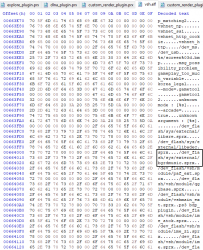
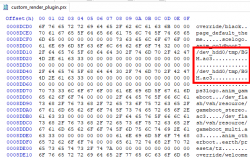
I haven't tested this, but I think that instead of rename the sprx in /dev_flash you could try patching this path in VSH.self
upload_2020-6-21_23-39-27.png


I think there must be a good way to apply this patch. SOMETHING must be telling the ps3 which plugin to use for the coldboot file. It is not decided by the file extension anyway as changing that does nothing.
In PS3 (like in most unix systems) the file type is generally detected by the "magic number" or file signature at the start of the file. The file extension is a less accurate method of file type detection.
 
Last edited:
I have kind of gone as far as I can TBH. I know its possible to play an mp3 coldboot, but have not got the time or the skills to finish off this hack.

I have tried patching the path in the vsh.self, and it does work, but that has the same issues as swapping the file.

Also something to take note of if anyone is looking at this, there is something slightly unstable that I have not quite figured out. When patched to use the mp3 plugin, Sometimes it will play no coldboot at all randomly, then work the next time. Something to do with length or bitrate, needs more testing.
 
I have kind of gone as far as I can TBH. I know its possible to play an mp3 coldboot, but have not got the time or the skills to finish off this hack.

I have tried patching the path in the vsh.self, and it does work, but that has the same issues as swapping the file.

Also something to take note of if anyone is looking at this, there is something slightly unstable that I have not quite figured out. When patched to use the mp3 plugin, Sometimes it will play no coldboot at all randomly, then work the next time. Something to do with length or bitrate, needs more testing.

I understand and appreciate all your feedback... Maybe in the future (when you get the time) you could re-run your tests and hopefully could find a workaround. Often when one return to a problem with a refresh mind can find new solutions ;)

I appreciate all the information and knowledge that you have shared in all these years.

Take care!
 
In PS3 (like in most unix systems) the file type is generally detected by the "magic number" or file signature at the start of the file. The file extension is a less accurate method of file type detection.
I have tried a few things here, like running a mp3 renamed to ac3 etc trying to see if there was a way around the custom_render_plugin.sprx patch. I had no luck. The only way to get it to play an mp3 was if I changed the sprx to say ".mp3".. tried quite a lot. inc lots of other formats.


Often when one return to a problem with a refresh mind can find new solutions ;)
True, I will try come back to this some time. I guess doing RAM dump with with both plugins loaded, compare, then use wMM to patch back in the original data or something like that. Also it would be cool if a few others could try some stuff. @LuanTeles etc. We know the principal works, maybe there is something I missed or a different way to approach it.
 
The only way to get it to play an mp3 was if I changed the sprx to say ".mp3".. tried quite a lot. inc lots of other formats.
It's weird that it needs the extension .mp3. Anyway I don't think this is the issue.

Also it would be cool if a few others could try some stuff. @LuanTeles etc. We know the principal works, maybe there is something I missed or a different way to approach it.
Yes it would be cool if other experienced users could collaborate. I did a few tests last night, but I ended semi-bricking my console; I prefer not experiment more to be able to work in other projects.

I'm not sure if you tried this, but I think it would worth to try again:
1- Patch VSH.self to load /dev_flash/sys/external/libmp3dec.sprx instead of libac3dec.sprx
2- Patch custom_render_plugin.sprx to load .mp3 (like you already did)
3- Patch videoplayer_plugin.sprx to load /dev_flash/sys/external/libac3dec.sprx instead of libmp3dec.sprx
Note: I didn't see any reference to libac3dec.sprx in the prx probably because the lib is already loaded.

Maybe the plugin must be swapped also patching the path found in bdp_BDVD.self and bdp_BDMV.self too.
 
Last edited:
So basically, if i wanted to use this now, can someone jus sum up all the known bugs and issues for me? Sorry if im asking too much, but would be appreciated.

I can't believe how far this community has gone. It's amazing.
 
Issue 1: Basically if we swap the ac3 plugin for the mp3 plugin, what happens is there is no longer any ac3 plugin loaded. So if you try to play a movie file with ac3 sound it will crash. So if you do not use your ps3 for videos this one is not an issue.

Issue 2: The other separate issue is that sometimes randomly the mp3 coldboot audio does not play. I think that is some timing thing and probably fixable but needs more testing. This issue will effect everyone.

Issue 3: Separate issue again is that if we want background audio playing on the XMB, (really long coldboot mp3 that keeps playing. well then we need need to remove the line from the custom_render_plugin.rco that ends the coldboot animation. This causes a couple of small bugs when the XMB loads. the click sound does not play when you move around the XMB and the mouse pointer does not show in the web browser. These issues are only a problem if you want a long coldboot that plays after the XMB has loaded.
 
Issue 1: Basically if we swap the ac3 plugin for the mp3 plugin, what happens is there is no longer any ac3 plugin loaded. So if you try to play a movie file with ac3 sound it will crash. So if you do not use your ps3 for videos this one is not an issue.

What do you think about my theory in post #27?
Do you think the plugins could be swapped in VSH and in the player? instead of swap the files physically.

I wonder if the issue happens with Movian or if it remains after load it, since it plays ac3 too.
 
For issue number 3, basically the ps3 loads the click sound and web browser pointer after the coldboot is finished.
The only way to fix this would be to trick the system to think in the coldboot had already ended, which isnt possible it seems. So, I think there might be a file somewhere where it tells the ps3 to load everything once the coldboot ends. If there is someway to patch that file so everything loads while the coldboot plays, I think that would fix the issue. But again, it may not be possible. It's just a theory.
 
What do you think about my theory in post #27?
Do you think the plugins could be swapped in VSH and in the player? instead of swap the files physically.

I wonder if the issue happens with Movian or if it remains after load it, since it plays ac3 too.
That sounds possible, just not sure if the player will know which plugin to use if their positions have been swapped.
 
That sounds possible, just not sure if the player will know which plugin to use if their positions have been swapped.

Your working solution was swapping the file libmp3dec.sprx & libac3dec.sprx.

What I'm saying is it could work leaving these files intact (not swapping them).

VSH.self originally loads libac3dec.sprx. I mean change it to load libmp3dec.sprx

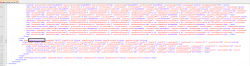
upload_2020-6-21_23-39-27-png.26372


So libmp3dec.sprx will be loaded at boot time. I suppose it should let the patched custom_render_plugin.sprx to load the .mp3 (like you already did) without swap the sprx.

In the player I noticed that it only has a reference libmp3dec.sprx. Probably because libac3dec.sprx was already loaded by VSH.self at boot time. But if we changed VSH.self to libmp3dec.sprx, then we would need to change the players bdp_BDVD.self and bdp_BDMV.self to load libac3dec.sprx to have both plugins loaded in memory.

Again this is just a theory... I haven't tested this concept.
 
Last edited:
Small update, want to get this down here before I forget.

1. The file extension is important anyway, I thought from other tests in the past that maybe the extension would be ignored and the system would just attempt to load the file requested with the plugin requested, but no. If I change the the file to acx in custom render plugin, and change the filename of the ac3 to acx, it does not play. So this means the custom_render_plugin will have to be patched whatever happens. Not a big deal but worth noting

2. It seems to be the instability is some kind of timing issue, from my tests it seems more likely to play the mp3 coldboot from a soft reboot then from a hard reboot or an actual cold boot but hard to tell as the fails are kinda random.

BUT I have had some luck here. Deleting the coldboot.raf seems to help with this timing issue, so far it is working 90% of the time if there is no coldboot.raf. I have only had it fail to play the mp3 a few times since removing the coldboot.raf. We can work around this by having the coldboot logo setup the old way where it reads a gim from the rco and not the raf. So its not the end of the world. Or maybe someone else has some ideas for tweaking the timing of things a little? Possibly via cobra or webman idk.

3. Making a copy of the libmp3dec.sprx called bgrdmusic.sprx and then editing the vsh.self to load that plugin works fine, the mp3 coldboot still plays 90% of the time

upload_2021-1-9_16-29-18.png


4. The Hz of the mp3 is important too. The system can not seem to detect the Hz correctly. So it expects 44.1kHz and will play the sound at the wrong speed if its anything else... BUT the lower the kHz the more likely it is to play the mp3, A 32Khz mp3 seems to be more reliable in my tests so far. .

The speed issue is not a big deal, we could have a specially crafted low kHz mp3 that plays at the right speed.


Really could do with more people testing stuff here as there are so many variables. I am going to try loading the plugin and audio file from different locations and see if it helps with the timing.

I am also going to try all other available codecs, maybe one will work better. idk
 
Last edited:
+I was reading again your post #20 and noticed in the picture why you were getting the freeze.

You were loading thing the sprx using the VSH plugin interface of ps3mapi.
The /vshplugin.ps3mapi is used to load VSH plugins like psnpatch, VSH Menu, sMAN, etc.

For system modules like libac3dec.sprx or libmp3dec.sprx you need to use the Game Plugins interface or /gameplugin.ps3mapi then set the process to 01000300_main_vsh.self
upload_2021-1-9_13-15-12.png


Once the VSH.self is attached, you will see the modules loaded by the process.
You can load or unload the system modules that you want like libac3dec.sprx or libmp3dec.sprx
upload_2021-1-9_13-18-8.png
 
I dont really understand that ps3mapi stuff tbh. I've never used that at all.

I am starting to think its not worth messing with mp3s.

It adds too many issues with these random fails and ac3 movie issues. Especially when we know we can load ac3s from hdd, so the filesize is not an issue. I can run a 70MB ac3 file from HDD.

The other issue is that editing the rco so that the coldboot audio does not stop when the XMB loads causes other issues on top, even with ac3 files:

1a. The mouse pointer in the web browser wont show (on Rebug REX), you can still move around a webpage with the dpad, but still.
1b. The web browser completely freezes the console (Rebug Lite)
2. no XMB sounds like clicks etc
3. the clock/date does not load at all

I think this approach using the coldboot has too many issues to solve.

Dunno but had enough testing for now.

EDIT: I have tried m4a, aac, wma and at3 as well, none of these will play coldboot audio at all when loading thier specific plugins instead of the ac3 plugin. Think I just got lucky with mp3.
 
Last edited:
I dont really understand that ps3mapi stuff tbh. I've never used that at all.

I am starting to think its not worth messing with mp3s.

It adds too many issues with these random fails and ac3 movie issues. Especially when we know we can load ac3s from hdd, so the filesize is not an issue. I can run a 70MB ac3 file from HDD.

The other issue is that editing the rco so that the coldboot audio does not stop when the XMB loads causes other issues on top, even with ac3 files:

1a. The mouse pointer in the web browser wont show (on Rebug REX), you can still move around a webpage with the dpad, but still.
1b. The web browser completely freezes the console (Rebug Lite)
2. no XMB sounds like clicks etc
3. the clock/date does not load at all

I think this approach using the coldboot has too many issues to solve.

Dunno but had enough testing for now.

I understand. It's really frustrating.

Maybe a different approach could be auto-start the audio player using XMB automation.
Code:
http://localhost/browser.ps3$focus_category%20music;/browser.ps3$focus_segment_index+-1;/pad.ps3?triangle;/wait.ps3?2;/pad.ps3?cross;/wait.ps3?2;/pad.ps3?psbtn;/wait.ps3?1;/browser.ps3$focus_category%20game

It's not elegant, but does the task ;)


EDIT:
LOL as a side effect, I managed to get the visual player plugin as "dynamic XMB theme".
It only happens at random moments. Maybe it could be reproduced finding the right timing.
upload_2021-1-9_16-28-53.png


Talk about using the multimedia player as "dynamic theme" continues here:
https://www.psx-place.com/threads/using-the-multimedia-player-as-a-dynamic-theme.32494/
 
Last edited:
I have been looking at this background audio idea again. Not with MP3s for now, just with a long ac3 running from HDD. Just want to get this info down in case someone else decides to look into this someday.

My patch to custom_render_plugin.rco that allows the coldboot audio to keep playing has a couple of bugs, this patch simply involves removing this line from the animation script. This is the key.
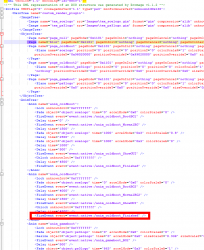
upload_2021-1-18_5-3-46.png

The 2 main side effects of this patch are
  • The clock only shows for a couple of seconds after booting up.
  • The web browser has no mouse pointer

I have a partial work around for these issues, One is that it seems that any notifications like webMAN MOD are part of the issue with the clock or at least it's related to pop ups somehow. Disabling wMMs pop up makes the clock stay on screen, until you get any other notification at least, like low battery on controller etc.

With this other work around I can make it so the background audio will play as long as you want up until when you enter a folder on the XMB, for example package manager or webman games, then I can have the blur effect seen in folders also trigger "event:native:/anim_coldboot_Finished" which fixes all the bugs and stops the audio.

I am doing that like this:
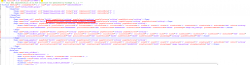
upload_2021-1-18_5-12-12.png

So now with these 2 workarounds you could say its partially working up until you enter a folder. I really need to know exactly what the event anim_coldboot_Finished is specifically doing behind the scenes. I suspect it is doing a few things and stopping the coldboot audio is just one of them. I would say its possible to patch it to do everything else it needs to do, but leave the ac3 playing.

Here are the files I have right now if anyone wants to see where I am at. To use these you need
  • webMAN mod notification disabled in setup.ps3
  • The BGM.ac3 file in dev_hdd0/tmp/
  • Then put this patched custom_render_plugin.rco/sprx on flash.
You will see the audio plays for as long as you want, until you enter a folder on the XMB. This is done on purpose for now for testing.

The sprx is simply a small patch to read the ac3 from HDD instead of flash. Nothing more:
upload_2021-1-18_5-27-59.png

And the 2 small patches to the rco shown above,

1. this line removed
Code:
<FireEvent event="event:native:/anim_coldboot_Finished" />

2. And then added to the blur page for oninit:
Code:
event:native:/anim_coldboot_Finished

I have included all files plus a sample BGM.ac3 for testing if anyone thinks they might be able to help here. It really all comes down to this rco event. :(
 

Attachments

A little more info. The coldboot audio stopping when the XMB loads issue seems to be tied in with system_plugin.rco and basic_plugin.sprx.

These are the files that handle the notification pop ups and also the mouse pointer plane. These are the 2 areas causing all the problems.

upload_2021-1-18_16-9-7.png

Put simply we need to be able to remove this line from custom_render_plugin.rco.
Code:
<FireEvent event="event:native:/anim_coldboot_Finished" />

But at the same time we need to have system_plugin.rco and basic_plugin.sprx still do their thing but without stopping the coldboot audio.

This is so close to working it's bloody annoying.


Side note: There is a limit to the size of the ac3 file used. It seems that the file gets loaded into RAM. I tested with a 160MB ac3 file and it slowed down the boot time about 10 seconds as the file is loaded, it still allows the system to boot up alright, but doing anything afterwards like opening the browser causes a hard freeze.

I suspect its fully loaded into RAM as deleting the ac3 file via FTP after it has started playing does not stop the audio from playing.. interesting.

70MB ac3 files are no problem. :) I have not found the exact limit yet but its somewhere between 70MB and 160MB :)
 
Last edited:
My nobles, @DeViL303 and @aldostools!
All right with you?
Would it be possible to make the version of Background_Music_on_Boot_v1.00.pkg available, for 4.91?
I have the PS3 Super Slim, and I use HEN, because the Super Slim doesn't support CFW unfortunately, but we would really like to be able to customize the background music on the XMB.

As mentioned in the topic Background Audio on XMB after boot report 24.
 
Back
Top