

I ended up looking at game_plugin_ext due to being interested in the gameboot audio patch, and I noticed something interesting.
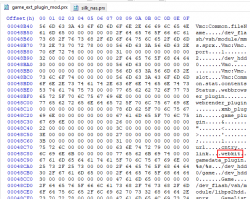
Well this lead me to do some testing with LINK.XML, and I think I learned something new. Maybe this is already known but I could not find anything about this on this site, wiki or google etc.
So the new thing I learned is that we can use the tag <webkit> inside LINK.XML. At first I thought this was maybe a way to set the webkit to silk, and then use JS inside LINK.XML, but I do not know if that is the case yet, more testing needed.
I have tried lots of stuff like, all with no luck so far.
<webkit>silk_webkit</webkit>
<webkit>silk_nas</webkit>
<webkit>silk</webkit>
<webkit>webbrowser_plugin</webkit>
<webkit>webrender_plugin</webkit>
<webkit>1</webkit>
<webkit>2</webkit>
Then I had a small breakthrough, So far it seems if this entry exists then the tag <url> is ignored and <webkit> takes priority. BUT it is also used to pass a url to the plugin it seems.
Also worth noting is we can use direct mp4 urls inside LINK.XML, this can then be used to install a streamable mp4 link directly to the XMB, kind of interesting and might have some uses.
This seems no different to
Long story short, it just seems to be an alternate tag that can be used instead of <url>, but my thinking is that they would not just double up something exactly the same like this for no reason, so it is possible there is a difference, or we just don't know the syntax to use it properly yet. I have tried loading some simple JS from inside the <webkit> tags but it just seems to behave the same as from <url>.
I have attached a pkg that will install to the TV category, and stream an mp4, just as an example.
I have also tried replacing silk.sprx with a copy of silk_webkit.sprx, but this causes a freeze, I have also tried replacing silk.sprx with a copy of silk_nas.sprx and this partially works, no freeze, but it just opens a blank page, more testing needed with this kind of mods.
Not sure if this is important but this code below opens webmans webpage on the files section. I assume this is just a feature of webman mod that it opens that page if the url "http://0" is opened (maybe @aldostools can clarify this?)
Well this lead me to do some testing with LINK.XML, and I think I learned something new. Maybe this is already known but I could not find anything about this on this site, wiki or google etc.
So the new thing I learned is that we can use the tag <webkit> inside LINK.XML. At first I thought this was maybe a way to set the webkit to silk, and then use JS inside LINK.XML, but I do not know if that is the case yet, more testing needed.
I have tried lots of stuff like, all with no luck so far.
<webkit>silk_webkit</webkit>
<webkit>silk_nas</webkit>
<webkit>silk</webkit>
<webkit>webbrowser_plugin</webkit>
<webkit>webrender_plugin</webkit>
<webkit>1</webkit>
<webkit>2</webkit>
Then I had a small breakthrough, So far it seems if this entry exists then the tag <url> is ignored and <webkit> takes priority. BUT it is also used to pass a url to the plugin it seems.
Also worth noting is we can use direct mp4 urls inside LINK.XML, this can then be used to install a streamable mp4 link directly to the XMB, kind of interesting and might have some uses.
Code:
<link ver="1.0">
<webkit>http://dl.dropboxusercontent.com/s/fqz3nbwfs2bl5w3/flyinglight.mp4</webkit>
</link>
This seems no different to
Code:
<link ver="1.0">
<url>http://dl.dropboxusercontent.com/s/fqz3nbwfs2bl5w3/flyinglight.mp4</url>
</link>
Long story short, it just seems to be an alternate tag that can be used instead of <url>, but my thinking is that they would not just double up something exactly the same like this for no reason, so it is possible there is a difference, or we just don't know the syntax to use it properly yet. I have tried loading some simple JS from inside the <webkit> tags but it just seems to behave the same as from <url>.
I have attached a pkg that will install to the TV category, and stream an mp4, just as an example.
I have also tried replacing silk.sprx with a copy of silk_webkit.sprx, but this causes a freeze, I have also tried replacing silk.sprx with a copy of silk_nas.sprx and this partially works, no freeze, but it just opens a blank page, more testing needed with this kind of mods.
Not sure if this is important but this code below opens webmans webpage on the files section. I assume this is just a feature of webman mod that it opens that page if the url "http://0" is opened (maybe @aldostools can clarify this?)
Code:
<link ver="1.0">
<webkit>0</webkit>
</link>
Attachments
Last edited:
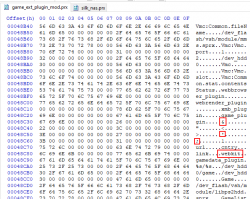

 . I swapped webbrowser_plugin and webrender_plugin, but now any URL just goes to a fullscreen wave, the browser does not open and the console does not freeze.

