
PS3 [Research] LINK.XML information

DeViL303

Developer
PSX-Place Supporter
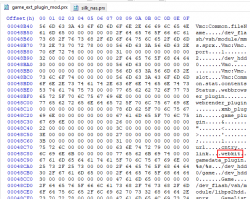
I ended up looking at game_plugin_ext due to being interested in the gameboot audio patch, and I noticed something interesting.
upload_2021-2-21_14-33-35.png

Well this lead me to do some testing with LINK.XML, and I think I learned something new. Maybe this is already known but I could not find anything about this on this site, wiki or google etc.

So the new thing I learned is that we can use the tag <webkit> inside LINK.XML. At first I thought this was maybe a way to set the webkit to silk, and then use JS inside LINK.XML, but I do not know if that is the case yet, more testing needed.

I have tried lots of stuff like, all with no luck so far.

<webkit>silk_webkit</webkit>
<webkit>silk_nas</webkit>
<webkit>silk</webkit>
<webkit>webbrowser_plugin</webkit>
<webkit>webrender_plugin</webkit>
<webkit>1</webkit>
<webkit>2</webkit>


Then I had a small breakthrough, So far it seems if this entry exists then the tag <url> is ignored and <webkit> takes priority. BUT it is also used to pass a url to the plugin it seems.

Also worth noting is we can use direct mp4 urls inside LINK.XML, this can then be used to install a streamable mp4 link directly to the XMB, kind of interesting and might have some uses.

Code:
<link ver="1.0">
<webkit>http://dl.dropboxusercontent.com/s/fqz3nbwfs2bl5w3/flyinglight.mp4</webkit>
</link>

This seems no different to
Code:
<link ver="1.0">
<url>http://dl.dropboxusercontent.com/s/fqz3nbwfs2bl5w3/flyinglight.mp4</url>
</link>


Long story short, it just seems to be an alternate tag that can be used instead of <url>, but my thinking is that they would not just double up something exactly the same like this for no reason, so it is possible there is a difference, or we just don't know the syntax to use it properly yet. I have tried loading some simple JS from inside the <webkit> tags but it just seems to behave the same as from <url>.

I have attached a pkg that will install to the TV category, and stream an mp4, just as an example.

I have also tried replacing silk.sprx with a copy of silk_webkit.sprx, but this causes a freeze, I have also tried replacing silk.sprx with a copy of silk_nas.sprx and this partially works, no freeze, but it just opens a blank page, more testing needed with this kind of mods.

Not sure if this is important but this code below opens webmans webpage on the files section. I assume this is just a feature of webman mod that it opens that page if the url "http://0" is opened (maybe @aldostools can clarify this?)

Code:
<link ver="1.0">
<webkit>0</webkit>
</link>
 

Attachments

Last edited:
OK, seems I misunderstood what is happening here. LINK.XML works a little differently than we thought.

The last line in the xml, before the very final tag </link> is where it grabs the URL, so this means that all of these are the same.

This:
Code:
<link ver="1.0">
<>http://dl.dropboxusercontent.com/s/fqz3nbwfs2bl5w3/flyinglight.mp4</>
</link>
is the same as
Code:
<link ver="1.0">
<xxx>http://dl.dropboxusercontent.com/s/fqz3nbwfs2bl5w3/flyinglight.mp4</xxx>
</link>
is the same as
Code:
<link ver="1.0">
<webkit>http://dl.dropboxusercontent.com/s/fqz3nbwfs2bl5w3/flyinglight.mp4</webkit>
</link>
is the same as
Code:
<link ver="1.0">
<url>http://dl.dropboxusercontent.com/s/fqz3nbwfs2bl5w3/flyinglight.mp4</url>
</link>

So , this means that if the tag <webkit> can really be used here, it must be used first, before the <url> tag. Like this:
Code:
<link ver="1.0">
<webkit>xxxxx</webkit>
<url>http://dl.dropboxusercontent.com/s/fqz3nbwfs2bl5w3/flyinglight.mp4</url>
</link>

Obviously this is not as interesting as I first thought as it is possible the webkit tag is completely ignored. We have no way to know. Maybe someone with reversing skills could have a look at game_plugin_ext.sprx and see if they can learn more about what might be possible syntaxes here.


Couple of other things I have noticed.
  • ps3tools can not repack pkgs with the LINK.XML, for some reason it ignores the link.xml file.
  • Any LINK.XMLs that exist on the console are loaded into memory during start up, this means you must reboot if you replaced/modified the LINK.XML, its not like an eboot where you can replace it after start up and it will still load the new one.
    [*]The info from LINK.XML is not loaded into the database or anything like that, so you can swap the XML after installing the pkg, but you just need to remember to reboot or reload the XMB to actually use the changes.

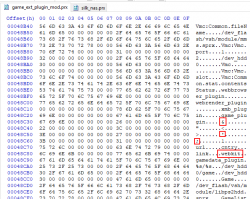
It's also kind of interesting that these extra entries are here:
upload_2021-2-21_16-10-37.png

This makes me think these can be used in the LINK.XML too, so maybe arguments can be added after the URL or something like that.
 
Last edited:
ps3tools can not repack pkgs with the LINK.XML, for some reason it ignores the link.xml file

The reason why ps3tools ignores LINK.XML is because psn_package_npdrm.exe filters what specific files can contain a PKG

upload_2021-2-21_15-5-28.png


I have attached a set of patched versions that replace PARAM.HIP with LINK.XML and HTMLDIR with MANUAL or LICDIR

I also increased the number of supported sub-directories from 9 to 25.

Extract the content of the rar in %userprofile%\ps3tools\ps3tools\tools

The psn_package_npdrm.exe is replaced with this version: psn_package_npdrm_25levels+LICDIR+LINK.XML.exe

If you need to create packages with manuals, replace psn_package_npdrm.exe with one with the patch for MANUAL directory.
 

Attachments

The reason why ps3tools ignores LINK.XML is because psn_package_npdrm.exe filters what specific files can contain a PKG

View attachment 31469

I have attached a set of patched versions that replace PARAM.HIP with LINK.XML and HTMLDIR with MANUAL or LICDIR

I also increased the number of supported sub-directories from 9 to 25.

Extract the content of the rar in %userprofile%\ps3tools\ps3tools\tools

The psn_package_npdrm.exe is replaced with this version: psn_package_npdrm_25levels+LICDIR+LINK.XML.exe

If you need to create packages with manuals, replace psn_package_npdrm.exe with one with the patch for MANUAL directory.
That is cool, interesting. So the files that are in the root level of the pkg must be on a whitelist otherwise they are ignored. Obviously everything in the USRDIR folder is not included. Good to know.
 
Last edited:
The reason why ps3tools ignores LINK.XML is because psn_package_npdrm.exe filters what specific files can contain a PKG

View attachment 31469

I have attached a set of patched versions that replace PARAM.HIP with LINK.XML and HTMLDIR with MANUAL or LICDIR

I also increased the number of supported sub-directories from 9 to 25.

Extract the content of the rar in %userprofile%\ps3tools\ps3tools\tools

The psn_package_npdrm.exe is replaced with this version: psn_package_npdrm_25levels+LICDIR+LINK.XML.exe

If you need to create packages with manuals, replace psn_package_npdrm.exe with one with the patch for MANUAL directory.
So, is it normal that http://0 opens the files webpage in webman settings? What I found strange is that it is only 0 that behaves like this. If I open http://1 or http://2 it just acts like a non existent web page.

Anyway it probably means nothing but I just found it interesting.
 
So, is it normal that http://0 opens the files webpage in webman settings? What I found strange is that it is only 0 that behaves like this. If I open http://1 or http://2 it just acts like a non existent web page.

Anyway it probably means nothing but I just found it interesting.

I find it interesting... it looks like 0 (00 or 000) are aliases for 127.0.0.1. It results helpful to make shorter urls when typing the web commands.

  • Any LINK.XMLs that exist on the console are loaded into memory during start up, this means you must reboot if you replaced/modified the LINK.XML, its not like an eboot where you can replace it after start up and it will still load the new one.
  • The info from LINK.XML is not loaded into the database or anything like that, so you can swap the XML after installing the pkg, but you just need to remember to reboot or reload the XMB to actually use the changes.
I'm not sure what you mean about need to reboot, but I could replace LINK.XML and the browser opened with the different links that I tried. However at some point (maybe after an invalid XML) I got a "Service has ended" and only worked after I reinstalled the PKG.

Something that I noticed is that the URLs are opened by default with the webbrowser_plugin, Maybe we could force the URLs open with webrender_plugin if we swap the strings in game_ext_plugin:
upload_2021-2-21_15-59-46.png


The advantage is that webrender_plugin uses the webkit that has better support for CSS, HTML and javascript.
 
I find it interesting... it looks like 0 (00 or 000) are aliases for 127.0.0.1. It results helpful to make shorter urls when typing the web commands.
Oh cool.

I find it interesting... it looks like 0 (00 or 000) are aliases for 127.0.0.1. It results helpful to make shorter urls when typing the web commands.


I'm not sure what you mean about need to reboot, but I could replace LINK.XML and the browser opened with the different links that I tried. However at some point (maybe after an invalid XML) I got a "Service has ended" and only worked after I reinstalled the PKG.
.
Ok, it must have been only doing that when I had added something that didnt work. I was trying lots of stuff that was not a proper URL so it is probably that.
Something that I noticed is that the URLs are opened by default with the webbrowser_plugin, Maybe we could force the URLs open with webrender_plugin if we swap the strings in game_ext_plugin:


The advantage is that webrender_plugin uses the webkit that has better support for CSS, HTML and javascript.
Oh, that is interesting.

I did not know that was the difference here. I will try swap those and see if JS works. Nice one, thanks for the tip.

I do know that if you open a MP4 URL with webrender_plugin, it just downloads. However if you open it with webbrowser_plugin it streams the mp4. You can force webbrowser_plugin to download too with a php file, but this is a way around that when calling mp4 links from xmbml.

Being able to load JS from LINK.XML could have nice benefits, we could have installable HEN enablers and other exploits., also the offline changelog documents would be installable to the XMB via pkg. Lots of possibilities.
 
No luck there :( . I swapped webbrowser_plugin and webrender_plugin, but now any URL just goes to a fullscreen wave, the browser does not open and the console does not freeze.

Same behaviour if I make them both webrender_plugin, So we know it is using that webbrowser string on it's own, I am still hopeful that the <webkit> tag can be used to change it "properly" so it works. It seems likely that it can be used here as it's referenced right there and there must be a reason IMO.

It seems these plugins are used/called in different ways. For example if I make a copy of webrender_plugin.sprx and overwrite webbrowser_plugin.sprx with it, I get a freeze.

So there is something different about swapping the entries in game_plugin_ext.sprx, and actually swapping the plugins at the other end.

Same if called from normal XMBML like in webmans xmls, swapping the plugin sprx files is not the same as just calling the other plugin via xmbml, they are called and used differently it seems.
 
Last edited:
So yeah, it seems that webrender_plugin has references to loads of other plugins at the start (of the bit I can read in a HEX editor)

upload_2021-2-21_21-0-32.png


webbrowser_plugin.sprx does not have all those.

upload_2021-2-21_21-2-5.png


The next bit is exactly the same in both files for quite a few bytes. There are some slight differences further down.


It results helpful to make shorter urls when typing the web commands.
On the subject of shortening urls, you can actually leave out the http:// too

So this URL is good enough to open webman setup
Code:
0/setup.ps3

In conjunction with the tag "include", this could be used to shorten webman xmls quite a lot.
 
No luck there :( . I swapped webbrowser_plugin and webrender_plugin, but now any URL just goes to a fullscreen wave, the browser does not open and the console does not freeze.

Same behaviour if I make them both webrender_plugin, So we know it is using that webbrowser string on it's own, I am still hopeful that the <webkit> tag can be used to change it "properly" so it works. It seems likely that it can be used here as it's referenced right there and there must be a reason IMO.

It seems these plugins are used/called in different ways. For example if I make a copy of webrender_plugin.sprx and overwrite webbrowser_plugin.sprx with it, I get a freeze.

So there is something different about swapping the entries in game_plugin_ext.sprx, and actually swapping the plugins at the other end.

Same if called from normal XMBML like in webmans xmls, swapping the plugin sprx files is not the same as just calling the other plugin via xmbml, they are called and used differently it seems.

Yes it also freezes if webbrowser_plugin is remapped to webrender_plugin.

It would be a nice patch if we find a way to load webrender_plugin using LINK.XML
EDIT: @DeViL303 solved it in this post. He found the syntax for the webkit attribute in link tag.

Look the difference between webrender_plugin and webbrowser_plugin:
upload_2021-2-21_17-56-20.png

upload_2021-2-21_17-57-27.png


As you can see in the first capture (webrender_plugin) the sections are collapsed and the check marks are green.
In the second capture (webbrowser_plugin) the sections are expanded and the check marks are B&W, the temperature is missing in the top bar and the small triangles are not shown.
 
Last edited:
On the subject of shortening urls, you can actually leave out the http:// too

So this URL is good enough to open webman setup
Code:
0/setup.ps3

In conjunction with the tag "include", this could be used to shorten webman xmls quite a lot.

Cool. This is a great discovery. This may be combined with the path aliases and short paths implemented in webMAN:

Here are various examples where you can see the text needed to type is considerably reduced:
0/xmb = http://localhost/dev_blind/vsh/resource/explore/xmb
0/cov = http://localhost/dev_hdd0//game/BLES80608/USRDIR/covers
0/cvr = http://localhost/dev_hdd0//game/BLES80608/USRDIR/covers_retro/psx
0/xml = http://localhost/dev_hdd0/xmlhost/game_plugin
0/pkg = http://localhost/dev_hdd0/packages
0/tmp = http://localhost/dev_hdd0/tmp
0/PS3ISO = http://localhost/dev_hdd0/PS3ISO
0/PSXISO = http://localhost/dev_hdd0/PSXISO
0/BLES80608 = http://localhost/dev_hdd0/game/BLES80608
 
Last edited:
Interesting, So it seems like webbrowser_plugin really is the crap one. Strange that is also the one that can stream videos but anyway that is not important, just worth noting when you actually want to stream a video.

I guess we need to see if anyone can reverse the game_plugin_ext a bit and figure out if the <webkit> tag can be used somehow. Maybe @kozarovv @bguerville or @NewFile could take a look. They might be able to tell quickly if <webkit> is used or just some left over crap.
 
Cool. This is a great discovery. This may be combined with the path aliases and short paths implemented in webMAN:

Here are various examples where you can see the text needed to type is considerably reduced:
0/xmb = http://localhost/dev_blind/vsh/resource/explore/xmb
0/cov = http://localhost/dev_hdd0//game/BLES80608/USRDIR/covers
0/cvr = http://localhost/dev_hdd0//game/BLES80608/USRDIR/covers_retro/psx
0/xml = http://localhost/mount.ps3/dev_hdd0/xmlhost/game_plugin
0/pkg = http://localhost/dev_hdd0/packages
0/tmp = http://localhost/dev_hdd0/tmp
0/PS3ISO = http://localhost/dev_hdd0/PS3ISO
0/PSXISO = http://localhost/dev_hdd0/PSXISO
0/BLES80608 = http://localhost/dev_hdd0/game/BLES80608
For even shorter xmls, you can do this too. Not sure if you are doing it already, I did mention it somewhere once before.

In XMBML, You can use the "include" tag, to have attributes added to every item without needing to duplicate them. so for example take this little snippet of mygames.xml
Code:
<View id="seg_wm_ps2_items">
<Attributes>
<Table key="0043">
<Pair key="icon"><String>/dev_hdd0/PS2ISO/Grand Theft Auto - Liberty City Stories.jpg</String></Pair>
<Pair key="title"><String>Grand Theft Auto - Liberty City Stories</String></Pair>
<Pair key="module_name"><String>idle_plugin</String></Pair>
<Pair key="bar_action"><String>none</String></Pair>
<Pair key="module_action"><String>/mount_ps3/dev_hdd0/PS2ISO/Grand+Theft+Auto+-+Liberty+City+Stories.ISO</String></Pair>
<Pair key="info"><String>/dev_hdd0/PS2ISO</String></Pair>
</Table>
<Table key="0044">
<Pair key="icon"><String>/dev_hdd0/PS2ISO/Grand Theft Auto - Vice City.jpg</String></Pair>
<Pair key="title"><String>Grand Theft Auto - Vice City</String></Pair>
<Pair key="module_name"><String>idle_plugin</String></Pair>
<Pair key="bar_action"><String>none</String></Pair>
<Pair key="module_action"><String>/mount_ps3/dev_hdd0/PS2ISO/Grand+Theft+Auto+-+Vice+City.ISO</String></Pair>
<Pair key="info"><String>/dev_hdd0/PS2ISO</String></Pair>
</Table>
<Table key="0045">
<Pair key="icon"><String>/dev_hdd0/PS2ISO/Grand Theft Auto III.jpg</String></Pair>
<Pair key="title"><String>Grand Theft Auto III</String></Pair>
<Pair key="module_name"><String>idle_plugin</String></Pair>
<Pair key="bar_action"><String>none</String></Pair>
<Pair key="module_action"><String>/mount_ps3/dev_hdd0/PS2ISO/Grand+Theft+Auto+III.iso</String></Pair>
<Pair key="info"><String>/dev_hdd0/PS2ISO</String></Pair>
</Table>

That is the very same as this:
Code:
<View id="seg_wm_ps2_items">
<Attributes>
<Table key="ps2_base">
<Pair key="module_name"><String>idle_plugin</String></Pair>
<Pair key="bar_action"><String>none</String></Pair>
<Pair key="info"><String>/dev_hdd0/PS2ISO</String></Pair>
</Table>
<Table key="0043" include="ps2_base">
<Pair key="icon"><String>/dev_hdd0/PS2ISO/Grand Theft Auto - Liberty City Stories.jpg</String></Pair>
<Pair key="title"><String>Grand Theft Auto - Liberty City Stories</String></Pair>
<Pair key="module_action"><String>/mount_ps3/dev_hdd0/PS2ISO/Grand+Theft+Auto+-+Liberty+City+Stories.ISO</String></Pair>
</Table>
<Table key="0044" include="ps2_base">
<Pair key="icon"><String>/dev_hdd0/PS2ISO/Grand Theft Auto - Vice City.jpg</String></Pair>
<Pair key="title"><String>Grand Theft Auto - Vice City</String></Pair>
<Pair key="module_action"><String>/mount_ps3/dev_hdd0/PS2ISO/Grand+Theft+Auto+-+Vice+City.ISO</String></Pair>
</Table>
<Table key="0045" include="ps2_base">
<Pair key="icon"><String>/dev_hdd0/PS2ISO/Grand Theft Auto III.jpg</String></Pair>
<Pair key="title"><String>Grand Theft Auto III</String></Pair>
<Pair key="module_action"><String>/mount_ps3/dev_hdd0/PS2ISO/Grand+Theft+Auto+III.iso</String></Pair>
</Table>

So you can basically take 3 lines off every entry, and you only need to add those lines once at the top, and then use the "include="ps2_base" to have them automatically added to every entry.
 
For even shorter xmls, you can do this too. Not sure if you are doing it already, I did mention it somewhere once before.

In XMBML, You can use the "include" tag, to have attributes added to every item without needing to duplicate them. so for example take this little snippet of mygames.xml
Code:
<View id="seg_wm_ps2_items">
<Attributes>
<Table key="0043">
<Pair key="icon"><String>/dev_hdd0/PS2ISO/Grand Theft Auto - Liberty City Stories.jpg</String></Pair>
<Pair key="title"><String>Grand Theft Auto - Liberty City Stories</String></Pair>
<Pair key="module_name"><String>idle_plugin</String></Pair>
<Pair key="bar_action"><String>none</String></Pair>
<Pair key="module_action"><String>/mount_ps3/dev_hdd0/PS2ISO/Grand+Theft+Auto+-+Liberty+City+Stories.ISO</String></Pair>
<Pair key="info"><String>/dev_hdd0/PS2ISO</String></Pair>
</Table>
<Table key="0044">
<Pair key="icon"><String>/dev_hdd0/PS2ISO/Grand Theft Auto - Vice City.jpg</String></Pair>
<Pair key="title"><String>Grand Theft Auto - Vice City</String></Pair>
<Pair key="module_name"><String>idle_plugin</String></Pair>
<Pair key="bar_action"><String>none</String></Pair>
<Pair key="module_action"><String>/mount_ps3/dev_hdd0/PS2ISO/Grand+Theft+Auto+-+Vice+City.ISO</String></Pair>
<Pair key="info"><String>/dev_hdd0/PS2ISO</String></Pair>
</Table>
<Table key="0045">
<Pair key="icon"><String>/dev_hdd0/PS2ISO/Grand Theft Auto III.jpg</String></Pair>
<Pair key="title"><String>Grand Theft Auto III</String></Pair>
<Pair key="module_name"><String>idle_plugin</String></Pair>
<Pair key="bar_action"><String>none</String></Pair>
<Pair key="module_action"><String>/mount_ps3/dev_hdd0/PS2ISO/Grand+Theft+Auto+III.iso</String></Pair>
<Pair key="info"><String>/dev_hdd0/PS2ISO</String></Pair>
</Table>

That is the very same as this:
Code:
<View id="seg_wm_ps2_items">
<Attributes>
<Table key="ps2_base">
<Pair key="module_name"><String>idle_plugin</String></Pair>
<Pair key="bar_action"><String>none</String></Pair>
<Pair key="info"><String>/dev_hdd0/PS2ISO</String></Pair>
</Table>
<Table key="0043" include="ps2_base">
<Pair key="icon"><String>/dev_hdd0/PS2ISO/Grand Theft Auto - Liberty City Stories.jpg</String></Pair>
<Pair key="title"><String>Grand Theft Auto - Liberty City Stories</String></Pair>
<Pair key="module_action"><String>/mount_ps3/dev_hdd0/PS2ISO/Grand+Theft+Auto+-+Liberty+City+Stories.ISO</String></Pair>
</Table>
<Table key="0044" include="ps2_base">
<Pair key="icon"><String>/dev_hdd0/PS2ISO/Grand Theft Auto - Vice City.jpg</String></Pair>
<Pair key="title"><String>Grand Theft Auto - Vice City</String></Pair>
<Pair key="module_action"><String>/mount_ps3/dev_hdd0/PS2ISO/Grand+Theft+Auto+-+Vice+City.ISO</String></Pair>
</Table>
<Table key="0045" include="ps2_base">
<Pair key="icon"><String>/dev_hdd0/PS2ISO/Grand Theft Auto III.jpg</String></Pair>
<Pair key="title"><String>Grand Theft Auto III</String></Pair>
<Pair key="module_action"><String>/mount_ps3/dev_hdd0/PS2ISO/Grand+Theft+Auto+III.iso</String></Pair>
</Table>

So you can basically take 3 lines off every entry, and you only need to add those lines once at the top, and then use the "include="ps2_base" to have them automatically added to every entry.

This is a cool feature of XML that I didn't know. I will start using it from today's build.

It saves 96 bytes per line (I only could take off 2 lines due the "info" pair is variable).
So in 300 games it will save 28KB of memory and processing.
 
Cool. I did not know about it either until I started looking at the pre retail xmls from 0.9x FW. There were some examples of "include" in there.

BTW, if there are only a few different variables for a string. It still might be worth including them like this. Not sure if it is worth it, but just mentioning it incase you thought only 1 per section was allowed. I guess the more you add the less efficient it becomes.

Example
Code:
<View id="seg_wm_ps2_items">
<Attributes>
<Table key="2_hdd0">
<Pair key="module_name"><String>idle_plugin</String></Pair>
<Pair key="bar_action"><String>none</String></Pair>
<Pair key="info"><String>/dev_hdd0/PS2ISO</String></Pair>
</Table>
<Table key="2_usb0">
<Pair key="module_name"><String>idle_plugin</String></Pair>
<Pair key="bar_action"><String>none</String></Pair>
<Pair key="info"><String>/dev_usb000/PS2ISO</String></Pair>
</Table>
<Table key="0043" include="2_hdd0">
<Pair key="icon"><String>/dev_hdd0/PS2ISO/Grand Theft Auto - Liberty City Stories.jpg</String></Pair>
<Pair key="title"><String>Grand Theft Auto - Liberty City Stories</String></Pair>
<Pair key="module_action"><String>/mount_ps3/dev_hdd0/PS2ISO/Grand+Theft+Auto+-+Liberty+City+Stories.ISO</String></Pair>
</Table>
<Table key="0044" include="2_hdd0">
<Pair key="icon"><String>/dev_hdd0/PS2ISO/Grand Theft Auto - Vice City.jpg</String></Pair>
<Pair key="title"><String>Grand Theft Auto - Vice City</String></Pair>
<Pair key="module_action"><String>/mount_ps3/dev_hdd0/PS2ISO/Grand+Theft+Auto+-+Vice+City.ISO</String></Pair>
</Table>
<Table key="0045" include="2_usb0">
<Pair key="icon"><String>/dev_usb000/PS2ISO/Grand Theft Auto III.jpg</String></Pair>
<Pair key="title"><String>Grand Theft Auto III</String></Pair>
<Pair key="module_action"><String>/mount_ps3/dev_usb000/PS2ISO/Grand+Theft+Auto+III.iso</String></Pair>
</Table>


Obviously then the PS3 section could have it's own separate ones if you wanted.
 
Last edited:
The reason why ps3tools ignores LINK.XML is because psn_package_npdrm.exe filters what specific files can contain a PKG

View attachment 31469

I have attached a set of patched versions that replace PARAM.HIP with LINK.XML and HTMLDIR with MANUAL or LICDIR

I also increased the number of supported sub-directories from 9 to 25.

Extract the content of the rar in %userprofile%\ps3tools\ps3tools\tools

The psn_package_npdrm.exe is replaced with this version: psn_package_npdrm_25levels+LICDIR+LINK.XML.exe

If you need to create packages with manuals, replace psn_package_npdrm.exe with one with the patch for MANUAL directory.

[Kinda off topic]/

I didn't checked this new build yet but this one has the PIC1 files fixed? the psn_package_npdrm.exe only compiles PIC1_00 up to _16, ignoring the _17 and _18
 
@aldostools I noticed True ancestor PKG Repacker does not have this issue with the whitelist of allowed files in root, it packs everything regardless of filename. I just found a thumbs.db file in the root of one of my pkgs. So it seems that app is using a different packing method.
 
Interesting, So it seems like webbrowser_plugin really is the crap one. Strange that is also the one that can stream videos but anyway that is not important, just worth noting when you actually want to stream a video.

I guess we need to see if anyone can reverse the game_plugin_ext a bit and figure out if the <webkit> tag can be used somehow. Maybe @kozarovv @bguerville or @NewFile could take a look. They might be able to tell quickly if <webkit> is used or just some left over crap.

i tried a time ago making some websites shortcuts for some friends using LINK.XML but since the webbrowser_plugin.sprx is very limited it didn't opened them up (webrender works fine), just broken stuff so i tried swaping the sprx and got only console freezing, iirc i tried swaping them inside explorer_plugin.sprx and got the same thing
 
Yeah, they seem to be called in a different way, so simply swapping them alone is not good enough. It is possible the webrender_plugin could have a copy made, and then be patched so it can be called in the same way as webbrowser_plugin.

Hopefully none of that is needed and we can figure out how to use the <webkit> tag.
 
Ha, I am having lots of luck with xmbml tonight.

I figured out we can set priority for items in sub menus. So we can have a submenu open on any item we want. Normally all xmbml sub menus open with the first item in focus, this is no longer the only option, we can have submenus open with the middle item focused.

So @aldostools, you know the way you mentioned having package manager rearranged as the PSN item is at the top and it is the least used, well now we can go one better, we can have the menu open with "install package files" in focus, but it can stay in the middle. This way it is only 1 click to get to any option. More efficient. And the same with the next menu down, we can have it so "package directory" is in focus, so also only 1 click to get to any option.

This is how it is done.
Code:
View id="seg_package_fixed">
<Attributes>
<Table key="hdd0_install">
<Pair key="focus_priority"><String>-80</String></Pair>
</Table>
</Attributes>
<Items>
<Query class="type:x-xmb/folder-pixmap" key="host_psn" attr="host_psn" src="#seg_install_files_psn"/>
<Query class="type:x-xmb/folder-pixmap" key="hdd0_install" attr="hdd0_install" src="#seg_package_files_install"/>
<Query class="type:x-xmb/folder-pixmap" key="hdd0_delete" attr="hdd0_delete" src="#seg_package_files_delete"/>
</Items>
</View>

Code:
<View id="seg_install_package">
<Attributes>
<Table key="usb_install">
<Pair key="focus_priority"><String>-80</String></Pair>
</Table>
</Attributes>
<Items>
<Query class="type:x-xmb/folder-pixmap" key="hdd0_install" attr="hdd0_install" src="#seg_install_files_hdd0"/>
<Query class="type:x-xmb/folder-pixmap" key="usb_install" attr="usb_install" src="#seg_install_files_usb"/>
<Query class="type:x-xmb/folder-pixmap" key="og_install" attr="og_install" src="#seg_install_files_og"/>
</Items>
</View>

This could maybe have some interesting uses, for example, in webman games you could have it so the last game you mounted, is highlighted the next time you enter the menu, even after a reboot. This particular one is probably not worth doing, but just an example :)
 
Last edited:
Back
Top