
You are using an out of date browser. It may not display this or other websites correctly.
You should upgrade or use an alternative browser.
You should upgrade or use an alternative browser.
PS4 [Research]PS2 emulator configuration on PS4
- Thread starter kozarovv
- Start date


Vika23
Senior Member
Thanks for info!For this version I didn't notice big differences with or without CLI.
I build it with anyway. JakX v2 used.

kozarovv
Developer
Im the one who added that info to wiki. By etc. I meant. https://en.m.wikipedia.org/wiki/Et_ceteraThe emulator accepts it.

Stayhye
Senior Member
I got ya. Those commands aren't on the wiki. But the emu accepts anything as an option for this command. I literally put "thisemuhastoomanycommands" and it still booted the game
Improvement fix for Need for Speed Most Wanted Black Edition
should work for all versions
CLI
Jakx v2 used
Improvement fix for Need for Speed Most Wanted Black Edition
should work for all versions
CLI
Code:
#emu used=jakx v2

--gs-uprender=2x2
--gs-upscale=edgesmooth

--vu0-di-bits=0
--vu1-di-bits=0

--gs-optimize-30fps=1

--ee-cycle-scalar=1.57
--iop-cycle-scalar=1.55

--vu1-mpg-cycles=360
Jakx v2 used
Last edited:

Manu Mx
Member
Can you explain, how you implement and test these numbers for scalar and mpg-cycles? So do you build 100+ patch files around the 0.0-2.0 range and test all the different combinations e.g.? Do you have "baseline" values from where you start your tests? How do you increment/decrement these values in what steps?--ee-cycle-scalar=1.57 --iop-cycle-scalar=1.55 --vu1-mpg-cycles=360
BTW the initial freeze in the car selection menu in Burnout Dominator can be fixed with the values from NFSC. So I guess finding the correct values for this game could finally get us in-game. Could also help with the annoying "You have to start crash-mode first in order to bypass the loading screen freeze" in Burnout Takedown + Revenge.
Last edited:
Stayhye
Senior Member
Can you explain, how you implement and test these numbers for scalar and mpg-cycles? So do you build 100+ patch files around the 0.0-2.0 range and test all the different combinations e.g.?.
Yes. Long and boring. depending on game, higher on scalar=slower gameplay. I use the old tools to build. Just a lot of trial and error. But, with remote pkg installer and patch files, I can get a lot of tests done in a relatively short time. I keep everything open on PC, so all I have to do is send, test, observe, edit config, build patch pkg, repeat x(X)
for the ee/iop scalar, I start at 1.01. If that speeds up the game, I increase by 1. If it slows the game, I decrease by 0.5. If it has no effect, I remove both from config, and then try the vu1/vu0 cycles(100,1000,10000), with the same increase/decrease process. When the game starts to dial in correct speed, I'll tweak ee/iop in the decimal range. then I add commands like "vu-di-bits" to help with stutter. and "host-audio-latency" to finish trying to clean up sound, if there is still sound issue.
This is the process that has been working for me with much success. 1 game so far this has no effect on.....GTA liberty city stories.
Last edited:
Vika23
Senior Member
Was test it now, gameplay good, not much slowdowns while ride! Graphical looks low, interesting will be same lua config as from first underground for this game?I got ya. Those commands aren't on the wiki. But the emu accepts anything as an option for this command. I literally put "thisemuhastoomanycommands" and it still booted the game
Improvement fix for Need for Speed Most Wanted Black Edition
should work for all versions
CLI
Code:--gs-uprender=2x2 --gs-upscale=edgesmooth --vu0-di-bits=0 --vu1-di-bits=0 --gs-optimize-30fps=1 --ee-cycle-scalar=1.57 --iop-cycle-scalar=1.55 --vu1-mpg-cycles=360
Jakx v2 used
Stayhye
Senior Member
Was test it now, gameplay good, not much slowdowns while ride! Graphical looks low, interesting will be same lua config as from first underground for this game?
No LUA required. The game has native 16:9
Vika23
Senior Member
Graphic not look good as in underground 1 or 2, or maybe it just for me, can u post video on ur youtube chanel?No LUA required. The game has native 16:9
Vika23
Senior Member
Was test both pal and ntsc version, and both freeze on screen loading after training mission....Fix for Spider-Man 3 NTSC
cli
Code:--vu0-di-bits=0 --vu1-di-bits=0 --ee-cycle-scalar=2.21 --iop-cycle-scalar=2.1 --vu1-mpg-cycles=310 --vu0-mpg-cycles=310 --host-audio-latency=2.21
emu used=JakX v2
Jak v1 and Jakx v2 used
Attachments
![Spider-Man 3 [US] [FiXed]_20210301224500.jpg](/data/attachments/30/30367-5e9665268102225408c5f08775f46dc4.jpg?hash=XpZlJoECIl)
kozarovv
Developer
You can try --vu-t-bit=0 or --vu-t-bit=1Was test both pal and ntsc version, and both freeze on screen loading after training mission....
Jak v1 and Jakx v2 used
If that won't help then i will search for my old pcsx2 patch, issue seems to be the same.
Manu Mx
Member
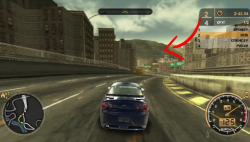
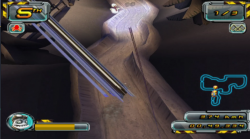
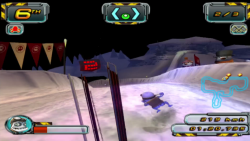
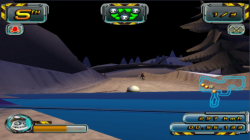
Try this in lua:i mean graphic bug on pic, u have same right? Also i record video how it looks at my console
Video with test race here
Code:
apiRequest(1.0)

local emuObj    = getEmuObject()

-- Graphic improvement: removes corrupted lines on screen with uprender on for PAL/NTSC version

emuObj.SetGsTitleFix( "forceSimpleFetch", "reserved", { texMode=1 } ) --texMode=1Vika23
Senior Member
Attachments
Stayhye
Senior Member
Someone know how to boot Scarface SLES-54182 ?
I found a 60fps fix
Use Star Ocean emu for scarface. still has issues though
Vika23
Senior Member
Was test both --vu-t-bit=1 - still freezeYou can try --vu-t-bit=0 or --vu-t-bit=1
If that won't help then i will search for my old pcsx2 patch, issue seems to be the same.
--vu-t-bit=0 - not freeze but loading "forever".
Test pal version, Jal v.1 emu used
Attachments

Vika23
Senior Member
It Works! Thank u for config, now graphic looks not broken! Bet this lua will help with other games that have same issue?Try this in lua:
Code:apiRequest(1.0) local emuObj = getEmuObject() -- Graphic improvement: removes corrupted lines on screen with uprender on for PAL/NTSC version emuObj.SetGsTitleFix( "forceSimpleFetch", "reserved", { texMode=1 } ) --texMode=1
Video with test race 2 here
Vika23
Senior Member
--iop-cycle-scalar=1.8
--host-audio-latency=1.1
Allows SSX to run flawlessly on the JakX v2 emu without @mrjaredbeta fix
Was test it, works good, without any freeze! Test few modes of game, race and freeride! Still disappearing character but only at Elysium Alps stage, maybe in some another stages also, just need test more!
Video with 1st test race here
Video with disappearing character here
Vika23
Senior Member
Work very good!Fix for Mortal Kombat - Shaolin Monks NTSC
cli
Code:--iop-cycle-scalar=0.8 --framelimit-fps=2.0 --host-vsync=1 --vif1-instant-xfer=0 --gs-optimize-30fps=1 --host-audio-latency=0.3
lua
Code:-- Mortal Kombat - Shaolin Monks (SLUS-21087) -- ported to PS4 Lua by Stayhye -- Lua 5.3 apiRequest(2.3) local gpr = require("ee-gpr-alias") local emuObj = getEmuObject() local eeObj = getEEObject() local gsObj = getGsObject() local eeOverlay = eeObj.getOverlayObject() local iopObj = getIOPObject() emuObj.SetDisplayAspectWide() gsObj.SetDeinterlaceShift(0) local widescreen = function() -- 16:9 eeObj.WriteMem32(0x004f4b38,0x3f400000) -- black border fix eeObj.WriteMem32(0x00322f2c,0x3c013f80) --FMV's fix eeObj.WriteMem32(0x00272210,0x24030256) eeObj.WriteMem32(0x00272498,0x240B0256) --No Interlace eeObj.WriteMem32(0x00249F7C,0x00000000) end emuObj.SetGsTitleFix( "forceSimpleFetch", "reserved", { texMode=1 } )
emulator used=JakX v2
Similar threads
-
-
-
PS4 How to play multiplayer (3-4 players) using PSX-FPKG?
- Started by PSXP_Kira
- Replies: 2
-
 PS3 [PS2] Gundam Warriors 2 FPU rounding fix
- Started by Low_Plankton_3329
- Replies: 0