
You are using an out of date browser. It may not display this or other websites correctly.
You should upgrade or use an alternative browser.
You should upgrade or use an alternative browser.
PS4 [Research]PS2 emulator configuration on PS4
- Thread starter kozarovv
- Start date

Vika23
Senior Member
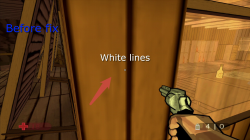
Today was test XIII game! Yes maybe not actual, becouse now we can play remaster version, but ps2 version still nice version for me!
Im able fix some parts of white lines (Watch attached pic and video) but sadly not fix full of them. But anyway its looks more better then before fix!
Game runs very good! Jak X v2 emu used for test!
Im able fix some parts of white lines (Watch attached pic and video) but sadly not fix full of them. But anyway its looks more better then before fix!
Game runs very good! Jak X v2 emu used for test!
Attachments

nifengyuexia
Member
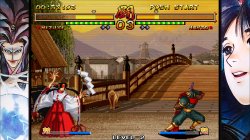
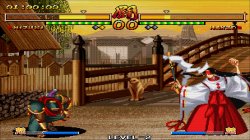
This is the effect of using the official LUA480P nostalgic filter in a 2D battle game, but it cannot be fully full screen. I want to know if I can modify the configuration of LUA to reach full screen.
like this
like this
nifengyuexia
Member
Yes, I want to display it in full screen with this filter effect!So you want Scanlines to be full screen? Or something else?

kozarovv
Developer
This should work full screen as far as i know.Yes, I want to display it in full screen with this filter effect!
https://www.psx-place.com/threads/r...onfiguration-on-ps4.16131/page-60#post-280156
nifengyuexia
Member
In other words, must a widescreen patch be used to reach full screen? If some 2D battle games do not have a widescreen patch, what should I do?This should work full screen as far as i know.
https://www.psx-place.com/threads/r...onfiguration-on-ps4.16131/page-60#post-280156
kozarovv
Developer
Create one :PIn other words, must a widescreen patch be used to reach full screen? If some 2D battle games do not have a widescreen patch, what should I do?
2D games are hard to patch. Fighting games luckily are little bit easier due to wide moving background, but still alot depend on game engine. I think this will be hard to do for ps2 games, if widescreen patch is already not available.
nifengyuexia
Member
I did it, just modify sprite0.SetPosXY((1920-1440)/2,0) in the configuration to sprite0.SetPosXY((1920-1920)/2,0), sprite0.SetSizeXY(1440,1080) Is (1920,1080). Although there is some stretching, it does not have much impact on 2D games!
LUA
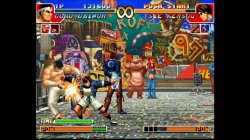
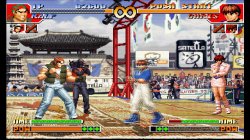
This configuration can be used not only for 2D games, but also for 3D games. You can add filters like nostalgic effects!
LUA
Code:
apiRequest(1.6)    -- request version 1.6 API. Calling apiRequest() is mandatory.

local eeObj       = getEEObject()
local emuObj    = getEmuObject()

local goatman = 0
local sprite0 = getSpriteObject(0)
local sprite1 = getSpriteObject(1)

Global_InitGpuResources = function()
    -- # Fragment Shader 0 is fixed as the default no-thrills as-is renderer.
    emuObj.LoadFsShader(2, "./shader_SL480_p.sb")        -- (2) = 480P ScanLine Sim
end

local scanlineParams = {
    240.0,        -- float scanlineCount
    0.7,        -- float scanlineHeight;
    1.5,        -- float scanlineBrightScale;
    0.5,        -- float scanlineAlpha;
    0.5         -- float vignetteStrength;
}

local scanlines_moder = function()
    if goatman == 0 then
        sprite0.BindTexture(0)
        sprite0.SetPosXY((1920-1440)/2,0)
        sprite0.SetSizeXY(1440,1080)
        sprite0.BindFragmentShader(2)
        sprite0.SetShaderParams(scanlineParams)
        sprite0.Enable()
        sprite1.Disable()
        goatman = 1
    end
end

emuObj.AddVsyncHook(scanlines_moder)
This configuration can be used not only for 2D games, but also for 3D games. You can add filters like nostalgic effects!
Last edited:

Hi Kozarovv! About GOW and music glitch: I probably found a solution https://forums.pcsx2.net/Thread-Help-with-God-of-War-1-audio but I don't know how to do it by emu settings.
kozarovv
Developer
No, emu have check for using higher level directories.Can we use path for patch outside the pkg file?

jacobsson
Senior Member
@kozarovv hi! I read your post on the pcsx2-forum:
Small hack that make sky less distracting. Proper solution is in the works (not by me), so you can wait instead.
As the burnout-junkie that I am I must ask what info you have on this "proper" sky-fix that is in the works?
Thanks for all the stuff you do here!
Small hack that make sky less distracting. Proper solution is in the works (not by me), so you can wait instead.
As the burnout-junkie that I am I must ask what info you have on this "proper" sky-fix that is in the works?
Thanks for all the stuff you do here!
kozarovv
Developer
https://github.com/PCSX2/pcsx2/pull/4094@kozarovv hi! I read your post on the pcsx2-forum:
Small hack that make sky less distracting. Proper solution is in the works (not by me), so you can wait instead.
As the burnout-junkie that I am I must ask what info you have on this "proper" sky-fix that is in the works?
Thanks for all the stuff you do here!
jacobsson
Senior Member
Nice! Thank mate, really appreciate it.
For anyone else that can't wait for the pull-request to merged:
https://github.com/PCSX2/pcsx2/actions/runs/702958350
Hi Kozarovv! I found that pcsx2 v 0.9.6 with P.E.Op.S SPU2 1.9.0 plugin have a same bug with sound in god of war! You can install this plugin version on the latest pcsx2, the bug will be there too. Can you debug it?
SPU2-X-1.1.dll from pcsx2 v 0.9.6 also have this bug
SPU2-X-1.1.dll from pcsx2 v 0.9.6 also have this bug
Last edited by a moderator:
I reproduced this bug check please.This is something that i can't fix without PS4 :/ I can try to help only if issue can be somehow reproduced on PCSX2 (any version)
Similar threads
-
-
-
PS4 How to play multiplayer (3-4 players) using PSX-FPKG?
- Started by PSXP_Kira
- Replies: 2
-
 PS3 [PS2] Gundam Warriors 2 FPU rounding fix
- Started by Low_Plankton_3329
- Replies: 0