PS4 [Research]PS2 emulator configuration on PS4

What is really strange about the Jak * emus. Scarface boots into a blackscreen unless you add "eeObj.SchedulerDelayEvent("vif1.dma", 0x6500)" to the lua script. At least for me. This can even say "vif1.dma", 0x0000 and it boots up just fine. It seems that this command with the different event options could be interesting.
Nice find!! I am Testing new commands with Scarface now.
 

Attachments

  • p1.png
    p1.png
    814.8 KB · Views: 48
  • p2.png
    p2.png
    504.4 KB · Views: 52
emu accepts these:

Code:
eeObj.WriteMem32(0x00643790,0x03e00080 * X) -- X can be any integer

or 

eeObj.WriteMem32(0x00643790,0x03e00080 + X) -- X can be any integer

What could this be doing in code?
 
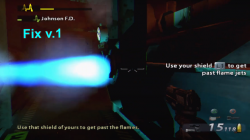
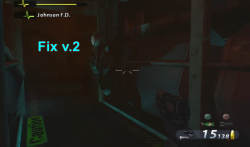
Was tested! In end video u can see bug with blue flame from a pipe (its invisible) noticed, but you can pass it! Apart this small bug all is fine and framerate is much better now!
Don't worry, its not an emulation bug. Those codes disable some effects and that is a side effect of it.
 
@Vika23 Not unless there is some PS4 command that is equivalent to the 0x04 command on netemu. I believe you or someone else tested lopnor with this config and it did nothing, so probably this command is not compatible with PS4.
 
Work in Progress Fix for Metal Gear Solid 3 Subsistence/Snake Eater

CLI
Code:
--gs-uprender=2x2
--gs-upscale=EdgeSmooth

--host-display-mode=16:9

--ee-cycle-scalar=0.1
--iop-cycle-scalar=0.1
#emu used=eternal ring v2
LUA
Code:
--emu used=eternal ring v2

local gpr = require("ee-gpr-alias")

apiRequest(1.5)

local eeObj = getEEObject()
local emuObj = getEmuObject()

local patcher = function()

--16:9
eeObj.WriteMem32(0x202050AC,0x3F400000) -- Subsistence
--eeObj.WriteMem32(0x2020247C,0x3f400000) -- Snake Eater
emuObj.ThrottleMax()
end

emuObj.AddVsyncHook(patcher)


Works finally! some FMVs are very slow. Gameplay is fine so far. Anyway It makes it to gameplay finally!

 
Last edited:
Fix for Metal Gear Solid 3 Subsistence NTSC (test 2)
CLI
Code:
--gs-uprender=2x2
--gs-upscale=EdgeSmooth

--ee-context-switch-cycles=2900  #VERY important for FMVs(Jak emu cannot use)
--ee-cycle-scalar=0.1   #value CANNOT be changed

--iop-cycle-scalar=0.1  #value CANNOT be changed

--vu1-mpg-cycles=700

--framelimiter=1
--framelimit-fps=15.0
--framelimit-scalar=2.1

#emu used=star ocean v2
LUA
Code:
-- Metal Gear Solid 3 - Subsistence (SLUS_21359)
-- Widescreen hack by No.47
-- 30 FPS/Speed Fix by applepiejr @PCSX2 Forums
-- ported to PS4 LUA
-- emu used=star ocean v2

local gpr = require("ee-gpr-alias")

apiRequest(1.3)

local eeObj = getEEObject()
local emuObj = getEmuObject()

local patcher = function()
--16:9
eeObj.WriteMem32(0x202050AC,0x3F400000)
-- Force 30 FPS <> causes title screen flicker..don't know why, rest of game fine
eeObj.WriteMem32(0x001D5AD8,0x00000040) -- 40=30fps / 00=60fps / 20=15 or20fps? <camera>
eeObj.WriteMem32(0x001D6DB8,0x00000002) -- 01=60fps / 02=30fps / 3=20fps / 4=16.67fps? <cut-scenes/fmv>
eeObj.WriteMem32(0x001D6DBC,0x00000001) -- 0=double speed / 1=normal speed  / 2 --> 99 no change <gameplay>
-- 480p 512x448
eeObj.WriteMem32(0x201741F4,0x3C050000)
eeObj.WriteMem32(0x201741F8,0xFFB20020)
eeObj.WriteMem32(0x201741FC,0x3C060050)
eeObj.WriteMem32(0x20174200,0xFFB10010)
eeObj.WriteMem32(0x20174204,0x3C070001)

--[[ MAKES SOME BARS RED FOR SOME REASON?
-- Remove Black Bars
local code_check = eeObj.ReadMem16(0x25E1CC)
if code_check == 0x0000 then
eeObj.WriteMem32(0x2025E6A4,0x00000000)
end
local code_check = eeObj.ReadMem16(0x20B3FC)
if code_check == 0x0001 then
eeObj.WriteMem32(0x2025E6A4,0x00000000)
end
local code_check = eeObj.ReadMem16(0x214D80)
if code_check == 0x0001 then
eeObj.WriteMem32(0x2025E6A4,0x00000000)
end
local code_check = eeObj.ReadMem16(0x214D70)
if code_check == 0x0001 then
eeObj.WriteMem32(0x2025E6A4,0x00000000)
end
--]]

--eeObj.SchedulerDelayEvent("sif1.dma", 0x6500)

emuObj.ThrottleMax()
end

emuObj.AddVsyncHook(patcher)

emuObj.SetDisplayAspectWide()

-- Fix shadow
emuObj.SetGsTitleFix( "forceSimpleFetch", "reserved", { texMode=1  } )

Switched from using Eternal ring to Star Ocean for command "--ee-context-switch-cycles="

Gameplay 100% so far! Cutscenes and FMV total fix(slight stutter rarely)! Only issue is title screen flickers(thats it? ) Also, if no black bars is enabled in LUA, some of the FMVs will have red bars instead. Most of them are gone with code enabled, so your choice.

 
Last edited:
Fix for Metal Gear Solid 3 Subsistence NTSC (test 2)
CLI
Code:
--gs-uprender=2x2
--gs-upscale=EdgeSmooth

--ee-context-switch-cycles=2900  #VERY important for FMVs(Jak emu cannot use)
--ee-cycle-scalar=0.1   #value CANNOT be changed

--iop-cycle-scalar=0.1  #value CANNOT be changed

--vu1-mpg-cycles=700

--framelimiter=1
--framelimit-fps=15.0
--framelimit-scalar=2.1

#emu used=star ocean v2
LUA
Code:
-- Metal Gear Solid 3 - Subsistence (SLUS_21359)
-- Widescreen hack by No.47
-- 30 FPS/Speed Fix by applepiejr @PCSX2 Forums
-- ported to PS4 LUA
-- emu used=star ocean v2

local gpr = require("ee-gpr-alias")

apiRequest(1.3)

local eeObj = getEEObject()
local emuObj = getEmuObject()

local patcher = function()
--16:9
eeObj.WriteMem32(0x202050AC,0x3F400000)
-- Force 30 FPS <> causes title screen flicker..don't know why, rest of game fine
eeObj.WriteMem32(0x001D5AD8,0x00000040) -- 40=30fps / 00=60fps / 20=15 or20fps? <camera>
eeObj.WriteMem32(0x001D6DB8,0x00000002) -- 01=60fps / 02=30fps / 3=20fps / 4=16.67fps? <cut-scenes/fmv>
eeObj.WriteMem32(0x001D6DBC,0x00000001) -- 0=double speed / 1=normal speed  / 2 --> 99 no change <gameplay>
-- 480p 512x448
eeObj.WriteMem32(0x201741F4,0x3C050000)
eeObj.WriteMem32(0x201741F8,0xFFB20020)
eeObj.WriteMem32(0x201741FC,0x3C060050)
eeObj.WriteMem32(0x20174200,0xFFB10010)
eeObj.WriteMem32(0x20174204,0x3C070001)

--[[ MAKES SOME BARS RED FOR SOME REASON?
-- Remove Black Bars
local code_check = eeObj.ReadMem16(0x25E1CC)
if code_check == 0x0000 then
eeObj.WriteMem32(0x2025E6A4,0x00000000)
end
local code_check = eeObj.ReadMem16(0x20B3FC)
if code_check == 0x0001 then
eeObj.WriteMem32(0x2025E6A4,0x00000000)
end
local code_check = eeObj.ReadMem16(0x214D80)
if code_check == 0x0001 then
eeObj.WriteMem32(0x2025E6A4,0x00000000)
end
local code_check = eeObj.ReadMem16(0x214D70)
if code_check == 0x0001 then
eeObj.WriteMem32(0x2025E6A4,0x00000000)
end
--]]

--eeObj.SchedulerDelayEvent("sif1.dma", 0x6500)

emuObj.ThrottleMax()
end

emuObj.AddVsyncHook(patcher)

emuObj.SetDisplayAspectWide()

-- Fix shadow
emuObj.SetGsTitleFix( "forceSimpleFetch", "reserved", { texMode=1  } )

Switched from using Eternal ring to Star Ocean for command "--ee-context-switch-cycles="

Gameplay 100% so far! Cutscenes and FMV total fix(slight stutter rarely)! Only issue is title screen flickers(thats it? ) Also, if no black bars is enabled in LUA, some of the FMVs will have red bars instead. Most of them are gone with code enabled, so your choice.


One of the most complex PS4 custom configs I've seen so far! I really appreciate your time and patience figuring out the different emu options. Can you explain why you implemented the "local code_check" like that? What is "SchedulerDelayEvent" (sif1.dma) used for in lua?
 
One of the most complex PS4 custom configs I've seen so far! I really appreciate your time and patience figuring out the different emu options. Can you explain why you implemented the "local code_check" like that? What is "SchedulerDelayEvent" (sif1.dma) used for in lua?
they are all un-commented.

http://tylerneylon.com/a/learn-lua/

"local code_check" is used to convert e codes from PCSX2 to LUA. If enabled, they will remove the black bars from cut scenes. Although some will turn red. To enable, remove --[[ and --]] from config at beginning and end of said code

@kozarovv explained here https://www.psx-place.com/threads/r...onfiguration-on-ps4.16131/page-89#post-295590

What is "SchedulerDelayEvent" (sif1.dma) used for in lua?

nothing at all. Left over debris from testing.
 
Last edited:
Fix for Metal Gear Solid 3 Subsistence NTSC (test 2)
CLI
Code:
--gs-uprender=2x2
--gs-upscale=EdgeSmooth

--ee-context-switch-cycles=2900  #VERY important for FMVs(Jak emu cannot use)
--ee-cycle-scalar=0.1   #value CANNOT be changed

--iop-cycle-scalar=0.1  #value CANNOT be changed

--vu1-mpg-cycles=700

--framelimiter=1
--framelimit-fps=15.0
--framelimit-scalar=2.1

#emu used=star ocean v2
LUA
Code:
-- Metal Gear Solid 3 - Subsistence (SLUS_21359)
-- Widescreen hack by No.47
-- 30 FPS/Speed Fix by applepiejr @PCSX2 Forums
-- ported to PS4 LUA
-- emu used=star ocean v2

local gpr = require("ee-gpr-alias")

apiRequest(1.3)

local eeObj = getEEObject()
local emuObj = getEmuObject()

local patcher = function()
--16:9
eeObj.WriteMem32(0x202050AC,0x3F400000)
-- Force 30 FPS <> causes title screen flicker..don't know why, rest of game fine
eeObj.WriteMem32(0x001D5AD8,0x00000040) -- 40=30fps / 00=60fps / 20=15 or20fps? <camera>
eeObj.WriteMem32(0x001D6DB8,0x00000002) -- 01=60fps / 02=30fps / 3=20fps / 4=16.67fps? <cut-scenes/fmv>
eeObj.WriteMem32(0x001D6DBC,0x00000001) -- 0=double speed / 1=normal speed  / 2 --> 99 no change <gameplay>
-- 480p 512x448
eeObj.WriteMem32(0x201741F4,0x3C050000)
eeObj.WriteMem32(0x201741F8,0xFFB20020)
eeObj.WriteMem32(0x201741FC,0x3C060050)
eeObj.WriteMem32(0x20174200,0xFFB10010)
eeObj.WriteMem32(0x20174204,0x3C070001)

--[[ MAKES SOME BARS RED FOR SOME REASON?
-- Remove Black Bars
local code_check = eeObj.ReadMem16(0x25E1CC)
if code_check == 0x0000 then
eeObj.WriteMem32(0x2025E6A4,0x00000000)
end
local code_check = eeObj.ReadMem16(0x20B3FC)
if code_check == 0x0001 then
eeObj.WriteMem32(0x2025E6A4,0x00000000)
end
local code_check = eeObj.ReadMem16(0x214D80)
if code_check == 0x0001 then
eeObj.WriteMem32(0x2025E6A4,0x00000000)
end
local code_check = eeObj.ReadMem16(0x214D70)
if code_check == 0x0001 then
eeObj.WriteMem32(0x2025E6A4,0x00000000)
end
--]]

--eeObj.SchedulerDelayEvent("sif1.dma", 0x6500)

emuObj.ThrottleMax()
end

emuObj.AddVsyncHook(patcher)

emuObj.SetDisplayAspectWide()

-- Fix shadow
emuObj.SetGsTitleFix( "forceSimpleFetch", "reserved", { texMode=1  } )

Switched from using Eternal ring to Star Ocean for command "--ee-context-switch-cycles="

Gameplay 100% so far! Cutscenes and FMV total fix(slight stutter rarely)! Only issue is title screen flickers(thats it? ) Also, if no black bars is enabled in LUA, some of the FMVs will have red bars instead. Most of them are gone with code enabled, so your choice.

which difference in Subsistence and Snake Eater? I boot Snake Eater with eternal ring v2 and gameplay looks like Subsistence! Im not fan of MGS series! Did second config with star ocean match with Snake Eater too ot it just for Subsistence?
 
which difference in Subsistence and Snake Eater? I boot Snake Eater with eternal ring v2 and gameplay looks like Subsistence! Im not fan of MGS series! Did second config with star ocean match with Snake Eater too ot it just for Subsistence?

CLI will, not LUA. Main reason for me to choose Subsistence is the free camera control. Snake Eater had MGS1 / MGS2 camera scheme
 

Similar threads

Back
Top