
You are using an out of date browser. It may not display this or other websites correctly.
You should upgrade or use an alternative browser.
You should upgrade or use an alternative browser.
PS4 [Research]PS2 emulator configuration on PS4
- Thread starter kozarovv
- Start date

Jvn9207
Member
this command fix that: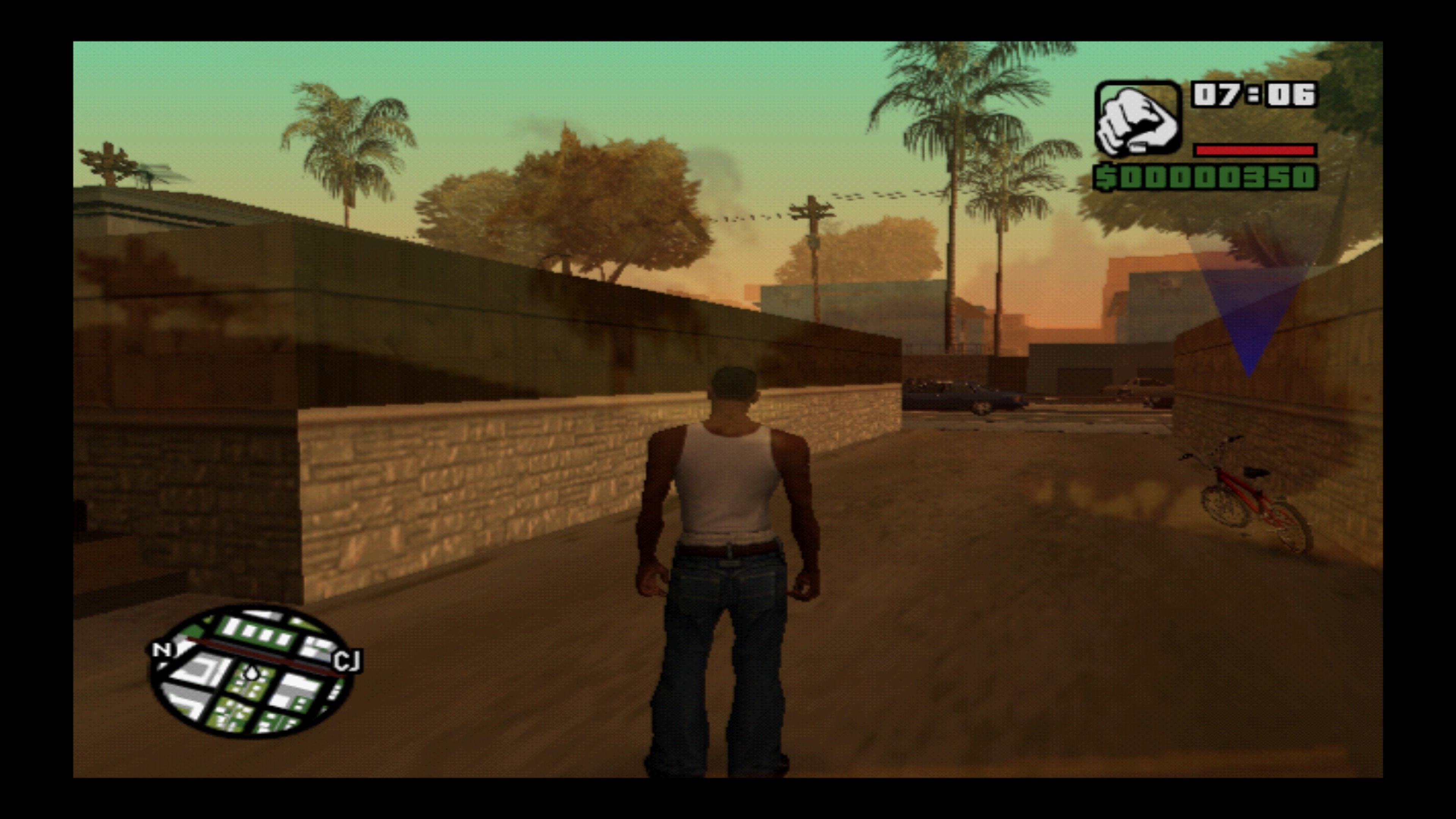
Hi why is my Grand Theft Auto: San Andreas graphics bug like that. Thanks sorry I'm bad in English
Code:
--gs-flush-ad-xyz=safe
Megaman X
Member
Tourist Trophy (SCES-53372)
CONFIG TXT
#Fix incomplete letters in menu
--vu0-no-clamping=0
--vu0-clamp-operands=1
--vu0-clamp-results=1
--vu1-no-clamping=0
--vu1-clamp-operands=1
--vu1-clamp-results=1
#Speedhack
--ee-cycle-scalar=1.50
#Fix video anticipated race license
--fpu-accurate-muldiv-range=0x00424258,0x00424258
--fpu-accurate-muldiv-range=0x0042427C,0x0042427C
--fpu-accurate-muldiv-range=0x004243A8,0x004243A8
--fpu-accurate-muldiv-range=0x004243D0,0x004243D0
--detect-idle-vif=1
#Gfx fix
--gs-use-deferred-l2h=1
--vif1-instant-xfer=1
--gs-use-mipmap=0
--gs-use-clut-merge=1
--gs-kernel-cl="clutmerge"
--gs-kernel-cl-up="clutmerge2x2"
LUA
-- Tourist Trophy PAL (SCES-53372)
--emu=siren v2
apiRequest(0.1)
local eeObj = getEEObject()
local emuObj = getEmuObject()
local gsObj = getGsObject()
local patch = function()
-- Stop Time [L2=ON/R2=OFF]
if eeObj.ReadMem16(0x00596404) == 0xFEFF then -- L2
eeObj.WriteMem32(0x202054F6,0x00002A00)
end
if eeObj.ReadMem16(0x00596404) == 0xFDFF then -- R2
eeObj.WriteMem32(0x202054F6,0x182B2442)
end
-- CPU No Move [L3=ON/R3=OFF]
if eeObj.ReadMem16(0x00596404) == 0xFFFD then -- L3
eeObj.WriteMem32(0x201FBBA8,0x24020000)
end
if eeObj.ReadMem16(0x00596404) == 0xFFFB then -- R3
eeObj.WriteMem32(0x201FBBA8,0x1440FFF9)
end
end
emuObj.AddVsyncHook(patch)
CONFIG TXT
#Fix incomplete letters in menu
--vu0-no-clamping=0
--vu0-clamp-operands=1
--vu0-clamp-results=1
--vu1-no-clamping=0
--vu1-clamp-operands=1
--vu1-clamp-results=1
#Speedhack
--ee-cycle-scalar=1.50
#Fix video anticipated race license
--fpu-accurate-muldiv-range=0x00424258,0x00424258
--fpu-accurate-muldiv-range=0x0042427C,0x0042427C
--fpu-accurate-muldiv-range=0x004243A8,0x004243A8
--fpu-accurate-muldiv-range=0x004243D0,0x004243D0
--detect-idle-vif=1
#Gfx fix
--gs-use-deferred-l2h=1
--vif1-instant-xfer=1
--gs-use-mipmap=0
--gs-use-clut-merge=1
--gs-kernel-cl="clutmerge"
--gs-kernel-cl-up="clutmerge2x2"
LUA
-- Tourist Trophy PAL (SCES-53372)
--emu=siren v2
apiRequest(0.1)
local eeObj = getEEObject()
local emuObj = getEmuObject()
local gsObj = getGsObject()
local patch = function()
-- Stop Time [L2=ON/R2=OFF]
if eeObj.ReadMem16(0x00596404) == 0xFEFF then -- L2
eeObj.WriteMem32(0x202054F6,0x00002A00)
end
if eeObj.ReadMem16(0x00596404) == 0xFDFF then -- R2
eeObj.WriteMem32(0x202054F6,0x182B2442)
end
-- CPU No Move [L3=ON/R3=OFF]
if eeObj.ReadMem16(0x00596404) == 0xFFFD then -- L3
eeObj.WriteMem32(0x201FBBA8,0x24020000)
end
if eeObj.ReadMem16(0x00596404) == 0xFFFB then -- R3
eeObj.WriteMem32(0x201FBBA8,0x1440FFF9)
end
end
emuObj.AddVsyncHook(patch)
how do I enter this code sorry I'm a noob in PS2 to PS4 gamesthis command fix that:
Code:--gs-flush-ad-xyz=safe
Jvn9207
Member
The Matrix - Path of Neo
SLUS - 21273:
SLES - 53799-53462:
SLUS - 21273:
Code:
--Disable Bloom by Juano V
eeObj.WriteMem32(0x2044C25C,0x00000000)
eeObj.WriteMem32(0x2044C22C,0x00000000)
eeObj.WriteMem32(0x2044C4C8,0x00000000)
Code:
--Disable Bloom by Juano V
eeObj.WriteMem32(0x2044C75C,0x00000000)
eeObj.WriteMem32(0x2044C72C,0x00000000)
eeObj.WriteMem32(0x2044C9C0,0x00000000)
Stayhye
Senior Member
The Matrix - Path of Neo
SLUS - 21273:
SLES - 53799-53462:Code:--Disable Bloom by Juano V eeObj.WriteMem32(0x2044C25C,0x00000000) eeObj.WriteMem32(0x2044C22C,0x00000000) eeObj.WriteMem32(0x2044C4C8,0x00000000)
Code:--Disable Bloom by Juano V eeObj.WriteMem32(0x2044C75C,0x00000000) eeObj.WriteMem32(0x2044C72C,0x00000000) eeObj.WriteMem32(0x2044C9C0,0x00000000)
Nice! does it help performance any?
Jvn9207
Member
I didn't have time to try it on ps4Nice! does it help performance any?
 , only on pcsx2
Stayhye
Senior Member
Hi the problem for Grand Theft Auto: San Andreas graphics bug is solve but any ideal for jame bond James Bond 007: Everything or Nothing the lag games. yet it is clearly marked playable in NTSC-U/C version THANKS
https://www.psx-place.com/threads/r...nfiguration-on-ps4.16131/page-205#post-357670
Madaxiom04
Forum Noob
@Vika23 pls i need help concerning this exact version of god of war on my ps4. it crashes at one point in the game and i havent been able to get past there. just after kratos get that thunder rage and is climbing the net before he sees that locknes or should i say big sea snake monster attacking people. the games crashes while hes climbing the net, what could be the cause

Vika23
Senior Member
depends what emu u use, what version of game and what settings@Vika23 pls i need help concerning this exact version of god of war on my ps4. it crashes at one point in the game and i havent been able to get past there. just after kratos get that thunder rage and is climbing the net before he sees that locknes or should i say big sea snake monster attacking people. the games crashes while hes climbing the net, what could be the cause
Madaxiom04
Forum Noob
i was able to get a setting that past that. but now the game has a stable freeze at a point. could we connect probably through dms or whatever so youd put me through, it slow communicating through threads and i dont know how to p.m on here.
Madaxiom04
Forum Noob
i used the two default emulators i.e. jak and rogue that were listed initially then later used the emu you stated in your post from Jan 30, 2024 which is jak x v2 in combination with the lua and txt cong texts you posted in that post and they still crashed at one point or the other not more than 2 checkpoints in the game, tried bully emulator the game didnt work at all, so i dont know what emulator or config or settings would work and get me past all levels, fights and scenes with no crash.
For context im pasting your post from Jan 30, 2024 below. And it seems youre not really active on here making it hard to get past this. could we connect through so more private way like social media or something to make the process faster?
For context im pasting your post from Jan 30, 2024 below. And it seems youre not really active on here making it hard to get past this. could we connect through so more private way like social media or something to make the process faster?
God of War [+Athena's Blades Mod] (SCUS97399)
FIX (No more green lines and heavy slowdowns while boss fights!)
TXT.
Code:
--host-display-mode=16:9
--cdvd-sector-read-cycles=40000
--gs-adaptive-frameskip=1
--gs-progressive=1
--ee-cycle-scalar=2.0
--iop-cycle-scalar=0.10
--vu1-mpg-cycles=2000
--vu1-di-bits=0
--vu1=trans
--vu1-jr-cache-policy=newprog
--vu1-jalr-cache-policy=newprog
--vu0-jr-cache-policy=newprog
--vu0-jalr-cache-policy=newprog
--gs-kernel-cl-up="up2x2skipinterp"
LUA.
Code:
-- God Of War US SCUS-97399
-- JakX v2
apiRequest(2.2)
local gpr = require("ee-gpr-alias")
local cpr = require("ee-cpr0-alias")
local hwaddr = require("ee-hwaddr")
local emuObj = getEmuObject()
local eeObj = getEEObject()
local gsObj = getGsObject()
local eeOverlay = eeObj.getOverlayObject()
local iopObj = getIOPObject()
local thresholdArea = 600
emuObj.SetDisplayAspectWide()
gsObj.SetDeinterlaceShift(0)
local CheckInputs = function()
local pad_bits = emuObj.GetPad()
local UP = pad_bits & 0x0010
local DOWN = pad_bits & 0x0040
local LEFT = pad_bits & 0x0080
local RIGHT = pad_bits & 0x0020
local Triangle = pad_bits & 0x1000
local Cross = pad_bits & 0x4000
local Square = pad_bits & 0x8000
local Circle = pad_bits & 0x2000
local L1 = pad_bits & 0x0400
local L2 = pad_bits & 0x0100
local L3 = pad_bits & 0x0002
local R1 = pad_bits & 0x0800
local R2 = pad_bits & 0x0200
local R3 = pad_bits & 0x0004
local Select = pad_bits & 0x0001
local Start = pad_bits & 0x0008
if (L3 ~= 0) then
--Removes Title screen flames
eeObj.WriteMem32(0x011123BC,0x00000000)
end
if (R3 ~= 0) then
--Use Athena's Blades In All Modes
eeObj.WriteMem32(0x2076D808,0x00000005)
end
end
emuObj.AddVsyncHook(CheckInputs)
local patcher = function()
-- Widescreen hack by nemesis2000
eeObj.WriteMem32(0x00169250,0x3c013f11)
eeObj.WriteMem32(0x00169254,0x342135fc)
eeObj.WriteMem32(0x00169258,0x44812000)
eeObj.WriteMem32(0x0016925c,0x54620002)
eeObj.WriteMem32(0x00169260,0x8c620008)
eeObj.WriteMem32(0x00169264,0x0000102d)
eeObj.WriteMem32(0x00169268,0x1040000a)
eeObj.WriteMem32(0x0016926c,0x27a40030)
eeObj.WriteMem32(0x00169270,0xc44000f8)
eeObj.WriteMem32(0x00169274,0x3c013f00)
eeObj.WriteMem32(0x00169278,0x44816000)
eeObj.WriteMem32(0x0016927c,0x0c060ee2)
eeObj.WriteMem32(0x00169280,0x460c0302)
eeObj.WriteMem32(0x00169284,0xc7a10030)
eeObj.WriteMem32(0x00169288,0x46010003)
eeObj.WriteMem32(0x0016928c,0x10000002)
eeObj.WriteMem32(0x00169290,0xe600037c)
eeObj.WriteMem32(0x00169294,0xe604037c)
eeObj.WriteMem32(0x00169298,0xc601037c)
eeObj.WriteMem32(0x0016929c,0x44800000)
eeObj.WriteMem32(0x001692a0,0x46010034)
eeObj.WriteMem32(0x001692a4,0x45030003)
eeObj.WriteMem32(0x001692a8,0xc605037c)
eeObj.WriteMem32(0x001692ac,0xe604037c)
eeObj.WriteMem32(0x001692b0,0xc605037c)
eeObj.WriteMem32(0x001692b4,0x3c020033)
eeObj.WriteMem32(0x001692b8,0x3c013f40)
eeObj.WriteMem32(0x001692bc,0x44810800)
eeObj.WriteMem32(0x001692c0,0xc442f1b0)
eeObj.WriteMem32(0x001692c4,0x46020842)
eeObj.WriteMem32(0x001692c8,0x46012942)
eeObj.WriteMem32(0x001692cc,0xe605037c)
eeObj.WriteMem32(0x001692d0,0xc6010368)
eeObj.WriteMem32(0x001692d4,0x26050100)
eeObj.WriteMem32(0x001692d8,0xc6000370)
eeObj.WriteMem32(0x001692dc,0xc6020378)
eeObj.WriteMem32(0x001692e0,0xc604036c)
eeObj.WriteMem32(0x001692e4,0xc6030374)
eeObj.WriteMem32(0x001692e8,0x46022882)
eeObj.WriteMem32(0x001692ec,0x46012101)
eeObj.WriteMem32(0x001692f0,0x460018c1)
eeObj.WriteMem32(0x001692f4,0xc441f1b0)
eeObj.WriteMem32(0x001692f8,0x46010803)
eeObj.WriteMem32(0x001692fc,0x46041082)
eeObj.WriteMem32(0x00169300,0x46030842)
eeObj.WriteMem32(0x00169304,0x46050003)
eeObj.WriteMem32(0x00169308,0x46011083)
eeObj.WriteMem32(0x0016930c,0xe6020380)
eeObj.WriteMem32(0x00169310,0x44030000)
eeObj.WriteMem32(0x00169314,0x48a30800)
eeObj.WriteMem32(0x00169318,0x4be000ec)
eeObj.WriteMem32(0x0016931c,0x4be41b3c)
eeObj.WriteMem32(0x00169320,0x3c01bf80)
eeObj.WriteMem32(0x00169324,0x44810000)
eeObj.WriteMem32(0x00169328,0x4b012100)
eeObj.WriteMem32(0x0016932c,0x46020003)
eeObj.WriteMem32(0x00169330,0x44070000)
eeObj.WriteMem32(0x00169334,0x48a70800)
eeObj.WriteMem32(0x00169338,0x4be21b3c)
eeObj.WriteMem32(0x0016933c,0x4a811080)
eeObj.WriteMem32(0x00169340,0xc6020384)
eeObj.WriteMem32(0x00169344,0xc6030388)
eeObj.WriteMem32(0x00169348,0x46031040)
eeObj.WriteMem32(0x0016934c,0x46031001)
eeObj.WriteMem32(0x00169350,0x46000843)
eeObj.WriteMem32(0x00169354,0x24040000)
eeObj.WriteMem32(0x00169358,0x24060000)
eeObj.WriteMem32(0x0016935c,0x70861b89)
eeObj.WriteMem32(0x00169360,0x46021000)
eeObj.WriteMem32(0x00169364,0x3c08bf80)
eeObj.WriteMem32(0x00169368,0x46021881)
eeObj.WriteMem32(0x0016936c,0x46030002)
eeObj.WriteMem32(0x00169370,0x44070800)
eeObj.WriteMem32(0x00169374,0x71071389)
eeObj.WriteMem32(0x00169378,0x46020003)
eeObj.WriteMem32(0x0016937c,0x704314c8)
eeObj.WriteMem32(0x00169380,0x7fa20040)
eeObj.WriteMem32(0x00169384,0x7fa20000)
eeObj.WriteMem32(0x00169388,0x0000402d)
eeObj.WriteMem32(0x0016938c,0x44070000)
eeObj.WriteMem32(0x00169390,0x71071389)
eeObj.WriteMem32(0x00169394,0xfa040100)
eeObj.WriteMem32(0x00169398,0x704314c8)
eeObj.WriteMem32(0x0016939c,0x7fa20050)
eeObj.WriteMem32(0x001693a0,0x26040280)
eeObj.WriteMem32(0x001693a4,0x7fa20010)
eeObj.WriteMem32(0x001693a8,0xf8a20010)
eeObj.WriteMem32(0x001693ac,0x7ba20040)
eeObj.WriteMem32(0x001693b0,0x7ca20020)
eeObj.WriteMem32(0x001693b4,0x7ba20050)
eeObj.WriteMem32(0x001693b8,0x7ca20030)
eeObj.WriteMem32(0x001693bc,0x8e08037c)
eeObj.WriteMem32(0x001693c0,0x48a80800)
eeObj.WriteMem32(0x001693c4,0x4be41b3c)
eeObj.WriteMem32(0x001693c8,0x4b012100)
eeObj.WriteMem32(0x001693cc,0xc6000380)
eeObj.WriteMem32(0x001693d0,0x46000007)
eeObj.WriteMem32(0x001693d4,0x44050000)
eeObj.WriteMem32(0x001693d8,0x48a50800)
eeObj.WriteMem32(0x001693dc,0x4be21b3c)
eeObj.WriteMem32(0x001693e0,0x4a811080)
eeObj.WriteMem32(0x001693e4,0xc6010384)
eeObj.WriteMem32(0x001693e8,0xc6030388)
eeObj.WriteMem32(0x001693ec,0x46010880)
eeObj.WriteMem32(0x001693f0,0x46011801)
eeObj.WriteMem32(0x001693f4,0x46031082)
eeObj.WriteMem32(0x001693f8,0x46020003)
eeObj.WriteMem32(0x001693fc,0x44070000)
eeObj.WriteMem32(0x00169400,0x48a70800)
eeObj.WriteMem32(0x00169404,0x4a2118c0)
eeObj.WriteMem32(0x00169408,0x46030840)
eeObj.WriteMem32(0x0016940c,0x46000847)
eeObj.WriteMem32(0x00169410,0x46020843)
eeObj.WriteMem32(0x00169414,0x44080800)
eeObj.WriteMem32(0x00169418,0x3c07bf80)
eeObj.WriteMem32(0x0016941c,0x71071389)
eeObj.WriteMem32(0x00169420,0xdfbf0070)
eeObj.WriteMem32(0x00169424,0xfa040280)
eeObj.WriteMem32(0x00169428,0x704314c8)
eeObj.WriteMem32(0x0016942c,0x7fa20060)
eeObj.WriteMem32(0x00169430,0x7fa20020)
eeObj.WriteMem32(0x00169434,0xf8820010)
eeObj.WriteMem32(0x00169438,0xf8830020)
eeObj.WriteMem32(0x0016943c,0x7bb00080)
eeObj.WriteMem32(0x00169440,0x7ba20060)
eeObj.WriteMem32(0x00169444,0x7c820030)
eeObj.WriteMem32(0x00169448,0x03e00008)
eeObj.WriteMem32(0x0016944c,0x27bd0090)
--Disable Fog
eeObj.WriteMem32(0x00128278,0x24020000) --24020001
--Disable Bloom
eeObj.WriteMem32(0x00126F80,0x24030000) --24030001
end
emuObj.AddVsyncHook(patcher)
-- Fix shadow
emuObj.SetGsTitleFix( "forceSimpleFetch", "reserved", { texMode=1 } )
After booting game, push L3 button for Removes flame in menu and set Widescreen correct in options! Also you can turn on Progressive scan! If you want, anytime in game you can activate Athena's Blades by R3 button! That make game more easy (ideal for me)! Also good for test game quickly! If you still want hardcore, just don't push R3 while in game!
As bonus im attach config for PS5!
God of War. Before\\\After FiX Comparison
VIDEO
GamePlay Video (PS4 Pro Golden Blades (Athena's Blades) Test) -
VIDEO
God of War. Short GamePlay! (Graphical Fix) (NTSC).
VIDEO
Attached Files:FIX (No more green lines and heavy slowdowns while boss fights!)
TXT.
Code:
--host-display-mode=16:9
--cdvd-sector-read-cycles=40000
--gs-adaptive-frameskip=1
--gs-progressive=1
--ee-cycle-scalar=2.0
--iop-cycle-scalar=0.10
--vu1-mpg-cycles=2000
--vu1-di-bits=0
--vu1=trans
--vu1-jr-cache-policy=newprog
--vu1-jalr-cache-policy=newprog
--vu0-jr-cache-policy=newprog
--vu0-jalr-cache-policy=newprog
--gs-kernel-cl-up="up2x2skipinterp"
LUA.
Code:
-- God Of War US SCUS-97399
-- JakX v2
apiRequest(2.2)
local gpr = require("ee-gpr-alias")
local cpr = require("ee-cpr0-alias")
local hwaddr = require("ee-hwaddr")
local emuObj = getEmuObject()
local eeObj = getEEObject()
local gsObj = getGsObject()
local eeOverlay = eeObj.getOverlayObject()
local iopObj = getIOPObject()
local thresholdArea = 600
emuObj.SetDisplayAspectWide()
gsObj.SetDeinterlaceShift(0)
local CheckInputs = function()
local pad_bits = emuObj.GetPad()
local UP = pad_bits & 0x0010
local DOWN = pad_bits & 0x0040
local LEFT = pad_bits & 0x0080
local RIGHT = pad_bits & 0x0020
local Triangle = pad_bits & 0x1000
local Cross = pad_bits & 0x4000
local Square = pad_bits & 0x8000
local Circle = pad_bits & 0x2000
local L1 = pad_bits & 0x0400
local L2 = pad_bits & 0x0100
local L3 = pad_bits & 0x0002
local R1 = pad_bits & 0x0800
local R2 = pad_bits & 0x0200
local R3 = pad_bits & 0x0004
local Select = pad_bits & 0x0001
local Start = pad_bits & 0x0008
if (L3 ~= 0) then
--Removes Title screen flames
eeObj.WriteMem32(0x011123BC,0x00000000)
end
if (R3 ~= 0) then
--Use Athena's Blades In All Modes
eeObj.WriteMem32(0x2076D808,0x00000005)
end
end
emuObj.AddVsyncHook(CheckInputs)
local patcher = function()
-- Widescreen hack by nemesis2000
eeObj.WriteMem32(0x00169250,0x3c013f11)
eeObj.WriteMem32(0x00169254,0x342135fc)
eeObj.WriteMem32(0x00169258,0x44812000)
eeObj.WriteMem32(0x0016925c,0x54620002)
eeObj.WriteMem32(0x00169260,0x8c620008)
eeObj.WriteMem32(0x00169264,0x0000102d)
eeObj.WriteMem32(0x00169268,0x1040000a)
eeObj.WriteMem32(0x0016926c,0x27a40030)
eeObj.WriteMem32(0x00169270,0xc44000f8)
eeObj.WriteMem32(0x00169274,0x3c013f00)
eeObj.WriteMem32(0x00169278,0x44816000)
eeObj.WriteMem32(0x0016927c,0x0c060ee2)
eeObj.WriteMem32(0x00169280,0x460c0302)
eeObj.WriteMem32(0x00169284,0xc7a10030)
eeObj.WriteMem32(0x00169288,0x46010003)
eeObj.WriteMem32(0x0016928c,0x10000002)
eeObj.WriteMem32(0x00169290,0xe600037c)
eeObj.WriteMem32(0x00169294,0xe604037c)
eeObj.WriteMem32(0x00169298,0xc601037c)
eeObj.WriteMem32(0x0016929c,0x44800000)
eeObj.WriteMem32(0x001692a0,0x46010034)
eeObj.WriteMem32(0x001692a4,0x45030003)
eeObj.WriteMem32(0x001692a8,0xc605037c)
eeObj.WriteMem32(0x001692ac,0xe604037c)
eeObj.WriteMem32(0x001692b0,0xc605037c)
eeObj.WriteMem32(0x001692b4,0x3c020033)
eeObj.WriteMem32(0x001692b8,0x3c013f40)
eeObj.WriteMem32(0x001692bc,0x44810800)
eeObj.WriteMem32(0x001692c0,0xc442f1b0)
eeObj.WriteMem32(0x001692c4,0x46020842)
eeObj.WriteMem32(0x001692c8,0x46012942)
eeObj.WriteMem32(0x001692cc,0xe605037c)
eeObj.WriteMem32(0x001692d0,0xc6010368)
eeObj.WriteMem32(0x001692d4,0x26050100)
eeObj.WriteMem32(0x001692d8,0xc6000370)
eeObj.WriteMem32(0x001692dc,0xc6020378)
eeObj.WriteMem32(0x001692e0,0xc604036c)
eeObj.WriteMem32(0x001692e4,0xc6030374)
eeObj.WriteMem32(0x001692e8,0x46022882)
eeObj.WriteMem32(0x001692ec,0x46012101)
eeObj.WriteMem32(0x001692f0,0x460018c1)
eeObj.WriteMem32(0x001692f4,0xc441f1b0)
eeObj.WriteMem32(0x001692f8,0x46010803)
eeObj.WriteMem32(0x001692fc,0x46041082)
eeObj.WriteMem32(0x00169300,0x46030842)
eeObj.WriteMem32(0x00169304,0x46050003)
eeObj.WriteMem32(0x00169308,0x46011083)
eeObj.WriteMem32(0x0016930c,0xe6020380)
eeObj.WriteMem32(0x00169310,0x44030000)
eeObj.WriteMem32(0x00169314,0x48a30800)
eeObj.WriteMem32(0x00169318,0x4be000ec)
eeObj.WriteMem32(0x0016931c,0x4be41b3c)
eeObj.WriteMem32(0x00169320,0x3c01bf80)
eeObj.WriteMem32(0x00169324,0x44810000)
eeObj.WriteMem32(0x00169328,0x4b012100)
eeObj.WriteMem32(0x0016932c,0x46020003)
eeObj.WriteMem32(0x00169330,0x44070000)
eeObj.WriteMem32(0x00169334,0x48a70800)
eeObj.WriteMem32(0x00169338,0x4be21b3c)
eeObj.WriteMem32(0x0016933c,0x4a811080)
eeObj.WriteMem32(0x00169340,0xc6020384)
eeObj.WriteMem32(0x00169344,0xc6030388)
eeObj.WriteMem32(0x00169348,0x46031040)
eeObj.WriteMem32(0x0016934c,0x46031001)
eeObj.WriteMem32(0x00169350,0x46000843)
eeObj.WriteMem32(0x00169354,0x24040000)
eeObj.WriteMem32(0x00169358,0x24060000)
eeObj.WriteMem32(0x0016935c,0x70861b89)
eeObj.WriteMem32(0x00169360,0x46021000)
eeObj.WriteMem32(0x00169364,0x3c08bf80)
eeObj.WriteMem32(0x00169368,0x46021881)
eeObj.WriteMem32(0x0016936c,0x46030002)
eeObj.WriteMem32(0x00169370,0x44070800)
eeObj.WriteMem32(0x00169374,0x71071389)
eeObj.WriteMem32(0x00169378,0x46020003)
eeObj.WriteMem32(0x0016937c,0x704314c8)
eeObj.WriteMem32(0x00169380,0x7fa20040)
eeObj.WriteMem32(0x00169384,0x7fa20000)
eeObj.WriteMem32(0x00169388,0x0000402d)
eeObj.WriteMem32(0x0016938c,0x44070000)
eeObj.WriteMem32(0x00169390,0x71071389)
eeObj.WriteMem32(0x00169394,0xfa040100)
eeObj.WriteMem32(0x00169398,0x704314c8)
eeObj.WriteMem32(0x0016939c,0x7fa20050)
eeObj.WriteMem32(0x001693a0,0x26040280)
eeObj.WriteMem32(0x001693a4,0x7fa20010)
eeObj.WriteMem32(0x001693a8,0xf8a20010)
eeObj.WriteMem32(0x001693ac,0x7ba20040)
eeObj.WriteMem32(0x001693b0,0x7ca20020)
eeObj.WriteMem32(0x001693b4,0x7ba20050)
eeObj.WriteMem32(0x001693b8,0x7ca20030)
eeObj.WriteMem32(0x001693bc,0x8e08037c)
eeObj.WriteMem32(0x001693c0,0x48a80800)
eeObj.WriteMem32(0x001693c4,0x4be41b3c)
eeObj.WriteMem32(0x001693c8,0x4b012100)
eeObj.WriteMem32(0x001693cc,0xc6000380)
eeObj.WriteMem32(0x001693d0,0x46000007)
eeObj.WriteMem32(0x001693d4,0x44050000)
eeObj.WriteMem32(0x001693d8,0x48a50800)
eeObj.WriteMem32(0x001693dc,0x4be21b3c)
eeObj.WriteMem32(0x001693e0,0x4a811080)
eeObj.WriteMem32(0x001693e4,0xc6010384)
eeObj.WriteMem32(0x001693e8,0xc6030388)
eeObj.WriteMem32(0x001693ec,0x46010880)
eeObj.WriteMem32(0x001693f0,0x46011801)
eeObj.WriteMem32(0x001693f4,0x46031082)
eeObj.WriteMem32(0x001693f8,0x46020003)
eeObj.WriteMem32(0x001693fc,0x44070000)
eeObj.WriteMem32(0x00169400,0x48a70800)
eeObj.WriteMem32(0x00169404,0x4a2118c0)
eeObj.WriteMem32(0x00169408,0x46030840)
eeObj.WriteMem32(0x0016940c,0x46000847)
eeObj.WriteMem32(0x00169410,0x46020843)
eeObj.WriteMem32(0x00169414,0x44080800)
eeObj.WriteMem32(0x00169418,0x3c07bf80)
eeObj.WriteMem32(0x0016941c,0x71071389)
eeObj.WriteMem32(0x00169420,0xdfbf0070)
eeObj.WriteMem32(0x00169424,0xfa040280)
eeObj.WriteMem32(0x00169428,0x704314c8)
eeObj.WriteMem32(0x0016942c,0x7fa20060)
eeObj.WriteMem32(0x00169430,0x7fa20020)
eeObj.WriteMem32(0x00169434,0xf8820010)
eeObj.WriteMem32(0x00169438,0xf8830020)
eeObj.WriteMem32(0x0016943c,0x7bb00080)
eeObj.WriteMem32(0x00169440,0x7ba20060)
eeObj.WriteMem32(0x00169444,0x7c820030)
eeObj.WriteMem32(0x00169448,0x03e00008)
eeObj.WriteMem32(0x0016944c,0x27bd0090)
--Disable Fog
eeObj.WriteMem32(0x00128278,0x24020000) --24020001
--Disable Bloom
eeObj.WriteMem32(0x00126F80,0x24030000) --24030001
end
emuObj.AddVsyncHook(patcher)
-- Fix shadow
emuObj.SetGsTitleFix( "forceSimpleFetch", "reserved", { texMode=1 } )
After booting game, push L3 button for Removes flame in menu and set Widescreen correct in options! Also you can turn on Progressive scan! If you want, anytime in game you can activate Athena's Blades by R3 button! That make game more easy (ideal for me)! Also good for test game quickly! If you still want hardcore, just don't push R3 while in game!
As bonus im attach config for PS5!
God of War. Before\\\After FiX Comparison
VIDEO
GamePlay Video (PS4 Pro Golden Blades (Athena's Blades) Test) -
VIDEO
God of War. Short GamePlay! (Graphical Fix) (NTSC).
VIDEO
a" style="margin: 0px; padding: 10px 10px 0px; overflow: hidden; zoom: 1; background: url("styles/nerva/xenforo/gradients/category-23px-light.png") center top repeat-x rgb(246, 246, 246); border-radius: 5px;">- GOW PS5 Config.rar
File size:
1.8 KB
Views:
13
Vika23
Senior Member
well if you have discord or some, ok theni used the two default emulators i.e. jak and rogue that were listed initially then later used the emu you stated in your post from Jan 30, 2024 which is jak x v2 in combination with the lua and txt cong texts you posted in that post and they still crashed at one point or the other not more than 2 checkpoints in the game, tried bully emulator the game didnt work at all, so i dont know what emulator or config or settings would work and get me past all levels, fights and scenes with no crash.
For context im pasting your post from Jan 30, 2024 below. And it seems youre not really active on here making it hard to get past this. could we connect through so more private way like social media or something to make the process faster?
God of War [+Athena's Blades Mod] (SCUS97399)Attached Files:
FIX (No more green lines and heavy slowdowns while boss fights!)
TXT.
Code:
--host-display-mode=16:9
--cdvd-sector-read-cycles=40000
--gs-adaptive-frameskip=1
--gs-progressive=1
--ee-cycle-scalar=2.0
--iop-cycle-scalar=0.10
--vu1-mpg-cycles=2000
--vu1-di-bits=0
--vu1=trans
--vu1-jr-cache-policy=newprog
--vu1-jalr-cache-policy=newprog
--vu0-jr-cache-policy=newprog
--vu0-jalr-cache-policy=newprog
--gs-kernel-cl-up="up2x2skipinterp"
LUA.
Code:
-- God Of War US SCUS-97399
-- JakX v2
apiRequest(2.2)
local gpr = require("ee-gpr-alias")
local cpr = require("ee-cpr0-alias")
local hwaddr = require("ee-hwaddr")
local emuObj = getEmuObject()
local eeObj = getEEObject()
local gsObj = getGsObject()
local eeOverlay = eeObj.getOverlayObject()
local iopObj = getIOPObject()
local thresholdArea = 600
emuObj.SetDisplayAspectWide()
gsObj.SetDeinterlaceShift(0)
local CheckInputs = function()
local pad_bits = emuObj.GetPad()
local UP = pad_bits & 0x0010
local DOWN = pad_bits & 0x0040
local LEFT = pad_bits & 0x0080
local RIGHT = pad_bits & 0x0020
local Triangle = pad_bits & 0x1000
local Cross = pad_bits & 0x4000
local Square = pad_bits & 0x8000
local Circle = pad_bits & 0x2000
local L1 = pad_bits & 0x0400
local L2 = pad_bits & 0x0100
local L3 = pad_bits & 0x0002
local R1 = pad_bits & 0x0800
local R2 = pad_bits & 0x0200
local R3 = pad_bits & 0x0004
local Select = pad_bits & 0x0001
local Start = pad_bits & 0x0008
if (L3 ~= 0) then
--Removes Title screen flames
eeObj.WriteMem32(0x011123BC,0x00000000)
end
if (R3 ~= 0) then
--Use Athena's Blades In All Modes
eeObj.WriteMem32(0x2076D808,0x00000005)
end
end
emuObj.AddVsyncHook(CheckInputs)
local patcher = function()
-- Widescreen hack by nemesis2000
eeObj.WriteMem32(0x00169250,0x3c013f11)
eeObj.WriteMem32(0x00169254,0x342135fc)
eeObj.WriteMem32(0x00169258,0x44812000)
eeObj.WriteMem32(0x0016925c,0x54620002)
eeObj.WriteMem32(0x00169260,0x8c620008)
eeObj.WriteMem32(0x00169264,0x0000102d)
eeObj.WriteMem32(0x00169268,0x1040000a)
eeObj.WriteMem32(0x0016926c,0x27a40030)
eeObj.WriteMem32(0x00169270,0xc44000f8)
eeObj.WriteMem32(0x00169274,0x3c013f00)
eeObj.WriteMem32(0x00169278,0x44816000)
eeObj.WriteMem32(0x0016927c,0x0c060ee2)
eeObj.WriteMem32(0x00169280,0x460c0302)
eeObj.WriteMem32(0x00169284,0xc7a10030)
eeObj.WriteMem32(0x00169288,0x46010003)
eeObj.WriteMem32(0x0016928c,0x10000002)
eeObj.WriteMem32(0x00169290,0xe600037c)
eeObj.WriteMem32(0x00169294,0xe604037c)
eeObj.WriteMem32(0x00169298,0xc601037c)
eeObj.WriteMem32(0x0016929c,0x44800000)
eeObj.WriteMem32(0x001692a0,0x46010034)
eeObj.WriteMem32(0x001692a4,0x45030003)
eeObj.WriteMem32(0x001692a8,0xc605037c)
eeObj.WriteMem32(0x001692ac,0xe604037c)
eeObj.WriteMem32(0x001692b0,0xc605037c)
eeObj.WriteMem32(0x001692b4,0x3c020033)
eeObj.WriteMem32(0x001692b8,0x3c013f40)
eeObj.WriteMem32(0x001692bc,0x44810800)
eeObj.WriteMem32(0x001692c0,0xc442f1b0)
eeObj.WriteMem32(0x001692c4,0x46020842)
eeObj.WriteMem32(0x001692c8,0x46012942)
eeObj.WriteMem32(0x001692cc,0xe605037c)
eeObj.WriteMem32(0x001692d0,0xc6010368)
eeObj.WriteMem32(0x001692d4,0x26050100)
eeObj.WriteMem32(0x001692d8,0xc6000370)
eeObj.WriteMem32(0x001692dc,0xc6020378)
eeObj.WriteMem32(0x001692e0,0xc604036c)
eeObj.WriteMem32(0x001692e4,0xc6030374)
eeObj.WriteMem32(0x001692e8,0x46022882)
eeObj.WriteMem32(0x001692ec,0x46012101)
eeObj.WriteMem32(0x001692f0,0x460018c1)
eeObj.WriteMem32(0x001692f4,0xc441f1b0)
eeObj.WriteMem32(0x001692f8,0x46010803)
eeObj.WriteMem32(0x001692fc,0x46041082)
eeObj.WriteMem32(0x00169300,0x46030842)
eeObj.WriteMem32(0x00169304,0x46050003)
eeObj.WriteMem32(0x00169308,0x46011083)
eeObj.WriteMem32(0x0016930c,0xe6020380)
eeObj.WriteMem32(0x00169310,0x44030000)
eeObj.WriteMem32(0x00169314,0x48a30800)
eeObj.WriteMem32(0x00169318,0x4be000ec)
eeObj.WriteMem32(0x0016931c,0x4be41b3c)
eeObj.WriteMem32(0x00169320,0x3c01bf80)
eeObj.WriteMem32(0x00169324,0x44810000)
eeObj.WriteMem32(0x00169328,0x4b012100)
eeObj.WriteMem32(0x0016932c,0x46020003)
eeObj.WriteMem32(0x00169330,0x44070000)
eeObj.WriteMem32(0x00169334,0x48a70800)
eeObj.WriteMem32(0x00169338,0x4be21b3c)
eeObj.WriteMem32(0x0016933c,0x4a811080)
eeObj.WriteMem32(0x00169340,0xc6020384)
eeObj.WriteMem32(0x00169344,0xc6030388)
eeObj.WriteMem32(0x00169348,0x46031040)
eeObj.WriteMem32(0x0016934c,0x46031001)
eeObj.WriteMem32(0x00169350,0x46000843)
eeObj.WriteMem32(0x00169354,0x24040000)
eeObj.WriteMem32(0x00169358,0x24060000)
eeObj.WriteMem32(0x0016935c,0x70861b89)
eeObj.WriteMem32(0x00169360,0x46021000)
eeObj.WriteMem32(0x00169364,0x3c08bf80)
eeObj.WriteMem32(0x00169368,0x46021881)
eeObj.WriteMem32(0x0016936c,0x46030002)
eeObj.WriteMem32(0x00169370,0x44070800)
eeObj.WriteMem32(0x00169374,0x71071389)
eeObj.WriteMem32(0x00169378,0x46020003)
eeObj.WriteMem32(0x0016937c,0x704314c8)
eeObj.WriteMem32(0x00169380,0x7fa20040)
eeObj.WriteMem32(0x00169384,0x7fa20000)
eeObj.WriteMem32(0x00169388,0x0000402d)
eeObj.WriteMem32(0x0016938c,0x44070000)
eeObj.WriteMem32(0x00169390,0x71071389)
eeObj.WriteMem32(0x00169394,0xfa040100)
eeObj.WriteMem32(0x00169398,0x704314c8)
eeObj.WriteMem32(0x0016939c,0x7fa20050)
eeObj.WriteMem32(0x001693a0,0x26040280)
eeObj.WriteMem32(0x001693a4,0x7fa20010)
eeObj.WriteMem32(0x001693a8,0xf8a20010)
eeObj.WriteMem32(0x001693ac,0x7ba20040)
eeObj.WriteMem32(0x001693b0,0x7ca20020)
eeObj.WriteMem32(0x001693b4,0x7ba20050)
eeObj.WriteMem32(0x001693b8,0x7ca20030)
eeObj.WriteMem32(0x001693bc,0x8e08037c)
eeObj.WriteMem32(0x001693c0,0x48a80800)
eeObj.WriteMem32(0x001693c4,0x4be41b3c)
eeObj.WriteMem32(0x001693c8,0x4b012100)
eeObj.WriteMem32(0x001693cc,0xc6000380)
eeObj.WriteMem32(0x001693d0,0x46000007)
eeObj.WriteMem32(0x001693d4,0x44050000)
eeObj.WriteMem32(0x001693d8,0x48a50800)
eeObj.WriteMem32(0x001693dc,0x4be21b3c)
eeObj.WriteMem32(0x001693e0,0x4a811080)
eeObj.WriteMem32(0x001693e4,0xc6010384)
eeObj.WriteMem32(0x001693e8,0xc6030388)
eeObj.WriteMem32(0x001693ec,0x46010880)
eeObj.WriteMem32(0x001693f0,0x46011801)
eeObj.WriteMem32(0x001693f4,0x46031082)
eeObj.WriteMem32(0x001693f8,0x46020003)
eeObj.WriteMem32(0x001693fc,0x44070000)
eeObj.WriteMem32(0x00169400,0x48a70800)
eeObj.WriteMem32(0x00169404,0x4a2118c0)
eeObj.WriteMem32(0x00169408,0x46030840)
eeObj.WriteMem32(0x0016940c,0x46000847)
eeObj.WriteMem32(0x00169410,0x46020843)
eeObj.WriteMem32(0x00169414,0x44080800)
eeObj.WriteMem32(0x00169418,0x3c07bf80)
eeObj.WriteMem32(0x0016941c,0x71071389)
eeObj.WriteMem32(0x00169420,0xdfbf0070)
eeObj.WriteMem32(0x00169424,0xfa040280)
eeObj.WriteMem32(0x00169428,0x704314c8)
eeObj.WriteMem32(0x0016942c,0x7fa20060)
eeObj.WriteMem32(0x00169430,0x7fa20020)
eeObj.WriteMem32(0x00169434,0xf8820010)
eeObj.WriteMem32(0x00169438,0xf8830020)
eeObj.WriteMem32(0x0016943c,0x7bb00080)
eeObj.WriteMem32(0x00169440,0x7ba20060)
eeObj.WriteMem32(0x00169444,0x7c820030)
eeObj.WriteMem32(0x00169448,0x03e00008)
eeObj.WriteMem32(0x0016944c,0x27bd0090)
--Disable Fog
eeObj.WriteMem32(0x00128278,0x24020000) --24020001
--Disable Bloom
eeObj.WriteMem32(0x00126F80,0x24030000) --24030001
end
emuObj.AddVsyncHook(patcher)
-- Fix shadow
emuObj.SetGsTitleFix( "forceSimpleFetch", "reserved", { texMode=1 } )
After booting game, push L3 button for Removes flame in menu and set Widescreen correct in options! Also you can turn on Progressive scan! If you want, anytime in game you can activate Athena's Blades by R3 button! That make game more easy (ideal for me)! Also good for test game quickly! If you still want hardcore, just don't push R3 while in game!
As bonus im attach config for PS5!
God of War. Before\\\After FiX Comparison
VIDEO
GamePlay Video (PS4 Pro Golden Blades (Athena's Blades) Test) -
VIDEO
God of War. Short GamePlay! (Graphical Fix) (NTSC).
VIDEO
Vika23, Jan 30, 2024
a" style="margin: 0px; padding: 10px 10px 0px; overflow: hidden; zoom: 1; background: url("styles/nerva/xenforo/gradients/category-23px-light.png") center top repeat-x rgb(246, 246, 246); border-radius: 5px;">- GOW PS5 Config.rar
File size:
1.8 KB
Views:
13

Drobovik2
Member
--=ALL-IN-ONE 5 DISC Widescreen Collection with Save bonus transfer and Uncensored Episode III=--
Xenosaga Episode I: Der Wille zur Macht (SLUS-20469)
Xenosaga Episode II - Jenseits von Gut und Bose [Disc 1] (SLUS-20892)
Xenosaga Episode II - Jenseits von Gut und Bose [Disc 2] (SLUS-21133)
Xenosaga Episode III - Also Sprach Zarathustra [Disc 1] [Uncensored](SLUS-21389)
Xenosaga Episode III - Also Sprach Zarathustra [Disc 2] [Uncensored](SLUS-21417)
NOTES: >Still issues with cutscene A/V sync in some places like Beach of Nothingness, etc UPDATE: Issue of out of sync cutscenes fixed with correct emu - AOFA (Art of Fighting Anthology)
>Widescreen gameplay codes enabled in all three games.
>Episode I FMVs can be viewed as original 4x3 aspect ratio (with glitchy sides) (R3+Select) or with FMV's fix vertical- (L3+R3), take your pick, switches on the fly.
>Swapping discs doesn't reload the game. If wanted to swap the games not the discs, just swap thru PS menu, close the game, then restart and it will load to last changed disc. Its intentional so the multidisc episodes II and III can be swapped as intended and completed saves are read by the Episodes II and III for bonuses.
>Episode III Uncensored ISOs need to be rebuilt to function on PS4. Recommend using UltraISO. Has a template for PS2 DVD rebuilt.
Xenosaga Episode I: Der Wille zur Macht (SLUS-20469)
Xenosaga Episode II - Jenseits von Gut und Bose [Disc 1] (SLUS-20892)
Xenosaga Episode II - Jenseits von Gut und Bose [Disc 2] (SLUS-21133)
Xenosaga Episode III - Also Sprach Zarathustra [Disc 1] [Uncensored](SLUS-21389)
Xenosaga Episode III - Also Sprach Zarathustra [Disc 2] [Uncensored](SLUS-21417)
NOTES: >Still issues with cutscene A/V sync in some places like Beach of Nothingness, etc UPDATE: Issue of out of sync cutscenes fixed with correct emu - AOFA (Art of Fighting Anthology)
>Widescreen gameplay codes enabled in all three games.
>Episode I FMVs can be viewed as original 4x3 aspect ratio (with glitchy sides) (R3+Select) or with FMV's fix vertical- (L3+R3), take your pick, switches on the fly.
>Swapping discs doesn't reload the game. If wanted to swap the games not the discs, just swap thru PS menu, close the game, then restart and it will load to last changed disc. Its intentional so the multidisc episodes II and III can be swapped as intended and completed saves are read by the Episodes II and III for bonuses.
>Episode III Uncensored ISOs need to be rebuilt to function on PS4. Recommend using UltraISO. Has a template for PS2 DVD rebuilt.
In Xenosaga, possessing Game Clear data from Episode I when starting Episode II gives your entire party the ability "Swimsuit", which dresses them up in swimsuits of various appeal, but more importantly is one of the only ways to boost your Speed, and can't be obtained any other way. Game Clear data from Episode II to Episode III also unlocks a couple new costumes as well, such as Shion's Vector uniform from I/II, which are again otherwise unobtainable. Both game's save data also allow for a bonus in starting XP and skill points for characters in the next game, though the benefits are severely curtailed; maxed-out levels in the first game will add perhaps 4-5 levels to your starting total in the second.
TXT
LUA
Code:
--max-disc-num=5
--gs-uprender=2x2
--gs-upscale=edgesmooth
#Force 480p
--gs-progressive=1
--gs-force-bilinear=1

#Fix for the flickering white lines on the textures
--gs-ignore-rect-correction=1

--gs-kernel-cl="h2lpool"       #Fix the stutter on the main interface in Xenosaga III
--gs-kernel-cl-up="h2lpool2x2"

--gs-flush-ad-xyz=safe #autoFlush
--switch-disc-reset=0

#fixes immoveable character (and camera inaccuracy) in "AGWS Parts Shop & Foundation Robot Academy" segment in
Xenosaga I
--fpu-accurate-range=0x00322494,0x00322494
--fpu-accurate-range=0x00322B90,0x00322B90
LUA
Code:
-- Xenosaga Episode I: Der Wille zur Macht (SLUS-20469)
-- Xenosaga Episode II: Jenseits von Gut und Böse (Disc 1)(SLUS-20892)
-- Xenosaga Episode II: Jenseits von Gut und Böse (Disc 2)(SLUS-21133)
-- Xenosaga Episode III: Also sprach Zarathustra (Disc 1) (SLUS-21389)
-- Xenosaga Episode III: Also sprach Zarathustra (Disc 2) (SLUS-21417)
-- Widescreen hack by nemesis2000
-- shadow fix by mrjaredbeta
-- ported as multi-disc pkg to PS4 by Drobovik
-- emu used=AOFA

local gpr = require("ee-gpr-alias")

apiRequest(1.0)

local eeObj = getEEObject()
local emuObj = getEmuObject()
local gsObj = getGsObject()

emuObj.SetDisplayAspectWide()

local WSpatchXI = function()
-- gameplay 16:9 -- original value 41445d17
eeObj.WriteMem32(0x204D88CC,0x4182e8ba)

-- Disable character shadows to fix graphics errors
eeObj.WriteMem32(0x00244a90,0x03e00008)

-- Widescreen FMV Selector
local pad_bits  = emuObj.GetPad()
local L1  = pad_bits &  0x0400
local L3  = pad_bits &  0x0002
local R1  = pad_bits &  0x0800
local R3  = pad_bits &  0x0004
local Select  = pad_bits &  0x0001
local Start  = pad_bits &  0x0008

if (R3 ~= 0 and L3 ~= 0) then
--FMV's fix vertical- by nemesis2000
eeObj.WriteMem32(0x204A7BF4,0x00006E37)--top 000071f7
eeObj.WriteMem32(0x204A7C14,0x000091B7)--bottom 00008df7
eeObj.WriteMem32(0x204a7bf0,0x00006ff8)
eeObj.WriteMem32(0x204a7c10,0x00008ff8)
end
if (R3 ~= 0 and Select ~= 0) then
--FMV's fix 4:3 retained by flameofrecca (causes garbage on sides)
eeObj.WriteMem32(0x204a7bf0,0x000073f8)--left 00006ff8
eeObj.WriteMem32(0x204a7c10,0x00008bf8)--right 00008ff8
eeObj.WriteMem32(0x204A7BF4,0x000071f7)
eeObj.WriteMem32(0x204A7C14,0x00008df7)
end

emuObj.ThrottleMax()
end

local WSpatchXII = function()
--gameplay widescreen 16:9
eeObj.WriteMem32(0x2069B784,0x4182e8ba) -- original value 41445d17
emuObj.ThrottleMax()
end

local WSpatchXIII = function()
--gameplay widescreen 16:9
eeObj.WriteMem32(0x2054FF20,0x3fc1f080) --original value 3f91745d

--cutscenes portrait's fix
eeObj.WriteMem32(0x00268f40,0x24020078)
eeObj.WriteMem32(0x203e4340,0x00000174)
eeObj.WriteMem32(0x203e4360,0x00000174)

--480p
eeObj.WriteMem32(0x0019adf8,0x24020001)
eeObj.WriteMem32(0x0019adfc,0xa2020081)

--black borders's fix (optional)
eeObj.WriteMem32(0x00244d90,0x24060000)
eeObj.WriteMem32(0x00244da4,0x24c801c0)

--Disable character shadows to fix graphics errors
eeObj.WriteMem32(0x00290a40,0x8600009c)
eeObj.WriteMem32(0x290a5c,0x8600009c)

-- FMV Fix for the first CG lag problem
eeObj.WriteMem32(0x1e7600,0x0)

emuObj.ThrottleMax()
end


local titleid = emuObj.GetDiscTitleId() -- returns string as read from iso img SYSTEM.CNF

if titleid == 'SLUS-20469' then
if true then
emuObj.AddVsyncHook(WSpatchXI)
end
end

if titleid == 'SLUS-20892' or 'SLUS-21133' then
if true then
--disable shadows
eeInsnReplace(0x1d82f0,0xae0500c4,0xae0000c4)
emuObj.AddVsyncHook(WSpatchXII)
end
end

if titleid == 'SLUS-21389' or 'SLUS-21417' then
if true then
--Skip the black and white filter in the animation to fix the CG lag
--eeInsnReplace(0x1e7fc8,0x1220003b,0x1000003b)

emuObj.AddVsyncHook(WSpatchXIII)
end
end
Attachments


Last edited:
sargentfart
Member
Does anyone have the CLI/Config for The Warriors NTSC - SLUS-21215?
The PAL version contains hook ranges which I assume are different from the US version.
Here's the 2 specific commands I'm talking about (from the PAL version):
The PAL version contains hook ranges which I assume are different from the US version.
Here's the 2 specific commands I'm talking about (from the PAL version):
Code:
--vu1-clamp-range=0x028,0x060
--ee-hook=0x48c660,FastForwardClock,0x1620ffe3
Stayhye
Senior Member
Does anyone have the CLI/Config for The Warriors NTSC - SLUS-21215?
The PAL version contains hook ranges which I assume are different from the US version.
Here's the 2 specific commands I'm talking about (from the PAL version):
Code:--vu1-clamp-range=0x028,0x060 --ee-hook=0x48c660,FastForwardClock,0x1620ffe3
just checked... it's the same.
Code:
--vu1-injection=1
--vu1-mpg-cycles=2300
--vu1-mpg-cycles=2600,-1
--vu1-clamp-range=0x028,0x060
--ee-hook=0x48c660,FastForwardClock,0x1620ffe3Drobovik2
Member
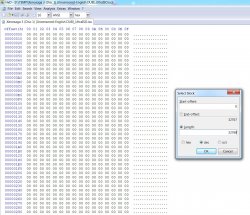
Regarding modded iso rebuilds (Undubs,etc). I figured out how to get undubbed DVD9 version of Xenosaga Episode I running on PS4, or PS3 for that matter. Typical rebuild with UltraISO wasn't working cause it can't see the second layer of DVD9. So to make it work you have to copy the header from unmodified USA ISO into modded ISO with a hex editor. Select a block from the beginning 0 that is 32768 dec long.
For example, HxD editor has the option under Edit "select block" on the hotkey Ctrl+E.
I'm suspecting that all modded isos can be fixed this way.
EDIT: Not all modded isos can be fixed this way. Some still need to be rebuilt.
For example, HxD editor has the option under Edit "select block" on the hotkey Ctrl+E.
I'm suspecting that all modded isos can be fixed this way.
EDIT: Not all modded isos can be fixed this way. Some still need to be rebuilt.
Attachments
Last edited:
Hello I tried this game with this configuration for James Bond 007: Everything or Nothing (SLUS-20751)
https://www.psx-place.com/threads/research-ps2-emulator-configuration-on-ps4. [URL='https://www.psx-place.com/threads/research-ps2-emulator-configuration-on-ps4.16131/page-205#post-357670']#4096/page-205[/URL]
sometimes I have loss of FPS and lags and sound problems I would like to know if this is normal thank you very much.
Bonjour j'ai essayer ce jeu avec cette configuration
https://www.psx-place.com/threads/research-ps2-emulator-configuration-on-ps4. [URL='https://www.psx-place.com/threads/research-ps2-emulator-configuration-on-ps4.16131/page-205#post-357670']#4096/page-205[/URL]
des fois j'ai des perte de FPS et des lags et des problème de son je voudrais savoir si c'est normal merci beaucoup.
https://www.psx-place.com/threads/research-ps2-emulator-configuration-on-ps4. [URL='https://www.psx-place.com/threads/research-ps2-emulator-configuration-on-ps4.16131/page-205#post-357670']#4096/page-205[/URL]
sometimes I have loss of FPS and lags and sound problems I would like to know if this is normal thank you very much.
Bonjour j'ai essayer ce jeu avec cette configuration
https://www.psx-place.com/threads/research-ps2-emulator-configuration-on-ps4. [URL='https://www.psx-place.com/threads/research-ps2-emulator-configuration-on-ps4.16131/page-205#post-357670']#4096/page-205[/URL]
des fois j'ai des perte de FPS et des lags et des problème de son je voudrais savoir si c'est normal merci beaucoup.
Similar threads
-
-
PS5 James Bond 007: Everything or Nothing (SLUS-20751)
- Started by Max7731
- Replies: 0
-
-