PS3 [Research] Quick Preview - Loading Whats New locally from /PS3/WSCREEN/

That is great. I can host that on my server if its ever needed.


Thanks, This backup is easier the folder names are exactly the same on the xmls

so a simple server rename will do the trick, but this one lacks the images, i mean the previous backup has 58xx images now this one is 12k xmls, so more than half is missing? @xp3riments .

Seems like some more homebrews are hosted in sony server besides the ones that we already know, XMBPLUS, PKGMANAGER, EMULATORS and etc
 
Can the date be defined as a future date?
As I did to show halloween stuff for today, it works, but I want it to only appear 10/31 and disappear 11/1

when past the date only the new icon will desappear, and then you set the date in the future it will always show it as new
 
Kind of interesting, an old entry in an q-spint NSX xml for Playstation Home.

https://nsx.sec.q-spint.dl.playstat...c/NSXWSV/NSXWSV-PN.P3.TR-WHATSNEW00000001.xml

Code:
 <mtrl id="1310309841" mname="HOME TEST" from="2010-12-15T00:00:00.000Z" until="2011-12-15T00:00:00.000Z" lastm="2010-12-15T06:45:40.000Z" anno="">
            <name></name>
            <owner>DS</owner>
            <desc></desc>
            <url type="2">http://nsx.e1-np.dl.playstation.net/fs/nsx/material/6/65d53a1c3e00e176ce85bf529328bf751eeb0bca-2441.jpg</url>
            <target type="u">psgm:play?id=NPIA00005&amp;arg=version%3D1%2E0%26scene%5Fname%3DJ%5FFS%5F3DDGH%5F1%5F181D%5F4365%26spawn%5Fid%3Dblah%26opt1%3D1%26opt2%3D%E6%97%A5%E6%9C%AC%E8%AA%9E</target>
            <cntry agelmt="0">all</cntry>
            <lang>all</lang>
        </mtrl>

I knew we could boot apps using the URI with the short content ID like this "psgm:play?id=NPIA00005", but see this example here. It's sending extra arguments to the application along with the URI, by the looks of it they will make you boot into a certain space or something like that.


Hmmm i'm using only lastm="2100-09-12T15:10:00.000Z" until="2100-12-31T23:59:00.000Z"

if i add from, i think it should work, what does the lastm does?
 
Hmmm i'm using only lastm="2100-09-12T15:10:00.000Z" until="2100-12-31T23:59:00.000Z"

if i add from, i think it should work, what does the lastm does?
It might work yes, So long since I messed with this stuff that I cant remember, you will have to trial and error it.
 
It might work yes, So long since I messed with this stuff that I cant remember, you will have to trial and error it.

It's working good, i added haloween, xmas and new year as test, all of them showed when changing the ps3 date.

So it refreshs automatically not only after 7 days, i didn't have to clean cache to show them, they appear and dissapear in the other day, that's great
 
IIRC there was comic section added to xmb on psp at some time. i never used it because there was a homebrew i used instead. maybe was planned for ps3?
Seems like you are probably right here.

Looks like there was support planned for PS3. Not sure if it was finished. Does anyone here have any comics for the PSP? It would be interesting to know more about the files/format, maybe we could get them going on PS3 too.

See here a guy from Sony was asked about it : https://www.playstationlifestyle.net/2009/11/27/sony-looking-into-digital-comics-for-the-ps3/
I hope so, we are looking into it, we've obviously seen that a lot of people in the community ask for it, so, yeah I can't confirm or deny
Well I can confirm they were definitely working on it and they added partial support at least. :)

Here is what it looks like on PSP:

Just going to add some info here in case someone is interested in taking a look at reversing this, or has any ideas.

This video from 2009 mentions PS3 in the title, It's a shame they never added this , it looks kinda cool.

Playstation blog post about comics from 2009, no mention of PS3. There was some codes there for free comics, but they are expired now obviously.
https://blog.playstation.com/archive/2009/11/26/playstation-network-digital-comics/

http://www.playstationportable.de/news/5795-gamescom-2009-comics-als-e-books-auf-der-psp.html
https://www.wired.com/2009/12/psp-comics/

Some references from explore_plugin on ps3.

This one is interesting, as we know psn, game, video and tv are working options. (Whats New, Game billboard, Video billboard,, and TV channels)
upload_2020-11-30_13-34-31.png


More references further down.
upload_2020-11-30_13-35-39.png


Doesn't this layout look a lot like the Whats New panel with 3x3 tiles?
upload_2020-11-30_14-34-36.png


The way you move around the comic freely and zoom in etc when reading is almost exactly like the PS3s photo slideshow mode (seen here at 1min 25sec
)

Compare to this

If you take a CBZ/CBR comic, and rename it to zip/rar and extract it, you can sort of read it on PS3 with the photo viewer, I guess they planned to automate that in some way and use a Whats New/PS3 EXTRA GUI to browse the available comics.
 
@DeViL303 i'm just digging stuff to make a custom MY CHANNELS with only no-psn apps and i just found this ones

anno="premium=1">
anno="csxad=0">

any clue?

EDIT:

Code:
<desc>Sony Entertainment Television</desc>
            <url type="117">http://nsx.np.dl.playstation.net/nsx/material/8/82e13a3c3cb66a4b7363f877e7ea20a1d4298bde-210996.png</url>
            <url type="120">http://nsx.np.dl.playstation.net/nsx/material/2/2e24185e1fc628d4c9b1f6ddb36d3563960db845-211132.txt</url>
            <target type="u">psgm:install?contentid=EP4452-NPEB00955_00-RU000000FULL0100&amp;url=http%3A%2F%2Fares.dl.playstation.net%2Fcdn%2FEP4452%2FNPEB00955_00%2FQNnlHdVwhdMMgpKewmXCyqIKHjmrKBbEvGVbijRjeBsEpgQzwxJJWKIDQGlGIUtv.pkg</target>

What does the txt do?

and data

Code:
 <mtrl id="1080617765" mname="total film" from="2013-09-05T00:00:00.000Z" until="2100-12-31T23:59:00.000Z" lastm="2013-09-05T15:03:03.000Z" anno="">
            <name></name>
            <owner></owner>
            <desc>Conecta y disfruta de 12 canales con las mejores series y cine en TotalChannel</desc>
            <url type="117">http://nsx.mgmt.dl.playstation.net/fs/nsx/material/a/a60220df49b9626829bd7fc3a91211d7fc38cbd8-530562.png</url>
            <data name="272792bee9642887b5bc389db42117e92822b41e-530626.txt" type="120">VG90YWxDaGFubmVsIGVzIHVuYSBpbm5vdmFkb3JhIHBsYXRhZm9ybWEgZGUgdGVsZXZpc2lvbiBkZSBwYWdvIHF1ZSBvcGVyYSAxMDAlIGVuIGxhIG51YmUgcGFyYSBxdWUgZWwgdXN1YXJpbyBwdWVkYSBkaXNmcnV0YXIgZGUgbG9zIGNvbnRlbmlkb3MgZW4gZGlyZWN0byBvIGVuIGRpZmVyaWRvIGN1YW5kbyBxdWllcmEuDQoNClRvdGFsQ2hhbm5lbCB0aWVuZSBsb3MgMTIgY2FuYWxlcyBkZSB0ZWxldmlzaW9uIHBhZ286IEFYTiBIRCwgQVhOIFdoaXRlIEhELCBDYWxsZSAxMyBIRCwgQ29zbW9wb2xpdGFuIEhELCBGb3gsIEZveCBDcmltZSwgTmF0aW9uYWwgR2VvZ3JhcGhpYyBIRCwgUGFyYW1vdW50IENvbWVkeSwgU3lGeSBIRCwgVE5UIEhELCBISVNUT1JJQSB5IENyaW1lbiAmIEludmVzdGlnYWNpb24uDQpBZGVtYXMgZWwgdXN1YXJpbyBkaXNwb25lIGRlIGVzcGFjaW8gZW4gZWwgZGlzY28gZHVybyB2aXJ0dWFsIHByaXZhZG8gZW4gbGEgbnViZS4gT2ZyZWNlIG1hcyBkZSAxMjAgc2VyaWVzLCBtYXMgZGUgMTAwIHBlbGljdWxhcyBhIGxhIHNlbWFuYS4NCg0K</data>
            <target type="u">psgm:install?contentid=EP4419-NPEB01848_00-TOTALCHANNEL0000&amp;url=http%3A%2F%2Fares.dl.playstation.net%2Fcdn%2FEP4419%2FNPEB01848_00%2FqjNmHtHqGmFTMOTQtAbFheKnpdlMhpZohtvwKuqeQvNZgqeJsUlRciWAGzaDjSNtYuoOGJtxRBEuobvnLCdfgTkqrMGYQfYwhYkPi.pkg</target>
            <cntry agelmt="18">es</cntry>
            <lang>3</lang>
        </mtrl>
 
Last edited:
anno="premium=1">
anno="csxad=0">

any clue?
No idea on those. I never noticed them before.

Did you notice anything? I guess you have tried adding them with 0,1,2,3 and looked for changes? Possible its something from older FW.

What does the txt do?
Not sure on the direct txt link, but its probably something to do with the message that shows before you install. See below.

Data I do know how to use. Its base64 encoded text.

and the ps3 converts it into the message seen before installing some apps. I have used it in tests before.

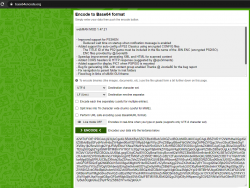
So using a site like: https://www.base64encode.org/

You can add app descriptions to psgm:install? type links like this

upload_2020-12-28_17-6-25.png


Copy the encoded text into the xml like this:
Code:
<mtrl id="0"  until="2100-12-31T23:59:00.000Z">
<desc>Download WebMAN Mod</desc>
<url type="2">http://devil303.com/simpleui/icons/package.png</url>
<data name="webman.txt" type="120">d2ViTUFOIE1PRCAxLjQ3LjIxCgoKLSBJbXByb3ZlZCBzdXBwb3J0IGZvciBQUzNIRU4KICAgICAgLiBSZWR1Y2VkIHdhaXQgdGltZSBvbiBzdGFydHVwIHdoZW4gbm90aWZjYXRpb24gbWVzc2FnZSBpcyBlbmFibGVkCi0gQWRkZWQgc3VwcG9ydCBmb3IgYXV0by1jb25maWcgb2YgUFMyIENsYXNzaWNzIHVzaW5nIGVuY3J5cHRlZCBDT05GSUcgZmlsZXMKICAgICAgLiBUaGUgVElUTEUgSUQgb2YgdGhlIFBTMiBnYW1lIG11c3QgYmUgaW5jbHVkZWQgaW4gdGhlIGZpbGUgbmFtZSBvZiB0aGUgLkJJTi5FTkMgKGVuY3J5cHRlZCBQUzJJU08pLgogICAgICAuIEVOQyBmaWxlcyBwcm92aWRlZCBieSBASm9vbmllODYKLSBTcGVlZHVwIGltcHJvdmVtZW50IGdlbmVyYXRpbmcgWE1MIGFuZCBIVE1MIGZvciBzY2FubmVkIGNvbnRlbnQKLSBBZGRlZCBDT1JTIGhlYWRlcnMgdG8gSFRUUCByZXNwb25zZSAoc3VnZ2VzdGVkIGJ5IEB4cHMzcmltZW50cykKLSBBZGRlZCBzdXBwb3J0IGZvciBkaXNwbGF5IFBJQzEgd2hlbiBQU1BJU08gaXMgbW91bnRlZAotIEJ1ZyBmaXggZ2VuZXJhdGluZyBYTUwgd2l0aCBjb250ZW50IGdyb3VwIGVuYWJsZWQgVGhhbmtzIEAgSm9vbmllODYgZm9yIHRoZSBidWcgcmVwb3J0Ci0gRml4IG5hdmlnYXRpb24gdG8gcGFyZW50IGZvbGRlciBpbiAvbmV0IGZvbGRlcnMKLSBGaXhlZCBidWcgaW4gbGlua3Mgb2Ygc01BTiBHVUkgdGhlbWUKCkFkZGVkIGR5bmFtaWMgbG9va3VwIGZvciBzeXNjYWxsIHRhYmxlIG9mZnNldCBmb3IgZnV0dXJlIGZpcm13YXJlCkFkZGVkIGJyZWFkY3J1bWIgdHJhaWwgdG8gcGF0aHMgbGlzdGVkIGluIFBTM01BUEkKQ0Qgc2VjdG9yIHNpemUgZGV0ZWN0aW9uIG9mIFBTWElTTyBub3QgbG9uZ2VyIHVzZSB0ZW1wIGZpbGU=</data>
<target type="u">psgm:install?contentid=EP4419-NPEB01848_00-TOTALCHANNEL0000&amp;url=http%3A%2F%2Fares.dl.playstation.net%2Fcdn%2FEP4419%2FNPEB01848_00%2FqjNmHtHqGmFTMOTQtAbFheKnpdlMhpZohtvwKuqeQvNZgqeJsUlRciWAGzaDjSNtYuoOGJtxRBEuobvnLCdfgTkqrMGYQfYwhYkPi.pkg</target>
<cntry agelmt="0">all</cntry>
<lang>all</lang></mtrl>

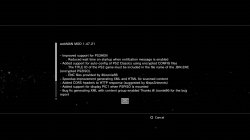
And end up with this message before it downloads:
screenshot_2020_12_28_17_03_14.jpg
 
Seems like 1 or 0 does not change anything in

anno="premium=1">
anno="csxad=1">

I also found this ones

anno="csxad=1&amp;adspace=1,52,53,54,55" autoflip="4000"

anno="picks=1&amp;emergency=1">

But not effect, the last one will ignore picks=1 and work as emergency=1
 
Its possible I guess, but if using it for downloads then its better and easier to use the normal method of loading What's New from the internet as all links work and it can update automatically.

Its a shame this is limited to psns type links, this method would have been perfect for webman launchpad and stuff like that. All webman would have had to do is copy the images and xmls for games found into the WSCREEN folder, and then all games would show up icons in correct proportions with no xml generation and also no XMB reload needed to see changes. You could add new games and just exity and enter whats new to see them.

Anyway this psns limitation fucks it for me for everything.


On a related note i found a way to load Whats New segments in a normal XMB menu, it loads up full size icons which is strange to see. Also swfs work. :)

using wboard://localhost/list?


Have I got enough clocks.?! :)


unknown.png


It has issues though, icons overlapping and no titles.


@DeViL303 I haven't found out yet how to use this

I'm using wboard://localhost/list? and placing sfw and jpg in dev_usb001/PS3/WSCREEN, how can i make this work?
 
I think for that wboard://localhost/list? mod it was reading them from the nsx xml. Also I can not remember now was I adding more stuff after wboard://localhost/list? , maybe something like x=1 or something. I forget now. Have a look in the sprx for anything like x=1 y=1 or something similar to that.
 
I think for that wboard://localhost/list? mod it was reading them from the nsx xml. Also I can not remember now was I adding more stuff after wboard://localhost/list? , maybe something like x=1 or something. I forget now. Have a look in the sprx for anything like x=1 y=1 or something similar to that.


About the Quick Preview

The xml file needs a especial format?

I tried the usual nsx files and none of them got loaded, it just read the images inside PS3/WSCREEN, i just placed a working xml there and nothing happens.

About the wboard://localhost/list? i read in the devwiki
wboard://localhost/item?x=%u&y=%u


Code:
<View id="seg_information_board">
        <Attributes>
            <Table key="information_board">
                <Pair key="title_rsc"><String>msg_information_board</String></Pair>
                <Pair key="icon"><String>/dev_hdd0/widget/npdrm/informationboard/Icon.png</String></Pair>
             </Table>
        </Attributes>
        <Items>
            <Query class="type:x-xmb/folder-pixmap" key="information_board" attr="information_board" src="wboard://localhost/item?x=1&y=1"/>
        </Items>
    </View>

i tried changed to 1 or 0 no success nothings came out.


I'm interested in it, because i want to repurpose the old what's new widget since it can read from files, so calling it from a xmb item, we can make a kind of RSS reader.


I also found this
<Query class="type:x-xmb/folder-pixmap" key="rss_provider_0" attr="rss_provider_0" src="rss://http://www.rssnavi.jp/rss/?k=caterss3"/>

but no success so far.
 
Last edited:
Yes quick preview needs a special format, and it does not work to call anything. The only type of link accepted by quick preview is psns, those are no good to us.


About the wboard://localhost/list? i read in the devwiki
wboard://localhost/item?x=%u&y=%u
Try add it as the root of a category, with no attributes, I think that was how I did it.

Anyway its nothing useful really. You are better off just using whats new and the other NSX items.
 
Last edited:
Yes quick preview needs a special format, and it does not work to call anything. The only type of link accepted by quick preview is psns, those are no good to us.


Try add it as the root of a category, with no attributes, I think that was how I did it.

Anyway its nothing useful really. You are better off just using whats new and the other NSX items.


Still nothing, i gave up :P

If you have time after your toolbox, would be very appreciated with you document it somewhere, just to know the possibilities
 
I don't think I will have time to figure it out again.

I was not great anyway, I was using a normal NSX xml loaded from dev_hdd0/tmp/explore/, not loading locally from USB. Also it was only showing every 3rd item. It was like I was showing 1 column of whats new, so item 1, item 4, item 7, item 10 etc etc.
 
@DeViL303

I'm trying to test if i can make a custom Recently Played server with Homebrews but, i'm not understanding what to replace

This entry does not contains any data inside of it, it will only show a blank xml ( if the xml exists, otherwise error 404)

https://nsx.sec.%s.dl.playstation.n...Yr/p/NSXWSV/NSXWSV-%s_00-WHATSNEW00000001.xml

the seconds %s is GAME ID


And this one is supposed to have the xmls

http://tmdb.%s.dl.playstation.net/tmdb/%s_%s/%s.xml , but i can't figure out what is the last variable
 
Back
Top