
Hi!
I recently installed FHDB 1.93 on an SSD (the newest version didn't advance beyond the FMCB logo so I went with this) and both NTSC and PAL games are loading fine on my 30004 model PAL PS2 through OPLGSM 0.9.2. However, there is something off about the image being sent to my CRT. It is not super noticeable, but there is definitely something wrong about how the image is being scaled it seems. It's as if the image isn't aligning properly to the slot mask of the CRT. Or as if the image and each line is being drawn ever so off from where they should be, resulting in an image that is more jagged and more flickery than interlaced 480 should be. However, I've run the PAL version of Rayman 3 in its 60Hz/NTSC mode and that results in a clean and solid image looking how it is supposed to, so with that in mind there shouldn't be any problem with this particular PAL PS2-CRT combo running 60Hz/NTSC content, unless I am missing something.
I split the SCART RGB signal and sent the other one to an OSSC to examine the actual resolution and fps and both Rayman 3 in the 60Hz mode and the NTSC ISOs running through OPL read 525i, 15.73kHz, 59.94Hz so I am stumped as to why NTSC games render incorrectly through OPL vs NTSC content from disc.
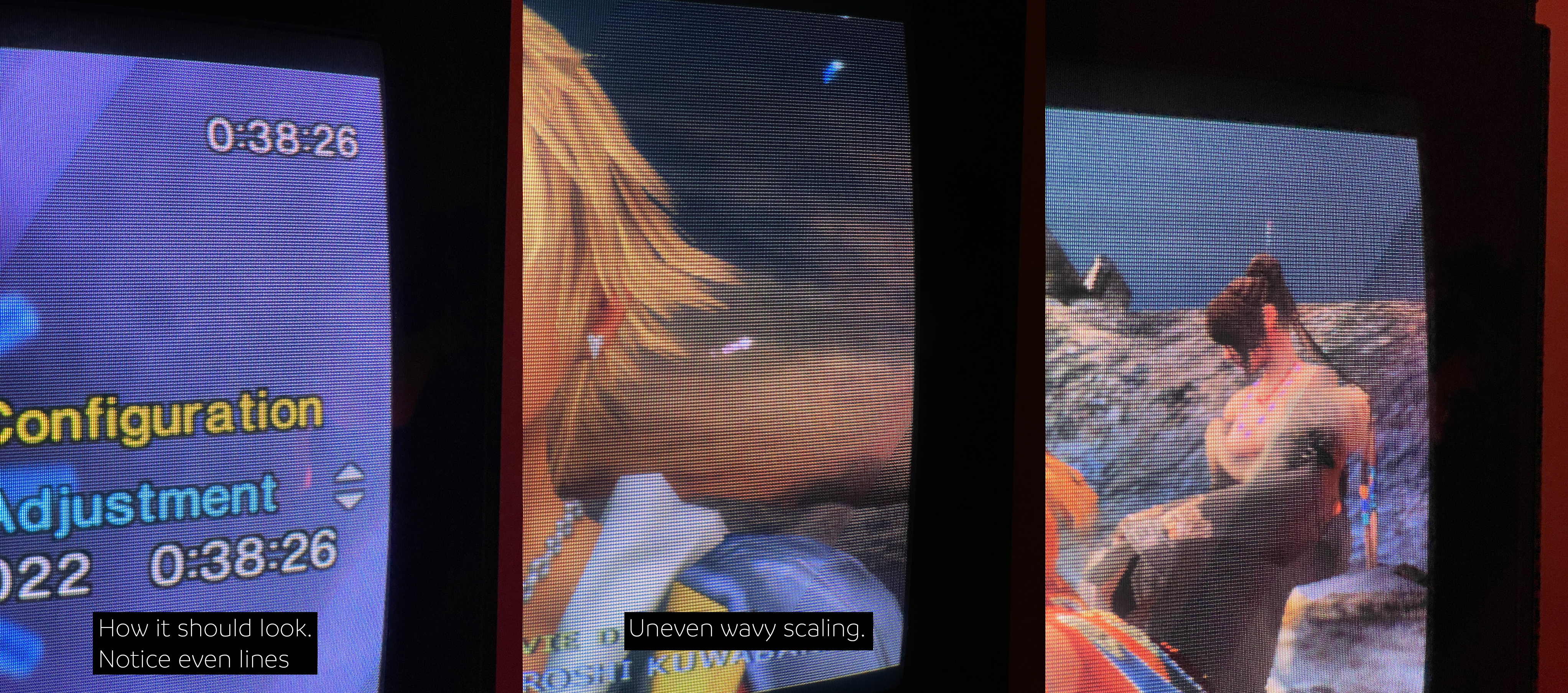
I've attached images showing the phenomenon. In it you can see how the CRT looks when given a proper image vs how it behaves when being fed an incorrect one. The problem manifests itself most noticeably in these images as sort of wavy patches of the image towards the edges of the screen where parts of the image almost seem to fall between the rows of the slot mask. Any ideas?
(The attached image is somewhat large. It kind of has to be for me to adequately resolve the fine CRT details, so make sure to view it at 1:1)
I recently installed FHDB 1.93 on an SSD (the newest version didn't advance beyond the FMCB logo so I went with this) and both NTSC and PAL games are loading fine on my 30004 model PAL PS2 through OPLGSM 0.9.2. However, there is something off about the image being sent to my CRT. It is not super noticeable, but there is definitely something wrong about how the image is being scaled it seems. It's as if the image isn't aligning properly to the slot mask of the CRT. Or as if the image and each line is being drawn ever so off from where they should be, resulting in an image that is more jagged and more flickery than interlaced 480 should be. However, I've run the PAL version of Rayman 3 in its 60Hz/NTSC mode and that results in a clean and solid image looking how it is supposed to, so with that in mind there shouldn't be any problem with this particular PAL PS2-CRT combo running 60Hz/NTSC content, unless I am missing something.
I split the SCART RGB signal and sent the other one to an OSSC to examine the actual resolution and fps and both Rayman 3 in the 60Hz mode and the NTSC ISOs running through OPL read 525i, 15.73kHz, 59.94Hz so I am stumped as to why NTSC games render incorrectly through OPL vs NTSC content from disc.
I've attached images showing the phenomenon. In it you can see how the CRT looks when given a proper image vs how it behaves when being fed an incorrect one. The problem manifests itself most noticeably in these images as sort of wavy patches of the image towards the edges of the screen where parts of the image almost seem to fall between the rows of the slot mask. Any ideas?
(The attached image is somewhat large. It kind of has to be for me to adequately resolve the fine CRT details, so make sure to view it at 1:1)


