PS3 SEN Enabler v5.8.2 + SEN Enabler Plugin v1.6

SEN Enabler has been updated to version 5.8.2 by its creator developer Evilnat (aka nathan_r32_69). In this update the dev has provided some new additions and also some stability fixes that should fix some of those rare random crashes that occur. Also the menu's with the application have been re-worked with a new Status Bar showing progress of various task. The package has shrunk once again to an impressive 1.42 MB , Also the developer has fixed the PS Button Freeze issue. Now when you press [break]ss[/break] the PS button it will exit to the XMB, but use this with caution as it's advised not use this while SEN Enabler is performing a task.


The SEN Enabler Plugin (which can be installed from the App) has also progressed to v1.6 with some added functionality. On start-up (with proper flag on your USB) You can now Patch MAC/IDs/ CFW Syscalls on the console Startup. There is alot of changes and improvements that you can view in the Release Quote below provided by the developer.


ICON0_1.png
Evilnat said:

I DON'T RECOMMEND USING PUBLIC IDS


Changelog said:
Improvements v5.8.2

  • Updated OFW, FULL CFW, APP and PACKAGES modes
  • Updated all menus
  • Menus more fluid than before
  • Random crash in menus seems to be fixed
  • Added progress bar in some tasks
  • Updated Cobra stage data in some CFWs
  • PKG size reduced again (3.84mb > 1.42mb)
  • SEN Plugin updated to v1.6
  • Added patch at startup in SEN Plugin
  • Patch MAC/IDs/Syscalls at startup with flag files
  • Fixed PS button and screen flickering on Title/TitleID task

Thanks to MaMaRe [PSX-PLACE] for add Brazilian/Portuguese language, xllBIGGBOSSllx [YOUTUBE STReeT poRKs], GeopByteSs [TWITTER], RevilingDante [WIISOS], franzes80 [GAMESONIC] and lokuelo [PSX-PLACE] for his help


Screenshots
SEN%20Enabler%20New%20menu.png

(SEN Enabler's NEW Menu)

SEN%20Enabler%20Progress%20bar.png

(SEN Enabler's NEW Progress Bar)

In this version all menus are re-coded, will be more fluid and all randomly crashes seems to be fixed now, this seems to be fixed now, zero crashes since i updated it. I wanted to add progress bar on some tasks like Spoof options and Fix hash, finally it's done and now is easy to check if all is fine and to know approximately how much time left to finish.

In older versions, if PS button was pressed will crash the PS3, now if is pressed will exit to XMB at any time, for example if you are enabling PSN/SEN access and PS is pressed will kill all SEN Enabler's process to exit XMB, use this with caution because you can get BSOD/RSOD if you exit when some tasks are working

XMB Modes are updated too, with this PKG's size is reduced from 3.84mb to 1.42mb (From ~70mb since older versions), is tested on all CEX CFWs with good results, on DEX is tested on some CFWs without issues, if you see something please let me know quickly, if you have blackscreen install your CFW from Recovery Mode menu

SEN Plugin now can patch data on startup, to do this you need to put some "flag" files on your USB device with FAT32 format like this:

  • x:\SEN_Enabler\flags\patch_ids_startup [Patches CID and PSID]
  • x:\SEN_Enabler\flags\patch_mac_startup [Patches MAC]
  • x:\SEN_Enabler\flags\patch_syscalls_startup [Deletes history files and hide Syscalls]

Remember SEN Plugin can be installed from SEN Enabler settings menu, you can chose what you want to patch simply putting the flag file on your USB device, will do it when PS3 is starting automatically (all flag files are in RAR)
If text is not displayed in some tasks maybe is because peek/poke/LV1 is disabled

This "flags" method maybe will be replaced in a future release with a newer mode


For those who doesn't know how to enable SEN access, go to SEN/PSN Options and select Enable SEN/PSN access (pressing :[]: button three times in main menu) and not Custom spoof, 9.99 Spoof is not created to go online, so if you are using it

DON'T LOG IN ON SEN UNDER ANY CIRCUMSTANCES AND NEVER ENABLE PS3'S NETWORK!!

Remember to use Charles Proxy now along with SEN Enabler and block three URLs (you can add more if you want), this software will minimize ban risk, but a ban is not 100% avoided on CFW

URLs to block said:
Block all these URLs on Charles or similar:


IF YOU FIND ANY BUG, PLEASE LET ME KNOW

 
[MENTION=76]Evilnat[/MENTION]

SEN Plugin now can patch data on startup, to do this you need to put some "flag" files on your USB device with FAT32 format like this:
•x:\SEN_Enabler\flags\patch_ids_startup [Patches CID and PSID]
•x:\SEN_Enabler\flags\patch_mac_startup [Patches MAC]
•x:\SEN_Enabler\flags\patch_syscalls_startup [Deletes history files and hide Syscalls]

Please explain for me. Are these new directories I need to use to put the mac.bin, psid.bin etc files. Before I'd just put them in the root directory.
Can this be explained a bit better for me please. I don't quite get it, sorry and thanks.
 
[MENTION=123]boxbundy[/MENTION] I think you need to make SEN_Enabler directory in root of usb. And there put bin files.

Doesn't matter i didn't understand your question.
 
Last edited:
Is it possible to eliminate the need for Charles by incorporating into app?

I didn't see a syscall or similar to avoid PS3 connect to some URL.. the only thing i have in mind is search and change all URLs blocked with Charles in flash files but i don't know if this will work... or like Aldostools's webMAN does, patch the URL on LV2 and see if Charles keeps sending data to these URLs, if not i think it will be safe to use without Charles, i will take a look :)

[MENTION=76]Evilnat[/MENTION]

SEN Plugin now can patch data on startup, to do this you need to put some "flag" files on your USB device with FAT32 format like this:
•x:\SEN_Enabler\flags\patch_ids_startup [Patches CID and PSID]
•x:\SEN_Enabler\flags\patch_mac_startup [Patches MAC]
•x:\SEN_Enabler\flags\patch_syscalls_startup [Deletes history files and hide Syscalls]

Please explain for me. Are these new directories I need to use to put the mac.bin, psid.bin etc files. Before I'd just put them in the root directory.
Can this be explained a bit better for me please. I don't quite get it, sorry and thanks.

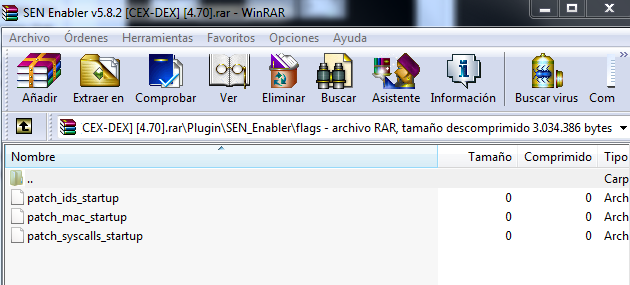
Patch files like MAC.bin, ConsoleID.bin and PSID.bin must be in the root of a USB device as always, these flags files are empty files to check startup tasks and must be in x:\SEN_Enabler\flags, if a flag is detected will search patch file and do his work

For example, i want to patch MAC on startup, i put patch_mac_startup in x:\SEN_Enabler\flags and MAC.bin in USB root, then put the USB on the PS3 and start it, you will see in a few seconds if startup patch is done (will show result in the upper right corner). This is for all the other flags and patcher files and remember that SEN Plugin must be installed to do this

Flag files are on RAR, in Plugin/SEN_Enabler/flags

a4f7c7e32ab019d3962a4a1c2dd79933.png

Regards
 
Last edited:
I didn't see a syscall or similar to avoid PS3 connect to some URL.. the only thing i have in mind is search and change all URLs blocked with Charles in flash files but i don't know if this will work... or like Aldostools's webMAN does, patch the URL on LV2 and see if Charles keeps sending data to these URLs, if not i think it will be safe to use without Charles, i will take a look :)


Patch files like MAC.bin, ConsoleID.bin and PSID.bin must be in the root of a USB device as always, these flags files are empty files to check startup tasks and must be in x:\SEN_Enabler\flags, if a flag is detected will search patch file and do his work

For example, i want to patch MAC on startup, i put patch_mac_startup in x:\SEN_Enabler\flags and MAC.bin in USB root, then put the USB on the PS3 and start it, you will see in a few seconds if startup patch is done (will show result in the upper right corner). This is for all the other flags and patcher files and remember that SEN Plugin must be installed to do this

Flag files are on RAR, in Plugin/SEN_Enabler/flags

a4f7c7e32ab019d3962a4a1c2dd79933.png

Regards

got ya now. thanks. Also I sent you a PM. If you could advise me on that it would be appreciated too.
 
I have a problem with this 5.8.2 version. Until 5.8.0 version you could patch Console id with the txt file from the root of the usb. Now I cannot do that although I have that ConsoleID.txt in that USB.. How can we patch Console ID now with this new version?


I didn't see a syscall or similar to avoid PS3 connect to some URL.. the only thing i have in mind is search and change all URLs blocked with Charles in flash files but i don't know if this will work... or like Aldostools's webMAN does, patch the URL on LV2 and see if Charles keeps sending data to these URLs, if not i think it will be safe to use without Charles, i will take a look :)


Patch files like MAC.bin, ConsoleID.bin and PSID.bin must be in the root of a USB device as always, these flags files are empty files to check startup tasks and must be in x:\SEN_Enabler\flags, if a flag is detected will search patch file and do his work

For example, i want to patch MAC on startup, i put patch_mac_startup in x:\SEN_Enabler\flags and MAC.bin in USB root, then put the USB on the PS3 and start it, you will see in a few seconds if startup patch is done (will show result in the upper right corner). This is for all the other flags and patcher files and remember that SEN Plugin must be installed to do this

Flag files are on RAR, in Plugin/SEN_Enabler/flags

a4f7c7e32ab019d3962a4a1c2dd79933.png

Regards
 
I have a problem with this 5.8.2 version. Until 5.8.0 version you could patch Console id with the txt file from the root of the usb. Now I cannot do that although I have that ConsoleID.txt in that USB.. How can we patch Console ID now with this new version?

Check in settings menu if you have "HDD" or "USB" to patch the IDs, shows any error like "There is no patch files"?

Regards
 
I didn't see a syscall or similar to avoid PS3 connect to some URL.. the only thing i have in mind is search and change all URLs blocked with Charles in flash files but i don't know if this will work... or like Aldostools's webMAN does, patch the URL on LV2 and see if Charles keeps sending data to these URLs, if not i think it will be safe to use without Charles, i will take a look :)


Patch files like MAC.bin, ConsoleID.bin and PSID.bin must be in the root of a USB device as always, these flags files are empty files to check startup tasks and must be in x:\SEN_Enabler\flags, if a flag is detected will search patch file and do his work

For example, i want to patch MAC on startup, i put patch_mac_startup in x:\SEN_Enabler\flags and MAC.bin in USB root, then put the USB on the PS3 and start it, you will see in a few seconds if startup patch is done (will show result in the upper right corner). This is for all the other flags and patcher files and remember that SEN Plugin must be installed to do this

Flag files are on RAR, in Plugin/SEN_Enabler/flags

a4f7c7e32ab019d3962a4a1c2dd79933.png

Regards

That would be an amazing feature, definitely. Every time I see an evilnat release, I know you just made something that's already awesome a little bit more amazing :)
 
That would be an amazing feature, definitely. Every time I see an evilnat release, I know you just made something that's already awesome a little bit more amazing :)

Thanks my friend :)
[MENTION=28]franzes80[/MENTION] asked me about themes in SEN Enabler and i'm testing it right now, i think is possible to see it in a future release and avoid Charles too, maybe :)

Regards
 
Last edited:
I use CFW 4:55. Would have any problems using this version?
If so which version you indicate to me to use?
Note: I never used any sen enabler.
 
I use CFW 4:55. Would have any problems using this version?
If so which version you indicate to me to use?
Note: I never used any sen enabler.

As of 4.70, they have changed the way psn logs into the network. It is highly recommended to upgrade to 4.70 cfw if you wish to access the network. :)
 
As of 4.70, they have changed the way psn logs into the network. It is highly recommended to upgrade to 4.70 cfw if you wish to access the network. :)
Thanks psykosis.But as I said, I use cfw 4.55. So which version of sen enabler I could test for the 4.55?
Would I like to upgrade to 4.70, sorry that Rogero left the scene.
If I go to Habib's could no longer use the Multiman, correct?
 

Trending content

Back
Top