PS3 sMAN 1.08n (by deank) - Adds new XMB Intergration Option, Improved ICON/SFO Scanning & more...

One of many legends in the PS3 Homebrew Community developer deank is back with a new progression of the sMAN plugin. We all know deank from projects like multiMAN, webMAN and now the sMAN plugin that has appeared to perhaps replaced (?) the original webMAN (aka webMAN Vanilla) project as now a new feature will allow you to choose between old style of "My Games" with the "XML" Mod, this option is off by default. As seen in the included pic in the release notes, the "XMB Intergration" can be toggled on/off easily in sMAN setup. The dev did not stop there with improving this PS3 Plugin in v1.08n additional details such as improved speed on scanning from external / internal hdd when extracting Game Icons / obtaining info from the PARAM.SFO can be seen with all details of this update​


sman_xmb1.jpg

  • sMAN 1.08n is available:


    sMAN version 1.08n Changes:
    • Added [x] XMB Integration option in setup for people who like the older xmb/xml style (off by default)
    • Improved scan speed from ntfs/internal hdd when extracting icons/sfo
    • sMAN resources in /dev_hdd0/tmp/wmtmp/res will not be overwritten if exist (at least until the next version)
    • Supports up to 2000 titles (even in XMB Integration mode)
    • Still uses the same amount of memory (~2300KB free while idle)


    Dean

    • Developer: @deank
    • Type of Release: A PS3 Plugin for use with Custom Firmware : Such as a COBRA CFW or other CFW types such as (STANDARD) with the ability to boot plugins via external applications ..
    • Short Description: the sMAN plugin takes deank original webMAN plugin and adds the new slaunch feature also developed by deank and merges them into a single plugin that also gives the ability with all the original webMAN features developed by deank.


  • History of Changes

    sMAN v1.07
    • It can be either 10 or 40 games per page. Both layouts can be switched with [R3].
    sMAN 1.06n
    • Some important parts of the plugin are rewritten and optimized to reduce stack usage
    • Returned another 112KB back to fg vsh :) (2316KB free - was 1920KB a month ago without ntfs :) so about 396KB less used)
    • Changed sman.bin to support longer game names/paths/icons - a rescan will be initiated
    • Cleaned some code (about 1000 lines gone after the optimization)
    • Loading games speed improved (at least the perceived speed)
    • sMAN will show the name of the loaded game as popup message (not the filename)
    • sMAN is now properly unloaded when requested (no zombie or dead threads should remain)
    • It supports up to 2000 titles (games/bd/dvd) now

    sMAN v1.05
    • Use [L2+R2] to start sMAN
    • The sprx is bigger (but actually uses less memory) because it contains some glued resources
    • It will use standard PS1/PS2/PSP/PS3/Blu-ray/DVD icons when there is no proper cover/image available
    • This version of the plugin must be named sman.sprx and loaded from (in this exact order):
      • /dev_hdd0/sman.sprx or
        /dev_hdd0/plugins/sman.sprx or
        /dev_flash/vsh/module/sman.sprx otherwise it won't work.​

    sMAN v1.02

    • Changed netiso/rawseciso implementation (external) - use plugin slot #0
    • Fixed crash when trying to load another PS1 title after one is played

    sMAN v1.01
    • Added "Setup" option in side-menu
    • Removed xml generation - no need for custom category_game.xml anymore
    • Removed xai_plugin/idle_plugin usage
    • Added x2 upscale for small images/covers (w/h < 336)
    • Added indication of current group mode (PS3 1 / xxx) under title name/path
    • Removed "My Games" entry from XMB - hold [START] to launch sMAN


Downloads:


Source: PSX-Place.com
 
Last edited:
Yeah no need to get too fancy web design wise.

PS3 browser is pretty garbage and the page preferably needs to work well on a small phone. Phones the Easiest way to quickly download new packages and ftp over. especially if using an ntfs drive.

GitHub doesn't even work to download files on the PS3 browser... even if using a fat32 drive the PS3 can actually save to. God it's horrible. The original wii supports more web sites than the PS3! lol

Maybe a simple tabbed approach using some basic CSS would work well for most browsers / screen resolutions?
Can add a few fancy curves / colour gradients, maybe even an sman logo to make it look nicer on a decent browser, without breaking the PS3 one.

Current design works well enough even on the old crt though. :)

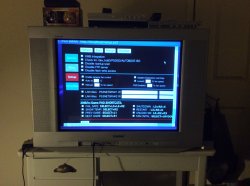
IMG_0459.JPG

Edit: actually, why is everything empty? lol
Ahhh, needs JavaScript enabled to even see the options now.
Used to just need it to refresh the game list.

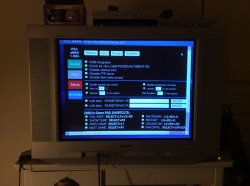
Looking better now. ;)

IMG_0460.JPG
 
Last edited:
@deank I like sman, it is fast, simple and has the options that a common user needs.

Maybe you mind if I mention this again, but I would really appreciate that the fan control will be handled like in WM, I use a lot online and I like to keep the fan at 56% always.

And try to unload sman from the menu on the right, but the same goes to SYSCON.

I appreciate your effort and your attention to the users.

----------------------------------------------------------------------------------------------------------------------
*By the way, the new interface with the colored boxes on the left looks very cool*
 
Last edited:
it's amazing how quickly this has progressed. I haven't tested sman yet. I'm still using wmm. I'm using an older version of wmm though since I don't play the ps3 at all. whenever I get around to it, I'm going to try out sman. ;) I've never really dabbled with plugins before. :)
 
it's amazing how quickly this has progressed. I haven't tested sman yet. I'm still using wmm. I'm using an older version of wmm though since I don't play the ps3 at all. whenever I get around to it, I'm going to try out sman. ;) I've never really dabbled with plugins before. :)

It's working bloody well at the moment. Especially when it comes to ntfs drives. Does everything automatically, copies covers etc. without needing prepntfs or any other external input.

Mount times are incredibly fast! Amazing compared to what things were like just a few months ago.

Right when you thought the PS3 scene would roll over and die... boom. Here comes dean like a freight train. :D

My favourite bit however is being able to have the browser exit confirmation turned on again. God that was a pain accidentally backing out of the browser completely when trying to do something.
 
I've not converted any games to iso and used ntfs before either. r there advantages to doing that or should I leave my games as jb format if they're on a fat32 drive?
 
I'd personally stick to a fat32 drive, just makes things easier when it comes to other homebrew like retro arch etc. No issues with split isos on fat32 in comparison to full sized isos on ntfs.

If all your games work as jb format it's probably not worth the time to convert them. I know isos are more compatible with cobra, but Not sure if it makes any speed difference or anything to warrant converting them if they work as is...
 
one of my ps3 hdds failed a while back, so I need to see what games r still present. that's y I started making backups shy of the hdds themselves. I don't have the money to backup hdds. I need to buy a new hdd for an enclosure I have to replace my ps3 hdd. thanks @self_slaughter .
 
I'd personally stick to a fat32 drive, just makes things easier when it comes to other homebrew like retro arch etc. No issues with split isos on fat32 in comparison to full sized isos on ntfs.

If all your games work as jb format it's probably not worth the time to convert them. I know isos are more compatible with cobra, but Not sure if it makes any speed difference or anything to warrant converting them if they work as is...
Or he can have both partitions on one drive. This avoids to split isos.
Actually i've got fat32 for pkgs, homebrews, etc
And ntfs for iso backups.
 
Didn't think windows could read multiple partitions on an external drive if you ever want to use it on a windows pc again to backup / copy files around from the second partition though? Unless things have changed.

Just sounds like more un needed hassles / complexity to me. But to each their own. :)

I'll be formatting my external back to fat32 soon. Was just trying out ntfs out of interest, but it's not for me...
 
Maybe you mind if I mention this again, but I would really appreciate that the fan control will be handled like in WM, I use a lot online and I like to keep the fan at 56% always.

And try to unload sman from the menu on the right, but the same goes to SYSCON.

Question:
someuser said:
Is there any way to keep the fan speed at unload sman? I use a lot online


Response:
deank said:
Yes, if you unload sMAN from the side-menu. Unloading it with the key-combo will let syscon control the fan, but unloading it from the GUI will set the "Manual" speed from the setup page.
 
Last edited:
Didn't think windows could read multiple partitions on an external drive if you ever want to use it on a windows pc again to backup / copy files around from the second partition though? Unless things have changed.

Just sounds like more un needed hassles / complexity to me. But to each their own. :)

I'll be formatting my external back to fat32 soon. Was just trying out ntfs out of interest, but it's not for me...
Windows can mount all fat32,NTFS partitions it wants. Without nothing to do in the case of an external hdd with one NTFS and one fat32 partitions.

Like you said to each their own complexity :)
 
Windows can mount all fat32,NTFS partitions it wants. Without nothing to do in the case of an external hdd with one NTFS and one fat32 partitions.

Like you said to each their own complexity :)

Ahh, very cool. Learn something new everyday. :)

Need to brush up on my windows skills, but god I hate it.
Especially windows 10 with them acting like Sony and removing features every update from the pro version to make their enterprise edition more "appealing" lol

Question:

Response:

Just tried that and it doesn't work. Goes back to Syscon no matter how you unload it for me.

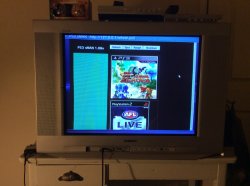
Edit: haha, wow those side buttons get huge depending what's on screen.
Took 13 seconds of scrolling to get past the first green button on the games screen. :D

Things show a lot differently when JavaScript is enabled from the get go. lol

IMG_0461.JPG
 
Last edited:
It should look much better now. You have a very early build. It now doesn't use tables, but I rewrote everything with css. Not really gorgeous, but still simple and lite. Shows 99% the same on the PC and on the PS3 now. Also it fits perfectly even in SD resolution (720x576). :)

sman_setup.jpg


Without Javascript the Setup page cannot be used (because js is used to set current options/values), but all other functions are ok.
 
Last edited:
It's working bloody well at the moment. Especially when it comes to ntfs drives.

I'm having a hard time trying to run backups from an external NTFS formatted USB HDD (1TB).

I have all backups in folder format, do I need to have them in ISO?
AFAIK backups should reside in GAMES/GAMEZ folder, I'm I right?
Does fragmentation affect the performance?
 
Always when I put a new game and scan the HD the green led flashes in yellow is this normal?
 
I'm having a hard time trying to run backups from an external NTFS formatted USB HDD (1TB).

I have all backups in folder format, do I need to have them in ISO?
AFAIK backups should reside in GAMES/GAMEZ folder, I'm I right?
Does fragmentation affect the performance?
JB format games have never been supported on ntfs drives. Use iso only. JB folder is a legacy format anyway & except for game modding there is no good reason to use it, especially with Cobra. On top, you cannot use psnpatch to disable the cfw with a number of JB folder games because as soon as the Cobra hooks are removed, those games won't run anymore. You will never get that kind of issue with iso.

Generally speaking fragmentation always has an impact on capacity and/or performance. However fragmentation is a broad term & I assume that you are referring in particular to file system fragmentation which is a special case of data fragmentation.
Both fat32 & ntfs file systems will produce fragmentation. Although ntfs is supposed to be better at dealing with fragmentation, in practice I never found it any different. The allocation table & general management are a lot better than in fat32 but fragmentation remains a problem. Check this out.
http://www.condusiv.com/disk-defrag/fragmentation-impact/

It's important to note that if your ntfs drive is full of large iso files, the Fragmentation should never be as bad as a fat 32 drive with thousands of files for each JB folder game.
Also when using a lot of small files (like JB folder files) the cluster size chosen during partitioning will have a direct impact on potential Fragmentation down the line.
 
Back
Top