Sir,
I thank your answer.
That is what I would like to do, contact the developer (user Boon Tobias), who has recently published the USB version of SNESTICLE in the specific post that I linked. And for that I registered into this forum as I am new into the PS scene. However, I do not have yet the rights to write in that post, or to send him a DM. That why I kindly asked for mi OP message to be copied in that post.
Also, I am not blaming any developer, as I thank them for their efforts. This user published 2 (testing) revised versions that con run completely on USB, quoting "one that saves games to SRAM (saves them to the MC) and only supports FAT32 storage, and another that doesn't save SRAM but supports both FAT32 and exFAT thanks to the use of BDM Assault". Tested in slim models and works perfectly, but I wanted to know a solution, or at least to inform the developer, that it doesnt work in Fat models.
Regarding the USB drivers, i thought that WLaunchelf was the one including them, as they allow me to navidate to the usb (MASS) and launch elf executables from there, like SNESTICLE one.
ps, when I mentioned "alternative", I meant an alternative course of action to the one I have tried, which was USB test revision from USB. Is it the default one which I should have tried? Yes, but I just got into PS scene. Lesson learned and move forward.
Hope I clarified my situation. I am only looking for information and, if possible, working solutions.
Hi, sorry to see this so late...
Well... first of all I have very little knowledge so it is very likely that there are many errors in the script... but in summary as Berion explains you can't read the USB without first loading its driver... but since SNESticle doesn't reset the IOP you can reuse these in SNESticle itself... so if you run uLE/wLE before SNESticle or RadShell you will have those drivers working...
Now come the problems... when you start SNESticle it loads the drivers from the PS2 ROM (peripherals and other things) and then loads its own drivers "MCSAVE.IRX" and "CDVD.IRX"... the latter are omitted by simply removing the ".irx" files but those that are loaded from the ROM can only be omitted by modifying the SNESticle source code... since making modifications to the source code is very difficult the alternative is to load the USB drivers from another application... The ideal would be to use uLE/wLE since they contain all those drivers, but unfortunately there are conflicts between the drivers when SNESticle reloads from the PS2 ROM... the quick solution... use RadShell, which is capable of saving the drivers in memory, resetting the IOP, reloading only the necessary drivers (previously saved in memory), and launching SNESticle without the drivers that generate conflicts or those that SNESticle itself will launch from the PS2 ROM.
The correct thing to do would be to modify uLE/wLE to load the necessary drivers and launch SNESticle (automatically). Due to time constraints and some library issues, I didn't do it this way... I only added a wLE that launches RadShell automatically in order to load the USB drivers before launching RadShell, and thus be able to control which drivers to load and which to remove from memory to avoid conflicts.
I don't know why RadShell fails to load USB drivers on FAT consoles, maybe there's a conflict with RadShell's own drivers or the script. There's nothing left to do but experiment... Maybe using the ROM drivers, honestly, I don't know...
You can try other drivers or modify the script... In the fat32 version, I commented out some lines that load the HDD drivers. You can test with those lines (also add the necessary .irx files) and hexadecimal edit SNESticle.elf so it reads the HDD instead of the USB. I don't have a FAT console to do those tests...
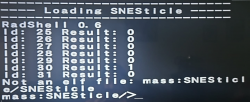
In the photo you passed on the right, you can see a number... 0 means the driver loaded correctly, but 1 means there was an error. You can check the script and see which one failed based on its loading order and the order in the script (maybe there's a problem with the loading order with FAT consoles or it requires other drivers) in your case, you are using the fat32 version, the one that fails is "ps2dev9.irx"...
But I can't help you, We just have to wait for someone with more experience to do a better job (more polished and stable). I only believe this as proof that a USB version of SNESticle is perfectly possible, but it's far from being a final project; as I mentioned, it's very experimental.
PS: You'll also get a black screen if you use an HDMI adapter... you have to launch GSM before SNESticle; that can also be added so it runs before SNESticle.
And thanks Berion for warning and shedding light.