Retro Sonic Mania (Dreamcast)

On the Wii port you can use the GameCube controller and the button to enable it is the 'Z' button.

I just asked a couple of friends. it's the Y button on the dreamcast controller. it's forced on, so need for a settings.ini edit. you can only enable stage select once the title screen is full loaded, so after press start appears. they said after plus appears, but I gave you the non plus version. hopefully, it doesn't force you to have plus for stage select, since encore stages can be accessed in there.
 
I just asked a couple of friends. it's the Y button on the dreamcast controller. it's forced on, so need for a settings.ini edit. you can only enable stage select once the title screen is full loaded, so after press start appears. they said after plus appears, but I gave you the non plus version. hopefully, it doesn't force you to have plus for stage select, since encore stages can be accessed in there.

Thank you. The Wii version I have is not plus and it works.
 
Thank you. The Wii version I have is not plus and it works.

yeah, it doesn't need to be plus. I don't know what might happen if someone selected an encore stage on non plus or if they're even listed.

here's the stage select menu:

upload_2024-8-16_14-59-51.png


upload_2024-8-16_15-0-32.png
 
Last edited by a moderator:
I know. I use it on Wii sometimes. Mostly to place monitors and use Super Sonic because I have not collected all of the emeralds. The 3D emerald stages are similar to Sonic CD, only more difficult.
Oh, I was thinking you were having trouble entering the menu on Dreamcast, because like I said, the main menu doesn't work currently in the port.

I'm going to try building mkdcdisc for windows to make this easier for people, but my computer is in the shop. They had to reinstall the os (don't know yet if that worked), so I'll be busy reinstalling everything. I did backup dkp, msys, and my Linux drives, so not all is lost. I'll post the windows version at some point or at least post whether I could build it. It works fine for doom and sm64 as well btw. There's another app like mkdcdisc, but it doesn't heavily pad the image. I think it requires kos, the Dreamcast sdk, iirc though. They made some changes recently, which may benefit mania, but I'm not sure if they've implemented them into mania yet.

I just got my computer back tonight, so I've been trying my best to reinstall everything. I kept a backup of my linux drives, msys, and dkp, and I've already put dkp and msys back on (about to start doing the linux drives, which there are five of them). anyway, I real quickly tried building mkdcdisc in msys. there's a meson build equivalent, but the problem is there is no libisofs library outside of linux, so it's impossible to make a windows version, I think.
 
Last edited by a moderator:
I just got my computer back tonight, so I've been trying my best to reinstall everything. I kept a backup of my linux drives, msys, and dkp, and I've already put dkp and msys back on (about to start doing the linux drives, which there are five of them). anyway, I real quickly tried building mkdcdisc in msys. there's a meson build equivalent, but the problem is there is no libisofs library outside of linux, so it's impossible to make a windows version, I think.
I do remember having to build a program that required libisofs on windows before, it is possible to compile a non-static build in msys2 (only in msys2 though, couldnt get it to build in msys2/mingw) in windows,
Just compile it in msys2 with
Code:
./bootstrap
./configure --prefix=/usr --disable-static
sed -i.bak -e "s/\(allow_undefined=\)yes/\1no/" libtool
make
not sure if it suits your needs or not but should allow you to compile the program you want in windows. Good luck.

EDIT:- Ok i grabbed mkdcdisc from
https://gitlab.com/simulant/mkdcdisc
and compiled it in msys2 for windows, it runs but not sure how well it works (i dont have any DC games to test it on anymore)
here is the compiled version with the required DLL's
https://drive.google.com/file/d/1EQw8OM7gYQ4IQYRaZlnGjfuLbdEsivrp/view?usp=sharing
 
Last edited:
I do remember having to build a program that required libisofs on windows before, it is possible to compile a non-static build in msys2 (only in msys2 though, couldnt get it to build in msys2/mingw) in windows,
Just compile it in msys2 with
Code:
./bootstrap
./configure --prefix=/usr --disable-static
sed -i.bak -e "s/\(allow_undefined=\)yes/\1no/" libtool
make
not sure if it suits your needs or not but should allow you to compile the program you want in windows. Good luck.

EDIT:- Ok i grabbed mkdcdisc from
https://gitlab.com/simulant/mkdcdisc
and compiled it in msys2 for windows, it runs but not sure how well it works (i dont have any DC games to test it on anymore)
here is the compiled version with the required DLL's
https://drive.google.com/file/d/1EQw8OM7gYQ4IQYRaZlnGjfuLbdEsivrp/view?usp=sharing

you compiled libtool through msys2? is that what you mean? because I got a compiler not found error, and I do have gcc installed through msys2. I'm not sure if it has something to do with just copying and pasting the old msys64 directory after a reinstall of the computer's os.

I never did get the debug menu to work on the DC, even though I enabled it in the ini setting.

sorry for the double-post, but the dc version has the debug menu enabled by default, since you can't change the ini via a cd. I'm not sure if one is created naturally or not anywhere, but the stage select screen opens with Y on flycast. I think, even now, we still have to bypass the main menu due to vram problems. I haven't seen much work on the dc version lately though, aside from those additions to the kos sdk, which I haven't updated my kos install for yet.
 
Last edited by a moderator:
you compiled libtool through msys2? is that what you mean? because I got a compiler not found error, and I do have gcc installed through msys2. I'm not sure if it has something to do with just copying and pasting the old msys64 directory after a reinstall of the computer's os.
Msys2 has libtool included with "autotools" so after installing gcc, autotools,make and iconv with Pacman i was ready to compile, so i didnt need to compile libtool, the only thing i had to compile was libisofs itself.
 
Msys2 has libtool included with "autotools" so after installing gcc, autotools,make and iconv with Pacman i was ready to compile, so i didnt need to compile libtool, the only thing i had to compile was libisofs itself.

do you have a link to the libisofs page to compile?
 
do you have a link to the libisofs page to compile?
i just downloaded libisofs from its official site
https://files.libburnia-project.org/releases/libisofs-1.5.6.tar.gz
then in msys2 i did

Code:
./bootstrap
./configure --prefix=/usr --disable-static
sed -i.bak -e "s/\(allow_undefined=\)yes/\1no/" libtool
make
make install
and that compiled it and installed it, i can post the libs i made if you want
https://drive.google.com/file/d/1T8MP6WOhPf36TI8Kme6L2Oq5yFQlTtkP/view?usp=sharing
thats the whole thing compiled already, the libs are in the
libisofs\libisofs\.libs\
folder, you can probably just run "make install" to install it on msys2 or just copy the DLL "msys-isofs-6.dll" to your bin folder and "libisofs.dll.a" + "libisofs.la" to your libs folder and then just add the include "libisofs.h" to "include\libisofs" to manually install it.
 
i just downloaded libisofs from its official site
https://files.libburnia-project.org/releases/libisofs-1.5.6.tar.gz
then in msys2 i did

Code:
./bootstrap
./configure --prefix=/usr --disable-static
sed -i.bak -e "s/\(allow_undefined=\)yes/\1no/" libtool
make
make install
and that compiled it and installed it, i can post the libs i made if you want
https://drive.google.com/file/d/1T8MP6WOhPf36TI8Kme6L2Oq5yFQlTtkP/view?usp=sharing
thats the whole thing compiled already, the libs are in the
libisofs\libisofs\.libs\
folder, you can probably just run "make install" to install it on msys2 or just copy the DLL "msys-isofs-6.dll" to your bin folder and "libisofs.dll.a" + "libisofs.la" to your libs folder and then just add the include "libisofs.h" to "include\libisofs" to manually install it.
I'm having a lot of difficulty compiling libisofs. using your commands, I get this error:
upload_2024-9-1_18-56-35.png


if I run those commands, this happens:
upload_2024-9-1_18-57-11.png


the compiler fails to work. I even tried with a fresh install of msys. if I bypass the check, it fails at make with it not being able to find iconv.h iirc. I have libiconv installed, so I don't understand what the problem is.
 
sorry for the double-post, but the dc version has the debug menu enabled by default, since you can't change the ini via a cd. I'm not sure if one is created naturally or not anywhere, but the stage select screen opens with Y on flycast. I think, even now, we still have to bypass the main menu due to vram problems. I haven't seen much work on the dc version lately though, aside from those additions to the kos sdk, which I haven't updated my kos install for yet.

I doesn't work with me. The menu button (Y) does nothing when I press it.

Anyway, I have un-hooked my DC and put it away.
 
the compiler fails to work. I even tried with a fresh install of msys. if I bypass the check, it fails at make with it not being able to find iconv.h iirc. I have libiconv installed, so I don't understand what the problem is.
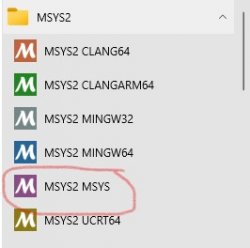
Ok first make sure you are running MSYS2 MSYS, this is important, it doesn't compile in mingw or clang or ucrt64 (outlined in red on my picture below)
MSYS.jpg
Once you are running this type
pacman -S gcc autotools libtool make libiconv-devel
And that should install everything you need, each version of MSYS2 has its own GCC so if you are installing the gcc pacage in MSYS2 MSYS you just do "gcc" but if you have it installed in mingw32 for example it would be "mingw-w64-i686-gcc" but if you had installed that gcc it wouldnt find it in the others, each is kind of sandboxed, anyway hopefully that has made it clearer and should allow you to compile, good luck.

EDIT: I will try doing a clean build in a few mins to double check this and to make sure i didn't miss any steps.

EDIT2: Ok ran it in a completely new setup (and recorded it), this is how i compile it
 
Last edited:
I got this error when I tried again. the problem originally was libiconv-devel:

View attachment 44155
as shown in the video above just run
sed -i.bak -e "s/\(allow_undefined=\)yes/\1no/" libtool
after you get that error, it will fix it (even if you ran it once you have to do it again after getting that error, for some reason after running the command once it runs configure again basically getting rid of the change, i think maybe we should run make before that line then once the error then run it maybe)
then run make again and it will compile
 
as shown in the video above just run
sed -i.bak -e "s/\(allow_undefined=\)yes/\1no/" libtool
after you get that error, it will fix it (even if you ran it once you have to do it again after getting that error, for some reason after running the command once it runs configure again basically getting rid of the change, i think maybe we should run make before that line then once the error then run it maybe)
then run make again and it will compile

okay, thanks. it compiled as did mkdcdisc in windows:
upload_2024-9-2_2-58-50.png


edit: gcc is messed up with my old msys, so I'm starting fresh.
 
okay, thanks. it compiled as did mkdcdisc in windows: View attachment 44156

edit: gcc is messed up with my old msys, so I'm starting fresh.
Congrats on getting it compiled, if it runs in msys2 msys but NOT in normal windows make sure you have all the dependency DLL's included (but default it doesnt place them in the same folder as the exe since its assuming you will run it from msys), i compiled it myself and it required
msys-2.0.dll
msys-gcc_s-seh-1.dll
msys-iconv-2.dll
msys-isofs-6.dll
msys-stdc++-6.dll
from the "C:\msys64\usr\bin" folder to be included with the mkdcdisc.exe
then your program should hopefully run without msys2 (if not grab a dependency checker). Good luck with it
 
Congrats on getting it compiled, if it runs in msys2 msys but NOT in normal windows make sure you have all the dependency DLL's included (but default it doesnt place them in the same folder as the exe since its assuming you will run it from msys), i compiled it myself and it required
msys-2.0.dll
msys-gcc_s-seh-1.dll
msys-iconv-2.dll
msys-isofs-6.dll
msys-stdc++-6.dll
from the "C:\msys64\usr\bin" folder to be included with the mkdcdisc.exe
then your program should hopefully run without msys2 (if not grab a dependency checker). Good luck with it

well, I tested it from within msys. worked perfectly:

upload_2024-9-2_12-30-15.png


btw, I tested this on flycast for android at the request of a friend. it works, but doesn't work. I'm not sure of the reason, but the game boots up, dev mode works, but once a stage is selected, it crashes. I used the mkdcdisc exe to make the cdi, because the main dev of flycast told me that loading an elf only works in cmdline on windows. however, it doesn't seem to work with loading a file. I had to add cd emulation to the code, so that may be the reason why it only works as cdi. I did it based on what a dev told me to edit, so it wasn't entirely my doing. I just made the change and compiled. it works fine in windows though, which is odd.

falco is working on one of the gta games right now for dreamcast, and he jokingly said that once he's dmca'd, he'll get back to sonic mania. he's not the main dev of mania though, but he's one of the main devs for kos or kallistoOS, which is the dreamcast sdk. they added some functions that may prove well for dreamcast. some of the tricks they could use could also benefit the psp version. they both suffer from lack of ram for the game. they're in the process of trying to get mania to work with sega saturn btw, but it may have to be like a demake, because that definitely has insufficient ram, and it's difficult to program for that system anyway. I've never compiled for saturn, but I'd try once something materializes.

it could be several months before a new update, because the original dev of the dreamcast version is in the process of moving iirc. btw, I found out what happens if you try selecting an encore stage on non-plus. nothing. the stage won't open at all. I forgot if I mentioned it, but apparently, there's a sega saturn version in the works. that could be interesting. the psp, dreamcast, and that version would need a major overhaul of some things from the engine due to lack of memory, if they want it to be able to do at least everything but the movies.

I heard from a dev friend that 5U is possible with this repo, but 5U requires so much more ram than 5, it probably wouldn't even boot. I built a 5U for the psp, which is similar in terms of being underpowered. it seems to work with mania fine, but I only tested it for a few moments. anyway, sonic cd, as tested by the devs, either froze or crashed instantly with 5U. the main difference between 5 and 5U is that 5U can be used for legacy versions of sonic (i.e. sonic 1, 2, and CD, not sure about nexus). I think the lead dev is in the process of moving, which is why there's been no progress for a couple months. I'll have to see if falco is still around. he may be taking a sabbatical.

GPF's github uploaded a new build that has controller support

GPF's github uploaded a new build that has controller support

He said in discord that he got the controller support from Xinerki's PSP fork too

 
Last edited by a moderator:

Similar threads

Back
Top