PS3 SYSCON Tutorial (Windows)

Hi,

I have CECHL04

Issue was graphical glitches/freezes, then GLOD, just got image while doing the testing with graphical glitches. My AV cable only arriving tomorrow to test. I did 1 x net tokin on RSX and got the screen now doing bringup.

Here is my original errlog (it is now repeating 1200 while doing more testing:

01 00000000 A0801200 Thermal Cell
03 00000000 A0802131 2D1846D2 Thermal Sensor, RSX
04 00000000 A0801200 Thermal Cell
06 A0802124 AV
07 A0801002 (Power RSX
08 A0802124 AV
09 A0801002 Power RSX
0A 2124 AV
0C 1002 Power RSX
0D 2022 - DVE - early GLOD
0F 2124 AV
10 1002 Power RSX
11 2124 AV
12 1002 Power RSX
13 2124 AV
15 1002 Power RSX
16 2124 AV
18 1002 Power RSX
19 2124 AV
1A 1002 Power RSX
1B 2124
1D 1002
1E 2124

No errors during bringup, powerstate has PCI and PCIex = off
 
thank you for all of this information!
do i need to disable internal SYSCON access before putting my console back together?
 
thank you for all of this information!
do i need to disable internal SYSCON access before putting my console back together?
no, it'll be enabled from now on. You can auth in to either CXR or CXRF without having to enable that byte ever again. It was only there to limit access
 
My syscon wont log new errors. Here is a backstory. I followed the guide, and managed to get some error codes out. But the last error code was 2019, whenever I booted up the console and got YLOD, there wasn't any new log. So I fond someone saying u might need to clear the list, so I did that. And after that nothing, the list stays empty and wont log anything on it. Btw the ps3 is a fat model CECHK04
So it's YLOD, but not registering any errors?
 
Hi, I tried to follow the tutorial to read the syscon but when I tried to use the auth-command to get into internal mode I only got the response "scopen response invalid"
I tried typing it in upper-case and lower-case letters but got the same result

I did successfully get into external mode and enabled internal mode but now I'm stuck and am not quite sure what to do.
I made sure that I changed the right byte when I enabled internal access mode.
My Board is a COK-001
 
Hi, I tried to follow the tutorial to read the syscon but when I tried to use the auth-command to get into internal mode I only got the response "scopen response invalid"
I tried typing it in upper-case and lower-case letters but got the same result

I did successfully get into external mode and enabled internal mode but now I'm stuck and am not quite sure what to do.
I made sure that I changed the right byte when I enabled internal access mode.
My Board is a COK-001
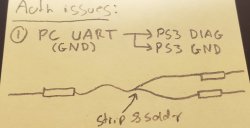
check the diag need to be wired on ground and try again
 
Hi, I tried to follow the tutorial to read the syscon but when I tried to use the auth-command to get into internal mode I only got the response "scopen response invalid"
I tried typing it in upper-case and lower-case letters but got the same result

I did successfully get into external mode and enabled internal mode but now I'm stuck and am not quite sure what to do.
I made sure that I changed the right byte when I enabled internal access mode.
My Board is a COK-001
Sometimes it get's stuck in a weird state where even if it's correct it won't auth. Technically, it means the previous serial connection wasn't closed (sc_close), before a new connection was atempted (sc_open). Which can happen if you were authed in one mode, didn't close the script, and attempted to auth into another serial connection type.

Unplug diag and auth back into CXR. Then PWR off, plug in diag, and try to auth in CXRF again. That usually fixes it.

And be sure that UART and PS3 share ground.
20240209_081531.jpg
 
Last edited:
check the diag need to be wired on ground and try again
I checked, didn't work.
I now tried it with & without ground and swapping RX and TX but I still always get "scopen response invalid"
could it be that I messed up when I enabled internal mode afterall?
 
Nevermind, I misunderstood something, thx you two^^
After actually grounding the DIAG-wire I managed to get in.

I only used Ground or DIAG before. That's probably why it didn't work.
 
Yeah, DIAG has to be tied low (ground). So you could simply short it to ground. The Ground on the adapter should be connected the the PS3 ground too, but that's just so the ps3 and pc share the same ground refrence.

Since phats have a ground prong, they typically have earth ground and dont have as many serial communication errors due to this. So I usuallt just connect the rx, tx, and UART GND to DIAG (as seen in the vid). It's only if you have issues that you need the extra GND to the PS3. Slims are bad about that, which makes sense because they dont have the earth ground prong.
 
Hello. I bring you something very crazy. Ps3 backward compatible. Console turns on without problem. I turn off with a CD inside. I turn it on again, no problem. I put in a BD, turn it off, turn it on, YLOD. If I remove the disc, the console turns on again. The console had its capacitors replaced C6019 and C6020 with error 2110.

No new error logs with this YLOD.
Only extract the disc and work again.
 
Hello. I bring you something very crazy. Ps3 backward compatible. Console turns on without problem. I turn off with a CD inside. I turn it on again, no problem. I put in a BD, turn it off, turn it on, YLOD. If I remove the disc, the console turns on again. The console had its capacitors replaced C6019 and C6020 with error 2110.

No new error logs with this YLOD.
Only extract the disc and work again.


UPDATE: I try some complete BD Drives with other flex/ribbon and same problem, with disc (cd or BD) YLOD, without boot ok. After boot read game without problems.

Normal voltages in drive connector (12.1 and 5.1).
 
Hello again. I have reflowed cpu and rsx, changed capacitors on both. And I'm still the same. I have cleaned syscon errors, and these are the ones I get WITH disk. If I remove the disk it starts without problems or errors.

 
Help Felix!can you help me determine what fault is causing it to not boot?thanks
Code:
>$ auth
Auth successful
Press Ctrl+C to exit
>$ errlog
00000000
# CODE     CLOCK
# A0111001 0B60878A
# A0111001 0B608731
# A0003001 0B607D09
# A0111001 0B606F6D
# A0111001 0B606F5B
# A0003001 0B5E12E9
# A0003001 0B5E1162
# A0111001 0B5DD8E2
# A0101001 0B5DD609
# A0403034 0B5DD4C5
# A0404402 0B5DD4C4
# A0401001 0B5DD4C4
# A0203010 0B5DD401
# A0111001 0B5DD400
# A0111001 0B5DD26F
# A0111001 0B5DD25E
# A0111001 0B5DD23F
# A0111001 0B5DD135
# A0102110 0B5DD001
# A0091001 0B5DD000
# A0093003 0B5DCFE6
# A0102110 0B5DCFCD
# A0091001 0B5DCFCD
# A0093003 0B5DCFBA
# A0093003 0B5DCFB1
# A0093003 0B5DCFA4
# A0093003 0B5DCF47
# A0093003 0B5DCF25
# A0403034 0B5DCF18
# A0404102 0B5DCF18
# A0401001 0B5DCF17

Press Ctrl+C to exit
>$ help
00000000
# B_AUTH "AUTH1"
# B_AUTH "AUTH2"
# ANY    "AUTHVER"
# A_AUTH "BOOT"
# A_AUTH "BOOTENABLE"
# A_AUTH "CID"
# A_AUTH "CSAREA"
# A_AUTH "DISABLEALLERASE"
# A_AUTH "ECID"
# A_AUTH "EEP"
# ANY    "ERRLOG"
# A_AUTH "HALT"
# A_AUTH "KSV"
# INT    "LS"
# A_AUTH "MOUNTINFO"
# A_AUTH "PDAREA"
# A_AUTH "R16"
# A_AUTH "R32"
# A_AUTH "R8"
# A_AUTH "REV"
# ANY    "SETCMDLONG"
# A_AUTH "SPU"
# ANY    "VER"
# A_AUTH "VID"
# A_AUTH "W16"
# A_AUTH "W32"
# A_AUTH "W8"
# A_AUTH "bestat"
# A_AUTH "bringup"
# INT    "buzz"
# INT    "buzzduty"
# INT    "cleareep"
# INT    "commt"
# A_AUTH "csum"
# A_AUTH "devpm"
# A_AUTH "duty"
# A_AUTH "eepcsum"
# A_AUTH "ejectsw"
# ANY    "errlog"
# A_AUTH "extend"
# A_AUTH "fanconmode"
# A_AUTH "fanconpolicy"
# A_AUTH "fanservo"
# A_AUTH "fanservosetval"
# A_AUTH "fanservostat"
# A_AUTH "fantbl"
# INT    "getrtc"
# A_AUTH "hdmi"
# A_AUTH "help"
# INT    "hversion"
# A_AUTH "hyst"
# INT    "meminfo"
# A_AUTH "nonfatalerror"
# A_AUTH "patchinfo"
# INT    "poll"
# A_AUTH "portscan"
# INT    "portset"
# A_AUTH "powerstate"
# A_AUTH "powersw"
# A_AUTH "powupcause"
# A_AUTH "r"
# A_AUTH "r16"
# A_AUTH "r32"
# A_AUTH "r64"
# A_AUTH "r64d"
# INT    "rbe"
# INT    "recv"
# ANY    "revision"
# INT    "send"
# ANY    "setcmdlong"
# A_AUTH "shutdown"
# A_AUTH "syspowdown"
# INT    "task"
# A_AUTH "thrm"
# A_AUTH "tmp"
# A_AUTH "trp"
# A_AUTH "tsensor"
# A_AUTH "tshutdown"
# A_AUTH "tzone"
# ANY    "version"
# A_AUTH "w"
# A_AUTH "w16"
# A_AUTH "w32"
# A_AUTH "w64"
# A_AUTH "wbe"

Press Ctrl+C to exit
>$ bringup
00000000
# [SSM] Bringup Start.

Press Ctrl+C to exit
>$ shutdown
00000000
# [SSM] Msg 2662 : being delayed.
# [SSM] PS0 ok.
# [SSM] Cond/Fatal received, msg=2662.
# [SSM] Fataldown Start.
# [SSM] Fataldown ok.
# (PowerOff State) (Fatal)
NG E00000E0
# [SSM] Clearfatal Start.
# [SSM] Clearfatal ok.
# (PowerOff State)

Press Ctrl+C to exit
>$ powersw
00000000
# [SSM] Bringup Start.

Press Ctrl+C to exit
>$ shutdown
00000000
# [SSM] Msg 2662 : being delayed.
# [SSM] PS0 ok.
# [SSM] Cond/Fatal received, msg=2662.
# [SSM] Fataldown Start.
# [SSM] Fataldown ok.
# (PowerOff State) (Fatal)
# [SSM] Clearfatal Start.
# [SSM] Clearfatal ok.
# (PowerOff State)

Press Ctrl+C to exit
>$
 
Help Felix!can you help me determine what fault is causing it to not boot?thanks
Code:
>$ auth
Auth successful
Press Ctrl+C to exit
>$ errlog
00000000
# CODE     CLOCK
# A0111001 0B60878A
# A0111001 0B608731
# A0003001 0B607D09
# A0111001 0B606F6D
# A0111001 0B606F5B
# A0003001 0B5E12E9
# A0003001 0B5E1162
# A0111001 0B5DD8E2
# A0101001 0B5DD609
# A0403034 0B5DD4C5
# A0404402 0B5DD4C4
# A0401001 0B5DD4C4
# A0203010 0B5DD401
# A0111001 0B5DD400
# A0111001 0B5DD26F
# A0111001 0B5DD25E
# A0111001 0B5DD23F
# A0111001 0B5DD135
# A0102110 0B5DD001
# A0091001 0B5DD000
# A0093003 0B5DCFE6
# A0102110 0B5DCFCD
# A0091001 0B5DCFCD
# A0093003 0B5DCFBA
# A0093003 0B5DCFB1
# A0093003 0B5DCFA4
# A0093003 0B5DCF47
# A0093003 0B5DCF25
# A0403034 0B5DCF18
# A0404102 0B5DCF18
# A0401001 0B5DCF17

Press Ctrl+C to exit
>$ help
00000000
# B_AUTH "AUTH1"
# B_AUTH "AUTH2"
# ANY    "AUTHVER"
# A_AUTH "BOOT"
# A_AUTH "BOOTENABLE"
# A_AUTH "CID"
# A_AUTH "CSAREA"
# A_AUTH "DISABLEALLERASE"
# A_AUTH "ECID"
# A_AUTH "EEP"
# ANY    "ERRLOG"
# A_AUTH "HALT"
# A_AUTH "KSV"
# INT    "LS"
# A_AUTH "MOUNTINFO"
# A_AUTH "PDAREA"
# A_AUTH "R16"
# A_AUTH "R32"
# A_AUTH "R8"
# A_AUTH "REV"
# ANY    "SETCMDLONG"
# A_AUTH "SPU"
# ANY    "VER"
# A_AUTH "VID"
# A_AUTH "W16"
# A_AUTH "W32"
# A_AUTH "W8"
# A_AUTH "bestat"
# A_AUTH "bringup"
# INT    "buzz"
# INT    "buzzduty"
# INT    "cleareep"
# INT    "commt"
# A_AUTH "csum"
# A_AUTH "devpm"
# A_AUTH "duty"
# A_AUTH "eepcsum"
# A_AUTH "ejectsw"
# ANY    "errlog"
# A_AUTH "extend"
# A_AUTH "fanconmode"
# A_AUTH "fanconpolicy"
# A_AUTH "fanservo"
# A_AUTH "fanservosetval"
# A_AUTH "fanservostat"
# A_AUTH "fantbl"
# INT    "getrtc"
# A_AUTH "hdmi"
# A_AUTH "help"
# INT    "hversion"
# A_AUTH "hyst"
# INT    "meminfo"
# A_AUTH "nonfatalerror"
# A_AUTH "patchinfo"
# INT    "poll"
# A_AUTH "portscan"
# INT    "portset"
# A_AUTH "powerstate"
# A_AUTH "powersw"
# A_AUTH "powupcause"
# A_AUTH "r"
# A_AUTH "r16"
# A_AUTH "r32"
# A_AUTH "r64"
# A_AUTH "r64d"
# INT    "rbe"
# INT    "recv"
# ANY    "revision"
# INT    "send"
# ANY    "setcmdlong"
# A_AUTH "shutdown"
# A_AUTH "syspowdown"
# INT    "task"
# A_AUTH "thrm"
# A_AUTH "tmp"
# A_AUTH "trp"
# A_AUTH "tsensor"
# A_AUTH "tshutdown"
# A_AUTH "tzone"
# ANY    "version"
# A_AUTH "w"
# A_AUTH "w16"
# A_AUTH "w32"
# A_AUTH "w64"
# A_AUTH "wbe"

Press Ctrl+C to exit
>$ bringup
00000000
# [SSM] Bringup Start.

Press Ctrl+C to exit
>$ shutdown
00000000
# [SSM] Msg 2662 : being delayed.
# [SSM] PS0 ok.
# [SSM] Cond/Fatal received, msg=2662.
# [SSM] Fataldown Start.
# [SSM] Fataldown ok.
# (PowerOff State) (Fatal)
NG E00000E0
# [SSM] Clearfatal Start.
# [SSM] Clearfatal ok.
# (PowerOff State)

Press Ctrl+C to exit
>$ powersw
00000000
# [SSM] Bringup Start.

Press Ctrl+C to exit
>$ shutdown
00000000
# [SSM] Msg 2662 : being delayed.
# [SSM] PS0 ok.
# [SSM] Cond/Fatal received, msg=2662.
# [SSM] Fataldown Start.
# [SSM] Fataldown ok.
# (PowerOff State) (Fatal)
# [SSM] Clearfatal Start.
# [SSM] Clearfatal ok.
# (PowerOff State)

Press Ctrl+C to exit
>$
What model console and Motherboard is it? Sherwood clearly, but having a 1001 at step #11 is suspect. I might think CPU tokins, but only phats have them and you didn't mention any behavior or history. Was it full of dust? Did this happen suddenly or over time. What work have you done to it?

The 3034 and 3010's make me think CPU. The 1001 at step #40 is related. 09 1001/3003 are usually CPU core related too. So tokins possable, if that model has them. But that doesn't cause 3034 or 3010.

Was it reflowed? I'm guessing. Need more context.
 
Last edited:
Does anyone know of anyone that has programmed a microcontroller with a LCD/LED screen attached that can display (and ideally store) CPU/GPU temps as well as error codes straight from the syscon? I was contemplating doing it myself however first I wanted to ask if anyone has done it, also, I just had my first biological child (I already have 2 adopted nephews) so my free time isn't very much these days. I would love to have this information accessible in a means other than my computer. Thanks!
 
you can jailbreak and use CFW to display that info on screen. Or use ps3toolset.com in a web browser to check errorlogs on a console that hasn't been jailbroken. The serial interface is mainly useful for repairing consoles that can't post to be checked via other means.
 
you can jailbreak and use CFW to display that info on screen..

I was aware of that. I was hoping to have a display off screen, as to not impede my gaming experience, with also the capability of viewing syscon information without moving my PS3 and hooking up my computer.

I was thinking of even using the trp value to flash an led or something.

Yes it's overkill, but it sounded like a fun project to attempt.
 
there's actually an unused fan led on the COK-001 motherboard, which I'm not sure the function of. But I suspect if populated would simply get brighter the higher the fan speed ramps.
 
Back
Top