

alexfree
Developer
The biggest limitation with a soft-modded Japanese PS1 or PS2 console is the lack of ability to play some PS1 games that span multiple CDs. While USA and PAL region consoles contain the no $ PSX unlock backdoor commands that allow one to just open/close the CD/DVD drive and play backups/imports as you please like real PSX CD-ROMs, Japanese consoles do not. Early Japanese PS1 consoles lack the unlock commands entirely (MottZilla looked into this), and all later Japanese consoles have them intentionally disabled and non-functional.
This is why Japanese consoles are soft-modded differently:
CD-ROM drive opened->Real Japanese PSX game inserted->Lid sensor fooled->Wobble verified->CD-ROM drive motor stopped->Backup or import inserted into stopped motor->Controller button pressed to start CD-ROM drive motor->SetSession (or SetSessionSuperUltraCommandSmash workaround for buggy CD-ROM controller firmware in early consoles) sent to update TOC->Laser re-calibrated (For later CD-ROM controller versions) manually since console has no idea a disc with different properties then the original Japanese PSX game disc was inserted->Game files read on disc and executable booted.
USA/PAL consoles are soft-modded this way:
CD-ROM drive opened->Backup or import inserted into stopped motor->CD-ROM drive closed->Disc treated as a real PSX game disc->Game files read on disc and executable booted.
So when we get a disc change screen in a multi-disc PSX game, we have a problem with the Japanese consoles. As soon as you unblock the lid sensor and tell the console the drive is open, you loose your ability to play backups or imports. When you put in the next disc, the wobble needs to be re-verified and it fails.
Next, I want to discuss how multi-disc games are handled:
Scenario 1: Some games give you a save prompt at the disc change screen. This allows you to create a save file, turn off the console, start the next disc with the soft-mod, and load that save to continue. This gives Japanese soft-mod console players a clear way to proceed and complete the game. One notable example of this is Final Fantasy VII:

Scenario 2: The disc change screen appears after a cut scene or game-play event. No option to save is given, preventing Japanese soft-mod console players from continuing the game. Notable examples include Parasite Eve (the first one) and Fear Effect. If you were to try to start the next disc from cold-boot/restart with the soft-mod and load a save from the previous disc, you get prompted by the same disc change screen to insert the previous disc.

Scenario 3: Games like Resident Evil 2, where your never prompted to do a disc change, but other functionality is unlocked on the other disc after beating it.
Workarounds are available for 'scenario 2' multi-disc games:
* Use a USA or PAL console for the disc change portion of the game.
* Extract the save file from the PS1, use an emulator to complete the disc change portion of the game, then move the save file back to the real PS1 for the rest.
* Use the 'mid-game hot-swap trick'. AFAIK I was the first to document this:
1) When the game asks you to insert disc 2, unblock the lid sensor and remove the CD.
2) Put any real authentic Japanese PSX disc into the PS1 drive.
3) Place the target disc you want to play in one hand, and whatever your using to block the lid sensor in another.
4) Block the lid sensor, freeing a hand in the process.
5) Wait until the original real Japanese PSX disc stats spinning fast (~3 seconds) and immediately swap the disc with your free hand, and put in the target disc.
The above is NOT RECOMMENDED due to swapping moving discs, and risks DAMAGING the delicate spindle motor. I did it for science before, but no longer do it. It's also not really possible for Japanese PS2s.
OK, finally, so what is this about? Parasite Eve II is also a 'scenario 2' multi-disc game (just like Parasite Eve 1). You beat the Motel boss 'Burner':

Then your supposed to hop in the truck to get to the shelter:

And... you get a glorious disc change screen preventing your Japanese soft-mod console from continuing the game:

Or... do you?? I haven't played this game in a while, realized my mistake, then I tried something. What if after the motel boss, I go to the lobby:
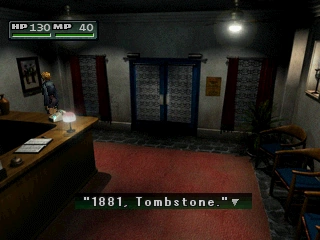
Save the game, then cold-boot Disc 2 with the soft-mod? I was really just trying to see if it would trigger the same disc change screen like Parasite Eve 1 if I attempted to load a disc 1 save with disc 2. But then:
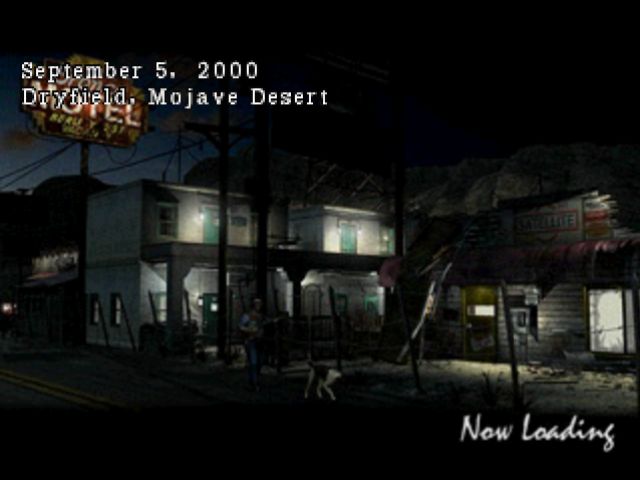
Disc 2 loaded the disc 1 save! Can I drive out of here without a disc change prompt? YES!
This was an intentional undocumented feature. Usually during disc change after wobble is verified the game checks for specific data only on Disc 2 to make sure you put in the right disc. It doesn't reload the PS-EXE or anything. Then it allows the game to continue using data from disc 2. But for some reason, with Parasite Eve II:
1) You can load a disc 1 save made after the motel boss fight on disc 2.
2) It checks if Disc 2 data is available BEFORE displaying the disc change screen.
3) If Disc 2 data is available, no disc change screen is displayed.
It's crazy to me that new things like this can be discovered in a 26 year old game. I've never seen any 'scenario 2' multi-disc game allow something like this. It's really weird disc 2 has a copy of the motel in it at all since you never go back here in the game once on disc 2…
This is why Japanese consoles are soft-modded differently:
CD-ROM drive opened->Real Japanese PSX game inserted->Lid sensor fooled->Wobble verified->CD-ROM drive motor stopped->Backup or import inserted into stopped motor->Controller button pressed to start CD-ROM drive motor->SetSession (or SetSessionSuperUltraCommandSmash workaround for buggy CD-ROM controller firmware in early consoles) sent to update TOC->Laser re-calibrated (For later CD-ROM controller versions) manually since console has no idea a disc with different properties then the original Japanese PSX game disc was inserted->Game files read on disc and executable booted.
USA/PAL consoles are soft-modded this way:
CD-ROM drive opened->Backup or import inserted into stopped motor->CD-ROM drive closed->Disc treated as a real PSX game disc->Game files read on disc and executable booted.
So when we get a disc change screen in a multi-disc PSX game, we have a problem with the Japanese consoles. As soon as you unblock the lid sensor and tell the console the drive is open, you loose your ability to play backups or imports. When you put in the next disc, the wobble needs to be re-verified and it fails.
Next, I want to discuss how multi-disc games are handled:
Scenario 1: Some games give you a save prompt at the disc change screen. This allows you to create a save file, turn off the console, start the next disc with the soft-mod, and load that save to continue. This gives Japanese soft-mod console players a clear way to proceed and complete the game. One notable example of this is Final Fantasy VII:
Scenario 2: The disc change screen appears after a cut scene or game-play event. No option to save is given, preventing Japanese soft-mod console players from continuing the game. Notable examples include Parasite Eve (the first one) and Fear Effect. If you were to try to start the next disc from cold-boot/restart with the soft-mod and load a save from the previous disc, you get prompted by the same disc change screen to insert the previous disc.
Scenario 3: Games like Resident Evil 2, where your never prompted to do a disc change, but other functionality is unlocked on the other disc after beating it.
Workarounds are available for 'scenario 2' multi-disc games:
* Use a USA or PAL console for the disc change portion of the game.
* Extract the save file from the PS1, use an emulator to complete the disc change portion of the game, then move the save file back to the real PS1 for the rest.
* Use the 'mid-game hot-swap trick'. AFAIK I was the first to document this:
1) When the game asks you to insert disc 2, unblock the lid sensor and remove the CD.
2) Put any real authentic Japanese PSX disc into the PS1 drive.
3) Place the target disc you want to play in one hand, and whatever your using to block the lid sensor in another.
4) Block the lid sensor, freeing a hand in the process.
5) Wait until the original real Japanese PSX disc stats spinning fast (~3 seconds) and immediately swap the disc with your free hand, and put in the target disc.
The above is NOT RECOMMENDED due to swapping moving discs, and risks DAMAGING the delicate spindle motor. I did it for science before, but no longer do it. It's also not really possible for Japanese PS2s.
OK, finally, so what is this about? Parasite Eve II is also a 'scenario 2' multi-disc game (just like Parasite Eve 1). You beat the Motel boss 'Burner':
Then your supposed to hop in the truck to get to the shelter:
And... you get a glorious disc change screen preventing your Japanese soft-mod console from continuing the game:
Or... do you?? I haven't played this game in a while, realized my mistake, then I tried something. What if after the motel boss, I go to the lobby:
Save the game, then cold-boot Disc 2 with the soft-mod? I was really just trying to see if it would trigger the same disc change screen like Parasite Eve 1 if I attempted to load a disc 1 save with disc 2. But then:
Disc 2 loaded the disc 1 save! Can I drive out of here without a disc change prompt? YES!
This was an intentional undocumented feature. Usually during disc change after wobble is verified the game checks for specific data only on Disc 2 to make sure you put in the right disc. It doesn't reload the PS-EXE or anything. Then it allows the game to continue using data from disc 2. But for some reason, with Parasite Eve II:
1) You can load a disc 1 save made after the motel boss fight on disc 2.
2) It checks if Disc 2 data is available BEFORE displaying the disc change screen.
3) If Disc 2 data is available, no disc change screen is displayed.
It's crazy to me that new things like this can be discovered in a 26 year old game. I've never seen any 'scenario 2' multi-disc game allow something like this. It's really weird disc 2 has a copy of the motel in it at all since you never go back here in the game once on disc 2…
Last edited:

