TrueAncestor BACKUP Retailer v2.00

hello, thanks for the post,and i´m doing all the things you say in the little tutorial, and everything seems to be fine, but when i start the game throws an 8001003d (to run the game insert the disk) error in all games i tried, please help me to solve this problem. btw i´m on ofw 4.70 so it should work fine but allways get this error.

thanks a lot for your help
 
Hi I am new to this.. but could you please tell me from where am I supposed to get the patches for the specific game?
 
Hi I am new to this.. but could you please tell me from where am I supposed to get the patches for the specific game?
I believe you can get what you need with ***PlayStation Store***.
Does your console run ofw 4.70 or ofw 4.75+?
If it's 4.70 you are ok, you can inject games directly.
If it's 4.75+, you will need another console on CFW as well to use the data transfer utility trick otherwise it won't work.
 
I am running OFW 4.80+ but I read a post about how injecting games is possible through SEX firmware. Also, where do I need to keep the DLC? I have multiple package files. The game which I am trying to inject is BLES01976_Minecraft. I found the patches here - http://consolecrunch.org/threads/minecaft-updates-fix-dlc.9392/ . Do I need to only download the patches for BLES01976 or others as well. I am really thankful for your help.

Edit- This is the link to the thread about SEX firmare http://www.ps3hax.net/showthread.php?t=100074
 
Last edited:
im having a problem when decrypting EDAT files using TrueAncestor EDAT rebuilder. When i decrypt it says it was successfully decrypted, but i can never see where the decrypted DAT file is. When using Aldostools im not able to decrypt it because of a dklic license error. Am i missing anything with your tools or is there a hidden folder the file is located in? Do i need a dklic license & if so how am i suppose to find it? Im just learning these tools & i need help please!
 
I am running OFW 4.80+ but I read a post about how injecting games is possible through SEX firmware. Also, where do I need to keep the DLC? I have multiple package files. The game which I am trying to inject is BLES01976_Minecraft. I found the patches here - http://consolecrunch.org/threads/minecaft-updates-fix-dlc.9392/ . Do I need to only download the patches for BLES01976 or others as well. I am really thankful for your help.

Edit- This is the link to the thread about SEX firmare http://www.ps3hax.net/showthread.php?t=100074
SEX method is not working
 
I am running OFW 4.80+ but I read a post about how injecting games is possible through SEX firmware. Also, where do I need to keep the DLC? I have multiple package files. The game which I am trying to inject is BLES01976_Minecraft. I found the patches here - http://consolecrunch.org/threads/minecaft-updates-fix-dlc.9392/ . Do I need to only download the patches for BLES01976 or others as well. I am really thankful for your help.

Edit- This is the link to the thread about SEX firmare http://www.ps3hax.net/showthread.php?t=100074
Not possible. SEX mode method does not work.
If you are on ofw 4.75+, you must use the data transfer utility with a console on CFW, it's the only way unless you managed to dump your idps in which case you could use ps3xport. Sorry.
 
Last edited:
im having a problem when decrypting EDAT files using TrueAncestor EDAT rebuilder. When i decrypt it says it was successfully decrypted, but i can never see where the decrypted DAT file is. When using Aldostools im not able to decrypt it because of a dklic license error. Am i missing anything with your tools or is there a hidden folder the file is located in? Do i need a dklic license & if so how am i suppose to find it? Im just learning these tools & i need help please!

The decrypted file is also in edat folder.
 
The decrypted file is also in edat folder.
It doesnt show in the folder just the encrypted edat file. I thought there was suppose to be a DAT file that appears after being decrypted. The edat file can be decrypted without becoming a DAT?
 
A lite tutorial for making a sharable backup containing a backup game:

1. place a game backup into GAMES folder, eg. BLUS31156_Grand_Theft_Auto_V.
note: no space or @#$!^&*() characters in folder name.

Sorry for my noob question, but what is game backup? - Is this an extracted contents of entire game iso-file or may be just PS3_GAME folder from it?
 
Sorry for my noob question, but what is game backup? - Is this an extracted contents of entire game iso-file or may be just PS3_GAME folder from it?
A game backup can be made in 2 usable formats, ISO & JB folder.
To use iso format, you need Cobra or Mamba. It can only be done on CFW (or with an ODE).

For game injection, JB folder format is always used. It's basically the files & folders extracted from an iso or copied from the BD disc..
Of course, the game backup has to be patched with TABR before you can inject it into your ofw ps3.
 
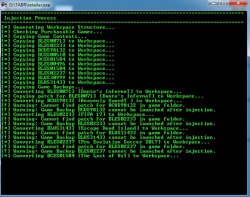
Hi, I am trying to inject multiple games (like 10 or so). Steps 1. selected ps3 backup---2. added GAMES (all)---3. added patches into game (all)---'S' then ok to inject to selected backup.... But from the second game onwards, Im getting Warning cannot find patch and a second warning game backup cannot be launched after injection. Is this normal or am I wasting my time; this wont work. I tried with 1 game via data transfer to superslim from a CFW PS3 and it works so decided to do all. If this doesnt work any other method? By the way Im using v2.15
 

Attachments

  • 123.jpg
    123.jpg
    178.3 KB · Views: 407
how to do this plzz tell brpp


same here have u fix


how to fix this error
Forget the SEX method, it will not work..

If your ofw is post 4.70 & you never extracted the idps of the console while it was still possible (up to 4.66 included) then you should either install your backups on a console on CFW or inject on a console with OFW<= 4.70 & use the data transfer utility to restore the games on the ofw console.

If ever you extracted the idps when the console was still under 4.70 then you have another option, you could use the ps3export method.
 
Back
Top