PS3 [TuT] How to sign in on OFW 4.81 or 4.82 & activate your system

Please delete everything from your Europea.txt, and replace with this:

# UK
Dest=87;ImageVersion=00000000;SystemSoftwareVersion=0.00;CDN=http://duk01.ps3.update.playstation...f37e6d29107b9a8b/PS3PATCH.PUP;CDN_Timeout=30;
I think it would be better that rather than replace the Europea.txt, those in the UK will have to create a .txt file called like "eu_uk.txt" and change the following in config.xml:
Code:
    <URL>http://fuk01.ps3.update.playstation.net/update/ps3/list/uk/ps3-updatelist.txt</URL>
    <File>C:\PS3ProxyServer\Europea.txt</File>

to

Code:
    <URL>http://fuk01.ps3.update.playstation.net/update/ps3/list/uk/ps3-updatelist.txt</URL>
    <File>C:\PS3ProxyServer\eu_uk.txt</File>

And so on for any other regions. That way you will be able to sign in with any region :P
 
Guys if someone could help me I would greatly appreciate it.
I managed finally managed to connect my ps3 to this proxy,but now I'm not too sure what to do next after going to the update screen.
I saw this thread: http://www.psx-place.com/threads/can-we-do-this-with-4-83-ofw.20974/
but because of his english I'm not too sure what to do after step 5.

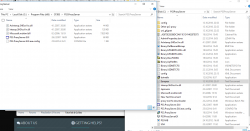
Also,could the problem be due to the fact that my installation and all the other files are in different places? (check pictures)
 

Attachments

  • ps3.png
    ps3.png
    58.7 KB · Views: 581
  • ps32.png
    ps32.png
    99.7 KB · Views: 616
Guys if someone could help me I would greatly appreciate it.
I managed finally managed to connect my ps3 to this proxy,but now I'm not too sure what to do next after going to the update screen.
I saw this thread: http://www.psx-place.com/threads/can-we-do-this-with-4-83-ofw.20974/
but because of his english I'm not too sure what to do after step 5.

Also,could the problem be due to the fact that my installation and all the other files are in different places? (check pictures)
You do not need to install anything.
Just extract the package in C:\PS3ProxyServer (avoid ps3.proxyserver, which have a . petween ps3and proxyserver)
The program that you have to execute is PS3.ProxyServer.GUI. I repeat, do not install anything. Unless you need dotnetfx, in that case, install dotnetfx.exe.
 
Same method here! :rapture:

However, I assume we are not able to play online as is, right? Game servers might ask to the PS3 its version, and BOOM! Banned because on 4.8x and not 4.83. How can we avoid to get banned, or can we ensure that the proxy will communicate to all request that we are on 4.83?
BUMP!

How can we avoid to get banned, or can we ensure that the proxy will communicate to all request that we are on 4.83?
I assume we are not able to play online as is, right? Game servers might ask to the PS3 its version, and BOOM! Banned because on 4.8x and not 4.83.
 
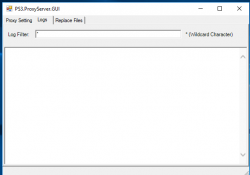
I'm doing exactly that,and it's still logging the stuff when I go to system update.
What I'm asking is,what do I do now,how do I trick it into thinking that I'm running 4.83 (I'm on 4.82)
I don't care about online play,I'm only doing it so I can sign in and activate the system,so that I'm able to do rest of HAN process
 

Attachments

  • Screenshot_29.png
    Screenshot_29.png
    18 KB · Views: 538
Something is wrong with your server as it is not catching the incoming request.
Download the package uploaded to Mega. This one.

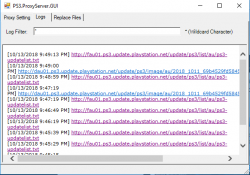
If working correctly, the log should look like this (USA.txt is replaced by your region):
Code:
[10/12/2018 6:49:36 PM] http://fus01.ps3.update.playstation.net/update/ps3/list/us/ps3-updatelist.txt -> C:\PS3ProxyServer\USA.txt
[10/12/2018 6:49:28 PM] http://fus01.ps3.update.playstation.net/update/ps3/list/us/ps3-updatelist.txt -> C:\PS3ProxyServer\USA.txt

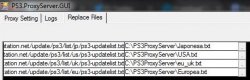
Take a look in REPLACE FILES tab, it should look like this:
example2.JPG

Are you from the uk? Go to the root directory where the proxy is located (Should be C:\etc), open config.xml and replace all its content with this:
Code:
<?xml version="1.0" standalone="yes"?>
<ReplaceFiles>
  <Item>
    <URL>http://fjp01.ps3.update.playstation.net/update/ps3/list/jp/ps3-updatelist.txt</URL>
    <File>C:\PS3ProxyServer\Japonesa.txt</File>
  </Item>
  <Item>
    <URL>http://fus01.ps3.update.playstation.net/update/ps3/list/us/ps3-updatelist.txt</URL>
    <File>C:\PS3ProxyServer\USA.txt</File>
  </Item>
  <Item>
    <URL>http://fuk01.ps3.update.playstation.net/update/ps3/list/uk/ps3-updatelist.txt</URL>
    <File>C:\PS3ProxyServer\eu_uk.txt</File>
  </Item>
  <Item>
    <URL>http://feu01.ps3.update.playstation.net/update/ps3/list/eu/ps3-updatelist.txt</URL>
    <File>C:\PS3ProxyServer\Europea.txt</File>
  </Item>
</ReplaceFiles>

Then create a new .txt file, name it eu_uk.txt, paste this inside, save it, and run again the proxy:
Code:
# UK
Dest=87;ImageVersion=00000000;SystemSoftwareVersion=0.00;CDN=http://duk01.ps3.update.playstation...f37e6d29107b9a8b/PS3PATCH.PUP;CDN_Timeout=30;

If you are not from the UK but another country, with the aforementioned you have enough tools to accomplish your goal, just replace the store code.
 
Sweet. Just tested and got this to work, can sign in and play online now with my 4.82 HAN system. To those having trouble getting this running, install the .net it comes with. Also, before extracting, create a folder in C: titled "PS3ProxyServer" then extract the contents of ps3.proxyserver to the new folder you have created.

On a side note, I was wondering if it would be possible to use this app on Linux? Maybe with WINE / PlayonLinux?? I'd hate having to dualboot into windows just so I can launch an application to play online lol. Maybe I'll test that out myself, been wanting to get PKGLinker 2.0 running on linux as well.
 
can anyone help me here it say connection error 80028EA6 on ps3 and also no logs in ps3proxyserver.

Edit: same IP with my ps3 and pc. Obtaining Ip address succeeded but internetc connection failed in ps3
 

Attachments

  • Untitled.png
    Untitled.png
    12.6 KB · Views: 547
Hi, my PS3 is 4.81. I'm about to install Han, but I'm stuck at the first step - sign into PSN. I cannot sign in without updating to 4.83 - dead loop.

So I downloaded the proxy tool, and made a new txt file with the following content (I live in New Zealand)

# AU/NZ
Dest=89;ImageVersion=0000000;SystemSoftwareVersion=4.8300;CDN=http://dau01.ps3.update.playstation...f37e6d29107b9a8b/PS3PATCH.PUP;CDN_Timeout=30;


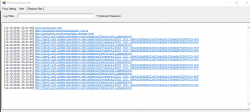
and I believe the proxy software is running correctly since it receives incoming request from ps3, please see screen shot attached.

However, I still cannot sign into PSN. The 'Update System Software' message keeps coming out. Could anyone help? Thanks!
 

Attachments

  • upload_2018-10-13_23-55-2.png
    upload_2018-10-13_23-55-2.png
    63.1 KB · Views: 600
Doing the same thing you said, gives this error...


maybe it's Windows 10 specific issue?

gonna try it on Windows XP VM

EDIT: I don't know what magic you did. but it didn't work for me. lol


تم الإرسال من D6503 باستخدام Tapatalk
9704661dc1e987308d74387d97ae7c96.jpg

Use the installer package instead then navigate C: programs files x86 > CF3B5 folder > PS3.ProxyServer > click PS3.ProxyServer.GUI
>set ip leave port and start
>then set proxy and ps3 (wired connection)
>PROFIT :)
 
Yes. the same link

تم الإرسال من D6503 باستخدام Tapatalk
Bro just create a new folder in C: and name "PS3ProxyServer" then open ps3.proxyserver.rar and the contents inside to the
PS3ProxyServer folder you created. Set ip and start
 
Use the installer package instead then navigate C: programs files x86 > CF3B5 folder > PS3.ProxyServer > click PS3.ProxyServer.GUI
>set ip leave port and start
>then set proxy and ps3 (wired connection)
>PROFIT :)
Thanks but it's already fixed.. the error was due to my ps3 region was UK.

also no need for wired. wifi also works [emoji6]

تم الإرسال من D6503 باستخدام Tapatalk
 
Hi, my PS3 is 4.81. I'm about to install Han, but I'm stuck at the first step - sign into PSN. I cannot sign in without updating to 4.83 - dead loop.

So I downloaded the proxy tool, and made a new txt file with the following content (I live in New Zealand)

# AU/NZ
Dest=89;ImageVersion=0000000;SystemSoftwareVersion=4.8300;CDN=http://dau01.ps3.update.playstation...f37e6d29107b9a8b/PS3PATCH.PUP;CDN_Timeout=30;


and I believe the proxy software is running correctly since it receives incoming request from ps3, please see screen shot attached.

However, I still cannot sign into PSN. The 'Update System Software' message keeps coming out. Could anyone help? Thanks!


Just change

SystemSoftwareVersion=4.8300

to

SystemSoftwareVersion=0.00
 
Hi guys the method offline working on 4.82 ofw?? so sign in to psn offline
I don't know how you sign in offline.. it doesn't make sense.. you need to be connected to internet, so you can communicate with PSN servers..

maybe you are referring to localproxy?


Yes it works


تم الإرسال من D6503 باستخدام Tapatalk
 
Back
Top