
ShaolinAssassin
Developer
Thnks! I'm from Brazil too! But I can't find any link to download the update fileDo you have a link?
http://www.psdevwiki.com/ps3/4.82_CEX

Thnks! I'm from Brazil too! But I can't find any link to download the update file
Thanks for the tip! I've updated the system and the Proxy Server works just fine nowUpdate to 4.82 (offline update method) and test again
Enviado de meu Moto G Play usando o Tapatalk

Thank you so much!

# MX
Dest=88;ImageVersion=00000000;SystemSoftwareVersion=0.00;CDN=http://dmx01.ps3.update.playstation.net/update/ps3/image/mx/2018_1011_69b4529fd584523cf37e6d29107b9a8b/PS3UPDAT.PUP;CDN_Timeout=30;http://fmx01.ps3.update.playstation.net/update/ps3/list/mx/ps3-updatelist.txtI'm Brazilian. I have a Mexican console (bought it in Mexico), so probably that's why my region on the updatelist.txt is MX. But I'm not sure, maybe all Brazilian consoles are MX? I really have no idea if this code is dictated by hardware or by IP/geographic location.
This is a little step-by-step on how do I managed to get it working:
1. Create a new .txt file inside the Dest folder. Name it mx_88.
2. Open with Notepad.
3. Paste this, then save:
4. Open PS3.ProxyServer.GUI and go to the Replace Files tabCode:# MX Dest=88;ImageVersion=00000000;SystemSoftwareVersion=0.00;CDN=http://dmx01.ps3.update.playstation.net/update/ps3/image/mx/2018_1011_69b4529fd584523cf37e6d29107b9a8b/PS3UPDAT.PUP;CDN_Timeout=30;
5. Click Add.
6. There are two lines where you can type in. Pastein the first (left) one, then click the little dot on the right line so you can select a file. Choose the mx_88.txt you just created.Code:http://fmx01.ps3.update.playstation.net/update/ps3/list/mx/ps3-updatelist.txt
7. Go back to Proxy Setting, type in your IP, check PS3 Mode then click START. Do the procedure on PS3 and you're done.
Haven't tried playing online, but it synced trophies normally. So I guess it's working perfectly. Thank you all for such a great tool!
Hey man I am currently on 4.82 and as you know 4.83 has released ..I want to sign in ..I used same method but when I search for update via intenint it still shows 4.83 is available to update...It would be great if you could help1. Download this proxy server.
2. Download and install .net Framework 1.1 from here
3. Type ipconfig in cmd and get your computer's local ip address . example

4. Run PS3.ProxyServer.GUI as admin and paste the ip address there
5. Setup manual connection on your ps3 and use the same address and the port in the proxy settings.
6. In PS3.ProxyServer.GUI select ps3 mode and start and allow through firewall

7. Check for update on ps3 and it should say that you are on the latest one.
8. Create a user and then use a throwaway account to sign in and activate system in account management.
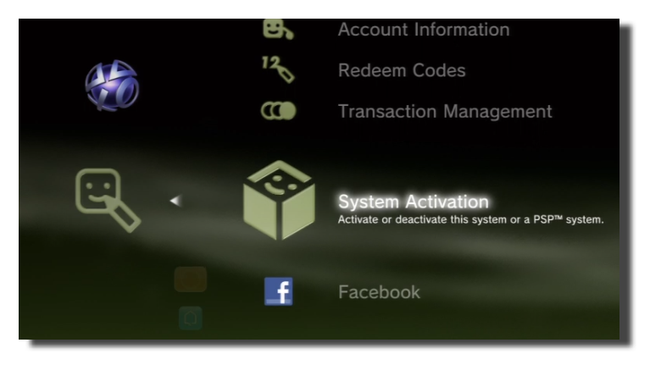
Note: This is only for 4.81 users only and if it doesn't work pm me. Try disabling your firewall as well. If you want to use on other versions, pm me as well.
EDIT:
you can now go to https://web.archive.org/ to get the updatelist.txt for older versions. Get the links from 'config.xml'.

Hey man I am currently on 4.82 and as you know 4.83 has released ..I want to sign in ..I used same method but when I search for update via intenint it still shows 4.83 is available to update...It would be great if you could help

If I'm not mistakin'My console is bought on an auction from germany. How to find what region i have to use?
Nope but I bought it from same region I'm living in ..I Live in India...And how can I find from which region does my PS3 belong?Have you tried to change your region as "Gabriel2Silva" did two posts before this?
My console is bought on an auction from germany. How to find what region i have to use?
 Thank you developers and everyone hope i helped
Yes, it works for 4.82 OFW.I know this says 4.81 ofw. But is there a possibility for it to work for ofw 4.82?
Hello.my ps3 super slim is south asia version how to use ps3 proxy server.as it does not have south asia text filedownload now and try. it should work now @Ahab
I dont see south asia file in it will it work for south asian consoles.download now and try. it should work now @Ahab

Hello.my ps3 super slim is south asia version how to use ps3 proxy server.as it does not have south asia text file


