• PS3HEN is now supporting 4.93 Firmware

    View Official Release Post for additional information HERE

PS3HEN [Tutorial] [PS3HEN] The Great Ps3 HEN All in One Guide

That's my problem, it's not allowing me to re-install HFW or OFW.. so that's why I'm a asking wether I should reset my system..
The Error Code is: (8002f957)
that code means that you lost jailbreak. so right now, it should only accept OFW or HFW pups.

i suggest to try HFW 4.88 from safe mode (recovery). do not use any USB hubs or extra devices. only plug in the controller and USB memory stick.

i am recommending HFW because, if you can get it installed, you can at least install HEN afterwards. HERE is a link to HFW 4.88 if you need it. (make sure that you extract the pup file from the downloaded rar.)
 
Im rlly losing my mind; when I try to install HFW, it says corrupted data.. so its technically not allowing me to install HFW, will resetting the hard drive help?? ill even upload a video of what im going through If you'd like.
 
i am not sure if it might help, but it can't hurt i guess. you might even try formatting it a computer first. does not matter what format (fat322/ntfs/whatever) because ps3 will format again.

Accidentally formatted my PS3 without backing it up.. f*king lost all my game saves etc.. but it most certainly did format it, I just completed the quick format, now I'm doing the full format, will update you


Sent from my iPhone using Tapatalk
 
i am not sure if it might help, but it can't hurt i guess. you might even try formatting it a computer first. does not matter what format (fat322/ntfs/whatever) because ps3 will format again.

OMG! AFTER FORMATTING MY HARD DRIVE IT STARTED TO INSTALL OFW AGAIN!!!! IM SO FKIN HAPPY RN! Now I'm gonna redo all the steps to re install CFW! Thanks a lot @Coro! You are an amazing person!
Edit: Successfully installed Evilnat 4.88 CFW! Thanks a lot Coro! Now I can atlast play my favourite PS2 Game's using my old game disks! My PS2 broke so I thought of selling my game disks but Im happy I didn't! Thanks a lot again @Coro!!


Sent from my iPhone using Tapatalk
 
Last edited:
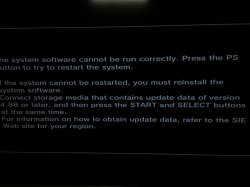
@Coro help, dunno why but whenever I turn on my PS3 this shows up.. i tried resetting it but it didn't work.. should I try updating it? It has Evilnat 4.88 CFW installed..
 

Attachments

  • image.jpg
    image.jpg
    562.2 KB · Views: 147
@Coro help, dunno why but whenever I turn on my PS3 this shows up.. i tried resetting it but it didn't work.. should I try updating it? It has Evilnat 4.88 CFW installed..
i means that the ps3 could not read the hard drive. it may be lose connection.

is the drive a SSD or a normal HDD? some ssd will have problems eventually.

IIRC you already checked the drive with s.m.a.r.t. tools but it may still be going bad in a way that the tools can not detect. try another drive if you can to see if i will work. (remember, any drive you use will be formatted by ps3.)
 
i means that the ps3 could not read the hard drive. it may be lose connection.

is the drive a SSD or a normal HDD? some ssd will have problems eventually.

IIRC you already checked the drive with s.m.a.r.t. tools but it may still be going bad in a way that the tools can not detect. try another drive if you can to see if i will work. (remember, any drive you use will be formatted by ps3.)
It's a Stock 320 GB HDD.
 
i means that the ps3 could not read the hard drive. it may be lose connection.

is the drive a SSD or a normal HDD? some ssd will have problems eventually.

IIRC you already checked the drive with s.m.a.r.t. tools but it may still be going bad in a way that the tools can not detect. try another drive if you can to see if i will work. (remember, any drive you use will be formatted by ps3.)

Uh, may I have a few examples of the 's.m.a.r.t. tools' I used? (is it PYPs3 Dump Checker?); Don't remember correctly.. also I'll checking the SATA port on the PS3 to look for some damage or smth, I also remember removing the HDD and holding it on the top where the HDD label is placed, dunno if I broke it.. if so RIP, I have 2 HDD's as of now, both of em are doing the same thing for some reason, my 500 GB hard drive has the same problem but it had this problem way before my 320 GB stock HDD received it, I don't have any more hard drives to test in so I may be in a tricky situation..


Sent from my iPhone using Tapatalk
 
few examples of the 's.m.a.r.t. tools'
my mistake, that was another user. those kind of programs check the drive' health. a free one is CrystalDisc Info. (if windows asks you to "initialize" the disk, click "no".)

it could be a hardware problem with the ps3 itself. especially if it happens with different drives. those kind of repairs are beyond my knowledge.
 
How do I connect my hard drive to my computer?


Sent from my iPhone using Tapatalk
there are SATA to USB adapters. (some usb hdd cases can easily have the drive swapped out but others may not work due to encryption.)

on desktop/tower PC, you can add a second drive if you have spare data and power cables.
 
That sucks.. I'll try getting that, also I'm just trying to update it but it's getting stuck at 98%..


Sent from my iPhone using Tapatalk
 
there are SATA to USB adapters. (some usb hdd cases can easily have the drive swapped out but others may not work due to encryption.)

on desktop/tower PC, you can add a second drive if you have spare data and power cables.
i just bought a SATA to USB 3.0 thingy and formatted it, it works now! thx a lot again!
 
I'm stuck at the first hurdle trying to install HFW on my super-slim CECH-40003A on 4.88 OFW. I get the 'latest firmware already installed' message via XMB and I can't do anything in recovery/safe mode because my only official PS3 controller is dead as a doormouse and not even working via USB (pressing reset doesn't work and I get no lights). I only have a third party gameware wired controller. It has a button called home but that doesn't seem to work. I didn't really want to buy an official controller for a ridiculous price second-hand because that would cost half the price of what the console itself is worth and I don't know anyone who has a PS3 still.

Anyway, I have some questions I'd greatly appreciate answers to:

1. Did we ever establish whether the move navigation controller can be plugged in via USB to use the PS button and get past that 'connect controller via USB' screen in recovery mode? I have the opportunity to pick one up cheap so I would greatly appreciate someone plugging it in an trying it out.

2. Does anyone know which third party controllers have working PS buttons in recovery mode?

3. Which models of PS3 can install HFW via XMB and not have to go into recovery mode?

4. Excuse my ignorance, but if the error is that the 'latest version of the firmware is already installed' couldn't the HFW be tweaked so that the PS3 thinks it is a different version? I say this because I read that the PS3 doesn't know the difference between 4.88 and 4.88.1 HFW.

5. Is there any way to tell whether HFW is installed via the PS3's internet browser or otherwise? I've read something about a BG toolset but was unclear how this applies to HEN and super-slims.

Thank you in anticipation.
 
Hello
I had the same problem with a PS3 4004A but in fact, since nothing allows you to verify the installation of the HFW 4.88, when you have the message "Firmware up to date" which appears, it means that the hybrid is correctly installed . You have to insist on installing the HEN because I had to try about 30 times before it worked. And then let's go for the rest of the tutorial.
So answer to your question 1. Good installation
 
Back
Top