
You are using an out of date browser. It may not display this or other websites correctly.
You should upgrade or use an alternative browser.
You should upgrade or use an alternative browser.

PS2 Tyrian WIP
- Thread starter Andres ruiz
- Start date

jolek
Senior Member
I'm working on the code to make an ISO file to be launched with OPL. It's a little tricky but I'm at good point. And sound is working (at least on the emulator).
Any chance for regular ELF+data files which can be launched from "mass:/" or any other folder?
Some users might have a problem with fragmentation though USB in OPL.
This way this problem can be avoided.
BTW what about do some buttons swap?
Currently:
 - Accept\Shoot
 - Cancel
Proposition:
- Accept\Shoot - Cancel
Last edited:

Andres ruiz
Member
I appreciate the work that is being done, but it would be very helpful if they made a good updated tutorial on how we can correctly port anything to the playstation 2, since I have not seen tutorials to have a chain of tools that is most up-to-date and functional. tell my request, personally I am a novice and I had many problems compiling since I do not know if I am doing it correctly
I appreciate the work that is being done, but it would be very helpful if they made a good updated tutorial on how we can correctly port anything to the playstation 2, since I have not seen tutorials to have a chain of tools that is most up-to-date and functional. tell my request, personally I am a novice and I had many problems compiling since I do not know if I am doing it correctly
PS2DEV is easy to install on a linux machine, and it setup an up to date and ready to use toolchain. Instructions are on the read.me file of the github repository.
I have a win10 laptop but use a Ubuntu Virtual Machine for all my coding stuff. Linux is a powerful tool to automate some compiling stuff with perl or python scripts (yes you can install everything on windoze, but it gets slower ans slower), while windows is useful for running some homebrew tools not avalable on linux (for PS2 i use it to make system icons and create the iso image).
For a tutorial about porting SDL games to PS2, in the Meritous sources there is all the basic examples you need.
Basic steps for porting a SDL game are:
1) add the code initialiaze the PS2 systems at the beginning of main(): in Meritous there is a .h file with the needed functons. I took them from the SDK examples but had to fix them because the SDK has changed and the examples are not updated. That .h file misses only mass init but can be easily added with the lib you used. There are things that must be initialized in a specific order to avoid conflicts, e.g. SDL joystick must be initialized before the memory card. The reason is hidden in the sources of the PS2 SDL port that I had to study to find a correct order. This is not something that can be teach to a newby
2) respect system limitation for video resolution, HW capabilitied (e.g. never use SDL HW surfaces on PS2), and file system oddities, e.g. PS2 is case sensitive like are linux machines, paths usually uses the slash (/) as separator but the CDROM uses only the backslash (\), can have no more than about 20 files in a directory, uses only capital letters and 8.3 file names format. I learned all this expermenting and using my esperience with a lot of modern and retro systems. Again this isn't something that can be taught, and with every port new strange things can happen, so you have to be ready to find a workaround using your ingenuity. This is the basic skill that defines an Engineer.
3) clean everything before exiting the program
Last thing to remenber porting games to an hacked console is that they are not resilient to using their resources out of the specs, so a single byte memory leak, or not releasing unused resources, or reading a not existing file (from CD), can hung the system or block some of its devices, so often when you port a game to such hacked system you have to clean the code written from other people.
To solve such problems you need debugging skills and without specific debugging tools you need to be creative. I spend about 4 hour of debugging for every hour spent porting.
If you have specific issues to solve I can try to help you. But consider I'll be very busy till the end of August, I'm working to two Atari Lynx games for a coding competition and I'm in terrible delay on the schedule.
Any chance for regular ELF+data files which can be launched from "mass:/" or any other folder?
Some users might have a problem with fragmentation though USB in OPL.
This way this problem can be avoided.
BTW what about do some buttons swap?
Already swapped the keys. I don't like resources on "mass:/" but can do it. Building an iso is a clean solution but I'm very disappointed by the problems with fragmented files.
For the Retroguru games I already ported I'm going to embed the resources in the elf file so to have a single file game. This way they should be easier to run and could be released in both .iso and .elf versions in the same zip package.
Can't do the same thing for Tyrian because there are a lot of files, and the code would need a big rework
Andres ruiz
Member
PS2DEV is easy to install on a linux machine, and it setup an up to date and ready to use toolchain. Instructions are on the read.me file of the github repository.
I have a win10 laptop but use a Ubuntu Virtual Machine for all my coding stuff. Linux is a powerful tool to automate some compiling stuff with perl or python scripts (yes you can install everything on windoze, but it gets slower ans slower), while windows is useful for running some homebrew tools not avalable on linux (for PS2 i use it to make system icons and create the iso image).
For a tutorial about porting SDL games to PS2, in the Meritous sources there is all the basic examples you need.
Basic steps for porting a SDL game are:
1) add the code initialiaze the PS2 systems at the beginning of main(): in Meritous there is a .h file with the needed functons. I took them from the SDK examples but had to fix them because the SDK has changed and the examples are not updated. That .h file misses only mass init but can be easily added with the lib you used. There are things that must be initialized in a specific order to avoid conflicts, e.g. SDL joystick must be initialized before the memory card. The reason is hidden in the sources of the PS2 SDL port that I had to study to find a correct order. This is not something that can be teach to a newby
2) respect system limitation for video resolution, HW capabilitied (e.g. never use SDL HW surfaces on PS2), and file system oddities, e.g. PS2 is case sensitive like are linux machines, paths usually uses the slash (/) as separator but the CDROM uses only the backslash (\), can have no more than about 20 files in a directory, uses only capital letters and 8.3 file names format. I learned all this expermenting and using my esperience with a lot of modern and retro systems. Again this isn't something that can be taught, and with every port new strange things can happen, so you have to be ready to find a workaround using your ingenuity. This is the basic skill that defines an Engineer.
3) clean everything before exiting the program
Last thing to remenber porting games to an hacked console is that they are not resilient to using their resources out of the specs, so a single byte memory leak, or not releasing unused resources, or reading a not existing file (from CD), can hung the system or block some of its devices, so often when you port a game to such hacked system you have to clean the code written from other people.
To solve such problems you need debugging skills and without specific debugging tools you need to be creative. I spend about 4 hour of debugging for every hour spent porting.
If you have specific issues to solve I can try to help you. But consider I'll be very busy till the end of August, I'm working to two Atari Lynx games for a coding competition and I'm in terrible delay on the schedule.
With the information that I provide and managed to make my first tests successfully creating an iso with sdl examples, you are right about the file system, you just have to have a little patience. I am working on njam to make it compatible with opl
With the information that I provide and managed to make my first tests successfully creating an iso with sdl examples, you are right about the file system, you just have to have a little patience. I am working on njam to make it compatible with opl
I prefer the iso file soluton, it works fine on my PS2 paying attention to not have fragmented files. But to make life easier to people I'm also working on embedding resources in the elf file (using bin2c tool).
Already have a working build of Hermes (A Retroguru game) with embedded resources. If the tester gives his ok, it will be released in about a week.
Andres ruiz
Member
I prefer the iso file soluton, it works fine on my PS2 paying attention to not have fragmented files. But to make life easier to people I'm also working on embedding resources in the elf file (using bin2c tool).
Already have a working build of Hermes (A Retroguru game) with embedded resources. If the tester gives his ok, it will be released in about a week.
what you can use is romfs to put all the resources in an elf and it will avoid the fatigue of trying in cdrom0: \\

El_Patas
Member
@Andres ruiz, from what i have seen there are several versions of the Tyrian:
1.0
1.1
2.0
2.01 / 2.1
Tyrian 2000 3.0
This port you have made it is from the latest version Tyrian 2000? which has an extra level and bug fixes?
The video mode the game uses on PS2 is PAL or NTSC?
What specific resolution is used on PS2?
Best regards.
1.0
1.1
2.0
2.01 / 2.1
Tyrian 2000 3.0
This port you have made it is from the latest version Tyrian 2000? which has an extra level and bug fixes?
The video mode the game uses on PS2 is PAL or NTSC?
What specific resolution is used on PS2?
Best regards.

jolek
Senior Member
Read "Controls" tab:
https://www.psx-place.com/resources/tyrian.943/.
https://www.psx-place.com/resources/tyrian.943/.
Andres ruiz
Member

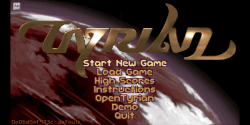
Andres ruiz
Member
Finalmente tenemos sonido y música, sin embargo, a veces, cuando hay mucha acción en la pantalla
debido a las ralentizaciones, SFX y BGM están entrecortados.
Cuando presiono :pero x:o "Salir" en la pantalla principal, solo aparece una pantalla en negro.
A veces, en las demostraciones, el juego puede congelarse (¿pérdida de memoria?):
[/CITA]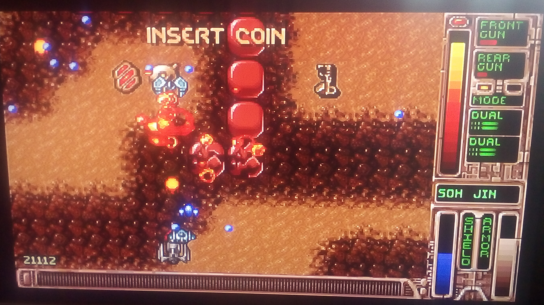
It seems that there is still something wrong with the memory, the problem is that there is no way to correctly debug the ps2.
Andres ruiz
Member
at this point i need helpPS2Link, PCSX2 and "Performance Analyser" should be helpful debugging an app.
Andres ruiz
Member
el inconveniente es que para seleccionar cualquier opción tendrás que pulsar cuadradoObtenga el menú como debería. Luego, cuando comienza un nuevo juego o presiona x en cualquier otra opción en el menú, simplemente aparece una pantalla negra
EN:
the drawback is that to select any option you will have to press squareGet the menu like it should. Then when start a new game or press x in any other option in the menu it just go into a black screen
Last edited by a moderator:
Andres ruiz
Member
:alegre:el audio funciona correctamente descargue el juego en el primer juego:vampiro sonriente:
:pero cuadrado:Seleccione
:pero x:espalda
EN:
 audio works fine download the game in the first game
- Select
- Back
:pero cuadrado:Seleccione
:pero x:espalda
EN:
audio works fine download the game in the first game - Select - Back
Last edited by a moderator:
Andres ruiz
Member
audio working ok..I am glad to share open tyrian, the functionality is 100%, it is in iso and .elf, unfortunately in the iso version it is slow in loading the data. In the case of the .elf they will have to put everything in the root of the memory, to confirm options press square. enjoy it

