
UPDATE FEB 2023 (The domain's of ** ** www.ps3xploit.net > Domain no Longer owned by team** (NEW URL = http://ps3toolset.com) > Domain no Longer owned by team** (NEW URL = http://ps3toolset.com and .com are no longer in poccession of the team, A new address will be posted in future release coverage.
Update (4) Now supporting 4.86 Fully & Issue fixed with NAND console's in rare situations
.You may recall a recent article revealing a few exclusive screenshots of bguerville's latest project, now the time has come to introduce the next evolution in PS3 Jailbreaking solutions. The PlayStation 3 Toolset by @bguerville is a new suite of tools, built upon a new PS3 exploitation framework & fueled by a new exploit discovered on the PS3 by the developer. The new exploit (and the toolset project as a whole) is compatible with all PS3 models running 4.82 - 4.86 OFW/HFW/CFW
While ps3xploit team member's @habib continued research and development of PS3HEN for nonCFW models with assistance from @esc0rtd3w, @bguerville meanwhile was working on his own research and developing other tools and exploits as you will see with this new PlayStation 3 Toolset, which thorough testing was conducted by @esc0rtd3w (whom we recently interviewed). All the team of talented devs have done some amazing work in the scene in recent years with all the PS3Xploit projects and that trend continues with this release.
The PS3 toolset is a project that @bguerville has been working on for some time,
the developer gave us a brief timeline of events since the Ps3Xploit Tools 2.0 framework (flash writer and dumper(s)) that led to this new release (see the timeline section).
Some tools in this project may offer limited features on non-CFW compatible consoles. For instance, the Flash Memory Manager includes the most functionality for CFW-compatible consoles, certain of its features are available on non-CFW models, others aren't. Features such as the dumping of flash memory (for backup purposes) and displaying of various console specific information in real-time such as the IDPS, Factory Installed Firmware version and automatic detection of your console's Custom Firmware (cfw) compatibility status are available on both CFW compatibles & non CFW compatibles console's.
Note that the PS3 Toolset does not feature PS3HEN, bguerville declared having his own plans for a HEN style solution.
The validation and safety checks have advanced greatly in this latest framework of bguerville's tools (since the release of the flashing tools in PS3Xploit v1.0 and v2.0), the toolset detects your console type and only allows the features that are compatible with your console to be used on your system, making it noob proof while also being very user friendly thanks to new automation and detection built in.
Let us now discover this release and how to use various functions of the toolset.

Update (4) Now supporting 4.86 Fully & Issue fixed with NAND console's in rare situations
.You may recall a recent article revealing a few exclusive screenshots of bguerville's latest project, now the time has come to introduce the next evolution in PS3 Jailbreaking solutions. The PlayStation 3 Toolset by @bguerville is a new suite of tools, built upon a new PS3 exploitation framework & fueled by a new exploit discovered on the PS3 by the developer. The new exploit (and the toolset project as a whole) is compatible with all PS3 models running 4.82 - 4.86 OFW/HFW/CFW
While ps3xploit team member's @habib continued research and development of PS3HEN for nonCFW models with assistance from @esc0rtd3w, @bguerville meanwhile was working on his own research and developing other tools and exploits as you will see with this new PlayStation 3 Toolset, which thorough testing was conducted by @esc0rtd3w (whom we recently interviewed). All the team of talented devs have done some amazing work in the scene in recent years with all the PS3Xploit projects and that trend continues with this release.
The PS3 toolset is a project that @bguerville has been working on for some time,
the developer gave us a brief timeline of events since the Ps3Xploit Tools 2.0 framework (flash writer and dumper(s)) that led to this new release (see the timeline section).
Some tools in this project may offer limited features on non-CFW compatible consoles. For instance, the Flash Memory Manager includes the most functionality for CFW-compatible consoles, certain of its features are available on non-CFW models, others aren't. Features such as the dumping of flash memory (for backup purposes) and displaying of various console specific information in real-time such as the IDPS, Factory Installed Firmware version and automatic detection of your console's Custom Firmware (cfw) compatibility status are available on both CFW compatibles & non CFW compatibles console's.
Note that the PS3 Toolset does not feature PS3HEN, bguerville declared having his own plans for a HEN style solution.
The validation and safety checks have advanced greatly in this latest framework of bguerville's tools (since the release of the flashing tools in PS3Xploit v1.0 and v2.0), the toolset detects your console type and only allows the features that are compatible with your console to be used on your system, making it noob proof while also being very user friendly thanks to new automation and detection built in.
Let us now discover this release and how to use various functions of the toolset.
About
Requirements & Features
Userland Tools Included
Toolset Functionality
Donations & Acknowledgements
-
PS3 Toolset by bguerville
"The PS3 Toolset is a repository project for tools built upon a new ps3 exploitation framework I have been working on for a while. More tools should be added to this repository with time.
I hope you enjoy using them as much as I enjoy making them ;-)"- @bguerville
Project Timeline:
-
End 2018, Sony patches one of the bugs the ps3xploit tools exploited to gain ROP execution. (4.83 OFW release)
- Beginning 2019, I begin to look for a replacement exploit & the release of ps3xploit tools 3.0 is postponed.
- Spring 2019, I rewrite most of the 3.0 framework to leverage the new capabilities gained with the new exploits.
- Summer 2019, realizing the potential of the newly written 4.0 framework to create flexible & powerful tools, I decide to cancel the 3.0 release altogether & scrap the 3.0 framework.
- Beginning 2020, I am releasing this "Toolset" project, as a repository for the tools created around my 4.0 framework that I deem release worthy, each tool being accessible in a toolset tab. This project is the fruit of many sleepless hours during many months, it showcases only part of the 4.0 framework capabilities though, there is still room for more surprises later... ;-)
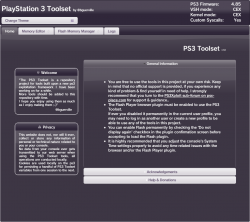
General Information about the PS3 Toolset
The initial release, contains a couple userland tools, a fully featured Flash Memory Manager & a Memory Editor (mostly for development & research purposes). A file explorer tool should be added to the repository soon, it will be the last userland tool I write for the foreseeable future
- Toolset supports all ps3 models & official firmware versions from 4.82 to 4.86 (cex & dex) *some ps3 models have exclusive features/tools (note: toolset tools will also work from CFW)
- PS3 Toolset is executed from the PS3's Web-Browser by visiting the following URL (SSL): ** www.** ** www.ps3xploit.net > Domain no Longer owned by team** (NEW URL = http://ps3toolset.com) > Domain no Longer owned by team** (NEW URL = http://ps3toolset.com > Domain no Longer owned by team** (NEW URL = http://ps3toolset.com)/bgtoolset
-
PS3 Browser Requirements
- JavaScript (Enabled from browser settings)
- Cookies (Enabled from browser settings)
-
Flash Plugin (Enabled, but this one has a few caveats that may need explaining, the good news being that the toolset will detect the issue and let you know how to proceed (if there is an issue), see further explanations below)
- If ever in the past, you agreed to load the Flash Player plugin when prompted and checked the checkbox "Do not show again", you should have no issue & will never even see the plugin popup.
- If you never before checked the "Do not show again" checkbox, you will be greeted with a popup asking you to allow the Flash player plugin. If you agree to load the plugin, the PS3 toolset should continue to load. Note that if you take more than 15s to agree when prompted by the popup, you will get a PS3 Toolset warning about the plugin being disabled even if you finally agreed to load the plugin, just refresh the page when prompted.
- If ever you got the Flash Player plugin popup in the past & selected NO and checked the checkbox "Do not show again", the Flash Player plugin will be permanently disabled, consequently the PS3 Toolset will not be able to load. Unfortunately there seems to be no official way to reset this setting in the browser. The PS3 toolset does have automatic detection of this issue and some instructions are given. Currently the easiest workaround is to create a new user profile on the XMB, when launching the toolset on the new profile, you will be greeted with the browser pop-up asking to allow the flash plugin. However it has been found that in some cases, a new user profile is not sufficient to reset the Flash Player plugin status. I hope that other devs & advanced users will look into this situation while I continue working on new tools, if nobody does, I might end up looking into the problem after the next tool release.
- If ever in the past, you agreed to load the Flash Player plugin when prompted and checked the checkbox "Do not show again", you should have no issue & will never even see the plugin popup.
- You are free to use the tools in this project at your own risk. Keep in mind that no official support is provided, if you experience any kind of problem & find yourself in need of help, I strongly recommend that you turn to the PS3Xploit sub-forum on psx-place.com for support & guidance..
- It is highly recommended that you adjust the console's System Time settings properly to avoid any time related issues with the browser and/or the Flash Player plugin.
- To avoid potential crashes, you should never attempt to close the browser while toolset operations are in progress, especially when the browser exit confirmation setting is turned off.
- PS3 Toolset only loads tools & features compatible for your console, this means no accidental use of a feature not compatible with your system.
- No local/offline version is planned & the source code will remain closed for the time being.
-
End 2018, Sony patches one of the bugs the ps3xploit tools exploited to gain ROP execution. (4.83 OFW release)
-
Requirements
- PS3 Console (Any Model) running 4.82 - 4.86 (CEX/DEX) Firmware
- Internet Connection to access Toolset from PS3's Internet Browser.
- PS3 Browser Flash Player 9 Plugin enabled (View General Information section for additional info)
- PS3 Browser Javascript enabled
- PS3 Browser Cookies enabled
Quick Overview of Toolset (v1.0.19) Capabilities:
All Models
- Display console's IDPS
- Detects Console's CFW Compatibility + Factory Installed Firmware
- Detects Internal Flash Type of console: NOR / NAND / eMMc ect...
- Detects console & firmware information
- Take's a Full dump (backup purposes) of Internal Flash
- Memory Editor tool (R&D tool)
- Patching of OFW Flash (Flash Memory Patch) for Custom Firmware Installations.
- PS3 Console (Any Model) running 4.82 - 4.86 (CEX/DEX) Firmware
-
Included Userland Tools (v1.x)
1. The Memory Editor tool v1.1
- The tool maps up all the currently loaded sprx modules segments (text & data) & allows you to browse them as well as the 2 vsh segments and the browser memory container. Users can also edit the memory as they see fit in all writable memory segments. This is mostly a R&D tool.
-
- Notice - issues caused by RAM synchronisation. The memory editor is not a live debugger, it cannot pause lv2 or userland threads execution. Consequently, the RAM can be modified by the various threads executing in userland between the moment the memory editor tool takes a snapshot of a ram range to create the hex table to display on screen & the moment the table is actually displayed on screen.This means that on rare occasions the values displayed on screen might be different from those actually in RAM. This is especially true for specific memory areas such as the browser container memory.
- There is no easy way to solve this issue, even the debugging deci3 syscalls available only in DEX would not help us much because while it would enable us to take properly synchronised snapshots of the RAM, displaying the data on screen would still require running js code in the browser, which would modify the RAM & lead to the same synchronisation problem we currently face without using the deci3 syscalls.
- I implemented code to color out the detected table cells found to be unsynced with RAM so there is as little ambiguity as possible. The text of such detected table cells is set to 'undefined'.
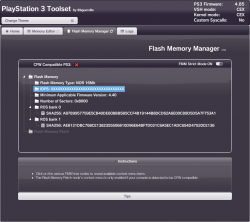
2. Flash Memory Manager v1.2 tool
- Compatible with all PS3 models (patching flash options exclusive to CFW compatible models)
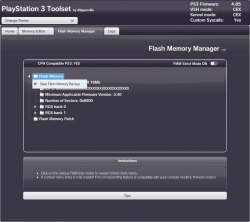
- FMM displays basic Flash Memory data in a tree.
- Clicking on appropriate tree nodes reveals context menu entries to launch the tool's features.
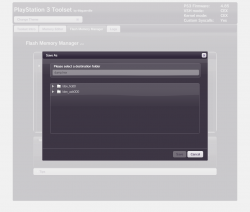
- Among other things, the manager can dump the Flash memory to file on any natively writable partition mounted on the console.
- To patch (for cfw installation) a console using the no-fsm method, users must first load a patch file in memory. That file will be checked first & if found valid, the context menu entry to apply the patch will be enabled.
There are 2 ways to acquire the correct patch file to flash.
1. it can be downloaded to disk first then loaded into memory from file & finally applied to the system
- or -2. it can be loaded via https directly to memory without using disk storage, the data is checked in RAM then if found valid, users can decide to apply it (from the unlocked menu, once file is validated by the toolset automatically).- After applying a patch, the FMM automatically dumps the 2 ROS regions it just overwrote to double check that patching was properly done.
- Progress dialogs keep the user informed of current operations & outcomes. User logs are provided in the various progress dialogs.
3. Logs v1.0 Tool
Technically the log section is also a tool of this Toolset. Its tab contains all the logs, warnings, errors & debug output of the toolset & its different tools.
- Whenever something goes wrong, it's the first place to look & screenshots can be used to identify problems.
- I also included a UDP broadcast similar to Cobra's. Users can use socat to listen on UDP to the Toolset broadcast. However for the moment, only some data gets broadcasted but not the entire contents of the log tab because of the performance impact. With the file explorer release, I plan implement a few changes to this feature as well, the UDP broadcast will be done in a separate thread & all logged data should be broadcasted to UDP.
-
Legend:
-
Displays firmware information
- PS3 Firmware: (version)
- VSH Mode: (Retail (CEX) or Debug (DEX))
- Kernel Mode: (Retail (CEX) or Debug (DEX))
-
Custom Syscalls:
- 1. detects 'Mamba' (if syscall 1022 exists)
- 2. detects 'Cobra' (if 1022 does not exist but syscall 8 works)
- 3. detects CFW (if 1022 & 8 are unavailable but syscall 6 works)
- 4. Displays 'No' (if neither sc 1022, 8 & 6 are unavailable)
-
Flash Memory
- the tree contains alot of information about any PS3 console and also provide option for taking a backup (dump) of internal flash
-
Quickly determines if your console is a NOR/NAND/eMMc type
- Displaying of console info, also note previous tools user's had to select NOR/ NAND/ eMMc Tools (depending on model), now the toolset automatically checks and detects tools needed.
-
Displays your IDPS (option to hide onscreen)
- Will display any Ps3 models IDPS
-
Displays Factory Installed Firmware
- If your console < 3.60 that means you can install CFW
-
Displays Custom Firmware Installation Compatibility,
- No longer have to check the sticker of your console and run minverpup and check min factory installed firmware, the toolset displays the compatibility of a Custom Firmware (CFW) Installation for your console.
-
ROS Bank 0/1
- Display's hash checks of ROS 0 /1 (technically the hashes are not calculated from the entire ros ranges but from the range corresponding to a noFSM patch so that ROS hashes & patch file hashes can be compared.
-
Flash Memory Patch (CFW Compatible Console Only)
- Patch Flash for CFW installations
.Flash Dumper:
- Notice - dumps should always be validated with PyPS3Checker to ensure a proper dump took place before using it for future backup purposes)
Purpose of dumping the Flash?
- Having a Clean backup of your system internal flash memory is a vital piece of information to have stored, its something that may never be used but can be extremely important in some instances where a brick occurs, having a clean backup can help restore your system along with a hardware flasher
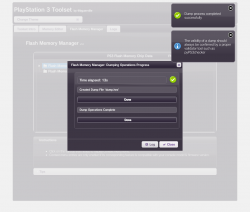
Patch Flash (aka Flash Writer Tool) - CFW compatible console's only
Purpose of patching flash?
- Patching the Flash (ROS 0/1) allows for Custom Firmware Installations on applicable models
Userland Memory Editor
Purpose of using Userland Memory Editor?
- The memory editor is a R&D tool. It's useful mostly for devs & hackers who can use it to peek/poke the RAM, either to verify certain results or to search for flaws.
Toolset detecting various PS3 models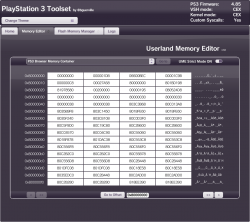
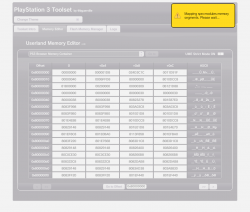
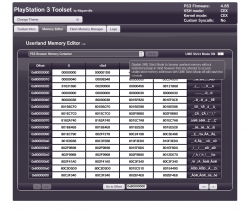
Toolset Themes Options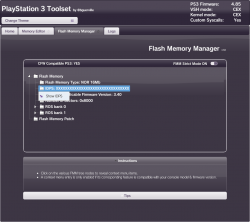
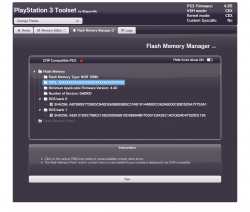
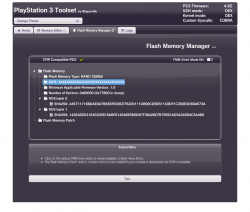
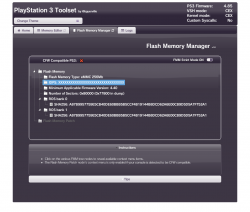
The toolset contains 4 Themes as shown below
-
Displays firmware information
-
Acknowledgements
My warmest thanks to Jason, for his friendship & support of course, but in the context of this project, also for testing my work on a daily basis, not just before this release but all year round.
The PS3 Toolset & its GUI were built in native js upon various open source js libraries including jQuery, jQueryUI, bigInteger, jstree, mCustomScrollbar, js-cookie, sjcl, switchButton & toastmessage as well as the Fork Awesome CSS icon library .
Thanks to all the coders involved in the various projects.
Thanks to all the psdevwiki contributors, scene hackers & developers who have brought us to this point.
- @bguerville
.Help and Donations
You can show your appreciation for my (@bguerville) work & help fund future projects with a donation in BTC at either of the addresses belowThank you for your support.
** www.** ** www.ps3xploit.net > Domain no Longer owned by team** (NEW URL = http://ps3toolset.com) > Domain no Longer owned by team** (NEW URL = http://ps3toolset.com > Domain no Longer owned by team** (NEW URL = http://ps3toolset.com)/bgtoolset/assets/images/qr-legacy-P2PKH.png** www.** ** www.ps3xploit.net > Domain no Longer owned by team** (NEW URL = http://ps3toolset.com) > Domain no Longer owned by team** (NEW URL = http://ps3toolset.com > Domain no Longer owned by team** (NEW URL = http://ps3toolset.com)/bgtoolset/assets/images/qr-native-segwit-BECH32.png** www.** ** www.ps3xploit.net > Domain no Longer owned by team** (NEW URL = http://ps3toolset.com) > Domain no Longer owned by team** (NEW URL = http://ps3toolset.com > Domain no Longer owned by team** (NEW URL = http://ps3toolset.com)/bgtoolset/assets/images/qr-PayNyms.pngLegacy P2PKHSegwit BECH32PayNyms
The PS3Xploit team also needs your continued help to cover its growing web hosting costs.
Please consider a donation to PS3Xploit via Paypal at https://www.paypal.me/ps3xploit
From the PS3 web browser you can access the toolset @: (SSL only)
** www.** ** www.ps3xploit.net > D... (NEW URL = http://ps3toolset.com)/bgtoolset
** www.** ** www.ps3xploit.net > D... (NEW URL = http://ps3toolset.com)/bgtoolset
UPDATE (2) - Regarding 4.86 Support via @bguerville
PS3 Toolset is fully supporting 4.86
UPDATE (3) -A limited number of user's have been complaining of errors, the information often provided by user's is incomplete, which means tracking the issue is not easy based on the information provided, Developer bguerville is asking those user's who are experiencing issue to provide a dump of the flash to diagnose a possible issue and fix for the problem, here is a thread by fellow developer @esc0rtd3w setup here to acquire those dumps from affected user's:
UPDATE (3) -A limited number of user's have been complaining of errors, the information often provided by user's is incomplete, which means tracking the issue is not easy based on the information provided, Developer bguerville is asking those user's who are experiencing issue to provide a dump of the flash to diagnose a possible issue and fix for the problem, here is a thread by fellow developer @esc0rtd3w setup here to acquire those dumps from affected user's:
Update (4) - Issues has been resolved and FMM has been updated to
v1.0.22. A fix for the handful of ppl with NAND consoles who are stuck unable to install another firmware at
** www.** ** www.ps3xploit.net > D...http://ps3toolset.com)/bgtoolset/fix_nand.php
Instructions here for NAND ISSUE:
https://www.psx-place.com/threads/bg-toolset-user-issues-and-dump-submissions.28868/
v1.0.22. A fix for the handful of ppl with NAND consoles who are stuck unable to install another firmware at
** www.** ** www.ps3xploit.net > D...http://ps3toolset.com)/bgtoolset/fix_nand.php
Instructions here for NAND ISSUE:
https://www.psx-place.com/threads/bg-toolset-user-issues-and-dump-submissions.28868/
Last edited:

 Let us know if it worked.


 |
|







