
PS3 **UPDATE** PS2 Classic GUI v2.2.3 (by Aldostools): Adds PS2 CONFIG Support

Developer Aldostools has updated one of his popular utilities to be better suited for PS3Xploit HAN (& CFW) user's, PS2 Classic GUI has been updated to version 2.1 and this update provides support for PS2 CONFIG files.The config's improves the game compatibility of the Ps2 emulator allowing for additional PlayStation 2 games to be played. So, this is a great update to make adding those config that much easier, thanks to the work in @Zar ManaGunZ (PS3 Homebrew) we have a database of PS2 Config Database already, that Aldostools has included in this download and the tool will easily be able to add available CONFIG for your PS2 Games. There is alot of great discussion on PS2 Configs in this thread about PS2 Compatibility in the psx-place forums
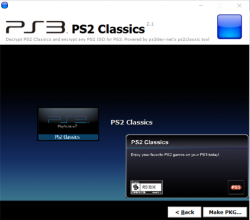
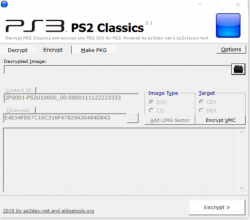
ps2classicd.png ps2classsic.png

  • New build of PS2 Classics GUI 2.2.3 to add the CONFIG.

    A set of CONFIG files taken from ManaGunZ repository are included in the archive.

    To make a PKG, simply select the ISO.BIN.ENC and the optional CONFIG file from the CONFIGS folder (included in the rar).
    The tool will auto-encrypt the CONFIG file and include it in the PKG next to ISO.BIN.ENC.
    If the game doesn't require a CONFIG, just cancel the dialog and the PKG will be made without it.

 
Last edited by a moderator:
I have a question about the config patches.To apply them to a game,do you just select the one that has the same code that matches it,for example tony hawks underground is listed on a compatability list to work with the config patches,so in the config files i would just have to find somthing that says SLUS20731? In what folder of config patches should i use,custom or gx?
 
Last edited:
I have a question about the config patches.To apply them to a game,do you just select the one that has the same code that matches it,for example tony hawks underground is listed on a compatability list to work with the config patches,so in the config files i would just have to find somthing that says SLUS20731? In what folder of config patches should i use,custom or gx?
For Tony Hawk use GX.
 
Just in case:

Since version 2.1 PS2 Classic GUI support building packages with CONFIG files. Included repository of configs can be confusing, so here is small explain of folder structure

  • GX - Configs extracted from emulator used in semi BC consoles. Very good compatibility with games.
  • SOFT - Configs extracted from software emulator that Sony prepared for us before they realized that they can resale game again as classic. If config exist here, and in GX folder, you should probably select GX one. Soft one will be outdated, but if config exist only here, then select and try it.
  • NET - Configs extracted from official PS2 Classics from PS Store, best compatibility as configs are created for emu we are currently using
  • CUSTOM - Configs made by scene contributors, you can find here some configs for rare games.

ORIGINAL - Here are files for CFW only, and they don't work on HAN hacked PS3.
  • |-- GX - read description above
  • |-- SOFT - read description above
  • |-- NET - read description above
  • |-- CUSTOM - read description above
 
@kozarovv Thank you, that info is awesome!

This tool can be useful when the game is not found in the repo:
PS2 CONFIG editor released by Zar
http://www.psx-place.com/threads/ps2-config-editor-for-ps3-cfw-users-by-zar.12918/

PS2 Netemu Selector can be useful too for CFW users:
http://www.psx-place.com/threads/ps...-way-to-toggle-ps2-emulator-on-ps3-cfw.16095/

Info about CONFIG commands in PS2 CONFIG editor
http://www.psdevwiki.com/ps3/PS2_Emulation#Game_CONFIG

Compatibility of PS2 Classics (some entries need to be retested with CONFIG)
http://www.psdevwiki.com/ps3/PS2_Classics_Emulator_Compatibility_List

PS2 Classics algorithm exposed by flatz
http://www.ps3hax.net/showthread.php?t=53444

Official repository of CONFIG by zar
https://github.com/Zarh/ManaGunZ/tree/master/pkgfiles/USRDIR/sys/CONFIG

ManaGunZ 1.32 for CFW only
https://github.com/Zarh/ManaGunZ/releases
Edit/Create PS2 CONFIG files directly on PS3.

Homebrews to convert PS2 ISO to PS2 Classic directly on the PS3
* multiMAN 04.82.00 by deank (Convert ISO to PS2 Classic from multiMAN mode)
* PS2 Classics Manager v1.02 by CaptainCPS-X

Launch converted ISO with any PS2 Classic Launcher

TUTORIAL: How to convert any PS2 Game to PS2 Classics
http://psx-scene.com/forums/f327/[guide]how-convert-any-ps2-game-ps2-classics-|-install-run-multiple-ps2-classics-xmb-117108/

RAP Activation
* PSN Patch 2017.02B use R1 to unlock PS2 Classics (CFW only)
* ReActPSN 3.20+ - Copy rap to /exdata folder in USB (CFW only)
* HAN Resigner Tool by ps3Xploit team - Dump your IDPS/act.dat, convert rap to rif, install signed pkg (PKG_RIF) or inject act.dat / .rif

Note: Use 2P0001-PS2U10000_00-0000111122223333.rap included in PS2 Classic GUI archive.
 
Is it normal for the ps2 game to save in game data rather then virtual internal memory card created for ps2 games?
 
Is it normal for the ps2 game to save in game data rather then virtual internal memory card created for ps2 games?
Yes. PS2 classics use their own memory cards, localized in game data on XMB. Only Original disc games on CECH- a/b/c/e and ISOs on latest custom firmwares consoles use memory cards assigned in xmb.
 
yes. I believe it's a similar process as converting them from the ps2 itself. I think ps2 memory cards are in .ps2 format. I can't recall if you need to convert saves themselves first though. I have a tutorial on doing this, but it assumes that the saves are in a specific format. afaik, there's no format that you can't use to convert the save, so that shouldn't be an issues. :)
Can you help me?
If you make a video about this and works in the game would be great
 
But what are the config files?
The config files contains commands, to simplify it you can think there are 2 groups of commands:
-emulator settings
-game patches

All commands are optional, so there could be a config file that only changes some emulator settings (or only patches some game files)... and there could be another config that does both things (emulator settings + game patches)
 
Hi Im getting this error "psn_package_npdrm.exe has stopped working" ,creatinh the pkg what should I do to avoid that ?
 
there's probably a video somewhere. what format are the saves?
the files of the savegame extracted from ps3 are in .vme format

i found a way to change the .max files (from gamefaqs savedata) to .vme but in the game dont open

the process is simple, look

"
  1. The first thing you need, is to have the old savefile that is on your PS3's internal memory cards. If you began playing the game on the PS3 in the first place, and want to "upgrade" to a PS2 Classics version of the game, head down to step 2. If you still have the save on a PS2 Memory Card only, then you'll very logically need to buy a Memory Card Adapter to transfer the saves to the PS3 first.
  2. Plug in a USB (/ SD / CompactFlash / Memory Stick) unit to your PlayStation 3. Go to the menu for the internal memory card, and transfer the savefile to the USB stick.
  3. You need to have booted up the PS2 Classics game at least once. Yes, I know, it won't have your old saves just yet, but it's necessary. This will create a file in the PS3 menu "Saved program files (PS2)". Copy its save to your USB stick as well.
  4. Take out the USB stick, and plug it into your PC. The old internal savefile should show up on the stick as a .PSV file. (The PS2 Classics file should also show up as a .VME file)
  5. Use PSV Exporter to open the .PSV file, which is located at :[USB stick]/PS3/EXPORT/PSV. Choose to extract all its files with the program, into a folder that you know the location of on your Windows system.
  6. Open up the folder in File Explorer. Also, open up PS2 Save Builder, where you go to Edit → Add File, and insert the (normally three) files of the extracted (previously-)PSV file, one at a time. Save the file on your PC as save.max
  7. Open up the directory where you installed Fire Pro Wrestling Returns Save Conversion Kit (Its default folder name is fpwr-sck). Paste save.max into it. Go to its subfolder called "scripts" → and run CONVERT_to-PSN.bat
  8. You should under normal circumstances then get an output file in fpwr-sck's "output" folder, called SCEVMC0.VME, or SCEVMC1.VME
  9. Copy the output file, into the PS2 Classics' folder, which should be :[USB stick]/PS2/EXPORT/PS2SD/NPED[some numbers]. If there already is a VME file there with the same name, that's a very good sign. Choose to paste into the folder, and to overwrite the file that had the same name.
  10. Take out the USB drive from your PC, and put it back into the PS3 machine. Go to "Saved program files (PS2)". Delete the file for the game that is already there, and copy over the edited file that is (hopefully) on your USB stick.
  11. If you've done this entire guide by the book, you can start up the PS2 Classic and see if the file is there. If it shows up on the PS2 Classic's savefile menu, then you've succeeded! "
 
that tutorial sounds convoluted. try my tutorial. you need mymc. it's pretty easy to do. you just need to get the memory cards into a working order. if the saves are some crazy format, you need to figure out how to get them to a manageable state.
 
that tutorial sounds convoluted. try my tutorial. you need mymc. it's pretty easy to do. you just need to get the memory cards into a working order. if the saves are some crazy format, you need to figure out how to get them to a manageable state.
Can you repeat your tutorial? Or give me a link please
 
Hello, I used this program for emulators and a ps2 game, both have a delay when pressing a key, is it normal? Does that problem have a solution?
 

Similar threads

Back
Top


