Nintendo Using a USB Flash Drives on a Wii

Would using stored games on a modded Wii, using, say, USB GX Loader, be rccommended?

EDIT: The question should be: would storing Gamecube/Wii games on a USB flash drive be smart?
 
Last edited:
I use a 128GB flash drive to play Wii Games with USB Loader GX

and use a 200GB micro SDXC with a micro to full-size SD card adapter to play GC games with Nintendont.

Nintendont has better compatibility and functions

Gecko is a PITA with .gct files and certain games

USB Loader GX is good for playing Wii games with the native Wii core or Revolution

Default memcard setup for GC games in USB Loader GX is annoying because it will use emulated memcard instead of actual physical memory card and when you make saves for a game that you are playing with Nintendont that you initially launched through USB Loader GX first, then the save will not be made or the Wii is not able to find it.

So launch GC games through Nintendont only

and launch Wii games with GX + native only
 
Sorry if my question seems loaded as I forgot to ask them in the format the subject line that I asked it in.

I was just worried about the failure rate of using USB thumb drives on a Wii. See, I can't afford a big-ass USB hard drive, so thumb drives are the way to go.

Do you know what? Screw this! I'll use thumb drives no matter what! Sorry for asking. Just close/delete this thread.
 
Sorry if my question seems loaded as I forgot to ask them in the format the subject line that I asked it in.

I was just worried about the failure rate of using USB thumb drives on a Wii. See, I can't afford a big-ass USB hard drive, so thumb drives are the way to go.

Do you know what? Screw this! I'll use thumb drives no matter what! Sorry for asking. Just close/delete this thread.

You seem to have misunderstood my answer anyways

By 128GB flash drive I MEANT thumb drive, lmao.

Failure rate is not that bad even for flash drives or hard drives that go up to 1TB or more.

Emulating games from a small USB could be more problematic than emulating from an HDD

But still an overpacked HDD can give issues too

and a 128GB thumb drive is only $25 while a 200GB SD card might run for $35

If not then have fun with your cheap 32GB sticks that you will end up buying 40 of them if you have a collection of more than a hundred games

So before you assume that I answered your question wrong maybe you should think that you simply cannot interpret what I meant, sorry that it is too complex that you misinterpret "flash drive" for HDD when a flash drive is a thumb drive or a dongle or a cruzer or whatever other nickname you've heard for flash drive but with HDD they just call it HDD or hard drive

AGAIN, MY ANSWER WAS REFERRING TO USB THUMB DRIVES AND SD CARDS. LMAO

EDIT: it is best to keep all Wii games on a USB in the back slot and keep all GC games on the SD Card in the front slot... and I was trying to say that GX is more for Wii games and might give issues with GC games so it is best to play GameCube games with Nintendont only and Wii games in GX only... Basically it means don't launch your GameCube games with USB Loader GX.
 
Last edited:
Of course, I never meant to accuse you of anything, so I apologise if I sound that way.

I was just rewording my question in case it sounded little misleading.

Indeed, I know what you meant, and I can interpret. I was just saying that I don't know if USB thumb drives are the way to go when playing backups.

Thank you and no hard feelings.
 
Last edited:
In my experience, Wiis have dodgy compatibility with USB flash drives. It's mainly an issue with cIOS, while IOS58 reads the drives fine.
 
In my experience, Wiis have dodgy compatibility with USB flash drives. It's mainly an issue with cIOS, while IOS58 reads the drives fine.

this is true from what I remember. though, the wii u is far worse when it comes to usb flash drives and things like usb loader gx. that system it's not recommended at all. if you're getting a black screen, try an hdd or post your syscheck by hacksden, so that we can see what cios you have installed.
 
@laukinming USB should work fine to play 99% of games whether it is a thumb drive or hard drive

@metroid_maniac I've never had an issue with the wii core directly... but I've had the CIOS/MIOS issue where GC games become invisible in USB Loader GX and another IOS issue that I had to fix to get MyMenuify working correctly. Other than that, never had a single issue related to actual game play besides 1 game out of 50 and that 1 game is Mario party 5 which gives framerate lag at FMV intro. Everything else runs perfectly

By the way, it is very easy for ANYONE to screw up their IOS setups with MIOS2CIOS, etc. you could just be using a beta or a version with poor compatibility towards your console and FW model
 
@metroid_maniac I've never had an issue with the wii core directly... but I've had the CIOS/MIOS issue where GC games become invisible in USB Loader GX and another IOS issue that I had to fix to get MyMenuify working correctly. Other than that, never had a single issue related to actual game play besides 1 game out of 50 and that 1 game is Mario party 5 which gives framerate lag at FMV intro. Everything else runs perfectly

In my experience, cIOS-using homebrews will simply fail to detect some flash drives outright. Interestingly, newer (USB 3.0) are less likely to be detected than older ones. I have tried at least a dozen different flash drives so it seems to be a trend. Hard drives have always worked, however, and even an SSD was successfully detected by the Wii.
 
I think not all backup loaders can use an sd card for wii games. I don't think usb loader gx can, but wii flow can (I think).
 
In my experience, cIOS-using homebrews will simply fail to detect some flash drives outright. Interestingly, newer (USB 3.0) are less likely to be detected than older ones. I have tried at least a dozen different flash drives so it seems to be a trend. Hard drives have always worked, however, and even an SSD was successfully detected by the Wii.

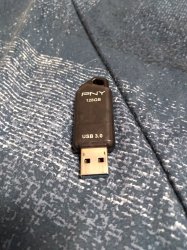
@metroid_maniac I have external hard drives that I use with PS3 but I have never bought one to use with my Wii. Also, I'm not sure how you are going about it but a USB device will not be recognized so easily unless you have formatted it to "wbfs" using Wii Backup Manager... and that's not to be guaranteed that it will fix recognition issues but the 128GB thumb drive that I use is a 3.0 by PNY. (and it works perfect.)

@laukinming the actual gameplay compatibility for SD CARD vs. USB DRIVE is 99% the same. Any game will run fine whether it is on a card, stick, or harddrive... But like pinky is trying to say, not all backup loaders are programmed to work with all types of storage.

It is IDEAL to use a USB with "USB Loader GX", which I'm pretty sure is why this backup loader was given that name... and even though I don't think Wii can completely use a USB 3.0 to it's maximum, it would be best to use a 3.0 for Wii Games.

I use an SD card for everything else (GameCube, SNES, NES, GBA, etc.) and I'm not saying that WiiFlow couldn't read 8GB-20GB Wii games from SD, but there is probably less compatibility. So again, your best bet is to use USB Loader GX with a USB thumb drive for Wii games and use an SD card for GameCube, GBA, SNES and any other older/retro games from before the Wii came out.

Also, many of the backup loaders (Nintendont, Snes9xGx, VBAGX, etc.) can read from both USB and SD but it would still be good idea to keep games from consoles "older than Wii" on your SD because you can just dump the games into your SD and leave it in the Wii until you want to add something more

There is also the fact that you might find yourself removing the USB stick much less than you remove the SD card, plus the USB is more convenient to remove and most of your homebrew/loaders is going to be on the SD card which will need to be in the Wii at all times for them to work... and yes, you CAN use GX to rip Wii games to USB & also for ripping GC games to SD. (GX will ask where to install)

Literally, have not had to remove this USB from my Wii for several years, all I do is dump games to it & play them. As for my SD, well I have to remove it and plug it into PC every time I want to add more homebrew / games older than Wii.

The only times I remove the USB from my Wii is to backup my disc-rips to PC.

SD should be your main repository for all homebrew and old games (GameCube at most.) AND IT ALREADY IS BY DEFAULT.

and USB should be where all your Wii games are copied to from disc, as well as a backup of EVERYTHING on your SD card.

I really don't think I could be any more informative than that. It's been 10+ years since I did the letterbomb, you're a decade behind.

 

Attachments

  • 20210407_125918.jpg
    20210407_125918.jpg
    5.5 MB · Views: 544
Last edited:

Similar threads

Back
Top