1. Connect your PS3 to PC with a Ethernet cable.
2. Change network settings on your PS3, Custom>Wired>Auto-Detect>Automatic>Do Not Set>Automatic>Automatic>Do Not Use>Enable>Press X To save settings.
3. Once this is done go to the "Network and Sharing Center" on your PC,
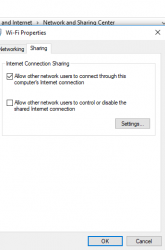
select your connection (in my case wifi), properties, sharing, and check "Allow other network users to connect through this computer's internet connection, Done..Enjoy!
Thanks to
@CYB3R18 for posting this in another threat.
thought it would be useful for people having trouble direct connecting like i was.