
UPDATE v1.61 (03/18/2017): Small update to provide several fixes
(03/17/2017): The much anticipated release of VitaShell v1.60 that contains USB Mass Storage Support for the PlayStationTV (PSTV) aka VitaTV has been released. Also announced is the winner of the VitaShell Theme Competition, with the new theme available in this update. This update provides some additional tweaks and cleanup as PSTV user's will no longer have to see the battery indicator going forward from v1.60. This AIO File Manager for the Vita & PSTV continues to pack in creditable functionality for HENkaku users on Vita firmware 3.60. The full details of this update and also a history of logs has been provided along with some additional details from creator and developer of VitaShell, TheFlow.

New VitaShell: Electron by Acemad (Competition Winner)
(03/17/2017): The much anticipated release of VitaShell v1.60 that contains USB Mass Storage Support for the PlayStationTV (PSTV) aka VitaTV has been released. Also announced is the winner of the VitaShell Theme Competition, with the new theme available in this update. This update provides some additional tweaks and cleanup as PSTV user's will no longer have to see the battery indicator going forward from v1.60. This AIO File Manager for the Vita & PSTV continues to pack in creditable functionality for HENkaku users on Vita firmware 3.60. The full details of this update and also a history of logs has been provided along with some additional details from creator and developer of VitaShell, TheFlow.
New VitaShell: Electron by Acemad (Competition Winner)
-
Update (03/18/2017) - VitaShell 1.61 Changelog
- Fixed database corruption crash by inheriting 'calendar', 'mms' and 'mtp' when mounting USB ux0:.
- Fixed bug where insufficent memory dialog appeared on uma0:.
- Fixed bug where pressing triangle crashed if unsafe mode was disabled.
VitaShell v1.60 Changelog (03/17/2017):
- Added ability to mount uma0: and ability to use uma0: as ux0:.
- Added ability to mount game card as usb device.
- Added possibility to refresh the livearea.
- Added scrolling text for long filenames.
- Added 'Sort by' option to context menu (R trigger combo removed).
- Added 'Electron' theme by Acemad, the winner of the VitaShell theme contest.
- Added theme selector.
- Improved property dialog animation.
- Fixed text editor bugs.
- Fixed bug where USB cable wasn't recognized.
- Fixed bug where VitaShell left to livearea after deleting the updater.
- Removed battery icon in status bar for PSTV.
- File statistics are now inherited when copying.
- I/O operations speed will now be showed in KB/s.
- Made control smoother.
How to use an USB flash drive as Memory Card on a PS TV
- Format your USB flash drive as exFAT or FAT32.
- Launch VitaShell and press /\ in the 'home' section.
- Select 'Mount uma0:' and attach your USB flash drive. You can now copy stuff from/to your USB stick.
- Once 'uma0:' is listed under the partitions, press /\ again and choose 'Mount USB ux0:'.
- Your USB flash drive is now acting as a Memory Card.
- To sync all your apps on your USB flash drive, press /\ and choose 'Refresh livearea'. This will NOT refresh PSP games.
- If you wish to revert the patch, press /\ and select 'Umount USB ux0:'.
-
Contest Winner: New VitaShell Theme (by Acemad)
This theme was submitted in the official competition thread over at wololo.net, checkout other themes and submissions within that thread linkvia Acemad
My third entry to the competition.
This one took lots of effort / time to complete than I had imagined. Lots of experiments were made before settling on the final looks. Anyway, It's inspired by the flow of electrons through electronic circuits, it's not too dark nor bright, kinda neutral. Subtle and unobtrusive design focusing on the essence of VitaShell without too much unnecessary frills.
More screens, info and download here : https://github.com/Acemad/VitaShell-Themes/tree/master/Electron Theme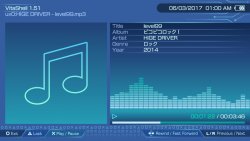
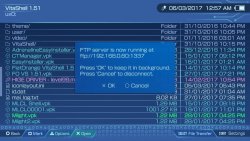
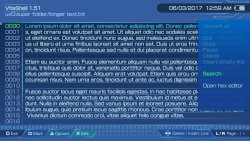
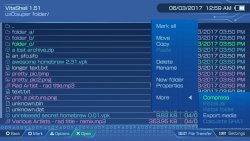
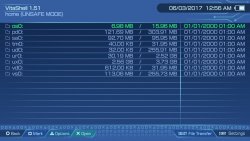
I recommend installing the theme and seeing it on a vita(screenshots don't do it justice)
Working on this was a great experience !
Thank you all and good luck !
EDIT : Updated theme to support 12H clock format. Thanks to razneck for the heads up !
EDIT 2 : Bonus LiveArea theme to go with this theme :
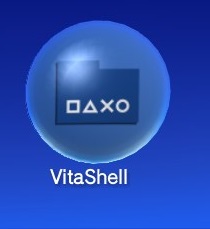
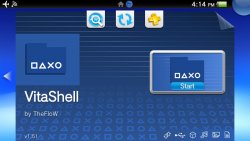
More info and download from the link above.
Thank you
-
History of VitaShell Changes:
Changelog 1.51
- Fixed bug where 'Please wait...' was shown instead of a specifc USB message.
- Fixed VPK installation crash.
- Fixed bug where 'theme.txt' was always resetted.
- Updated to newest libftpvita.
Changelog 1.50
- Added USB mass storage transfer support.
- Added RAR archive support (by Mayoshiroi).
- Added coredump viewer.
Changelog 1.43
- Added taiHEN config.txt reload option available in molecularShell.
- Changed default HENkaku spoofed version to 3.63.
- Fixed bug where you couldn't exit the application.
- Added a brand new settings menu which is accessible by pressing START (design by WesleyPolicena).
This adds the ability to disable auto-update and power options have been added where you can
reboot, enter standby or turn off your device. - Fixed local date being incorrect.
- The name 'molecularShell' will now be displayed if it's runned as molecularShell, otherwise 'VitaShell'.
This will help differentiating the two applications, as molecularShell is from now on a safe homebrew
and doesn't have the full range of features like VitaShell. Additionally in molecularShell you can see
the HENkaku settings section which are hidden in VitaShell (note that both still share the same eboot.bin,
only the flag is different).
- Added ability to sort files and folders by size and date. Press R to switch sort method.
- Added the long desired 'Properties' feature. You can also check whether an eboot.bin is safe or not.
- Added group RW permissions on files and folders when moving.
Safe homebrews like RetroArch will now recognize files and folders
that you have moved from 'ux0:video'. - Added scanning for dangerous functions in packages.
- Added possibility to choose compression level.
- Fixed time information in zip archives.
- Touching the screen on dialogs would abort the process, fixed.
- Added ability to compress files and folders into a zip archive.
- Added scanning for unsafe fself's and imports.
- Added lrc support for audio player by Mayoshiroi.
- Added partition used/total size information, thanks to littlebalup.
- Added 'Install folder' by soarqin.
- Added ability to export photo and music files ('More' -> 'Export media').
- Added battery percentage to system information (thanks to littlebalup).
- Added toolbox where more features will have place, by theorywrong (press START).
- Improved stability for file browser delete operation.
- Pressing L in the music player will now restart the song if the song is not at the beginning.
- VitaShell will now remove the unused updater bubble after successful updating.
- Added cover.jpg and folder.jpg as alternative cover image.
- Fixed ID3 tag parsing.
- Play and pause icons where swapped, fixed.
- FTP does now show 'Please wait...' until it has been connected to Wi-Fi.
- Added ability to install update files as .vpk (for Vitamin).
- Added patch to make .vpk installation appearing as full version instead of test version.
- Added text editor by BigBoot (WIP).
- Added 'More' entry to the context menu.
- Added 'Install all' feature to install all packages available in the folder (by ribbid987).
- Added 'Calculate SHA1' feature by xerpia64.
- Added support for ftp promoting for https://github.com/soywiz/vitaorganizer.
- Fixed 'Move' operation. Now it does integrate into folders and replace files.
- Dropped GENERAL_COLOR, now all colors are adjustable.
- Added audio player with .MP3 and .OGG support (Press /\ to turn off the display while listening to music. Graphics by Valle).
- Added changelog to the VitaShell bubble (press /\ or hold the bubble of VitaShell in the livearea).
- Added ability to resume to the directory you've last visted before exiting VitaShell).
- Leaving to livearea or suspending the device does no longer corrupt an IO process anymore (while copying things you can now leave VitaShell and resume).
- Improved text editor and added search feature to context menu (press /).
- Fixed bug where copying to different partitions didn't work.
- Fixed network update bug.
- Added automatic network update. VitaShell will now notify you when there's a new update.
You'll then be able to download it within the VitaShell application and it will update both
molecularShell and VitaShell to the newest verison. - Added text and audio file icon by littlebalup.
- Updated to latest libftpvita which fixed file size string > 2GB and added APPE command.
- Added possibility to use specific background for file browser, hex editor, text editor, photo viewer.
- Added files and folder icons by littlebalup.
- Added charging battery icon by ribbid987.
- Added sfo reader by theorywrong.
- Added translation support for turkish (english_gb uses the same id as turkish, fix it Sony!).
- Updated to latest libftpvita which fixed file size string > 2GB and added APPE command.
- Fixed bug where copied files and folders of archives didn't stay on clipboard.
- Allow auto screen-off.
- System information trigger combo changed to START instead of L+R+START.
System information can now also be translated, thanks to littlebalup.
- Added dialog box animation and aligned dialog box y to make it look better.
- Fixed wrong time string for files and folders. Thanks to persona5.
- Fixed INSTALL_WARNING text crash.
- Added default files creating.
- Added customization possibility for ftp icon, battery, dialog and context menu.
- Added random wallpaper feature.
- Changed location of themes to 'ux0:VitaShell/theme/YOUR_THEME_NAME'.
- Fixed russian and korean language support.
- Added support for >2GB zip archives (dropped support for 7zip and rar though).
- Added cache system for zipfs (faster file reading when browsing in zip archives).
- Added possibility to customize the application's UI.
- Added possibility to translate the application.
- Fixed 12h time conversion.
- Ported to HENkaku (support for renaming/creating folders and for analog stick for fast movement).
- Added custom dialogs.
- Added graphics by Freakler.
- Added possibility to use FTP in background.
- I/O operations can now be cancelled.
- Removed misc stuff, shader compiler, homebrew loading, PBOOT.PBP signing, network host.
- Fixed various bugs.
- Fixed size string of files, again.
- Optimized I/O operations regarding speed.
- Increased homebrew force-exit compatbility and stability.
- Added network host mountpoint.
- Added ability to compile shader programs (use the _v.cg suffix for vertexes and _f.cg for fragments).
- Finished photo viewer. Use the right analog stick to zoom in/out. Left analog stick to move. L/R to rotate and X/O to change display mode.
- Updated to newest vita2dlib which fixed many bugs with images.
- Improved 'New folder' by extending to 'New folder (X)', where 'X' is an increasing number.
- Improved message dialog texts.
- Limited filenames so it doesn't overlap with the size/folder text.
- Fixed infinite loop when copying the src to its subfolder by an error result.
- Fixed FTP client crashes and added support for Turboclient Android.
- Fixed alphabetical sorting, finally.
- Added experimental feature: Holding START to force exit homebrews.
- Added battery symbol by Ruben_Wolf.
- Switched to official PGF font.
- Changed triangle-menu animation to ease-out.
- Improved mark all/unmark all feature.
- Fixed percentage precision in progress bar.
- Fixed small bug in move operation.
- Added translation support. See translation_readme.txt for more details.
- Added move ability (only possible within same partition).
- Added tabulator support in text viewer.
- Removed 'Paste', 'Delete', 'Rename' and 'New folder' in read-only partitions.
- Fixed size string of files over 1GB.
- Fixed alphabetical sorting.
- Fixed battery percent bug being -1% on PSM Dev Assistant.
- Added ability to sign PSP homebrews.
- Added sleep prevention when using FTP, deleting and copying files.
- Added a scrollbar.
- Added date and time to info bar.
- Added correct enter and cancel buttons assignment.
- Added some cosmetic changes.
- Fixed crash when deleting marked entries.
- Copied entries now still rest in clipboard after pasting them.
- The application now cleans itself before launching homebrews.
-
- Release: VitaShell (A multi-functional file manager )
-
Open Source: Yes (Source Code)
- Developer: TheFlow (Github Page, Official Twitter )
-
Requirements: A PS Vita / PlayStation TV / Vita TV running the HENkaku exploit on Vita firmware 3.60.
- Mirror(s): via psx-place
Downloads VitaShell_1.61.vpk
Last edited:







