WAY-launchers

-----------------------------
I just realized in the wiring of "NANDway Dual NAND Edition" the signal RY/BY is assigned to D6 pad (same trace connected to the onboard led)... is because judges thought in the led and in this version should light properlly when writing/reading or other operations. Only blinks with NAND-1 though
So my idea i suggested before about adding an external led in pad E6 to use it with norway (because in norway pad E6 is RY/BY) should work
...
Sorry for the offtopic, i think i answered myself, but has been after spending some time/hours verifying things and writing all this, sometimes i need to write this kind of things to put some order in my thoughts, i hope it helps others :)

Interesting, I never realy cared avout the onboard LED. It make sense to have one on Ready/Busy. :)
 
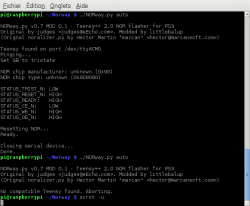
After some quick tests, it works well :) (on windows7 at least) :
BdnBb8t.png

Works on linux too :)
2015-10-20-183550_657x542_scrot.png

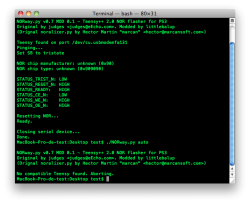
But some troubles on OS X... :mad: i'm working on it.

edit: finaly works on OSx too :p
Capture d’écran 2001-01-01 à 05.08.15.png
 
Last edited:
I completed my tests some weeks ago and finaly decided to share as it is. So, if some of you wants to make a try of this NORway mod: https://www.dropbox.com/s/rpdz68t8beszqdl/NORway_V0.7-MOD0.2_beta_littlebalup.zip?dl=1

Still a beta. Not a release. At your own risk.


Notes:

- The .hex file is the same as the official one (v0.7) except I modified the device serial number from default "12345" to "NORWAY_V07" to ensure the .hex file version match the python script version. The "auto" serial port detection searches for this custom serial number, so only works with teensy programmed with my modded .hex.

- The .py script is based on the official v0.7 plus my "perfirmware" write/verify option and the "auto" port detection feature.

- Serial port detection requires the serial.tools module to be present on your computer. Like this: Screenshot by Lightshot
If it's not the case, update/re-install your python + pyserial to the latest 2.x build:
. https://www.python.org/downloads/
. https://pypi.python.org/pypi/pyserial
Note for linux : you may have to install pyserial from python-pip to get the serial.tools module:
Code:
sudo apt-get install python-pip
sudo pip install pyserial
Note for Mac : you'll have to build/install pyserial from the source package:
Code:
tar xfvz pyserial-2.7.tar.gz
cd pyserial-2.7
sudo python setup.py install

- Tested and works on:
Windows 7 x64
Windows 10 x64
raspbian (ubuntu based)
Mac OS X


enjoy ;)
 
I had a doubt about python and pyserial versions, now is a good timing to ask you a couple of questions
In official norway is recommended to install python 2.7.2 and pyserial 2.5... but is really needed to use that specific versions or we can use the latest ones availables ?
I guess they keeps some kind of retrocompatibility with previous versions to dont break old apps based on them, but i guess this is a bit doubtfull in long term

And about your port auto detection... the "serial tools" used by your auto detection comes included in the basic installation of python for windows, or needs to be installed separatedlly ?
 
Last edited:
I had a doubt about python and pyserial versions, now is a good timing to ask you a couple of questions
In official norway is recommended to install python 2.7.2 and pyserial 2.5... but is really needed to use that specific versions or we can use the latest ones availables ?
I guess they keeps some kind of retrocompatibility with previous versions to dont break old apps based on them, but i guess this is a bit doubtfull in long term

And about your port auto detection... the "serial tools" used by your auto detection comes included in the basic installation of python for windows, or needs to be installed separatedlly ?

You can use any 2.7.x python and 2.x pyserial. Actualy I'm using python 2.7.10 and pyserial 2.7 on windows without any issue.

For the serial.tools, it's included with basic pyserial installation.
 

Similar threads

Back
Top