
- Forums
- PlayStation 3 (PS3)
- PS3 Homebrew
- PS3 Homebrew Apps / Plugins / Emulators
- PS3 Plugins (sprx)
- webMAN MOD
You are using an out of date browser. It may not display this or other websites correctly.
You should upgrade or use an alternative browser.
You should upgrade or use an alternative browser.

PS3 webMAN MOD - General Information Thread 1.47.48q
- Thread starter STLcardsWS
- Start date

It's included in the webMAN_MOD_1.43.19..rar file. Already compiled.Can someone compile new ps3netsrv to synology arm nas? Thank you.
Sent with Tapatalk
you guys are twisting my arm, lol, OK I'll give it a look to see what needs to be updated (or what new can be added). Expect an official/unofficial whatever update coming in the next week [emoji14]
It's not coercion per se, just positive reinforcement of a good idea!!!
Let's put it this way, you will certainly make some of us very happy if you are to update XMBM+.
Since I posted working XML files for XMBM+ on Rebug 4.75.3 DEX in this thread 2 months ago, a number of people have sent me pms to get their hand on the latest XMBM+ pkg. So much so that I decided to add a download link to the files (& a mirror link) in that thread, at least temporarily.
Sent with Tapatalk

Rudi Rastelli
Developer
Guess i've found a little prob with VSH menu 1.06(webMAN 1.34.19):
Normaly i have a midi-adapter for rockband drumset plugged in which is recognized as controller #1... therefore my game controller is #2.
I can call VSH menu with SELECT on #2 no prob... but i can't navigate nor leave it with #2... but i can navigate and exit with the buttons on the midi-adapter.
Now my idea was to switch game controller to #1 through system settings (makes midi-adapter #2) and then call VSH-menu... but in this case SELECT shows no VSH menu. And...
Pressing SELECT to call VSH-menu on midi-adapter doesn't work in both cases.... but this could be caused by the adpater itself.
Regards
Rudi
Normaly i have a midi-adapter for rockband drumset plugged in which is recognized as controller #1... therefore my game controller is #2.
I can call VSH menu with SELECT on #2 no prob... but i can't navigate nor leave it with #2... but i can navigate and exit with the buttons on the midi-adapter.
Now my idea was to switch game controller to #1 through system settings (makes midi-adapter #2) and then call VSH-menu... but in this case SELECT shows no VSH menu. And...
Pressing SELECT to call VSH-menu on midi-adapter doesn't work in both cases.... but this could be caused by the adpater itself.
Regards
Rudi
Last edited:
What webman mod + prepNTFS version I can use on 4.75.3 CEX Rebug?
I want to run ISO from external HDD.
I already tried webMAN_MOD_1.43.19_Updater.pkg + prepNTFS_1.12.pkg and
webMAN_MOD_1.42.03_Updater.pkg + prepNTFS_1.10.pkg, but unsuccessful.
When I press at the game icon in menu, webman tells "game loaded" in status message, but after several seconds (about 10 sec) webman tells "Error! /dev_hdd0/tmp/wmtmp/<game_iso_name>" in status message.
IrisMan 3.50 works well, all 4TB games from external NTFS HDD partition mount and run successful.
I want to run ISO from external HDD.
I already tried webMAN_MOD_1.43.19_Updater.pkg + prepNTFS_1.12.pkg and
webMAN_MOD_1.42.03_Updater.pkg + prepNTFS_1.10.pkg, but unsuccessful.
When I press at the game icon in menu, webman tells "game loaded" in status message, but after several seconds (about 10 sec) webman tells "Error! /dev_hdd0/tmp/wmtmp/<game_iso_name>" in status message.
IrisMan 3.50 works well, all 4TB games from external NTFS HDD partition mount and run successful.
Is it me or is this really similar to the problem [MENTION=680]lennypenny[/MENTION] described having a couple of days ago?What webman mod + prepNTFS version I can use on 4.75.3 CEX Rebug?
I want to run ISO from external HDD.
I already tried webMAN_MOD_1.43.19_Updater.pkg + prepNTFS_1.12.pkg and
webMAN_MOD_1.42.03_Updater.pkg + prepNTFS_1.10.pkg, but unsuccessful.
When I press at the game icon in menu, webman tells "game loaded" in status message, but after several seconds (about 10 sec) webman tells "Error! /dev_hdd0/tmp/wmtmp/<game_iso_name>" in status message.
IrisMan 3.50 works well, all 4TB games from external NTFS HDD partition mount and run successful.
Sent with Tapatalk

Also I tried to check prepNTFS 1.12 with ext2 partition, but it's not work, not recognize drive.Is it me or is this really similar to the problem [MENTION=680]lennypenny[/MENTION] described having a couple of days ago?
Sent with Tapatalk
I can provide any debug/log information for you if you can tell me how.
Anymore ideas about this issue anyone?Also I tried to check prepNTFS 1.12 with ext2 partition, but it's not work, not recognize drive.
I can provide any debug/log information for you if you can tell me how.
Before anything, have you got another external drive you could try? Smaller if poss?
A USB key?
Try Fat32 first with one small iso. No need for prepNTFS,
Try again with NTFS.
Do isos work if they are on your internal hdd?
Have you tried multiman/mCM 4.76 to see how it fares?
Sent with Tapatalk
It's included in the webMAN_MOD_1.43.19..rar file. Already compiled.
Sent with Tapatalk
the one that in SynologyDS1512_ARM folder? but its old or not? (date 06.11.2013)
My mistake I should have checked the date...the one that in SynologyDS1512_ARM folder? but its old or not? (date 06.11.2013)
I think if you install Cygwin & GNUARM 4.1 toolchain binaries (automatic setup) you should be able to compile that new ARM version for NAS.
Sent with Tapatalk
Last edited:
[MENTION=19409]metalor[/MENTION] & [MENTION=680]lennypenny[/MENTION], if you have not solved your problem yet there may be some hope!?Also I tried to check prepNTFS 1.12 with ext2 partition, but it's not work, not recognize drive.
I can provide any debug/log information for you if you can tell me how.
After updating to 1.43.19, I realised that I had got the exact same errors as you guys if I tried to mount an iso (on internal or external hdd btw). It said "Loaded" at first but the hourglass kept running & 10s later it said "Error!", followed by the ISO/NTFS file path.
If I tried to mount a jb game, it worked but there was no icon showing in XMB, I had to start the game via app_home.
So I started to check everything, re-installed previously working wMM versions 1.43.16, resetting configurations, even manually switching any modified file to its originall Rebug 4.75.3 version.
Nothing worked. Even with all the original files back in place, wMM couldn't mount any iso games.
So I replaced the originals by the modified versions again & was back to square one
Finally, I tried switching Rebug mode, went from DEX to CEX & everything started to work alright again.
The strange thing was, I eventually went back to DEX to make sure the problem laid there however it all worked fine. Changing TargetID seems to have got rid of this nasty issue.
Can anyone give possible explanations for this?
Sent with Tapatalk
Last edited:
1) yes, I have 1x6TB (AF), 2x3TB (AF) and 1x40GB (512b).Before anything, have you got another external drive you could try? Smaller if poss?
A USB key?
Try Fat32 first with one small iso. No need for prepNTFS,
Try again with NTFS.
Do isos work if they are on your internal hdd?
Have you tried multiman/mCM 4.76 to see how it fares?
Sent with Tapatalk
2) yes
3) usb flash 16GB fat32 with iso works
4) usb flash 16GB ntfs with iso works
5) usb flash 16GB ext2 with iso does not recognized
6) iso works on internal hdd
7.1) multiman 4.70 usb flash 16GB fat32 works
7.2) multiman 4.70 usb flash 16GB ntfs works
7.3) multiman 4.70 usb flash 16GB ext2 does not recognized
Last edited:
Thanks for the reply my problem was I didn't have the full version installed. Very very impressed with this feature.1. Install the FULL version of webMAN MOD 1.43.19 (webftp_server_full.sprx) on the PS3 that will act as server.
2. Both consoles must be in the same network and port 38008 must be open in the firewall.
3. Go to /setup.ps3 of the PS3 that will act as client and enter the IP address of the PS3 console that will act as PS3 server. Also put the check mark next to the field to enable the server.
4. Make sure that your ISOs are not split (I'm still working on adding support .iso.0)
5. Use Refresh HTML or Refresh XML, select the game and mount the /net game as you normally do when using the PC as server. You can also use the file manager to mount the game.
6. Start the game, play and enjoy it!
Look the answer above.
My mistake I should have checked the date...
I think if you install Cygwin & GNUARM 4.1 toolchain binaries (automatic setup) you should be able to compile that new ARM version for NAS.
Sent with Tapatalk
I don't know linux(totaly noob), but i ran ubuntu on virtual box with official synology toolchain and got this:

at here makefile
Code:
OS =  linux
BUILD_TYPE = release

OUTPUT := ps3netsrv
OBJS=main.o compat.o File.o VIsoFile.o
CFLAGS += -I/usr/local/arm-marvell-linux-gnueabi/bin/arm-marvell-linux-gnueabi/libc/include
#CPPFLAGS=-D_LARGEFILE64_SOURCE -D_FILE_OFFSET_BITS=64
LDFLAGS += -L/usr/local/arm-marvell-linux-gnueabi/bin/arm-marvell-linux-gnueabi/libc/lib
LIBS = -lstdc++

LIBS += -lpthread
CC= /usr/local/arm-marvell-linux-gnueabi/bin/arm-marvell-linux-gnueabi-gcc
LD= /usr/local/arm-marvell-linux-gnueabi/bin/arm-marwell-linux-gnueabi-ld

all: $(OUTPUT)

clean:
	rm -f $(OUTPUT) *.o

$(OUTPUT): $(OBJS)
	#$(LINK.c) $(LDFLAGS) -o $@ $^ $(LIBS)
	$(CC) $(CFLAGS) $(OBJS) -o $@ $(LDFLAGS)
can somebody help me?
I detect several rules, when external NTFS HDD works or not (remember, that ps3 detect drives with MBR only alignment, no GPT).
It depends on:
1) your HDD physical sector size (512b, 4K)
2) your USB-to-SATA controller mode (512b, 512e, 4K)
Now all HDD with 4K physical sector (AF) report mode 512e (emulation 512-byte logical sectors on 4K physical), but you can change it with bridge SATA controller for your HDD report 4K logical-4K physical sector: 4K native mode
I have HDD USB dock with such SATA controller flashed with special 4K-mode firmware
Also I have another simple USB docks, that works in 512e mode with 4K physical sector HDDs and 512-byte mode with non-AF (non 4K) HDDs.
I got this result.
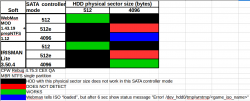
All usb-flash drives report 512b mode, so it all works.
It depends on:
1) your HDD physical sector size (512b, 4K)
2) your USB-to-SATA controller mode (512b, 512e, 4K)
Now all HDD with 4K physical sector (AF) report mode 512e (emulation 512-byte logical sectors on 4K physical), but you can change it with bridge SATA controller for your HDD report 4K logical-4K physical sector: 4K native mode
I have HDD USB dock with such SATA controller flashed with special 4K-mode firmware
Also I have another simple USB docks, that works in 512e mode with 4K physical sector HDDs and 512-byte mode with non-AF (non 4K) HDDs.
I got this result.
All usb-flash drives report 512b mode, so it all works.
Last edited:
Could you check your HDD physical sector size and controller report mode?Okay, so I tested the idea of an ISO from /dev0_hdd/PS3ISO and it works using webMAN 1.46.18.
The error I would get from launching an ISO from my 2 TB external hdd would be something along the lines of "Error! dev0_hdd/tmp/wmtmp/BLESXXXXX-TITLE.ntfs[PS3ISO]"
You can check it on windows by console command:
example:
Code:
fsutil fsinfo ntfsinfo <disk_symbol>
Code:
fsutil fsinfo ntfsinfo E:You can check it on unix-like os by terminal command (root access required):
example:
Code:
fdisk -l <target_device>
Code:
fdisk -l /dev/sdb
Today I have updated the binaries of webMAN MOD 1.43.19 (same links).
The changes are:
* Re-made ps3netsvr (netserver.h) with support for multi-part ISOs and using memory allocated dynamically instead of static buffers
- The buffer sizes will be as large as possible and the amount of memory allocated depends on the memory usage configured in /setup.ps3
* Updated VSH Menu to fix an issue reading pads
* Fixed issue mounting .cue on remote PSXISO (ps3netsvr)
* Renamed netsvr.h to netclient.h
The source code is in the same link for 1.43.19; the binaries and source code of the previous 1.43.19 are in the links for 1.43.18 (just in case this new build has issues).
The changes are:
* Re-made ps3netsvr (netserver.h) with support for multi-part ISOs and using memory allocated dynamically instead of static buffers
- The buffer sizes will be as large as possible and the amount of memory allocated depends on the memory usage configured in /setup.ps3
* Updated VSH Menu to fix an issue reading pads
* Fixed issue mounting .cue on remote PSXISO (ps3netsvr)
* Renamed netsvr.h to netclient.h
The source code is in the same link for 1.43.19; the binaries and source code of the previous 1.43.19 are in the links for 1.43.18 (just in case this new build has issues).
Last edited:

i doubt you will see a non temp/test release.Nice! I will add new version to tutorial (and edit it) when it will be official available on non test/temp
Similar threads
-

-

-

-
MPS5 {Modded Warefare} Overview & Setup of etaWEN v2.2B from LigthingMods
- Started by MODDED WARFARE
- Replies: 1