webMAN MOD

PS3 webMAN MOD - General Information Thread 1.47.48q

I am not sure if you understand me.
1. I uninstalled a previous version of webMAN MOD (v1.47.38 I think) from its menu (webMAN Games -> webMAN Setup -> Uninstall webMAN MOD).
2. I rebooted the console.
3. I installed webMAN MOD v1.47.40.
4. Changed language from PL to EN.
5. Once again rebooted the console.
6. I have mixed text. When I enter PS3 webMAN MOD [Setup] everything is in English.
In XMB everything is in Polish.
7. I did NOT change anything in txt or in xml files.

I did not have this issue with v1.47.38.

As for the Reload XMB option.
I do not want to translate it.
The thing is that the text is only visible when you highlight\select it.
Only this option has this that kind of a behavior.

Versions 1.47.39 and .40 are having a big number of internal changes in the code & structure.

Please uninstall wMM, download the latest package currently online in github (do not use any .40 already downloaded).
Install the new package, test it. Please report your results here or open an issue in github. Thanks.

BTW That is part of the troubleshooting procedure that I wrote in wMM's wiki
https://github.com/aldostools/webMAN-MOD/wiki#troubleshooting
 
Versions 1.47.39 and .40 are having a big number of internal changes in the code & structure.

Please uninstall wMM, download the latest package currently online in github (do not use any .40 already downloaded).
Install the new package, test it. Please report your results here or open an issue in github. Thanks.

BTW That is part of the troubleshooting procedure that I wrote in wMM's wiki
https://github.com/aldostools/webMAN-MOD/wiki#troubleshooting
aldo did you remove the pkg_custom 1.4.6 program? Before it was in the webMAN-MOD/_Projects_/tools/ folder.
 
Versions 1.47.39 and .40 are having a big number of internal changes in the code & structure.

Please uninstall wMM, download the latest package currently online in github (do not use any .40 already downloaded).
Install the new package, test it. Please report your results here or open an issue in github. Thanks.

BTW That is part of the troubleshooting procedure that I wrote in wMM's wiki
https://github.com/aldostools/webMAN-MOD/wiki#troubleshooting

1. I uninstalled a previous version of webMAN MOD from its menu:
webMAN Games -> webMAN Setup -> Uninstall webMAN MOD
2. I rebooted the console.
3. Today I downloaded webMAN MOD v1.47.40 from GitHub's repository.
Its checksum: a6dcdcea625cd3651a3163958463b3f0
webMAN MOD 1.47.40
- Fix with copy/paste on NTFS reported by @ozapft on issue #681
- Auto-mount NTFS when mountCount == NtFS_UNMOUNTED
- Added comments to memcpy64 / _memset (64bit)
4. Installed it (Full Version).
5. Changed language from PL to EN.
6. Once again rebooted the console.
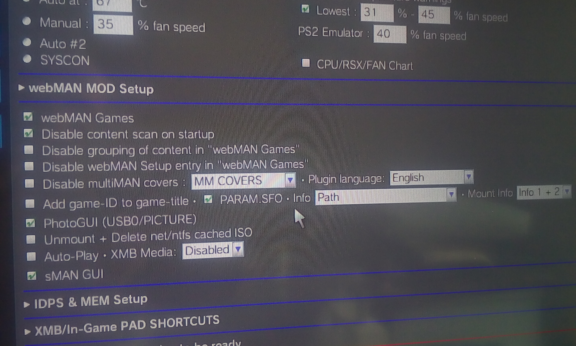
7. I have mixed text.
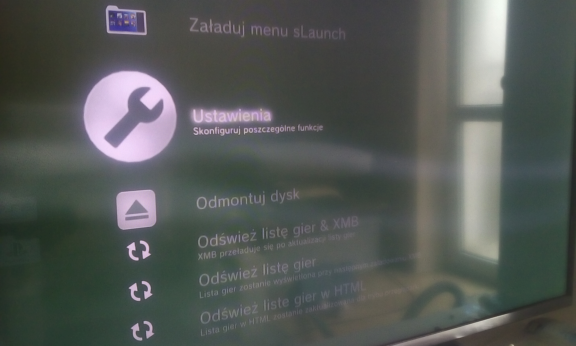
When I enter Ustawienia (PS3 webMAN MOD [Setup]) everything is in English:
4.png


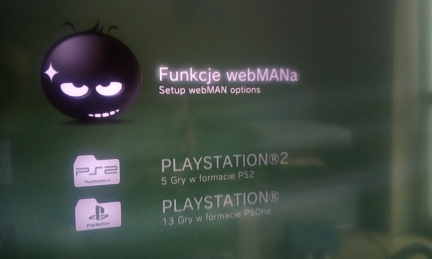
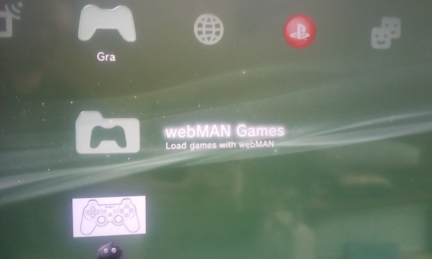
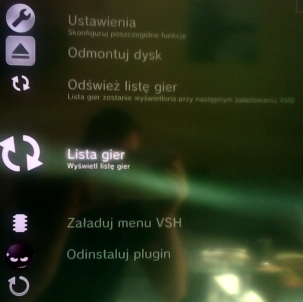
In XMB (almost*) everything is in Polish:
2.png
3.png


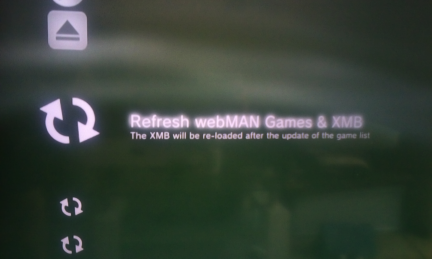
* - Only the main option is in English:
1.png


8. I did NOT change anything in txt or in xml files.
I do NOT have Other plugins or mods that could be preventing the proper operation of webMAN MOD.

My PS3 has REBUG LITE 4.86.1.

I do not have this issue with v1.47.38.

As for the Reload XMB option.
I do not want to translate it.
The thing is that the text is only visible when you highlight\select it.
Only this option has this that kind of a behavior.

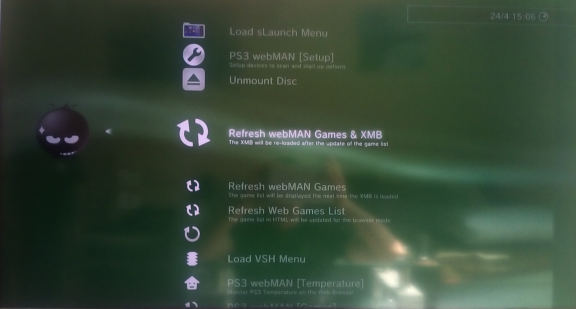
EDIT: After Refreshing XMB:
5.png

everything is in English.

In version v1.47.38 I did not need to do it.
I mean once the webMAN Settings were saved, PS3 rebooted
and all options were in English.
 
Last edited:
1. I uninstalled a previous version of webMAN MOD from its menu:
webMAN Games -> webMAN Setup -> Uninstall webMAN MOD
2. I rebooted the console.
3. Today I downloaded webMAN MOD v1.47.40 from GitHub's repository.
Its checksum: a6dcdcea625cd3651a3163958463b3f0

4. Installed it (Full Version).
5. Changed language from PL to EN.
6. Once again rebooted the console.
7. I have mixed text.
When I enter Ustawienia (PS3 webMAN MOD [Setup]) everything is in English:
4.png


In XMB (almost*) everything is in Polish:
2.png
3.png


* - Only the main option is in English:
1.png


8. I did NOT change anything in txt or in xml files.
I do NOT have Other plugins or mods that could be preventing the proper operation of webMAN MOD.

My PS3 has REBUG LITE 4.86.1.

I do not have this issue with v1.47.38.

As for the Reload XMB option.
I do not want to translate it.
The thing is that the text is only visible when you highlight\select it.
Only this option has this that kind of a behavior.

EDIT: After Refreshing XMB:
5.png

everything is in English.

In version v1.47.38 I did not need to do it.
I mean once the webMAN Settings were saved, PS3 rebooted
and all options were in English.

Thank you for the report. I have to put this in my to-do list.
 
Screenshot_2022-04-22-09-39-31-37.jpg
@aldostools hi beast! (idk if in English beast is friendly we hope...)
I'm trying a bit of webcommands and I'm interested in those downloads, I tried to download the .40 of webmanmod leaving the path undeclared, the pkg file s here but was downloaded in the rootz of hdd_0. then I'm trying the install command (which was supposed to show a gui but it doesn't work) I put a photo.

ps=I put the root because the pkg file was downloaded there, from the same result with any other folder
ah I'm at the previous version .39


same with install_ps3/<folder-path> thats show me a gui but start to install some pkg and after go to recovery and uninstall webmanmod without any reason
 
Last edited:
View attachment 36981 @aldostools hi beast! (idk if in English beast is friendly we hope...)
I'm trying a bit of webcommands and I'm interested in those downloads, I tried to download the .40 of webmanmod leaving the path undeclared, the pkg file s here but was downloaded in the rootz of hdd_0. then I'm trying the install command (which was supposed to show a gui but it doesn't work) I put a photo.

ps=I put the root because the pkg file was downloaded there, from the same result with any other folder
ah I'm at the previous version .39


same with install_ps3/<folder-path> thats show me a gui but start to install some pkg and after go to recovery and uninstall webmanmod without any reason

The path for the internal hdd is /dev_hdd0, not /hdd0

If the system goes to recovery, the pkg may be corrupted.

webMAN MOD is not uninstalled, Entering to Recovery menu deletes boot_plugins.txt, therefore the plugin is not loaded when the system boots. On Evilnat 4.88.2, Cobra 8.3 may get disabled too if the system goes to recovery.
 
The path for the internal hdd is /dev_hdd0, not /hdd0

If the system goes to recovery, the pkg may be corrupted.

webMAN MOD is not uninstalled, Entering to Recovery menu deletes boot_plugins.txt, therefore the plugin is not loaded when the system boots. On Evilnat 4.88.2, Cobra 8.3 may get disabled too if the system goes to recovery.

thanks for your time

please can u write for me a example of download with dev_hdd0/tmp and www.example.lol/iampoornotpirate.zip


best is if u add a section on webmanmod setup page like a gui when u add url, select the folder and press download...
 
Feedback a issue that has always been,in the XMB Webman mod PS3 game list,when using the up and down button to select the game,if the confirm button is pressed too early at this time,there will be high probability of crash
Hope this bug can be fixed,thanks
 
1. I uninstalled a previous version of webMAN MOD from its menu:
webMAN Games -> webMAN Setup -> Uninstall webMAN MOD
2. I rebooted the console.
3. Today I downloaded webMAN MOD v1.47.40 from GitHub's repository.
Its checksum: a6dcdcea625cd3651a3163958463b3f0

4. Installed it (Full Version).
5. Changed language from PL to EN.
6. Once again rebooted the console.
7. I have mixed text.
When I enter Ustawienia (PS3 webMAN MOD [Setup]) everything is in English:
4.png


In XMB (almost*) everything is in Polish:
2.png
3.png


* - Only the main option is in English:
1.png


8. I did NOT change anything in txt or in xml files.
I do NOT have Other plugins or mods that could be preventing the proper operation of webMAN MOD.

My PS3 has REBUG LITE 4.86.1.

I do not have this issue with v1.47.38.

As for the Reload XMB option.
I do not want to translate it.
The thing is that the text is only visible when you highlight\select it.
Only this option has this that kind of a behavior.

EDIT: After Refreshing XMB:
5.png

everything is in English.

In version v1.47.38 I did not need to do it.
I mean once the webMAN Settings were saved, PS3 rebooted
and all options were in English.
I have had such problems in the past, something is wrong with you console between cobra and wmm so I suppose, I have no problem with the newest wmm. Try to install new CFW evilnat, maybe it will help. Re-load cobra and delete completely all wmm files are in different places on the disk.
 
I have had such problems in the past, something is wrong with you console between cobra and wmm so I suppose, I have no problem with the newest wmm. Try to install new CFW evilnat, maybe it will help. Re-load cobra and delete completely all wmm files are in different places on the disk.

I have updated my FW to 4.88.2 Evilnat CFW with Cobra 8.3 but nothing has changed...
I checked a newer CFW md5sum on HDD after downloading and on a USB drive after coping:
CFW EVILNAT 4.88.2 COBRA 8.3 [CEX]
MD5: 3202971E05140F24E52B36D5C443AD35
It matched.

I do not have a problem with changing language on webMAN MOD v1.47.38 or lower.
I mean I do not have to Refresh webMAN Games & XMB to change XMB's entries
to have the selected language as it is in options.
Off course after saving settings console need to at least once reboot to apply these changes.
 
I have updated my FW to 4.88.2 Evilnat CFW with Cobra 8.3 but nothing has changed...
I checked a newer CFW md5sum on HDD after downloading and on a USB drive after coping:
CFW EVILNAT 4.88.2 COBRA 8.3 [CEX]
MD5: 3202971E05140F24E52B36D5C443AD35
It matched.

I do not have a problem with changing language on webMAN MOD v1.47.38 or lower.
I mean I do not have to Refresh webMAN Games & XMB to change XMB's entries
to have the selected language as it is in options.
Off course after saving settings console need to at least once reboot to apply these changes.
Try this https://www95.zippyshare.com/v/WbsH3eV3/file.html and give answer if it work.
 

With this version (I installed a full version) I only have a few (7) options:
options-PL.png

When I'm changing language from PL* to EN nothing is changing in XMB except of the main option:
1.png


When I use Odśwież listę gier and Reload XMB finally everything is in English
and I have all options (I think):
dde.png


* - My console has PL language but for most homebrew app I use EN language.
 
@jolek When you uninstall webMAN, it assumes the console language as the default. If you want to use the menus in English, you have to select the language in /setup.ps3, save and refresh XML & XMB.
 
Last edited:
With this version (I installed a full version) I only have a few (7) options:
options-PL.png

When I'm changing language from PL* to EN nothing is changing in XMB except of the main option:
1.png


When I use Odśwież listę gier and Reload XMB finally everything is in English
and I have all options (I think):
dde.png


* - My console has PL language but for most homebrew app I use EN language.
This is my modded xmb version, i see you have a really messup on your consol, files on your hdd is a mixed and smoething with them are break up. In the past i have issue like this, i fix it make full format hdd, replace hdd to pc and full erase hdd to zero and reinstall all cfw, plugins and other things.
 
@jolek When you uninstall webMAN, it assumes the console language as the default. If you want to use the menus in English, you have to select the language in /setup.ps3, save and refresh XML & XMB.

Then this scenario is normal?
I though that something went wrong...
I mean I did not have to do in the past (up to webMAN MOD v1.47.38).
On the other hand @DEX357 does not have this problem.
I mean after saving settings he does not need to refresh XML & XMB to have other language e.g. English in XMB.

This is my modded xmb version, i see you have a really messup on your consol, files on your hdd is a mixed and smoething with them are break up. In the past i have issue like this, i fix it make full format hdd, replace hdd to pc and full erase hdd to zero and reinstall all cfw, plugins and other things.

I will try to connect my PS3 HDD to a PC and to scan its surface.
 
Then this scenario is normal?
I though that something went wrong...
I mean I did not have to do in the past (up to webMAN MOD v1.47.38).
On the other hand @DEX357 does not have this problem.
I mean after saving settings he does not need to refresh XML & XMB to have other language e.g. English in XMB.
Yes, that scenario is normal when you install webMAN MOD for the first time or after uninstall it.
The file wm_config.bin is configured by default with the console's language.

If you install webMAN MOD over an existing installation, it will keep the last selected language.

The file mygames.xml is created with the language that was selected at the moment of generate it.

If you change the language, you need to refresh XML and XMB to update the labels in the selected language.
 
anyone else having NTFS issues with Webman Mod 1.47.40 it just doesn't work i'm on Rebug CEX 4.84.2 where it works every time on 1.47.39 and older versions i even used older PrepISO versions but didn't helped 1.47.39 is working just fine with PrepISO 1.30 the version released with Webman Mod 1.47.40
 
anyone else having NTFS issues with Webman Mod 1.47.40 it just doesn't work i'm on Rebug CEX 4.84.2 where it works every time on 1.47.39 and older versions i even used older PrepISO versions but didn't helped 1.47.39 is working just fine with PrepISO 1.30 the version released with Webman Mod 1.47.40

This issue has been reported today on github issues report system

I already uploaded a commit with this bug fixed. You can update using the online updater:
webMAN Games > webMAN Setup > Update webMAN MOD > Install

Or re-download the installer from the releases page or from brewology.
 
Back
Top