PS3 webMAN MOD v1.45.04 - webMAN MOD Supporting RetroArch Roms, 4.81 DEX & More

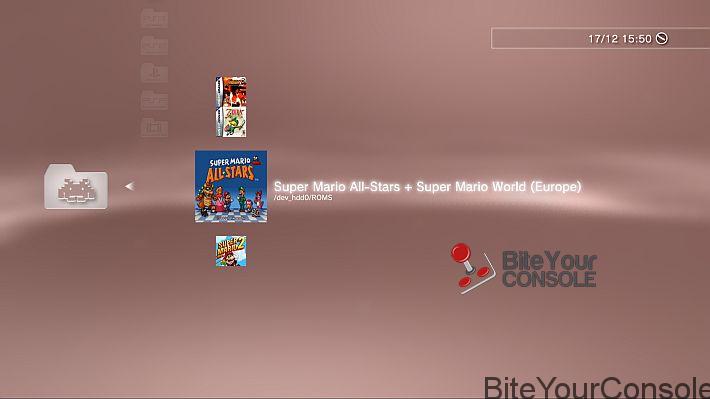
This project continues to impress and evolve overtime, a highly requested feature has finally made it's way to the popular PS3 plugin that was originally created by deank with the original version of webMAN, but developer aldostools has been the leading developer behind the webMAN MOD project that has added so many new features and functionality to an already great plugin. Now appearing in version 1.45.04 the dev has added RETRO support for the plugin (sprx), now see an added ROMS category on the XMB & HTML Game list of the plugin. The update does not stop there you can view additional additions in the provided changelog, but its does look like Aldostools is preppping for an upcoming REBUG release with adding support to 4.81 DEX.

Additional details on version 1.45.04 can be viewed in the details provided below.


webMAN MOD.png
.​

  • webMAN MOD 1.45.04 - Changelog
    • Added support for 4.81 DEX
    • Added support for the optional PKG Launcher
      • Added support for mounting /GAMEI games
      • Added support for scanning & mounting /ROMS and subfolders
      • Added ROMS category to game lists XMB & HTML
    • Added support for display of localized title in PARAM.SFO
    • Added check to prevent deletion of XMB icon of external games
    • netclient & rawseciso threads now keep working after unload webman
    • LaunchPad top icons now use localized strings
    • Fixed external game data not auto-enabled with [gd] tag on ntfs
    • Fixed nonCobra edition not using mM's IEXP0_470.BIN on 4.81
    • Fixed default file name used for ISO created by /copy.ps3/net0/***PS3***/ or /***DVD***/
    • Fixed video rec combo required another combo enabled
    • Updated "vanilla" editions with support for 4.81 CEX
    • Merged wm_url_launcher & PKG Launcher projects
    • Updated libntfs_ext.a in prepNTFS (same version as IRISMAN)
    • Updated latest FW version in prepNTFS (used to skip fix games


    • Checkout this thread for additional information about this PS3 plugin.

  • Aldostools shares some additional details about this update in the comments below. Here is the direct link


    http://www.psx-place.com/threads/we...etroarch-roms-4-81-dex-more.11838/#post-63936

Download(s):

 
Last edited:
I never use so little memory.
Not with 100 games..
But if you have this issue with a few games then I think there is a problem...
However there is something else that bothers me, am not sure if it's normal, I hope @aldostools can enlighten me..

If in memory usage I choose to use 12xxkb, after reboot it tells me that it uses 10xxkb.
If I choose 10xxkb, then it says 8xxkb..
What it uses never seems to be what I choose..
Why is that?
I have not looked at the source for an answer... I know.. Sorry... [emoji6]

I actually have almost 700 games but I would not let webMAN building the xml list of them and overload the PS3 . I use my app to do that and I only let webMAN launch the game I choose from the web interface of PS3 Games Manager.
 
You can't rely on an external machine to run a console, at least not as standard behaviour.
There is no choice, a game list has to be created by wMM.
All ps3 backup managers do something similar to cache the list otherwise listing the games on the fly takes for ages...

I understand, what you say is that some people dont have another machine on which they can install it indeed. If only the PS3 would not be a piece of antique and would have modern computing capabilities this problem would not exist and you would be able to run PHP, MySQL and a proper web server on it :(

If only the PS4 would be capable of a CFW we could do miracles with it :(
 
After installing this update when ever i update my settings trough the webbrowser it won't save it :(
Tried to setup the Roms part, and memory part and other settings but none of it get saved.
Any suggestions why :( ?
 
Google translates it fairly well:
https://translate.google.com/translate?sl=it&tl=en&js=y&prev=_t&hl=en&ie=UTF-8&u=http://www.biteyourconsole.net/2016/12/09/scena-ps3-rilasciato-webman-mod-v1-45-04/&edit-text=&act=url


If you have "Disable grouping of content" unchecked and check ROMS, you will get a ROMS category with the following icon the next time that you scan the content:
icon_wm_album_emu.png
@aldostools ... I have 1.45.04 and i installed the Full version , I installed pkg launcher and now next to Playstation 3 I have 2 boxes one for PKG launcher and the Roms box. I checked both of them. the Disable Grouping of Content box down below is unchecked, but I do not get this Icon on the screen, so will this ONLY display with the newest retroarch? because I have the older 1.0.2 version ...

when I go to the "games" tab in the Webman browser it says I have 492 games and it shows me various roms from various folders but I have waaaay more than 492. So is that icon not showing because I don't have the newest retroarch? because I thought the old one and the new one still use the same folder and what not.

thanks aldo
 
Last edited:
@aldostools ... I have 1.45.04 and i installed the Full version , next to my "Disable grouping of content" there is the "&" character follow by an empty little box , followed by LaunchPad.xml
I do not see the word ROMS or a box so I can check it.

hello, you have to click refresh My Games, wait, and click restart to make sure that the changes are to succeed
Not simply click on save
 
@aldostools ... I have 1.45.04 and i installed the Full version , I installed pkg launcher and now next to Playstation 3 I have 2 boxes one for PKG launcher and the Roms box. I checked both of them. the Disable Grouping of Content box down below is unchecked, but I do not get this Icon on the screen, so will this ONLY display with the newest retroarch? because I have the older 1.0.2 version ...

when I go to the "games" tab in the Webman browser it says I have 492 games and it shows me various roms from various folders but I have waaaay more than 492. So is that icon not showing because I don't have the newest retroarch? because I thought the old one and the new one still use the same folder and what not.

thanks aldo

If you have checked the new ROMS check box and unchecked the option to disable grouping of content, press save and run prepNTFS to rescan the content or use Select+L3 then restart to see the changes to the XML.

The ROMS category is not intended to show your whole collection. You can increase the number of ROMS a bit more changing the profile of the memory usage.

Put in ROMS folder only your favorite games or the ones that you really are going to play.
 
There is a little cosmetic error. In PARAM.SFO file TITLE_08 is "webMAN Mod 1.45.04 [??????: R1 ??? ???-?? VSH-????, L1 ??? Full-??????, X ??? Lite-??????]".
 
Hi guys,

The download link is not working.
It's working perfectly.
Try another browser.
Latest version of. 1.45.05:
github.com/aldostools/webMAN-MOD/releases/tag/1.45.05
Don't forget the PKG launcher if you want to use the new ROM feature.
Previous version 1.45.04:
github.com/aldostools/webMAN-MOD/releases/tag/1.45.04
 
It's working perfectly.
Try another browser.
Latest version of. 1.45.05:
github.com/aldostools/webMAN-MOD/releases/tag/1.45.05
Don't forget the PKG launcher if you want to use the new ROM feature.
Previous version 1.45.04:
github.com/aldostools/webMAN-MOD/releases/tag/1.45.04


Thanks for the uploaded link, I was able to download it.
 
If you have checked the new ROMS check box and unchecked the option to disable grouping of content, press save and run prepNTFS to rescan the content or use Select+L3 then restart to see the changes to the XML.

The ROMS category is not intended to show your whole collection. You can increase the number of ROMS a bit more changing the profile of the memory usage.

Put in ROMS folder only your favorite games or the ones that you really are going to play.

thanks @aldostools --- Ok so I finally got it going, I was experiencing freezing, I had to do restore a few times. I think the memory has to be set to MAX because after that it was ok. So not all of the roms showed, but about 1500+ roms were showing up in my ps3 games folder on the xmb? they were random, some GBC, GBA, CPS1...etc So now I renamed my ROMS folder, and pointed my emulators to that one, and in the ROMS folder I have 15 roms only...that solved my problem for now :) basically I just wanted the roms icon folder to show on the xmb lol
 
Last edited:
I think Refresh xml should be sufficient as long as you don't use ntfs drives.
Am I wrong Aldo?

Refresh XML (using /refresh.ps3 or SELECT+L3) is enough only if "webMAN Games" hasn't been accessed.

Once webMAN Games is accessed the icons are cached by VSH, and the changes to the XML are not reflected on the XMB until VSH is reloaded or until the next restart.

The reason why I suggest using prepNTFS (even if there are not any game on NTFS nor USB devices connected) is because the VSH is reloaded after prepNTFS completes the scan and refresh XML is called too.
 
Last edited:
I updated a couple of icons from the icons pak ...now that you can get roms to show I figure I'd do something worthy of retro stuff....also , the icons for the rom games in that roms directory are the same as "insert disc" so I changed it to an icon thats nice but doesn't show or suggest the action of putting in a disc because it just looked weird for these rom icons.

I actually wanted to use like a space invader or something but since its the same as insert disc then the insert disc icon would be a space invader and really wouldn't make sense, maybe @aldostools on one of your next updates the insert disc and roms icons can be separate maybe? or if its written in a file somewhere i can change it and then do and icons pak pkg with just the icons only and the new script changes ...its all good though

thanks guys again!

free photo upload


screen shots
 
Last edited:

Featured content

Trending content

Back
Top