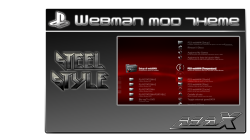
PS3 webMAN v1.43.23 + Custom Themes from MaxModding

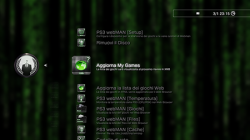
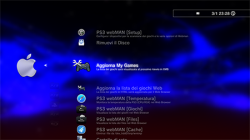
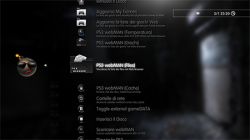
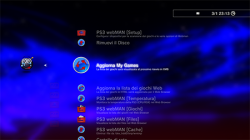
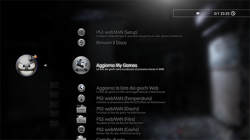
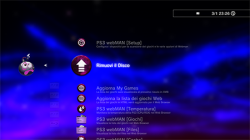
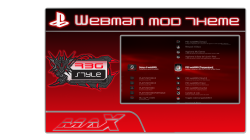
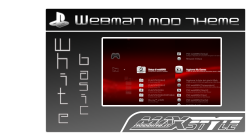
Developer Aldostools has released a small update that fix a bug that affected games not showing, this was a regression present from version v1.43.20, so if you are on any of those versions be sure to update for this fix. Then over at maxmodding they have a nice collection of webMAN MOD Themes, giving your XMB a more customized look[BREAK]xxxxxxxxxx[/BREAK]. View all details of these two releases below

T5Q3zMc.png

webMAN v1.43.23


  • The issue about games not showing when "Disable grouping of content in "webMAN Games" is selected seems to be a regression present since build 1.43.20, but nobody reported about it until now.

This issue should be fixed in the build 1.43.23
http://aldostools.org/temp/test/webM...23_Updater.pkg
AnonymousiOS
Black SteelinFAMOUSGrey SteelPurpleRed DarknesSREBUG STYLEBasic WhiteSteel Style
anon_2.pngios_2.pngb_steel_2.pnginf_2.pngg_steel_2.pngpurple_2.pngPIC0.pngPIC0.pngPIC0.pngPIC0.png
Downloads & Additional Details can be found via: www.maxmodding.it
Download: webMAN v1.43.23.pkg
Themes via MaxModding

 
Webman not see all games.

[MENTION=89]aldostools[/MENTION] Webman Mod has always had an annoying bug, no longer displays a "certain number" of games, in fact I get the letter T (and not all), I do not see the others and I have to open multiman if for example I want to play Tomb Raider, UFC etc.
 
[MENTION=89]aldostools[/MENTION] Webman Mod has always had an annoying bug, no longer displays a "certain number" of games, in fact I get the letter T (and not all), I do not see the others and I have to open multiman if for example I want to play Tomb Raider, UFC etc.

The number of games scanned is limited by the memory usage assigned to the plugin (mainly due the sorting).

Try changing the "Plugin memory usage" in /setup.ps3 to MAX or MAX PSX+ (if you have several hundreds of PSX isos), reboot and rescan the games again.
 
The number of games scanned is limited by the memory usage assigned to the plugin (mainly due the sorting).

Try changing the "Plugin memory usage" in /setup.ps3 to MAX or MAX PSX+ (if you have several hundreds of PSX isos), reboot and rescan the games again.

Perfect, i set MAX and now sees all games.
You are a great!
Thank you.
 
(Sorry for my bad english. i'm from germany)
i've installed the d-rex rebug 4.76.1 fw - switched kernel to DEX.
I've activated cobra&webman too(v 1.43.23)
Now when i press combo R2+Triangle for disabling syscalls&remoe history, it works fine but after that when i press start+select for systeminfo, the system freezes. On restart, the system stucks in a loop of "File System Restore".
I can press circle to go over the xmb, but when i restart the console, i get the same message every time

Is it a bug in the FW or in webman?
thx for help
 
Last edited:
(Sorry for my bad english. i'm from germany)
i've installed the d-rex rebug 4.76.1 fw - switched kernel to DEX.
I've activated cobra&webman too(v 1.43.23)
Now when i press combo R2+Triangle for disabling syscalls&remoe history, it works fine but after that when i press start+select for systeminfo, the system freezes. On restart, the system stucks in a loop of "File System Restore".
I can press circle to go over the xmb, but when i restart the console, i get the same message every time

Is it a bug in the FW or in webman?
thx for help

I don't think either webMAN MOD or the CFW are the cause... Try doing the File System Restore without skipping it..
 
[MENTION=1913]tys0n[/MENTION] , if the message is what I think it is, u can disable it through one of the debug settings. I can't recall off the top of my head which setting it is, but it'll be obvious. the reason for that message is to prevent damage to system files/database in case the system isn't shut off normally. the ps4 does something similar where it system storage automatically if something like that happens. anyway, this is something that would happen with rebug if using reactpsn. when the system restarts, that message will pop up. I don't know if this is still the case though. do what [MENTION=89]aldostools[/MENTION] suggested first. if u keep being nagged, try disabling the debug setting for that message. iirc, it's close to the bottom of the cex qa debug settings.
 
each time I [refresh webman games list HTML] the PS3 Freezes,,, why?not opens PS3 webman [games] freezes, only opening is the [PLAYSTATIONⓇ3] PS3 format games
 
Last edited:
I don't think either webMAN MOD or the CFW are the cause... Try doing the File System Restore without skipping it..

That was the first thing ive done. Tried it more than once. Its always the same problem
Installed the CFW new and the loop with restore was gone but not the problem

The Prob starts with when i start disablin cfw syscalls + removing history files with Controller Combo R2+ Triangle.
After that i press start + select on the controller and the system freezes. why?
The previous versions had not this bug.
 
Last edited:
update:

tested it with rebug d-rex/rex rebug 4.76.1 and lite version
there are the same prob :/

I think the bug is in webman?
 
update:

tested it with rebug d-rex/rex rebug 4.76.1 and lite version
there are the same prob :/

I think the bug is in webman?

I haven't been able to reproduce your issue... so I cannot fix a code that's working properly on my side.

It could be an issue in your system, unless it is happening also to several other users.

My suggestions are:
1- Try running webMAN MOD 1.43.23 alone without any other plugin.
2- If the problem persists, verify if the problem happens with a previous build (e.g. 1.43.19 or the one that you said that didn't have issues)

Also you can try doing a rsod fix, a database rebuild and file system restore.
 
I Think the issue starts with when i install a custom wave or update the cobra payload to 7.20
ive tried webman mod from ..20 - ..23 and i get always stuck/a freeze with the installed things above
(tried it with several consoles)

alone is everything fine.
i thought you can have a look although or know the problem, why its get a freeze
 
Last edited:
Thank you Aldo for your work.

I've a problem. If "load last-played game on startup" option is checked, when ps3 boots it always run the game automatically. Earlier versions of webman with the same option checked only show the game, not launch automatically. I like to see in the last game loaded in XMB, but I don't want to be launched.

Can you fix this?

Thank you.
 
Thank you Aldo for your work.

I've a problem. If "load last-played game on startup" option is checked, when ps3 boots it always run the game automatically. Earlier versions of webman with the same option checked only show the game, not launch automatically. I like to see in the last game loaded in XMB, but I don't want to be launched.

Can you fix this?

Thank you.

Turn Off this setting:
PS3
 
Oh, so easy!

Another question please, is there anyway to show the Game title in XMB when loading instead of title ID? I mean, show "Far Cry 4" loaded" instead of "BLUS31420" loaded.

Thank you.
 
Last edited:
Hi [MENTION=89]aldostools[/MENTION], i'm from MaxModding :)
We are customizing other aspects of our custom webMAN Themes.
i am wondering if there is a way to modify the XMB WebMAN Games icon.
We have tried to edit the xml file 'fb.xml', and create a custom icon named icon_wm_games.png
It work, but when reboot, we got back the original icon..

Now.. You know a way to completely modify that icon??
Thanks a lot :o
 
[MENTION=8086]LizZo[/MENTION] it's because webMAN is creating the file, look at the file game_xml.h you'll find the functiun to do "make_fb_xml(char *path)"
 
Turn Off this setting:
PS3

Aldo , please check show temperature feature , when is set on SYSCON (disabled dynamic fan control) , when I am in a game and I want to check temperature it freezes console . It must be something wrong only in new versions 1.43.22 and 1.43.23 , because earlier versions like 1.43.16 worked fine .
 
Last edited:
Aldo , please check show temperature feature , when is set on SYSCON (disabled dynamic fan control) , when I am in a game and I want to check temperature it freezes console . It must be something wrong only in new versions 1.43.22 and 1.43.23 , because earlier versions like 1.43.16 worked fine .

I have tested disabling dynamic fan control (SYSCON mode) with webMAN MOD 1.43.23 on my CFW 4.46 Rogero Cobra 7.2 and I the system info (CPU/RSX temps, memory, IP, Cobra version, etc.) shows fine when I press SELECT+START on XMB in-game (accessed with PS button).

So it must be an issue with the settings in your CFW or your console... try disabling all the other plugins (if you have any). Also test if it still does not happen reinstalling 1.43.16.

BTW a screenshot and a detailed description of the environment (CFW version, if Cobra or Mamba is enabled or not, other plugins running, game, ISO or JB folder, logs, etc.) is always helpful.
Otherwise I'd have to guess what you exactly did...
 
[MENTION=89]aldostools[/MENTION], can you modify the webman code and try to add the xmb icon in the wm_icons folder?
This way, we can add a custom xmb icon to all our webman pkg themes.
Also can be great for all those users that love to customize their ps3 sistem :)
 

Featured content

Trending content

Back
Top