PS3 Where does PS3 OPL look for a hard drive?

Ok, but did You booting such OPL(or uLE)+CNF image with success? And with already replaced VHDD to already formatted one? If last case is valid: do You have access to any of partition? << This is part in Your post which still isn't clear to me. ^^"

No, it won't boot with the IMAGE.DAT hard-drive mounted if it's changed from the one the PS3 creates from the XMB in any way, even if you boot to the disc it was made for, in this case the FF11 installer. Can't seem to access the partition from ULE at all - like I said I don't think the PS3 mounts the PS2VHDD unless the exact disc is booted.

Is there a way to extract the PS2LOGO from the FF11 disc so we can boot uLE and gain access to the PS3-created PS2VHDD? Maybe that check failing is the thing which prevents access to it.

Newer OPLs can booting in higher resolutions (VGA, 576p if I'm correct) than native SDTV one (PAL/NTSC (640x448/512)). In such case assets aren't stretch more but less (because eg. background bitmap is larger than it was needed for SDTV). In case of fonts, verctor fonts (*.ttf) are used instead to bitmap fonts (*.bmp/*.png/build-in in rom0).

That's actually really interesting; obviously developers of games wouldn't worry about stuff like that because PS2 games would be developed for one main SDTV type resolution (and occasionally the cutscenes doing a res switch, for example God Of War) but it's such a great attention to detail touch that OPL boots up with much higher quality vector fonts to scale text nicely to HD resolutions. Makes a big difference especially if the HDTV is 28" or more and you can tell.
 
Yes, can be transplant from original game, copy or made a new. Donwload AIO Project and in gfx tools for Windows there was some app for injecting custom logo (read readme to know how to make valid one).

Games at best using 576i but almost all just PAL or NTSC.
 
Judging by above experience, first step is consider emulator that we running one of those games while in reality we running eg. uLE. And the question is how. In theory it should work ordinary DVD image with bootable eg. uLE, disguised as whitelisted (?) game by just naming it the same GameID.

But also important would be if You goes official road and install this Socom, then compress this VHDD and upload somewhere so I could look into it if anything extraordinary it have.
 
Judging by above experience, first step is consider emulator that we running one of those games while in reality we running eg. uLE. And the question is how. In theory it should work ordinary DVD image with bootable eg. uLE, disguised as whitelisted (?) game by just naming it the same GameID.

But also important would be if You goes official road and install this Socom, then compress this VHDD and upload somewhere so I could look into it if anything extraordinary it have.

I installed the VHDD pkg and when I launched SOCOM II from disc, the PS3 asked if I wanted to install it to the hard drive. I went through with it and now I have game data labeled "SOCOM" that is 2049 mb. Is this the file you're wanted a copy of? I'm not sure where it resides on the PS3 but I can send it.
 
VHDD should be in "dev_hdd0/game/<GameID>/USRDIR/IMAGE.DAT". I'm interesting also in of PARAM.SFO from that folder. GameID will be match probably to Socom.

After You copy it to PC via FTP, compress it by eg. 7-Zip and send me a link on PM (i.e to Mediafire or whatever You preferring).
Thanks. ^^
 
VHDD should be in "dev_hdd0/game/<GameID>/USRDIR/IMAGE.DAT". I'm interesting also in of PARAM.SFO from that folder. GameID will be match probably to Socom.

After You copy it to PC via FTP, compress it by eg. 7-Zip and send me a link on PM (i.e to Mediafire or whatever You preferring).
Thanks. ^^

Sending you a PM with both SOCOM and PS2 System Data files (just in case there's something different about mine) @Berion
 
@complexusername Thank You for sharing. I think I know how it works now.

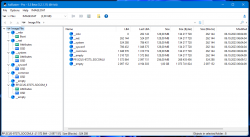
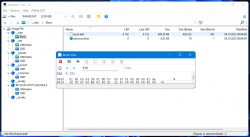
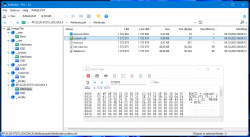
So first, it is just ordinary PS2 HDD image:
apa_socom_1.png apa_socom_2.png apa_socom_3.png
For some reason, it have bootstrap in __mbr, which probably executing what is written in system.cnf in APA section of PP partition, which means it executing game executable on mounted disc, and further, game will seeking HDD and adopting stuff from his partition.

On system partitions, there is nothing interested, just some files from HDD OSD and PSBBN:
Code:
root@mint:/home/mint/ps2# tree -a net
net
└── etc

1 directory, 0 files
root@mint:/home/mint/ps2# tree -a sysconf
sysconf
├── atok
│  ├── atok100.erx
│  ├── atokp.dic
│  └── atokpyou.dic
├── etc
│  └── bnnetwork
│  └── netcnf000.dat
└── font
  ├── s22i646.gf
  ├── s22j201.gf
  ├── s22j213.gf
  ├── s22ulst.gf
  ├── s26i646.gf
  ├── s26j201.gf
  ├── s26j213.gf
  ├── s26ulst.gf
  ├── sce20i22.gf
  └── sce24i26.gf

4 directories, 14 files
root@mint:/home/mint/ps2# tree -a system
system

0 directories, 0 files
root@mint:/home/mint/ps2# tree -a common
common

0 directories, 0 files
root@mint:/home/mint/ps2#
What lies on SOCOM partition I don't know because I don't know how to mount it due this "||" symbols at the end which bash and pfsshell have special interpreting functions. Later I will write it to real HDD and check on real PS2.

Code:
root@mint:/home/mint/ps2# pfsshell

pfsshell for POSIX systems
https://github.com/ps2homebrew/pfsshell

This program uses pfs, apa, iomanX, 
code from ps2sdk (https://github.com/ps2dev/ps2sdk)

Type "help" for a list of commands.

> device /dev/loop2
hdd: PS2 APA Driver v2.5 (c) 2003 Vector
hdd: max open = 1, 3 buffers
hdd: 09:14:49 10/11/2023
hdd: disk0: 0x003fffff sectors, max 0x00200000
hdd: checking log...
hdd: drive status 0, format version 00000002
hdd: version 0000 driver start.
pfs Playstation Filesystem Driver v2.2
ps2fs: (c) 2003 Sjeep, Vector and Florin Sasu
pfs Max mount: 1, Max open: 1, Number of buffers: 10
pfs version 0000 driver start.
# mount PP.SCUS-97275..SOCOM_||
read/write: /dev/loop2: Success
hdd: error: disk err -5 on device 0, sector 4194304, type 0
(!) hdd0:PP.SCUS-97275..SOCOM_||: Input/output error.
(!) Exit code is -5.
#

Few partitions are password protected but I don't know what it doing TBH. It is somehow tied to DNAS and network stuff but that's what I know.

- - -
So I think we can hack this that way:
  1. creating disc image with uLE disguised as Socom by using its ID
  2. mount it in WebMAN MOD
  3. changing in WMM settings to choosing first emulator
  4. making HDD image with custom bootstrap which would do the same as original but loads OPL-Launcher from APA of specified PP partition instead from disc.
  5. OPL-Launcher will launch OPL from +OPL.
- - -
BTW: If someone is curious, first __empty is padding to avoid APA fragmentation. Second padding is unknown purpose, maybe because minimal VHDD size is 2GiB?

- - -
Any ideas? ^^ @aldostools @uyjulian @sandungas
 
Last edited:
Wow. @Berion this is some amazing work, spurred on by @complexusername and his excellent find of the installable SOCOM data. Great to see some progress has been made since I've been away. SOCOM II might be the key to this in the way FFXI wasn't, due to the fact the install can complete and the PS2VHDD for PS3 can be "finalised". I notice that on the drive it makes a PP named partition, similar to how HDLoader would on a real PS2 when installing games, perhaps this can be used for making partitions of other games, I suppose the problem might be can we get around the PS2VHDD size limitation when SOCOM II is used - this is why I was keen on trying with FFXI initially due to having a 20GB or so partition to work with, allowing a decent amount of space for other games, potentially.

@Berion what is step 3 meaning on your list please? Choosing first emulator?
 
I know this is a bit old to be bumping, but has anyone made progress with this yet? I'd love to be able to play games through OPL with an internal hard drive on my CECHA01.

I did try this with both ImgBurn (for the DVD) and CDGENPS2 (for the CD) using the SYSTEM.CNF from both the US and JPN versions of the POL Viewer/Tetra Master install disc.. Only the CD version would boot the ps2emu at all, and only then if executable was named, for the Japanese version for example, SLPS_202.00 and it had to be the first file on the disc when making the image.

What I found interesting is that the spoofed Japanese CD version (which didn't have a 22GB IMAGE.DAT created in the same named folder yet) would trigger the PS3 to make the PS2VHDD. I did that and it rebooted and errored back to the XMB.

This leads me to believe there is something about the way the FFXI POL images are created which would need to be replicated in order to have uLE and/or OPL see a mounted PS2VHDD when using a spoofed image.

I was able to make an ISO with just a OPL ELF renamed SCUS_972.69 and the SYSTEM.CNF from just making a quick DVD image in ImgBurn and have it start and make the same 22GB IMAGE.DAT. After making the VHDD, booting the ISO shows the PS2 logo, and just throws me back to the XMB with an error 80028F17, not starting OPL.

If there's anything I can do to help here, I'm all ears!
 
I know this is a bit old to be bumping, but has anyone made progress with this yet? I'd love to be able to play games through OPL with an internal hard drive on my CECHA01.


I was able to make an ISO with just a OPL ELF renamed SCUS_972.69 and the SYSTEM.CNF from just making a quick DVD image in ImgBurn and have it start and make the same 22GB IMAGE.DAT. After making the VHDD, booting the ISO shows the PS2 logo, and just throws me back to the XMB with an error 80028F17, not starting OPL.

If there's anything I can do to help here, I'm all ears!
Does it work on a real (modded) PS2?
 
Couldn't tell you, I don't own one. Just the BC PS3.
I might have one, though I will need to dig it up, or maybe someone else has one readily available.
If the ISO only has OPL and does not include any pirated games then it's OK to share. Could you upload it somewhere and post a link so someone could check?
 
I might have one, though I will need to dig it up, or maybe someone else has one readily available.
If the ISO only has OPL and does not include any pirated games then it's OK to share. Could you upload it somewhere and post a link so someone could check?
Sure. I went ahead and attached it to this post. I can confirm just renaming the ELF to OPL.ELF, changing the name in SYSTEM.CNF to OPL.ELF, and remaking the ISO in ImgBurn boots into OPL no problem.
 

Attachments

Last edited:
Sure. I went ahead and attached it to this post. I can confirm just renaming the ELF to OPL.ELF, changing the name in SYSTEM.CNF to OPL.ELF, and remaking the ISO in ImgBurn boots into OPL no problem.
I also noticed that on the OPL GitHub, under "PS3 BC" in the readme, it mentions that HDD mode is compatible with CFW. How was this tested/used for it to be mentioned in the documentation? Must've been able to be used in some capacity if it's mentioned there.
 
I didn't look into that since last post. I have it on my list, just other projects took priority. Just FYI. ^^
It is doable I believe but I don't have CECHA/B/C. So testers will be mandatory.
 
It seems the PS3 verifies some sort of checksum of the ELF; I changed one byte of the PlayOnline Viewer ELF and imported it into the image with CDMage, so only that byte is different in the entire image, and upon loading it kicked me back out with the same 80028F17 error. In the embedded PS2 BIOS there seems to be some Base64 strings located near the text "hdd0:PP.SCUS-97269.1000.POLVIEWER" which decode to possible checksums (in raw binary), but it didn't seem to be anything standard like MD5.

There is an XSHA1 module in the BIOS which apparently only exists on PS3 so it is possibly using that.
 
Last edited:
@Rib Could you attach hex view of start of that executable? If it is XLF (signed ELF, some have stripped header), it cannot be changed just like that. Yet still, possibile external validation as another factor.
 

Similar threads

Back
Top