
PS3 XMB MOD Manager Update Out

Following its previous release, developer brunolee was kind enough to drop by the forums with a update to his XMB MOD Manager. The update adds support for custom firmware 4.70 and includes a updated version of Aldostools webMAN MOD. Below you will find various versions to install. Base is [break].[/break]for a fresh install and update is for those who already have the previous version installed. Also note that there are Portuguese counterparts of each.
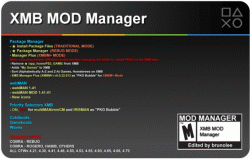

XMB Mod Manager.gif

Changes:
  • Added 4.70 compatibility
  • Update webMAN MOD

Notes:
  • If you have no "XMB MOD Manager" installed, just BASE is required
  • If you have last "XMB MOD Manager" installed, only the UPDATE is necessary


Downloads:

XMB MOD Manager (Rev1C) Base:
English | Portuguese

XMB MOD Manager (Rev1C) Update:
English | Portuguese

Source: PSX-Place


Be sure to check out our XMB Mod Manager thread right here at PSX-Place
 
What exactly do you have to do to make for example retroarch show up in xmb Plus catagory emulators?
 
What exactly do you have to do to make for example retroarch show up in xmb Plus catagory emulators?

Try adding the red code to the query for homebrew emulators in Game_Manager.xml:

Code:
<Query class="type:x-xmb/folder-pixmap" key="[B]type_homebrew_emulators[/B]" attr="type_homebrew_emulators"
 src="xcb://localhost/query?sort=+Game:Common.titleForSort&cond=OGL+Game:Game.titleId RX0000000 RXZZZZZZZ
[B][COLOR="#FF0000"]+Oe+Game:Game.titleId SSNE10000[/COLOR][/B]+Oe+Game:Game.titleId FCEU90000+Oe+Game:Game.titleId GENP00001
+Oe+Game:Game.titleId MDFN90000+Oe+Game:Game.titleId NSTP90000+Oe+Game:Game.titleId PCEE00000+Oe+Game:Game.titleId NPXS00006
+Oe+Game:Game.titleId SCUM12000+Oe+Game:Game.titleId SNES90000+Oe+Game:Game.titleId VBAM90000+Oe+Game:Game.titleId NPXS00006
+Oe+Game:Game.titleId EUAE00829+Oe+Game:Game.titleId FBAN00000+Oe+Game:Game.titleId HBDB90000+Oe+Game:Game.titleId GMBT90000
+Oe+Game:Game.titleId MAME90000+Oe+Game:Game.titleId HBFS90000+Oe+Game:Game.titleId HBST90000+Oe+Game:Game.titleId VICE90000
+Oe+Game:Game.titleId MDFN90002+Oe+Game:Game.titleId PSPC66820+Oe+Game:Game.titleId PS3VECX0+Oe+Game:Game.titleId ONE11111_
+Oe+Game:Game.titleId SSNE1000+An+Game:Game.category 2D+An+Game:Game.category BV+An+Game:Game.category GD
+An+Game:Game.category HM+An+Game:Game.category SD+An+Game:Game.category VF+An+Game:Game.category WT"/>
 
ALERT
I forgot update "webMAN MOD" on BASE "XMB MOD Manager's".
I don't now why but the "installation" of a old "webMAN MOD" in CFW 4.70 will softbrick the PS3.
SORRY, people!


I already uploaded "XMB MOD Manager's" BASES with rigth "webMAN MOD".
I'll do some more tests but I think there will be no more problems.
So for those who downloaded the versions BASE, before this message, please download it again.
 
Thanks for the great brunolle tool, use darknet 4.70 cobra 7.3 if it is compatible with my cfw will install. Sorry for my bad English, I'm from Brazil and I have always used your tool.
 
(...) use darknet 4.70 cobra 7.3 if it is compatible with my cfw will install. (...)
My English is bad also.
If you're trying to ask if it is compatible with your CFW, the answer is yes.
Is compatible with all CFW's 4.21, 4.30, 4.41, 4.46, 4.50, 4.53, 4.55, 4.60, 4.65, 4.66, 4.70 (Cobra or not)

brunolee em PortuguĂŞs said:
O meu Inglês também é mau.
Se estás a tentar perguntar se é compativel com a tua CFW, a resposta é sim.
É compavel com todas as CFW's 4.21, 4.30, 4.41, 4.46, 4.50, 4.53, 4.55, 4.60, 4.65, 4.66, 4.70 (sejam Cobra ou não)
Cumprimentos!
 
My English is bad also.
If you're trying to ask if it is compatible with your CFW, the answer is yes.
Is compatible with all CFW's 4.21, 4.30, 4.41, 4.46, 4.50, 4.53, 4.55, 4.60, 4.65, 4.66, 4.70 (Cobra or not)
Obrigado pela orientação, tudo entendido, não via a hora da atualização dessa grande ferramenta para minha cfw porque jogo online e sem banimento e a 9 meses e nunca banido graças a vocês grandes desenvolvedores com suas ferramentas.

Thanks for the guidance, all understood, I couldn't wait for the update of this great tool for my cfw because online game and without banishment and 9 months and never banned thanks to you great developers with their tools
 
Hmmm, was playing with this a bit but it seems to of killed PSNPatch :'(

I thought everything was working wonderfully, (played with different webman versions / install package file options and removed the wave etc).
Got things the way I liked it then manually deleted a few things from the XMLs (multiple ps store icons etc)

Then I decided to mount a game in webman, hit the button combo and realised psnpatch plugin wasn't running anyway.
Tried to delete the psnpatch then reinstall it, but the app itself just goes to a black screen.

Looks like I'm in for a fun afternoon lol

edit: ok turned out to be a fairly easy fix :)

looks like something funky happened to /dev/hdd0/boot_plugins.txt and it was an empty file.
just added /dev_hdd0/psnpatch.sprx back into it, restarted the PS3 and now the plugin loads again and the app runs again.

Strange. Using Rebug 4.70.1 REX on CECHL02 btw...

edit 2: as for the update which version would I have?

Filename: XMB MOD Manager (Rev1C).pkg
MD5: 1379c627e9f3faee7d19aad375d28b3c

Was installing a pretty old webman that had issues, but no soft brick fortunately.
 
Last edited:
i have problem
i heve rebug cobra rex 4.70 +webman 1.41.40
when i install webman mod in xmb mod => it install webman 1.33 !!!
the fan noise is very high ,when i reintall webman 1.41.41 the some problem
any fix ?
 
i have problem
i heve rebug cobra rex 4.70 +webman 1.41.40
when i install webman mod in xmb mod => it install webman 1.33 !!!
the fan noise is very high ,when i reintall webman 1.41.41 the some problem
any fix ?

I'm assuming you have CECHL or thereabouts like me.
Go into webman settings and disable dynamic fan control.

Reverts back to default Sony fan settings.
 
i have slim
but i need dynamic fan control
i think some old file from webman 1.33 in hdd !!
try to disable and enbale afetr reboot ps3 ?
any command uninstall completely webman and remove all files ?
 
i have slim
but i need dynamic fan control
i think some old file from webman 1.33 in hdd !!
try to disable and enbale afetr reboot ps3 ?
any command uninstall completely webman and remove all files ?

Hmm that's a different issue then mine then.

I don't think there is a command and I don't really know the inner workings of webmanmod but you could try delete /dev/hdd0/tmp/wmconfig.bin from your ps3? (Just guessing here, but that's the only configuration file I could find with a quick look)

edit: Just tested and that's definitely the configuration file.
Try updating to latest webman, then deleting that file and restarting your ps3.
Should start on default settings again. Might help.... :/
 
Last edited:
Try adding the red code to the query for homebrew emulators in Game_Manager.xml:

Code:
<Query class="type:x-xmb/folder-pixmap" key="[B]type_homebrew_emulators[/B]" attr="type_homebrew_emulators"
 src="xcb://localhost/query?sort=+Game:Common.titleForSort&cond=OGL+Game:Game.titleId RX0000000 RXZZZZZZZ
[B][COLOR="#FF0000"]+Oe+Game:Game.titleId SSNE10000[/COLOR][/B]+Oe+Game:Game.titleId FCEU90000+Oe+Game:Game.titleId GENP00001
+Oe+Game:Game.titleId MDFN90000+Oe+Game:Game.titleId NSTP90000+Oe+Game:Game.titleId PCEE00000+Oe+Game:Game.titleId NPXS00006
+Oe+Game:Game.titleId SCUM12000+Oe+Game:Game.titleId SNES90000+Oe+Game:Game.titleId VBAM90000+Oe+Game:Game.titleId NPXS00006
+Oe+Game:Game.titleId EUAE00829+Oe+Game:Game.titleId FBAN00000+Oe+Game:Game.titleId HBDB90000+Oe+Game:Game.titleId GMBT90000
+Oe+Game:Game.titleId MAME90000+Oe+Game:Game.titleId HBFS90000+Oe+Game:Game.titleId HBST90000+Oe+Game:Game.titleId VICE90000
+Oe+Game:Game.titleId MDFN90002+Oe+Game:Game.titleId PSPC66820+Oe+Game:Game.titleId PS3VECX0+Oe+Game:Game.titleId ONE11111_
+Oe+Game:Game.titleId SSNE1000+An+Game:Game.category 2D+An+Game:Game.category BV+An+Game:Game.category GD
+An+Game:Game.category HM+An+Game:Game.category SD+An+Game:Game.category VF+An+Game:Game.category WT"/>

Thank you Aldo. I will try that :)
 
aldo in other poste
you poste command to uninstall webman ?

/delete.ps3?uninstall uninstalls webman (delete all files related to webMAN). The command is available only since build 1.41.31 and later.

The following files/folders are deleted:
/dev_hdd0/webftp_server.sprx
/dev_hdd0/plugins/webftp_server.sprx
/dev_hdd0/tmp/wmconfig.bin
/dev_hdd0/tmp/wmtmp
/dev_hdd0/xmlhost
/dev_hdd0/tmp/wm_lang
/dev_hdd0/tmp/wm_icons


/dev_hdd0/boot_plugins.txt is also deleted, if the size of the file is under 40 bytes.
 
(...)
looks like something funky happened to /dev/hdd0/boot_plugins.txt and it was an empty file.
just added /dev_hdd0/psnpatch.sprx back into it, restarted the PS3 and now the plugin loads again and the app runs again.

Strange. Using Rebug 4.70.1 REX on CECHL02 btw...

edit 2: as for the update which version would I have?

Filename: XMB MOD Manager (Rev1C).pkg
MD5: 1379c627e9f3faee7d19aad375d28b3c

Was installing a pretty old webman that had issues, but no soft brick fortunately.

For REBUG CFWs "XMB MOD Manager" install an empty boot_plugins.txt

I post an ALERT before, for those who downloaded the versions BASE, to download again.
You had lucky not softbrick the PS3, I softbrick mine 3 times

XMB MOD Manager (Rev1C).pkg 112,8 MB (118.253.872 bytes)
MD5: 556ad8f331a98d13b9f3bbd52709c482

XMB MOD Manager PT (Rev1C).pkg 112,8 MB (118.252.928 bytes)
MD5: f5e0105b61e845cfefdade02fd58d756


XMB MOD Manager (Rev1C) Update.pkg 11,9 MB (12.525.056 bytes)
MD5: c677db84452915eefc5ea4cc64e1bd74

XMB MOD Manager PT (Rev1C) Update.pkg 12,0 MB (12.537.504 bytes)
MD5: 9945b51c1ba314ed1473c21099add42e
 

Similar threads

Back
Top


