

Hollow Knight for the PS Vita

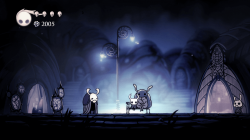
While it's not perfect and may never be, it's in reasonably good shape to let you enjoy this amazing game.
Disclaimer for new players. The tutorial scene is the only scene with that kind of horrific performance, After that scene, experience is better.
Compromises
- Texture downsizing: Most textures were reduced in size.
- Frame rate: Capped at 30 FPS but may drop in larger scenes with multiple enemies (until some are defeated).
- Audio glitches: Sounds may occasionally be glitchy.
- Loading times: Scenes take longer to load due to the Vita's I/O speeds.
- Lower FPS in busy areas: Performance drops in some scenes with many enemies (the tutorial scene has the most noticeable lag).
- Longer load times for larger scenes: Bigger areas may take extra time to load.
- Periodic lag spikes: Once every minute or so, you may encounter a lag spike caused by various factors.

PS VITA Set up
In order to have the best possible experience, I recommend you to use following plugins (that you should be able to find somewhere on the net) :
- ioplus.skprx
- iostaging.skprx
- (ThreadOptimizer) => Optional, requires configuration, and can have negative impact if not correctly done
Instructions
Prerequisites
- Install the Hollow Knight .VPK using VitaShell or download it straight from VitaDB on your PS Vita.
Do not attempt to launch the game yet, as it will crash without the required files. - Ensure you have purchased and downloaded the game from Steam or GOG.
- Overclocking is necessary to run the game properly.
- Visit the Releases page of this repository and download HollowKnightVitaSTEAM.zip.
- Extract the downloaded zip to a folder on your PC.
- Copy the Steam game folder into the extracted folder.
Note: Your HollowKnightVitaPatchSteam folder should look like this:
├── Hollow Knight/ <- ../steamapps/common/Hollow Knight
├── vcdiff/
├── APPLYPATCH.bat
├── deterministic.exe
├── xdelta3
└── xdelta3-x.x.x-x86_64.exe
</code>
- Run APPLYPATCH.bat and wait for the process to complete (this can take 15–25 minutes depending on your system).
- Once completed, you will see a file named HollowKnightVITA.zip.
- Using VitaShell, connect your PS Vita to your PC and copy the extracted contents of HollowKnightVITA.zip (zip file should be around 380–450MB) to ux0:app/HKVT12222/. Note: Your HKVT12222 folder on your Vita should look like this:
├── Media/
├── sce_module/
├── sce_sys/
└── eboot.bin
</code>
- When prompted, select Replace the files in destination.
- if you encounter any issues take a look at the Troubleshooting section
- Launch the game and enjoy!
- Visit the Releases page of this repository and download HollowKnightVitaGOG.zip.
- Extract the downloaded zip to a folder on your PC.
- Copy the GOG game folder into the extracted folder.
Note: Your HollowKnightVitaPatchGOG folder should look like this:
├── Hollow Knight_Data/ <- ../GOG/Hollow Knight/Hollow Knight_Data
├── vcdiff/
├── APPLYPATCH.bat
├── deterministic.exe
├── xdelta3
└── xdelta3-x.x.x-x86_64.exe
</code>
- Run APPLYPATCH.bat and wait for the process to complete (this can take 15–25 minutes depending on your system).
- Once completed, you will see a file named HollowKnightVITA.zip.
- Using VitaShell, connect your PS Vita to your PC and copy the extracted contents of HollowKnightVITA.zip (zip file should be around 380–450MB) to ux0:app/HKVT12222/. Note: Your HKVT12222 folder on your Vita should look like this:
├── Media/
├── sce_module/
├── sce_sys/
└── eboot.bin
</code>
- When prompted, select Replace the files in destination.
- if you encounter any issues take a look at the Troubleshooting section
- Launch the game and enjoy!
- Ensure that your PS Vita is properly overclocked.
- Verify that you have the correct game version (Steam or GOG) and have followed the steps for your version.
- If ux0:app does not appear in File Explorer, make sure you have visibility of hidden directories enabled.
This patch requires a legally purchased copy of Hollow Knight.


