
You are using an out of date browser. It may not display this or other websites correctly.
You should upgrade or use an alternative browser.
You should upgrade or use an alternative browser.

PS2 3D Pinball Space Cadet PS2 port v0.3
- Thread starter Headshotnoby
- Start date


Headshotnoby
Member
Headshotnoby
Member
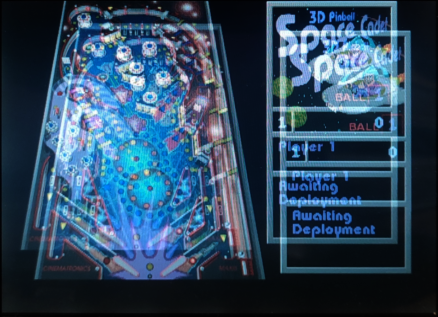
It looks like a display output blending issue. How did you set the display buffers? If you set the PMODE (0x12000000) register to 0x66, the blending should be turned off. Keep in mind with this particular setting you need to use a second display buffer (DISPLAY2/DISPFB2) for the output, as the first one is used for alpha blending solely.
Headshotnoby
Member
i don't think i'm using the PMODE register, but if it's any help, gsKit->PrimAlphaEnable is on and the display is initialized with PSM CT32 and PSMZ_16SIt looks like a display output blending issue. How did you set the display buffers? If you set the PMODE (0x12000000) register to 0x66, the blending should be turned off. Keep in mind with this particular setting you need to use a second display buffer (DISPLAY2/DISPFB2) for the output, as the first one is used for alpha blending solely.
also i believe it's more of a screen flickering issue than an alpha blending issue, i'm not trying to use any of the latter here

1052
Member
@Headshotnoby
You have a fully working code from version 0.2. Is it possible to add code from version 0.3 to it in parts to find out which code causes this issue?
You have a fully working code from version 0.2. Is it possible to add code from version 0.3 to it in parts to find out which code causes this issue?
Headshotnoby
Member
i'm not sure if i can do that, for v0.3 i had changed the graphics code to use gsKit, i can't mix both@Headshotnoby
You have a fully working code from version 0.2. Is it possible to add code from version 0.3 to it in parts to find out which code causes this issue?
i'll put up another test build where i changed the PSM and PSMZ parameters, set PrimAlphaEnable to false and flush the cache every time the texture updates
Attachments

Headshotnoby
Member
i think i actually know the real issue now, but just a quick question, is your display PAL?
Last edited:
Headshotnoby
Member
1052
Member
@Headshotnoby
This test version works well. Also here is a list of things that can be added and improved:
This test version works well. Also here is a list of things that can be added and improved:
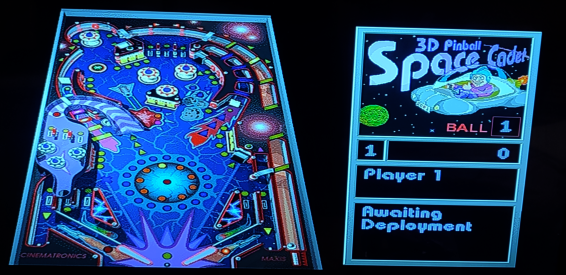
- My CRT TV doesn't display PAL very well and this causes the pinball mission and high score text to flicker. Can you please display it in NTSC or add a selector? By the way, in version 0.2 this text does not flicker.
- Decompilation project and original pinball both support cheats. Could you please add these cheats or create a cheat menu?
- Decompilation project supports localization. For example, for Russian localization you can set this font in the settings and localization will work. Is it possible to add Russian and other localizations to PS2 version?
- The dots and lines near the edges of letters are still not fixed.
- Full Tilt Pinball table still doesn't work.

Headshotnoby
Member
does this flickering happen in v0.3 and/or the test version?
- My CRT TV doesn't display PAL very well and this causes the pinball mission and high score text to flicker. Can you please display it in NTSC or add a selector? By the way, in version 0.2 this text does not flicker.
alexboanta3107
Member
The latest version (v0.3) didn't work on my SCPH-30004R unit!
Headshotnoby
Member
try the latest test build a few messages aboveThe latest version (v0.3) didn't work on my SCPH-30004R unit!
alexboanta3107
Member
The high score text is blinking in PAL mode for the English version of Windows XP's Pinball!
Last edited:
Similar threads
-
-
 PS VITA / PsTV Hill Climb Racing PSVita Port by memory-hunter
- Started by jolek
- Replies: 1
-

-
PS2 [POC/Outdated] unofficial Open PS2 Loader (uOPL)
- Started by Ripto
- Replies: 58