PS3 4.82 NoBD CFW Options ( REBUG / FERROX / OVERFLOW ) : Unable to boot Apps / Games from PS3 XMB?

Here is a type of CFW for PlayStation 3 consoles with a broken BD Logic Board/Drive and contains an issue of not being able to boot anything from the PS3 XMB. It does not matter if the content is stored on the DISC or HDD, you can not launch anything from the XMB with PS3 Console's contain this defect. If that sounds like a PS3 console you have laying around or know someone who might have that issue, there is good news as there is an easy fix (Yes, Sony its easy and Sony should issue this patch themselves). Simply by disabling & patching the Disc drive, developer's in the PS3 community have found out this allows those otherwise useless consoles to launch items once again from the PS3 XMB, So play your purchased Content from PSN / Disc Backups ect/ Purchase things from PSN store/ play video & use services once again on your PS3. noBD CFW for a majority will never be used, but is a great option for PS3 owners that are otherwise stuck with a broken console that would only use would be a power hungry screensaver. So lets take a look at some of the NoBD CFW options and favors we have seen released to this point

noBD_CFW.jpg
(View ALL the current noBD CFW Options in the TABS below)


  • Red_Scorpion_3_sml.png
    Features & Patches for 4.82 REBUG LITE (NoBD - Unofficial)
    Note COBRA is off by default, you must install REBUG Toolbox and toggle Cobra ON, otherwise this REBUG Lite edition will behave like a Standard CFW without Cobra extra features, the choice is up to the user to use as a Standard CFW or a Cobra CFW
    • BASED ON OFW CEX 4.82
    • NoBD Patches
    • FEATURE – QA Token compatibility
    • FEATURE – OtherOS++ support enabled
      • Use Rebug Toolbox to Boot OtherOS with different LV1 patches
    • FEATURE – Package Manager
      • (Replacement for the standard 'Install Package Files' option)
    • FEATURE – FSELF compatibility
      • (Fake Signed ELF is supported)
    • INCLUDED – Rebug Toolbox 02.02.15.MULTI15
      • (Install included Rebug Toolbox or higher for full compatibility)
    • PATCHED – Appldr: LV2 memory hash check is disabled
      • (Memory protection on LV2 is disabled in higher level)
    • PATCHED – LV1: Disable System Integrity Check
      • (Safe to use with mismatched COREOS/SYSCON versions or if PS3 is not QA enabled)
    • PATCHED – LV1: Undocumented function 114
      • (Allow mapping of protected memory)
    • PATCHED – LV1: Skip all ACL Checks
      • (Needed to allow booting of OtherOS)
    • PATCHED – LV1: Peek and Poke support
      • (Unused LV1 call 182 and 183)
    • PATCHED – LV2: Peek and Poke support
      • (LV2 Syscall 6 and 7)
    • PATCHED – LV2: Peek and Poke support for LV1
      • (LV2 Syscall 8 and 9)
    • PATCHED – LV2: LV1 CALL System call
      • (LV2 Syscall 10)
    • PATCHED – LV2: LV2: Allow execution of any LV2 internal function *NEW
      • (LV2 Syscall 15)
    • PATCHED – Recovery: Prevent accidental OFW update while on Recovery mode
    • PATCHED – VSH: Allow Unsigned act.dat and *.rif files
    • PATCHED – VSH: Auto unlocks c00 demo contents *
    • PATCHED – VSH: Disable Unlinking/Deleting of act.dat
      • (Improved patches applied)
    • PATCHED – VSH: Disable NEW PSP DRM Check
      • (Allowing unsigned PSP pkg contents on 4.75 or higher CFW)
    • PATCHED – VSH: Disable Epilepsy Warning for Faster Boot-Up Speed
    • FUN FEATURE – In Game Screenshot
      • (Allows taking screenshots in Game XMB)
    • FUN FEATURE – Enhanced Remote Play
      • (This unlocks the limitation of working apps/games for remote play, by disabling SFO flag check)
    • FEATURE – Full Polish support for XMB/PS2 Emu *NEW
      • (Provide full Polish character support)
    • FEATURE – Cinavia protection fully disabled
      • (Supports optical media/bd iso, AACS must be decrypted)
    • FEATURE – Homebrew store compatibility *NEW
      • (Downloading debug signed packages is now available on retail CFW.)
    • FEATURE – XMB CFW settings v0.1a *NEW
      • (XMB icons for simple CFW tasks available via REBUG TOOLBOX)
    • FEATURE – PSN/SEN Accessibility
      • (PSN /SEN Accessible , until the next OFW update)
    • FEATURE – XMBM+ Compatibility *NEW
      • (XMB Manager Plus developed by Team XMBM now supported via standalone pkgs.)
    • FEATURE – COBRA 7.55 (NEW COBRA Version)
      • (Disabled by default, REBUG Toolbox required to enable)


  • ferrox2017.png
    4.82 FERROX NoBD (+ COBRA 7.55) CFW:

    CFW FEATURES:

    • Built from the base of OFW 4.82
    • NoBD Patches (Applied by Alexander (Official NoBD Release)
    • Can be installed from every CEX CFW and 3.55 OFW and 4.82 OFW via PS3Xploit
    • QA Flags enabled if already enabled, so there is the possibility to Downgrade to every Fw version
    • COBRA 7.55
    • Optional Graphic mods can be installed, along with HB Store. Read under the features.
    • PS2, PSX, PSP ISO / Minis / Remastered / PKG Compatibility
    • ReactPSN Compatibility
    • RSOD Screen Bypass
    • App_home/PS3_GAME
    • XMB In-Game Screenshot
    • Remote Play Compatibility
    • Package Manager replaces the classic Install Install Package Files
    • CPU & RSX Temperature are now shown on XMB In-Game while playing PS2 Games
    • LV1: Patched to remove PS2 LV2 Protection
    • LV1: Patched coreOS Hash Check to prevent Brick non non-Dehashed consoles
    • LV1: Peek & Poke
    • LV2: Peek & Poke
    • Disabled Epilepsy message
    • CINAVIA completely Disabled

    This build has the Fixes introduces on FERROX COBRA v1.01.
    Here are the Changelog:
    • COBRA 7.54 - Fixed the installation of Packages and game updates with Syscalls disabled. Credits to Alexander, Aldo Vargas, Joonie
    • COBRA 7.55 - Fixed deleting Homebrews / Apps / Game updates with Syscalls disabled. Credits to Alexander
    • Fix PSP DRM & Fix PSX. So now PSP PKGs and PSX PKGs runs correctly
    • Fix BlueRay ISO
    • Fix: Added support to download unsigned PKG from XMBPD - Credits to DeViL303, Bobby_Downgrades

  • Overflow_CFW.jpg

    4.82 Overflow - Standard CFW - Features
    • Built from 4.82 ofw
    • NoBD Patches Applied (Official Applied by @Bobby_Downgrades )
    • LV0- All security checks disabled
    • LV0- AppLdr patched to disable sig checks on pkgs
    • LV1- Disabled lv2 protection
    • LV1- Disabled Hash Checks
    • LV1- Added Peek & Poke
    • Lv1- Added mmap-function 114
    • Lv1- ACL checks removed
    • LV2- Added Peek & Poke
    • LV2- Lv1 peek & poke support
    • Games with 4.82 keys and lower will start
    • RED SCREEN OF DEATH Bypass
    • Not added app/home as it's old and not needed on cex really
    • Added option to xmb Install Packages with three paths (USB or HDD or DOWNLOAD to usb option)
    • Warning message disabled for faster boot time
    • Update from any cfw up to 4.82 and 3.55 ofw
    • Toggle qa all cfw inside cfw for convenience
    • QA flag compatable
    • Both dex and cex packages supported
    • React psn compatability
    • Visual updated (also changed stock overflow waves)
    • Cinavia protection disabled for disc and hdd
    • Some trophy sync errors removed/bypassed
    • Remote play supported on non Son# product
    • ingame screenshots supported
    • psp drm checks disabled
    • Removed annoying singstar icon
    • Full blu ray and dvd support
    • fselfs are native (debug/dex files like eboots run)
    • Added option to visit you tube channels and websites (pre selected some helpful ones like psx place, ngu and ps3hax)
    • Added download and install to what's new in psn column (updated packages will be sent to the ps3 when they are available, option in boxed tools to clear cache and check for updates will update download list) Massive thanks to PS3 Extra and devil_303 :)
    • Added Restart System options to power options in xmb user column

    4.82 Overflow - COBRA (v7.3 Lite) CFW...
    • Built from 4.82 ofw
    • NoBD Patches Applied (Officially by @Bobby_Downgrades )
    • LV0- All security checks disabled
    • LV0- AppLdr patched to disable sig checks on pkgs
    • LV1- Disabled lv2 protection
    • LV1- Disabled Hash Checks
    • LV1- Added Peek & Poke
    • Lv1- Added mmap-function 114
    • Lv1- ACL checks removed
    • LV2- Added Peek & Poke
    • LV2- Lv1 peek & poke support
    • Games with 4.82 keys and lower will start
    • RED SCREEN OF DEATH Bypass
    • Not added app/home as it's old and not needed on cex really
    • Added option to xmb Install Packages with three paths (USB or HDD or DOWNLOAD to usb option)
    • Warning message disabled for faster boot time
    • Update from any cfw up to 4.82 and 3.55 ofw
    • Toggle qa all cfw, ccapi and overflow boxed tools packages inside cfw for convenience
    • QA flag compatable
    • Both dex and cex packages supported
    • React psn compatability
    • (Cobra 7.3 lite)Changed some stage2 functions and also made some small clean ups
    • Has webman integrated (fan control disabled by default)
    • Update from disc disabled (prevents accidental update to ofw from disc)
    • Visual updated
    • Cinavia protection disabled for disc and hdd
    • Some trophy sync errors removed/bypassed
    • Remote play supported on non Son# product
    • ingame screenshots supported
    • psp drm checks disabled
    • Removed annoying singstar icon
    • fselfs are native (debug/dex files like eboots run)
    • Added option to visit you tube channels and websites (pre selected some helpful ones like psx place, ngu and ps3hax)
    • Added download and install to what's new in psn column (updated packages will be sent to the ps3 when they are available, option in boxed tools to clear cache and check for updates will update download list) Massive thanks to PS3 Extra and devil_303 :)
    • Added Restart System options to power options in xmb user column
    • plays iso games from disc (thanks to Dean K)


Additional Info & Downloads:

Additional CFW & Homebrew updates for 4.82 can be seen in this thread:
psx-place.com

(Not all homebrew needs an update to support a new firmware release)
 
And did you install that NoBD CFW? It should avoid that blackscreens

Yes 3 different times, let me ask I do have a bluray conncted, its just not the right 1 I do not have original logic oard so I was gonna try to remarry it,yet dont have eid root ke, Cant get it either because , I cant open any apps. I did install all 3 nobd cfw, which is my reason for asking this question. Either of them allowed any app to open just like the normal cfw. Should I disconnect the drive I do have in there? I don't think that would keep apps from booting up.
 
Yes 3 different times, let me ask I do have a bluray conncted, its just not the right 1 I do not have original logic oard so I was gonna try to remarry it,yet dont have eid root ke, Cant get it either because , I cant open any apps. I did install all 3 nobd cfw, which is my reason for asking this question. Either of them allowed any app to open just like the normal cfw. Should I disconnect the drive I do have in there? I don't think that would keep apps from booting up.
are you sure bd drive is your only problem as these FWs should allow for your apps to work as they remove all BD function. I could make you a Rebug 4.81.2 NoBD with syscon 4.82 (cobra, webMAN, CFW Tools Enabled) if apps aren't working in these then probably not working in that either.
 
see what the cobra files are named in dev_blind/rebug/cobra. I believe that when they're disabled they'll have bk or bak added to the file name.

how do i access dev blind or any other option?? nothing from xmb loads. I did go to remarry and enter service mode and those did load but i didnt have a eid root key to have on my usb drive, So that was a failure, not sure how to get the info you requested being unable to load any homebrew apps or anything much.
 
are you sure bd drive is your only problem as these FWs should allow for your apps to work as they remove all BD function. I could make you a Rebug 4.81.2 NoBD with syscon 4.82 (cobra, webMAN, CFW Tools Enabled) if apps aren't working in these then probably not working in that either.

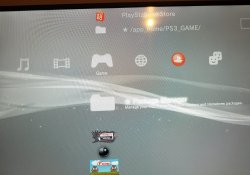
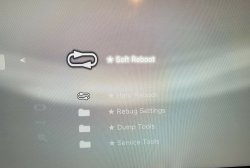
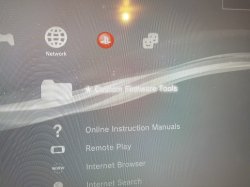
That would be awesome and Illl try it, let me try to take a few pics, and I believe thats my only issue, it didnt have a bluray in it, I put 1 that works but is not the right board, everything else is ok. I can access internet, and do the main options on ps3 just not apps that I install via pacvkage manager.
 
Ok i have all this not sure what else to actually show you, i try to open rebug toolbox or multiman and I get a black screen.
 

Attachments

  • ps3.jpg
    ps3.jpg
    1.4 MB · Views: 723
  • ps3-3.jpg
    ps3-3.jpg
    285.9 KB · Views: 556
  • ps3-2.jpg
    ps3-2.jpg
    1.6 MB · Views: 647
If anyone can help that be great. I have a Phat 4 USB Port PS3, and I tried to use Rebug 4.80, 4.81, 4.82 and Ferrox 4.82 Cfw all had noBD and Cobra, used Irsman and mmCM and they all failed to load ISO on fat32, files no bigger than 4gb. some JB folder games worked some did not. I even tried the Fake BD drive.pkg with usb stick and that didnt work either. On rebug 4.80 BDemu on Dex mode i tried the setting>blu ray access and HDD native and that didnt work either. Every time i swapped cfw it was under xmb and installed twice and formatted the file system and storage system with same results. Does anyone know if theres anyway to run ISO and JB games with out a physical BD drive and no Logic Board and if there is which Cfw is the right one?
 
INSTALLED CFW REBUG AND I CAN NOT HANDLE GAMES, BOTH FOR THE MULTIMAN, WEBMAN, CHOOSE THE GAME BUT THEY DO NOT APPEAR IN THE XMB .. SOME HELP ?

CECH2501A !
 
INSTALLED CFW REBUG AND I CAN NOT HANDLE GAMES, BOTH FOR THE MULTIMAN, WEBMAN, CHOOSE THE GAME BUT THEY DO NOT APPEAR IN THE XMB .. SOME HELP ?

CECH2501A !
First, check your caps lock key on your keyboard ;):-p

Since you posted this here I'm assuming your bd doesn't work and you installed this nobd version of rebug, right?
What was your previous fw and did the games work there?
Are your games in iso format or jb folders?
Have you enabled cobra in the toolbox?
 
What actually means a not working bd?
My console reads music and PS1 CD's just fine, but no PS3 games.
Struggles, i can hear an eject sound, more struggling than nothing.
I'm on 4.82 OFW, can I install regular CFW?
 
What actually means a not working bd?
My console reads music and PS1 CD's just fine, but no PS3 games.
Struggles, i can hear an eject sound, more struggling than nothing.
I'm on 4.82 OFW, can I install regular CFW?
have you been able to install OFW without problem? It sounds like just the laser, you should be able to install regular CFW without issue, provided you have a CFW compatible model.
 
Yes, the OFW installation was smooth without any issue. It's a 2004A model, I'm gonna try a regular CFW then. Thanks.
 
What actually means a not working bd?
My console reads music and PS1 CD's just fine, but no PS3 games.
Struggles, i can hear an eject sound, more struggling than nothing.
I'm on 4.82 OFW, can I install regular CFW?
The lens will be relying on 3 burning diodes on a ps3 BD drive, one in infrared (for CDs), one in red (for DVDs) & one blue/violet for Bluray discs.
It's likely that at least the blue diode is malfunctioning. If it is the case you would need to replace the whole lens.
A malfunctioning lens should let you install a standard CFW & use Cobra/Mamba without problems
 
QUESTION: the ribbon on my BD drive is mangled (actually its the clamp that holds the ribbon tight in place) since that obviously makes the BD drive useless....when I install a NoBD firmware, do I need to remove the Bd drive or unhook the ribbon completely? As of right now, I have it wedged in there with some Jerry-rigged YouTube cardboard method I found haha. Needless to say, that did not work. the eject button beeps, but the drive doesn't take a disc in and now NO apps launch! Will a NoBD firmware fix these issues lol?
 
when I install a NoBD firmware, do I need to remove the Bd drive or unhook the ribbon completely?

Is your ps3 on Ofw 4.81 or below?if so..
I'm Pretty sure you just need the logic board (Fthat came With the MODEL NUMBER ps3 you have...Not from a Diff CECH-___* Model that fits ) from the bd drive hooked up , (And in working condition). to get to 4.82 and run the rest..
Im curious to know also.
been wrong before
 
Last edited:
when I install a NoBD firmware, do I need to remove the Bd drive or unhook the ribbon completely?

Is your ps3 on Ofw 4.81 or below?if so..
I'm Pretty sure you just need the logic board (Fthat came With the MODEL NUMBER ps3 you have...Not from a Diff CECH-___* Model that fits ) from the bd drive hooked up , (And in working condition). to get to 4.82 and run the rest..
Im curious to know also.
been wrong before

1. There is technically no "need" to remove the drive or the ribbon cable in order to install a noBD firmware.
On CECH25xx, it makes no difference & you can remove the ribbon cable and/or the whole BD unit if you really wish. The logic board is integrated into the motherboard.
On all earlier consoles up to CECH21xx, it's highly recommended to leave at least the BD logic board, which is screwed under the drive unit, plugged in & in working order, without it, some cfw features will be unavailable. The BD drive itself can be removed without consequences though.

2. You cannot install a modified firmware unless your console is cfw compatible.
Only ps3 phat or slim models up to CECH25xx can use noBD MFW/CFW. If you have one of those models on ofw 4.82, you can use ps3xploit tools v2.0 to install any 4.82 noBD firmware.

Note: For all slim models CECH2xxx, you should always run MinVerChk to verify that the minimum installable firmware is < 3.60 before attempting to flash the console. Do not rely solely on the datecode due to possible refurbishment, if you omit this check you may end up with a partial brick recoverable only with a hardware flasher.
 
Last edited:
1. There is technically no "need" to remove the drive or the ribbon cable in order to install a noBD firmware.
On CECH25xx, it makes no difference & you can remove the ribbon cable and/or the whole BD unit if you really wish. The logic board is integrated into the motherboard.
On all earlier consoles up to CECH21xx, it's highly recommended to leave at least the BD logic board, which is screwed under the drive unit, plugged in & in working order, without it, some cfw features will be unavailable. The BD drive itself can be removed without consequences though.

2. You cannot install a modified firmware unless your console is cfw compatible.
Only ps3 phat or slim models up to CECH25xx can use noBD MFW/CFW. If you have one of those models on ofw 4.82, you can use ps3xploit tools v2.0 to install any 4.82 noBD firmware.

Note: For all slim models CECH2xxx, you should always run MinVerChk to verify that the minimum install-able firmware is < 3.60 before attempting to flash the console. Do not rely solely on the datecode due to possible refurbishment, if you omit this check you may end up with a partial brick recoverable only with a hardware flasher.

!thx
Whats your recommendation for an L01nor No bd cexCFW
 

Featured content

Trending content

Back
Top