PS3 4.82 Overflow cfw collection

Would you mind posting the MD5 for each PUP here?
There is no real need as each download comes inside a rar file which keeps the pup files integrity.

I install overflow its work fine but when i run a game (gta v and pes18) i have a black screen any idea please?
Maybe wrong options set in multiman ?

What is up with v4 when I run multman and try to turn on cobra mode it tells me incompatible fw?
The cfw has cobra auto enabled which means that multiman is automatically set to cobra mode, I do not know why multiman tells you that, maybe use the latest version.
 
Help plaeae. I've installed the overlow nobd cfw and my games won' launch from multiman, it keeps restarting to xmb. There isn't any apps_home/games_ps3 folder. What should I do ?
I will be updating the overflow boxed tools app which will support enabling apphome, keep an eye out in the what's new for overflow boxed tools 4.82 should be available for download in the next 48 hours
 
I will be updating the overflow boxed tools app which will support enabling apphome, keep an eye out in the what's new for overflow boxed tools 4.82 should be available for download in the next 48 hours
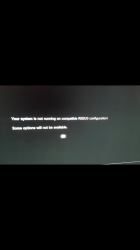
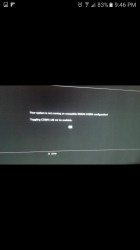
Hey, so i installed the cobra nobd and webman isn't playing the games. i then used rebug tool box to enable the webman and a message keeps saying that full cobra options wont be available.so now i cant enable webman
 
it's unclean flash and/or you're doing something wrong.v5 noBD is fully tested and works.try flashing v5 noBD,then do a full restore from recovery,then flash v5 noBD again to clean it properly.then test your backups from integrated webman.

edit:

ir your ps3 is nand model,ps2 iso's won't work.ps1 .bin and .img and ps3 backups work.ps1 backups can be problematic and if can it be launched depends of the rip.if they're not working try different version of the game and/or other rip.this issue is present ps3 wide and not related to cfw i think.
 
it's unclean flash and/or you're doing something wrong.v5 noBD is fully tested and works.try flashing v5 noBD,then do a full restore from recovery,then flash v5 noBD again to clean it properly.then test your backups from integrated webman.

edit:

ir your ps3 is nand model,ps2 iso's won't work.ps1 .bin and .img and ps3 backups work.ps1 backups can be problematic and if can it be launched depends of the rip.if they're not working try different version of the game and/or other rip.this issue is present ps3 wide and not related to cfw i think.
well i had a previous cfw on it and i wanted a nobd cfw so i simply updated to the cobra cfw nobd via usb just as any noob would do. may that be the issue?
 
flashing cfw on top of other cfw without cleaning could and will cause lot of issues (i've experienced them myself),especially with webman.

it's always good idea and a safe bet to do full restore from recovery after flashing,and to fully clean previous webman installs i've found that reflashing cfw is the way to go.

so to recap,do a full restore,reflash overflow v5 noBD,do again full restore from recovery and use integrated webman.then,if it's not working,it's because you have bad backups/rips.

are you sure your blueray isn't working properly?

 
Can I install Cobra CEX version over the Standard CEX version?
Meaning that I currently have Overflow 4.28 Standard CEX and want to replace it with Overflow 4.28 Cobra CEX.
Can I just simply use the XMB's Update from USB?
Thanks
 
Overflows works like a charm ps2iso and psx iso works but i cannot get psp iso or pkg to work keep getting black screen .i want to know if feerox cfw runs them
 
Guys I have another question (sorry but I'm pretty much new to all this).
I just installed Overflow 4.82 Cobra CEX CFW and I saw that it comes with webMAN app installed which has a nice and light web interface. I can load games that are on my external FAT32 HDD from that interface, but I can't load games if the same HDD is NTFS: unfortunately some games I downloaded have files bigger than 4GB inside and FAT32 doesn't allow such dimensions per-file. Is there a webMAN option I have to set to read games folder from my NTFS HDD? Or do I have to install an external PKG?
I wanted to keep the system as clean as possible, so I'm asking this before installing random pkg and don't know how to use them.

Thanks a 1000 times. :-)
 
if i remember correctly,integrated webman on overflow reads ntfs external drives out of the box.if not,use prepnfts 1.17.psp and ps2 iso's needs to be on internal hdd,currently there's no option on ps3 to read them from ntfs drive.
 
Well I actually don't have any .iso files: i have game folders named with the game code (something like BLES82738) containing PS3_GAME, PS3_UPDATE and another file. Putting those folders in HDD(FAT32)\GAMES\ allow me to load games from webMAN's web interface. So are you telling me that with prepntfs I should be able to do the same thing with a NTFS HDD?

P.S. If the HDD is NTFS, webMAN doesn't even see something like usb000\ under "Files" tab. Viceversa, for a FAT32 HDD, I can explore files.

Thanks again
 
i'm prety sure that for them to work from ntfs you'll need to convert them to .iso format.i know that's tedious,but it's the best way.put them in GAMES folder on internal drive,install irisman and you can directly and simoultaneously covert and copy them on your ntfs drive from irisman (when in irisman,press triangle and select create ISO and select ntfs and that's it).i've tested at least 40-50 games this way,not a single error.
 
flashing cfw on top of other cfw without cleaning could and will cause lot of issues (i've experienced them myself),especially with webman.

it's always good idea and a safe bet to do full restore from recovery after flashing,and to fully clean previous webman installs i've found that reflashing cfw is the way to go.

so to recap,do a full restore,reflash overflow v5 noBD,do again full restore from recovery and use integrated webman.then,if it's not working,it's because you have bad backups/rips.

are you sure your blueray isn't working properly?
MY blueray drive is completely shot.
 
That's the message I keep getting.. even after I did the while restore and reflash cobra
 

Attachments

  • Screenshot_20171130-214613.png
    Screenshot_20171130-214613.png
    483.1 KB · Views: 369
  • Screenshot_20171130-214617.png
    Screenshot_20171130-214617.png
    506.8 KB · Views: 439
@umart666 thank you again i'll give it a try!

By the way, after refreshing to cobra version, i fast-formatted my ps3 so I didn't see any error messages for now
 
hi, im having an issue with version 4 . earlier today none of the download links under install packages were connecting, kept getting error 400 i think, if i remember right. i dont know if the links were temporarily down or its something on my end. any advice?

Thanks in advance.

(I will try again now and update post if the problem is resolved)

###EDIT### though i was getting errors from the package installer>Downloads links, i just noticed the same items were in the whats new button of XMB, and those work, so all good. Disregard this post ###EDIT###
 
Last edited:
Back
Top