thnks poste editingdude, this txt files are not the dumps.
Those are just the txt results from PS3PyChecker.
Please post the actual dumps.
Also how is IDPS masked when this is not a dump
Good effort, but please re-submit or edit post

-
Official PS3 Toolset is now supporting 4.92 Firmware
View Official Release Post for additional information HERE
- Forums
- PlayStation 3 (PS3)
- PS3 Jailbreak CFW and PS3HEN
- Ps3Xploit [Official Forum's] PS3HEN & PS3 Toolset
- bguerville's PS3 Toolset (bgtoolset)
You are using an out of date browser. It may not display this or other websites correctly.
You should upgrade or use an alternative browser.
You should upgrade or use an alternative browser.
PS3 [BG Toolset] User Issues and Dump Submissions
ImFrickedAF
Member
Hi again everyone, im sorry i was gone for a week, i hope you guys still have some time to assist me.
Everything loads like it should and i was also able to get the Internet browser working again, my main issue is still that i cant install any other firmware on my console.
Many thanks in advance!
Specs:
PS3 Model: CECH-G04
Firmware Version: 4.86
Firmware Type: OFW CEX / 4.86.1 HFW
IDPS Is Masked: Yes
Have Original Dump: Yes
Have Patched Dump: Yes
Original Dump URL: https://www.mediafire.com/file/9ltzm94cb75urpt/original_dump.hex/file
Patched Dump URL: https://www.mediafire.com/file/jidzoyajbv94whe/patched_dump.hex/file
System Boots To XMB: Yes
System Boots To Recovery: Yes
Firmware Version Displayed In Recovery: ffff.ffff
Minimum Firmware Version Displayed In Toolset: 1.9
Mounted Devices: None
Disc In Drive: No
Screenshot link:
https://www.mediafire.com/view/bw4x...545354273028909_270691752644444160_n.jpg/file
Everything loads like it should and i was also able to get the Internet browser working again, my main issue is still that i cant install any other firmware on my console.
Many thanks in advance!
Specs:
PS3 Model: CECH-G04
Firmware Version: 4.86
Firmware Type: OFW CEX / 4.86.1 HFW
IDPS Is Masked: Yes
Have Original Dump: Yes
Have Patched Dump: Yes
Original Dump URL: https://www.mediafire.com/file/9ltzm94cb75urpt/original_dump.hex/file
Patched Dump URL: https://www.mediafire.com/file/jidzoyajbv94whe/patched_dump.hex/file
System Boots To XMB: Yes
System Boots To Recovery: Yes
Firmware Version Displayed In Recovery: ffff.ffff
Minimum Firmware Version Displayed In Toolset: 1.9
Mounted Devices: None
Disc In Drive: No
Screenshot link:
https://www.mediafire.com/view/bw4x...545354273028909_270691752644444160_n.jpg/file

esc0rtd3w
Developer
PM Sentthnks poste editing
Follow the instructions and ONLY RUN ONE TIME as stated in PM
esc0rtd3w
Developer
ok. i will check your dumps and PM you a link to fix the correct ros bankHi again everyone, im sorry i was gone for a week, i hope you guys still have some time to assist me.
Everything loads like it should and i was also able to get the Internet browser working again, my main issue is still that i cant install any other firmware on my console.
Many thanks in advance!
Specs:
PS3 Model: CECH-G04
Firmware Version: 4.86
Firmware Type: OFW CEX / 4.86.1 HFW
IDPS Is Masked: Yes
Have Original Dump: Yes
Have Patched Dump: Yes
Original Dump URL: https://www.mediafire.com/file/9ltzm94cb75urpt/original_dump.hex/file
Patched Dump URL: https://www.mediafire.com/file/jidzoyajbv94whe/patched_dump.hex/file
System Boots To XMB: Yes
System Boots To Recovery: Yes
Firmware Version Displayed In Recovery: ffff.ffff
Minimum Firmware Version Displayed In Toolset: 1.9
Mounted Devices: None
Disc In Drive: No
Screenshot link:
https://www.mediafire.com/view/bw4x...545354273028909_270691752644444160_n.jpg/file
EDIT: The OFW and HFW listed for firmware type have me a bit confused. Are you saying you installed OFW then HFW? The dumps are downloading. I will check anyways and report back through PM
I will refine my template so its less confusing

Last edited:
esc0rtd3w
Developer
PM SentHi again everyone, im sorry i was gone for a week, i hope you guys still have some time to assist me.
Everything loads like it should and i was also able to get the Internet browser working again, my main issue is still that i cant install any other firmware on my console.
Many thanks in advance!
Follow the instructions and ONLY RUN ONE TIME as stated in PM
Once you run it and success, forget that link exists
ImFrickedAF
Member
Its finally installing the update! After 40+ hours of messing with this, i finally now have Rebug 4.86.1 Lite. I want to thank all of you so much for helping me with this issue!
Kudos for developing these awesome tools!
Kudos for developing these awesome tools!
- PS3 Model: CECH-C04
- Firmware Version: OFW 4.86
- IDPS Is Masked: NO
- Have Original Dump: YES
- Dump 1 URL: https://www.mediafire.com/file/mhyz9iu0v326bxu/dump.hex/file
- Have Patched Dump: NO
- Dump 2 URL:
- System Boots To XMB: NO
- System Boots To Recovery: YES
- Firmware Version Displayed In Recovery: ffff.ffff
- Minimum Firmware Version Displayed In Toolset: Can't Run
- Disc In Drive: NO
Thanks in advance
esc0rtd3w
Developer
please try pressing the PS button when recovery loads to see if it goes to xmbIf there is any other information necessary please just tell.
- PS3 Model: CECH-C04
- Firmware Version: OFW 4.86
- IDPS Is Masked: NO
- Have Original Dump: YES
- Dump 1 URL: https://www.mediafire.com/file/mhyz9iu0v326bxu/dump.hex/file
- Have Patched Dump: NO
- Dump 2 URL:
- System Boots To XMB: NO
- System Boots To Recovery: YES
- Firmware Version Displayed In Recovery: ffff.ffff
- Minimum Firmware Version Displayed In Toolset: Can't Run
- Disc In Drive: NO
Thanks in advance
also on what date did you originally use the toolset? and what steps taken?
Last edited:
please try pressing the PS button when recovery loads to see if it goes to xmb
also on what date did you originally use the toolset? and what steps taken?
I can access all the options in the recovery mode but none of then takes me back to xmb.
I did this on the 31th March.
Now I know everything went well because after I load Rebug 4.85.1 Lite it came back to xmb but without any of the options of CFW. When I access to the toolset in syscale I had the information saying COBRA. In system information it kept saying that it was OFW 4.85. At the time I think the jailbreak went bad and repeat all the process again, that's when the PS stop boot into xmb. When I power it on the led turns green and stay that way for about 50 seconds, after that it turns red and during the time it's green nothing happen and I have no image (until today). After that I've formatted the HDD and even try with a new HDD.
On the following day 1st of April I see that a new version of Rebug came out, I try to update it trough Recovery Mode without success.
After this because of professional issues never had the possibility to look for any solution until now. That's when I find your thread but it was late...
esc0rtd3w
Developer
At this point you had CFW and were done! Because you proceeded to again use the toolset (that still had the bug) causing the ffff.ffff issue to begin with. You should have also toggled QA flag at that point and the issue would not be present.I did this on the 31th March.
Now I know everything went well because after I load Rebug 4.85.1 Lite it came back to xmb but without any of the options of CFW. .
Finally, formatting the HDD most likely sealed your fate, and probably will need a hardware flasher to restore it.
I am not sure if it is possible to make a firmware PUP that can be ffff.ffff to allow installation, but it could be your only option at this point besides hardware methods. @Joonie @habib
Last edited:
At this point you had CFW and were done! Because you proceeded to again use the toolset (that still had the bug) causing the ffff.ffff issue to begin with. You should have also toggled QA flasg at this point and the issue would not be present.
Finally, formatting the HDD sealed your fate probably and will need a hardware flasher to restore it.
I am not sure if it is possible to make a firmware PUP that can be ffff.ffff to allow installation, but it could be your only option at this point besides hardware methods. @Joonie @habib
That's what I thought. If there is a possibility to have that firmware I would gladly test it. I'll wait for you feedback. Anyway thanks for the response
In case of hardware flasher which one do you recommend @esc0rtd3w ?
Last edited:
esc0rtd3w
Developer
i use the teensy++2.0 for my nand stuffThat's what I thought. If there is a possibility to have that firmware I would gladly test it. I'll wait for you feedback. Anyway thanks for the response
In case of hardware flasher which one do you recommend @esc0rtd3w ?
its a super big pain in the ass to get it all wired up lol
there is an excellent tutorial on this forum somewhere, and all the info also on the wiki
for your case (with the 239MB dump) you will need to pad out the rest of it with FF to equal 256MB, for hardware flasher, then use the splitting/merging tools.
Last edited:
esc0rtd3w
Developer
I forgot dev_flash is in nand not on hdd (thanks @Joonie lol) since you have nand it should boot with no hdd to xmb at least and give hdd error message. did you try that?That's what I thought. If there is a possibility to have that firmware I would gladly test it. I'll wait for you feedback. Anyway thanks for the response
In case of hardware flasher which one do you recommend @esc0rtd3w ?
Also try different hdd if possible
Last edited:
The problem for me with hard flashers is that I'me very weak in soldering... I try to look up for some kind of clip or a nand flasher already sold with a clip but without success.
I've tried already with another hdd (stay the same), i'll try without a hdd and give you a feedback. For me at this point if there was that option of a .PUP file file ffff, it would be the best I think.
I've tried already with another hdd (stay the same), i'll try without a hdd and give you a feedback. For me at this point if there was that option of a .PUP file file ffff, it would be the best I think.
Hello everyone
I cant install any firmware (OFW,HFW,CFW) on PS3
Please help!
Spec:
PS3 Model: CECH-04
Firmware Version: 4.85
Firmware Type: OFW CEX
IDPS Is Masked: Yes
Have Original Dump: Yes
Dump 1 URL: https://ufile.io/uhkyr47v
Have Patched Dump: Yes
Dump 2 URL: https://ufile.io/seobexb0
System Boots To XMB: Yes
System Boots To Recovery: Yes
Firmware Version Displayed In Recovery: ffff.ffff
Minimum Firmware Version Displayed In Toolset: 1.22
Disc In Drive: No
4.86 update error:
https://ufile.io/s3a2rmwl
I cant install firmware in SAFE MODE
https://ufile.io/sz6pfj6r
Flash Memory Manager
https://ufile.io/wws5i49k
LOGS FILES
https://ufile.io/f/urqby
THANKS!
I cant install any firmware (OFW,HFW,CFW) on PS3
Please help!
Spec:
PS3 Model: CECH-04
Firmware Version: 4.85
Firmware Type: OFW CEX
IDPS Is Masked: Yes
Have Original Dump: Yes
Dump 1 URL: https://ufile.io/uhkyr47v
Have Patched Dump: Yes
Dump 2 URL: https://ufile.io/seobexb0
System Boots To XMB: Yes
System Boots To Recovery: Yes
Firmware Version Displayed In Recovery: ffff.ffff
Minimum Firmware Version Displayed In Toolset: 1.22
Disc In Drive: No
4.86 update error:
https://ufile.io/s3a2rmwl
I cant install firmware in SAFE MODE
https://ufile.io/sz6pfj6r
Flash Memory Manager
https://ufile.io/wws5i49k
LOGS FILES
https://ufile.io/f/urqby
THANKS!
esc0rtd3w
Developer
PM SentHello everyone
I cant install any firmware (OFW,HFW,CFW) on PS3
Please help!
Spec:
PS3 Model: CECH-04
Firmware Version: 4.85
Firmware Type: OFW CEX
IDPS Is Masked: Yes
Have Original Dump: Yes
Dump 1 URL: https://ufile.io/uhkyr47v
Have Patched Dump: Yes
Dump 2 URL: https://ufile.io/seobexb0
System Boots To XMB: Yes
System Boots To Recovery: Yes
Firmware Version Displayed In Recovery: ffff.ffff
Minimum Firmware Version Displayed In Toolset: 1.22
Disc In Drive: No
4.86 update error:
https://ufile.io/s3a2rmwl
I cant install firmware in SAFE MODE
https://ufile.io/sz6pfj6r
Flash Memory Manager
https://ufile.io/wws5i49k
LOGS FILES
https://ufile.io/f/urqby
THANKS!
Follow the instructions and ONLY RUN ONE TIME as stated in PM
esc0rtd3w
Developer
Dude! Please try without HDD.It make any difference if I try to put the hdd in another PS3 and then put it back on mine?
You cannot use another HDD from another PS3 without formatting first!
Dude! Please try without HDD.
You cannot use another HDD from another PS3 without formatting first!
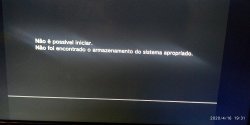
If I try only to power up it keeps led green and then turn red. If I try recovery mode I get the error.
When I speak to try the HDD in another PS3, it was to put my HDD on a working PS3. It was just an idea.
Attachments
esc0rtd3w
Developer
I don't understand why your console is not booting to xmb still. I do not think it is patch related, but not 100% sure.If I try only to power up it keeps led green and then turn red. If I try recovery mode I get the error.
When I speak to try the HDD in another PS3, it was to put my HDD on a working PS3. It was just an idea.
I sent you a pm for a pup to try that @Evilnat created out of Rebug 4.86.1 lite.
If it don't work, we can try getting one made that does
Similar threads
-
 PS3Xploit Flash Writer (4.93 HFW Req)
- Started by Evilnat
- Replies: 10
-
 PS3 PS3 Toolset (by bguerville) with 4.92 support has been released.
- Started by STLcardsWS
- Replies: 5
-
PS3 qCFW - Arrives to Slim (2500-3000) & SuperSlim (4000-NOR) PlayStation 3 Models
- Started by STLcardsWS
- Replies: 265
-
PS3 4.92 Evilnat Custom Firmware (w/ Cobra v8.5) Released - CEX,PEX,D-PEX,DEX builds
- Started by STLcardsWS
- Replies: 41