esc0rtd3w
Developer
IMPORTANT NOTICE FOR NAND USERS! (04-08-2020)
The NAND Fix link will from now on be on a per case basis, as we now have 2 fixes, one for each ros bank due to the fact that certain users have not followed recommendations & used the fix several times including when there was nothing to fix.
Please PM @esc0rtd3w or post in this thread, with the issue submission template filled in & a fresh dump, and if your situation warrants it, we will send you a link to an alternative Toolset you can use to fix your issue.
IMPORTANT NOTICE FOR NAND USERS! (04-04-2020)
We have fixed a bug where user couldn't install any FW after patch, but boots fine. It happens only on non-qa flagged CFW Compatible NAND.
@bguerville @Joonie @habib @littlebalup
Instructions In Spoiler For NAND Users Only That have below problems
!End Important Messages!
>>> Submission Templates For Users To Copy & Paste Are Located At Bottom of This Post <<<
How To Use The Toolset
Create A Backup
Patch CFW Compatible NAND/NOR
NAND Patch Should Take 6 - 8 seconds to apply
NOR Patch Should Take Roughly 1:30 - 1:40 to apply
If it says anything other than "You can reboot your console" in a green toast message when complete....STOP!
Make a New Backup! Post on this thread with your original and patched dumps
This is the url you should be using on your PS3 to take a picture/screenshot:
** www.** ** www.ps3xploit.net > D...p://ps3toolset.com)/bgtoolset/index.php#tblog
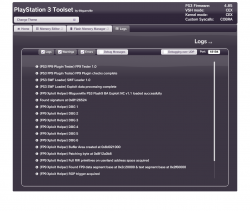
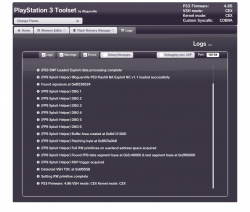
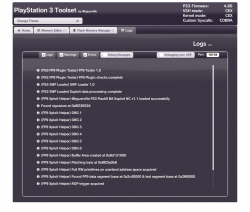
This will be a place for users to submit screenshots and dump submissions for any issues related to bguerville's PS3 Toolset (BG Toolset)
PLEASE DO NOT SUBMIT AN ISSUE OR PROBLEM WITHOUT AT MINIMUM, AN ACCOMPANYING LOGS SCREENSHOT AND EXAMPLE INFO COPIED AND FILLED OUT, EXCEPT DUMP INFO, IF UNAVAILABLE
You can also submit your good dumps to help further progress in the checking of abnormalities.
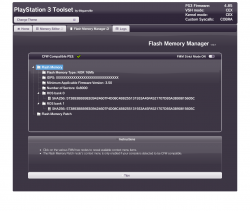
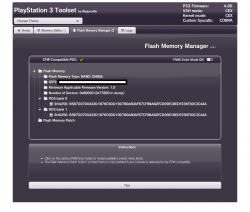
To dump your flash, please use the Flash Memory Manager tab on main exploit page.
Your IDPS should be masked before submitting dump (to protect your Unique Console ID), and there is a great tool by @pink1 for this exact thing here:
https://www.mediafire.com/file/lkc6xj6ewgeueua/IDPSMasker.exe/file
You may also manually mask them, usually done by replacing hex characters with FF
IDPS Masking Offsets

0x0002F070 1st IDPS instance on NOR
0x000303D0 2nd IDPS instance on NOR
0x00040870 1st IDPS instance on NAND/eMMC
0x00041BD0 2nd IDPS instance on NAND/eMMC
The original thread is located here:
https://www.psx-place.com/threads/u...ion-of-tools-fueled-by-new-ps3-exploit.28658/
To report a problem, please copy and paste the code below and replace with your information. Please also post accompanying screenshots, by means of a camera or screenshot tool in browser.
Submission Templates
Please copy and paste the correct one for your firmware type.
You will replace the following template answers with your own to match the system with the problem.
OFW
Copy & Paste Below Code For Submission
HFW
Copy & Paste Below Code For Submission
Common Upload Sites
https://uploadfiles.io/
https://www.mediafire.com
https://mega.nz/
This thread will be updated...
The NAND Fix link will from now on be on a per case basis, as we now have 2 fixes, one for each ros bank due to the fact that certain users have not followed recommendations & used the fix several times including when there was nothing to fix.
Please PM @esc0rtd3w or post in this thread, with the issue submission template filled in & a fresh dump, and if your situation warrants it, we will send you a link to an alternative Toolset you can use to fix your issue.
IMPORTANT NOTICE FOR NAND USERS! (04-04-2020)
We have fixed a bug where user couldn't install any FW after patch, but boots fine. It happens only on non-qa flagged CFW Compatible NAND.
@bguerville @Joonie @habib @littlebalup
Instructions In Spoiler For NAND Users Only That have below problems
- NAND Stuck in FW Issue Resolved
This applies to these CFW Compatible NAND users ONLY!
- You Cannot Install Any Firmware (OFW/CFW/HFW)
- 2.50 FW Displayed. Wants Version "ffff.ffff" in Recovery Mode
- 8002F169 or 8002F334 Error on XMB Installing Firmware
- 0.0 Minver In Toolset
Once we have provided you with the alternate toolset link, navigate to the EXACT page provided, and click the "Flash Memory Manager" tab, once beeped.
- Click "Flash Memory Patch"
- Click "Load Patch via HTTPS"
- Wait
- Click "Close" when finished!
- Click "Flash Memory Patch" again
- Click "Apply Loaded Patch"
- Click "Yes"
- Wait
- Click "Close" when finished
If it says anything other than "You can reboot your console" in a green toast message when complete....STOP! Contact @esc0rtd3w by PM to further analyze the problem!
That's All
Reboot your PS3 and try to install a 4.86 CFW, such as Rebug Lite, from recovery
!End Important Messages!
>>> Submission Templates For Users To Copy & Paste Are Located At Bottom of This Post <<<
How To Use The Toolset
Create A Backup
- Click "Flash Memory Manager" tab
- Click On The "Flash Memory" tree node
- Click "Save Flash Memory Backup"
- Save to USB or another destination
- Wait
- Click "Close" when finished
Patch CFW Compatible NAND/NOR
- Click "Flash Memory Patch"
- Click "Load Patch via HTTPS"
- Wait
- Click "Close" when finished!
- Click "Flash Memory Patch" again
- Click "Apply Loaded Patch"
- Click "Yes"
- Wait
- Click "Close" when finished
NAND Patch Should Take 6 - 8 seconds to apply
NOR Patch Should Take Roughly 1:30 - 1:40 to apply
If it says anything other than "You can reboot your console" in a green toast message when complete....STOP!
Make a New Backup! Post on this thread with your original and patched dumps
This is the url you should be using on your PS3 to take a picture/screenshot:
** www.** ** www.ps3xploit.net > D...p://ps3toolset.com)/bgtoolset/index.php#tblog
This will be a place for users to submit screenshots and dump submissions for any issues related to bguerville's PS3 Toolset (BG Toolset)
PLEASE DO NOT SUBMIT AN ISSUE OR PROBLEM WITHOUT AT MINIMUM, AN ACCOMPANYING LOGS SCREENSHOT AND EXAMPLE INFO COPIED AND FILLED OUT, EXCEPT DUMP INFO, IF UNAVAILABLE
You can also submit your good dumps to help further progress in the checking of abnormalities.
To dump your flash, please use the Flash Memory Manager tab on main exploit page.
Your IDPS should be masked before submitting dump (to protect your Unique Console ID), and there is a great tool by @pink1 for this exact thing here:
https://www.mediafire.com/file/lkc6xj6ewgeueua/IDPSMasker.exe/file
You may also manually mask them, usually done by replacing hex characters with FF
IDPS Masking Offsets
0x0002F070 1st IDPS instance on NOR
0x000303D0 2nd IDPS instance on NOR
0x00040870 1st IDPS instance on NAND/eMMC
0x00041BD0 2nd IDPS instance on NAND/eMMC
The original thread is located here:
https://www.psx-place.com/threads/u...ion-of-tools-fueled-by-new-ps3-exploit.28658/
To report a problem, please copy and paste the code below and replace with your information. Please also post accompanying screenshots, by means of a camera or screenshot tool in browser.
Submission Templates
Please copy and paste the correct one for your firmware type.
You will replace the following template answers with your own to match the system with the problem.
- PS3 Model: CECH-[YOUR_MODEL_HERE]
- Firmware Version: [YOUR_FIRMWARE_VERSION_HERE]
- IDPS Is Masked: [Yes or No ONLY]
- Have Original Dump: [Yes or No ONLY]
- Dump 1 URL: https://myfile.com/file.zip [Replace with actual valid link]
- Have Patched Dump: [Yes or No ONLY]
- Dump 2 URL: https://myfile.com/file.zip [Replace with actual valid link]
- System Boots To XMB: [Yes or No ONLY]
- System Boots To Recovery: [Yes or No ONLY]
- Firmware Version Displayed In Recovery: [VERSION_DISPLAYED]
- Minimum Firmware Version Displayed In Toolset: [VERSION_DISPLAYED]
- Disc In Drive: [Yes or No ONLY]
OFW
Copy & Paste Below Code For Submission
Code:
PS3 Model: CECH-A01
Firmware Version: 4.86
Firmware Type: OFW CEX
IDPS Is Masked: Yes
Have Original Dump: Yes
Dump 1 URL: https://myfile.com/file.zip
Have Patched Dump: Yes
Dump 2 URL: https://myfile.com/file.zip
System Boots To XMB: Yes
System Boots To Recovery: Yes
Firmware Version Displayed In Recovery: 4.86
Minimum Firmware Version Displayed In Toolset: 1.0
Disc In Drive: No
HFW
Copy & Paste Below Code For Submission
Code:
PS3 Model: CECH-A01
Firmware Version: 4.86.1
Firmware Type: HFW CEX
IDPS Is Masked: Yes
Have Original Dump: Yes
Dump 1 URL: https://myfile.com/file.zip
Have Patched Dump: Yes
Dump 2 URL: https://myfile.com/file.zip
System Boots To XMB: Yes
System Boots To Recovery: Yes
Firmware Version Displayed In Recovery: 4.86
Minimum Firmware Version Displayed In Toolset: 1.0
Disc In Drive: No
Common Upload Sites
https://uploadfiles.io/
https://www.mediafire.com
https://mega.nz/
This thread will be updated...
Last edited:


 and navigating the sidebar to File > Save Screenshot. The resulting screenshot(s) will be saved in dev_hdd0/photo under the year & month they were taken. Just might be better for clarity when examining them