• Official PS3 Toolset is now supporting 4.92 Firmware

    View Official Release Post for additional information HERE

PS3 [BG Toolset] User Issues and Dump Submissions

Ok, please stop doing that lol

How many times you ran it?

My original question was NOT answered either?

What day did you first run it?

Does it show ffff.ffff in recovery when trying to install firmware?


Sorry for bad english! <3 Thanks for time :)
 
it's possible to run the toolset with an ESP without internet ?
Yes it's possible in theory but in practice you would need the Toolset source code and a standalone version of it for that matter, without php/ssl. None of that is currently available to the public.

For the moment & things can always change, I plan to release Toolset v1.0 (current version) or rather v1.1 (not yet released/wip) source code whenever I complete Toolset v2.0. However I dunno yet whether this source code release will be a standalone version or not, I will think about it & decide in the coming months.
No ETAs.
 
PS3 Model: CECH-2004B
Firmware Version: 4.86.1
Firmware Type: HFW CEX
IDPS Is Masked: Yes
Have Original Dump: NO
Dump 1 URL:
Have Patched Dump: Yes
Dump 2 URL: https://www.mediafire.com/file/0pch2zpzkrk5wq2/Masked_dump.hex/file
System Boots To XMB: Yes
System Boots To Recovery: Yes
Firmware Version Displayed In Recovery: 4.86
Minimum Firmware Version Displayed In Toolset: 1.0
Disc In Drive: No

I have the last HEN installed, i patch my nand to intall a Rebug CFW and after the patch and the reboot, i can't installed any ofw/cfw : error 80029C55
 
PS3 Model: CECH-2004B
Firmware Version: 4.86.1
Firmware Type: HFW CEX
IDPS Is Masked: Yes
Have Original Dump: NO
Dump 1 URL:
Have Patched Dump: Yes
Dump 2 URL: https://www.mediafire.com/file/0pch2zpzkrk5wq2/Masked_dump.hex/file
System Boots To XMB: Yes
System Boots To Recovery: Yes
Firmware Version Displayed In Recovery: 4.86
Minimum Firmware Version Displayed In Toolset: 1.0
Disc In Drive: No

I have the last HEN installed, i patch my nand to intall a Rebug CFW and after the patch and the reboot, i can't installed any ofw/cfw : error 80029C55
The patch is correctly done as far as I can make out, I see nothing wrong with the CoreOS.
Both ROS regions have the right hashes & Flash Memory Manager doesn't modify anything else, only those 2 ROS regions.
Validation tools do not detect any dangers or warnings either in the entire Flash Memory.
I do not think your problem comes from the patch at all, but rather from something else, possibly changes you made since you started to use HEN.
Moreover I don't know this error, it is not even listed on psdevwiki either. It looks like a userland utility error.

Please post screenshots of firmware installation error message(s) in recovery mode to confirm.
 
The patch is correctly done as far as I can make out, I see nothing wrong with the CoreOS.
Both ROS regions have the right hashes & Flash Memory Manager doesn't modify anything else, only those 2 ROS regions.
Validation tools do not detect any dangers or warnings either in the entire Flash Memory.
I do not think your problem comes from the patch at all, but rather from something else, possibly changes you made since you started to use HEN.
Moreover I don't know this error, it is not even listed on psdevwiki either. It looks like a userland utility error.

Please post screenshots of firmware installation error message(s) in recovery mode to confirm.
In Recovery, the console detect any firmware on my USB but on XMB, it detect the firmware and after i launch the update, it give me this error code :(
 
In Recovery, the console detect any firmware on my USB but on XMB, it detect the firmware and after i launch the update, it give me this error code :(
Recovery mode should work perfectly fine so you need to check your USB key & the pup file.
 
Here my screenshot on recovery menu. It detect any firmware : hfw, ofw and cfw
9180EB82-508F-417B-A70F-426F1E6E3ADB.jpeg
 
It work now on Recovery, i got my solution on this theat and here is the solution now, rebug is installed :)
I have a controler with usb cable, after i press START+SELECT, i unplugged the controler and it detect the firmware, i'm now on Rebug 4.86 :)

Thanks a lot for your help !!!

Sorry for the multiple post :(
 
It work now on Recovery, i got my solution on this theat and here is the solution now, rebug is installed :)
I have a controler with usb cable, after i press START+SELECT, i unplugged the controler and it detect the firmware, i'm now on Rebug 4.86 :)

Thanks a lot for your help !!!
Recovery mode doesn't make mistakes, if it cannot detect the firmware pup on your key as a valid firmware, there are only 2 possibilities:
1. something is wrong with either the key or the file
2. Something was done to the system to induce the issue, for instance the minimum firmware can be changed through various operations like idps spoofing or a bad CoreOS patching.
But it was clearly not the case here, recovery mode detects 4.86 as minimum firmware which seemed normal if the console QA is disabled. You should use the Rebug Toolbox to enable QA straight away & leave it enabled.

If the patch had messed up your console, the validation of ros0 & ros1 after patching would have failed & you would have been notified NOT TO REBOOT because after a reboot you would have had a full brick.
As you can see in this thread, the only consoles having had partial brick issues were nand consoles because on nand the ros region contains ros0 & ros1 BUT also a few bytes indicating the active ROS. Not updating those additional bytes correctly led the system to make a wrong calculation of the minimum installable firmware version & consequently mess with further firmware installation. This bug was fixed in v1.0.22 update.
But such problems cannot happen on NOR simply because the ros region contains no extra bytes, only ros0 & ros1. If ros0 & ros1 pass the hash tests, the patch is guaranteed to be 100% valid.

 
Last edited:
Recovery mode doesn't make mistakes, if it cannot detect the firmware pup on your key as a valid firmware, there are only 2 possibilities:
1. something is wrong with either the key or the file
2. Something was done to the system to induce the issue, for instance the minimum firmware can be changed through various operations like idps spoofing or a bad CoreOS patching.
But it was clearly not the case here, recovery mode detects 4.86 as minimum firmware which seemed normal if the console QA is disabled. You should use the Rebug Toolbox to enable QA straight away & leave it enabled.

If the patch had messed up your console, the validation of ros0 & ros1 after patching would have failed & you would have been notified NOT TO REBOOT because after a reboot you would have had a full brick.
As you can see in this thread, the only consoles having had partial brick issues were nand consoles because on nand the ros region contains ros0 & ros1 BUT also a few bytes indicating the active ROS. Not updating those additional bytes correctly led the system to make a wrong calculation of the minimum installable firmware version & consequently mess with further firmware installation. This bug was fixed in v1.0.23 update.
But such problems cannot happen on NOR simply because the ros region contains no extra bytes, only ros0 & ros1. If ros0 & ros1 pass the hash tests, the patch is guaranteed to be 100% valid.
Ok i see but, why it dont work with the usb plugged in ?
 
Ok i see but, why it dont work with the usb plugged in ?
To be candid, I am not sure, it doesn't make much sense to me.
It sounds like something is not quite right with your system. That error on XMB firmware update is weird & should not happen afaik. Firmware update should be doable from usb with both XMB & recovery mode.
As you are a HEN user & consequently capable of making impacting changes to the system, I can only assume that some changes could have been made along the way that are now clashing with what we should be a simple firmware installation like any other. But then again, that's nothing more than an educated guess, it could be something else like hardware or a setting changed recently etc..., it's really hard to tell.

@esc0rtd3w did 100% of the testing for the Flash Memory Manager patching feature, maybe he encountered some similar situation with one of his test consoles but if ever he did, he never told me about it. Anyway he is probably in a better position than I am to discuss those particular installation quirks.
I am sure he will chime in on reading this.
 
Although I think it would have been reported already, we should maybe confirm that there isn't a systematic issue.

@esc0rtd3w
When you have a minute, could you try to reproduce this issue on a nor console?

@chronoss
Could you please describe the state of your console before patching?

HFW 4.86
HEN
What else?
 
@esc0rtd3w :
After installed the HFW 4.86, i installed the HEN 3.0.1 and after that, i patch my nand to install a Rebug CFW. After the reboot, i can't install any fw on xmb and recovery menu it's because i use a controler usb, without the controler plugged in on my console, it detect the firmware and i can install a cfw without problem... Tha'ts is the issue !
 
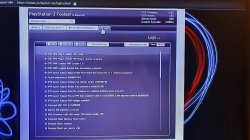
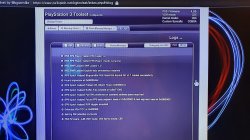
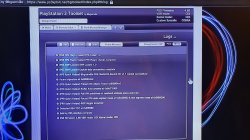
PS3 Model: CECH-G01
Firmware Version: 4.85
IDPS Is Masked: YES
Have Original Dump: NO
Dump 1 URL:
Have Patched Dump: NO
Dump 2 URL:
System Boots To XMB: Yes
System Boots To Recovery: Yes
Firmware Version Displayed In Recovery: 4.85
Minimum Firmware Version Displayed In Toolset: 1.0
Disc In Drive: NO

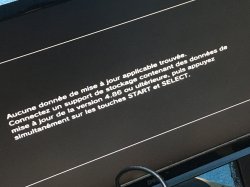
good night could you help me I have a problem trying to update from 4.85 to 4.86 is the error 8002f169 thanks
 

Attachments

  • 20200630_195602.jpg
    20200630_195602.jpg
    2.6 MB · Views: 719
  • 20200630_195747.jpg
    20200630_195747.jpg
    2.9 MB · Views: 361
  • 20200630_195751.jpg
    20200630_195751.jpg
    2.8 MB · Views: 885
  • 20200630_195842.jpg
    20200630_195842.jpg
    2.6 MB · Views: 822
Back
Top