SteveFearless
Forum Noob
Unfortunately, although my PS3 on on the official firmware 4.92, I can't access the website https://www.ps3tools.com , because it says my browser is no longer supported! I can't find any version number specific to the browser, but it IS still supported by https://manuals.playstation.net I can't see any way to update this browser, or to install another browser, so what can I do now? I'm a total noobie to the PS3. I bought it only about two weeks ago. My MacBook can't download anything from there either using either Chrome or Safari browsers, because only the Home and Logs tabs are enabled. Perhaps there's another still supported way to jailbreak it with CFW. I'm going to look round.
More news! The page https://www.ps3xploit.me/ give the error that the page can't be displayed on the PS3 browser. It looks like I'm allowed to download tools from there on my MacBook, though. Another website that's working, but not relevant here is www.aminet.net , as well as www.bbc.com but text only.
The answer to this problem had already been suggested in another topic. You have to search from another search engine. I used aolsearch.com , but I also read you could use duckduckgo.com/lite , although the main duckduckgo.com doesn't work with the PS3 browser anymore. I had to click on search results, sometimes links underneath, but not go directly to the sites. I managed to display https://www.ps3toolset.com , as well as https://www.ps3xploit.me , so I now plan to install the CFW, NOT Hen. My PS3 has been declared CFW compatible, but sysinfo.log has declared 32 errors. I don't know what these errors mean. Are they HDD errors? I plan to install a 512Gb SSD. Here's what it says...
PS3 System Information:
Flash Memory Type: NAND 256Mb
Number of NAND Sectors: 0x80000 (0x77800 in dump)
Minimum Applicable Firmware Version: 1.90
IDPS: 0000000100870005100A2BC106FEFBE3
PSID: FFFC6696A5DDA08715106B0B12F94ADD
Product Code: 87
Product SubCode: 0005
Firmware Version: 4.92 build 50763
Platform ID: CokC12
Board ID: SEM-001
Hardware Config: 4E00FFFF0007FCFF
Syscon Firmware Version: D52.0001000200030002 (EEPROM: 0001000200030002)
Statistics: Boot Count 4335 - Shutdown Count 3319 - Runtime 528d 10h 25mn 20s
Error 0: 0xA0801002 Time: Tue, 16 Sep 2025 00:28:30 GMT
Error 1: 0xA0801001 Time: Tue, 16 Sep 2025 00:26:37 GMT
Error 2: 0xA0801001 Time: Mon, 15 Sep 2025 01:51:08 GMT
Error 3: 0xA0801002 Time: Tue, 29 Jul 2025 15:10:28 GMT
Error 4: 0xA0801001 Time: Tue, 22 Jul 2025 22:33:08 GMT
Error 5: 0xA0801001 Time: Tue, 23 Jul 2013 19:05:41 GMT
Error 6: 0xA0801001 Time: Sat, 24 Nov 2012 19:06:36 GMT
Error 7: 0xA0801001 Time: Wed, 21 Nov 2012 19:09:25 GMT
Error 8: 0xA0801001 Time: Sat, 17 Nov 2012 19:55:07 GMT
Error 9: 0xA0801001 Time: Fri, 16 Nov 2012 16:45:04 GMT
Error 10: 0xA0801001 Time: Wed, 14 Nov 2012 22:45:42 GMT
Error 11: 0xA0801001 Time: Mon, 12 Nov 2012 13:42:37 GMT
Error 12: 0xA0801001 Time: Mon, 12 Nov 2012 02:20:18 GMT
Error 13: 0xA0801001 Time: Tue, 06 Nov 2012 15:56:28 GMT
Error 14: 0xA0801001 Time: Fri, 02 Nov 2012 21:20:39 GMT
Error 15: 0xA0801002 Time: Fri, 02 Nov 2012 11:43:17 GMT
Error 16: 0xA0801001 Time: Sun, 28 Oct 2012 18:46:58 GMT
Error 17: 0xA0801001 Time: Wed, 17 Oct 2012 17:41:02 GMT
Error 18: 0xA0001004 Time: Wed, 17 Oct 2012 14:24:22 GMT
Error 19: 0xA0801001 Time: Fri, 12 Oct 2012 21:04:44 GMT
Error 20: 0xA0801001 Time: Sun, 07 Oct 2012 16:45:46 GMT
Error 21: 0xA0801001 Time: Sat, 29 Sep 2012 21:59:57 GMT
Error 22: 0xA0801001 Time: Sat, 29 Sep 2012 10:55:32 GMT
Error 23: 0xA0801001 Time: Thu, 27 Sep 2012 12:09:10 GMT
Error 24: 0xA0801001 Time: Wed, 26 Sep 2012 14:32:55 GMT
Error 25: 0xA0801002 Time: Wed, 26 Sep 2012 09:38:33 GMT
Error 26: 0xA0801001 Time: Tue, 25 Sep 2012 15:54:06 GMT
Error 27: 0xA0801001 Time: Sun, 23 Sep 2012 09:57:10 GMT
Error 28: 0xA0801001 Time: Sat, 22 Sep 2012 11:33:56 GMT
Error 29: 0xA0801002 Time: Mon, 10 Sep 2012 16:27:08 GMT
Error 30: 0xA0801001 Time: Sat, 08 Sep 2012 14:09:07 GMT
Error 31: 0xFFFFFFFF Time: Thu, 01 Jan 1970 00:00:00 GMT
Extracted SYSCON Errors (32)
ROS 1 hash: 4EBAE019F3D0BCEC2898AA0BFE340FBF537BFB11D85926124460E5181E7449DE
ROS 0 hash: C3B518A983B7ABAB917A1A7DA2862152C5FC820446F0473195F9F99364FCB962
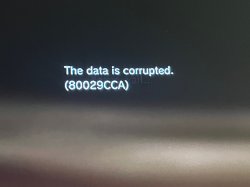
This is how my first attempt at jailbreaking my PS3 ended! Error 80029CCA. Has anyone else had this? I think it might be something to do with me downloading the file onto my MacBook first instead on onto my PS3, so I'll try it next directly onto the PS3 next time. I think I only need to repeat the final stage.
More news! The page https://www.ps3xploit.me/ give the error that the page can't be displayed on the PS3 browser. It looks like I'm allowed to download tools from there on my MacBook, though. Another website that's working, but not relevant here is www.aminet.net , as well as www.bbc.com but text only.
The answer to this problem had already been suggested in another topic. You have to search from another search engine. I used aolsearch.com , but I also read you could use duckduckgo.com/lite , although the main duckduckgo.com doesn't work with the PS3 browser anymore. I had to click on search results, sometimes links underneath, but not go directly to the sites. I managed to display https://www.ps3toolset.com , as well as https://www.ps3xploit.me , so I now plan to install the CFW, NOT Hen. My PS3 has been declared CFW compatible, but sysinfo.log has declared 32 errors. I don't know what these errors mean. Are they HDD errors? I plan to install a 512Gb SSD. Here's what it says...
PS3 System Information:
Flash Memory Type: NAND 256Mb
Number of NAND Sectors: 0x80000 (0x77800 in dump)
Minimum Applicable Firmware Version: 1.90
IDPS: 0000000100870005100A2BC106FEFBE3
PSID: FFFC6696A5DDA08715106B0B12F94ADD
Product Code: 87
Product SubCode: 0005
Firmware Version: 4.92 build 50763
Platform ID: CokC12
Board ID: SEM-001
Hardware Config: 4E00FFFF0007FCFF
Syscon Firmware Version: D52.0001000200030002 (EEPROM: 0001000200030002)
Statistics: Boot Count 4335 - Shutdown Count 3319 - Runtime 528d 10h 25mn 20s
Error 0: 0xA0801002 Time: Tue, 16 Sep 2025 00:28:30 GMT
Error 1: 0xA0801001 Time: Tue, 16 Sep 2025 00:26:37 GMT
Error 2: 0xA0801001 Time: Mon, 15 Sep 2025 01:51:08 GMT
Error 3: 0xA0801002 Time: Tue, 29 Jul 2025 15:10:28 GMT
Error 4: 0xA0801001 Time: Tue, 22 Jul 2025 22:33:08 GMT
Error 5: 0xA0801001 Time: Tue, 23 Jul 2013 19:05:41 GMT
Error 6: 0xA0801001 Time: Sat, 24 Nov 2012 19:06:36 GMT
Error 7: 0xA0801001 Time: Wed, 21 Nov 2012 19:09:25 GMT
Error 8: 0xA0801001 Time: Sat, 17 Nov 2012 19:55:07 GMT
Error 9: 0xA0801001 Time: Fri, 16 Nov 2012 16:45:04 GMT
Error 10: 0xA0801001 Time: Wed, 14 Nov 2012 22:45:42 GMT
Error 11: 0xA0801001 Time: Mon, 12 Nov 2012 13:42:37 GMT
Error 12: 0xA0801001 Time: Mon, 12 Nov 2012 02:20:18 GMT
Error 13: 0xA0801001 Time: Tue, 06 Nov 2012 15:56:28 GMT
Error 14: 0xA0801001 Time: Fri, 02 Nov 2012 21:20:39 GMT
Error 15: 0xA0801002 Time: Fri, 02 Nov 2012 11:43:17 GMT
Error 16: 0xA0801001 Time: Sun, 28 Oct 2012 18:46:58 GMT
Error 17: 0xA0801001 Time: Wed, 17 Oct 2012 17:41:02 GMT
Error 18: 0xA0001004 Time: Wed, 17 Oct 2012 14:24:22 GMT
Error 19: 0xA0801001 Time: Fri, 12 Oct 2012 21:04:44 GMT
Error 20: 0xA0801001 Time: Sun, 07 Oct 2012 16:45:46 GMT
Error 21: 0xA0801001 Time: Sat, 29 Sep 2012 21:59:57 GMT
Error 22: 0xA0801001 Time: Sat, 29 Sep 2012 10:55:32 GMT
Error 23: 0xA0801001 Time: Thu, 27 Sep 2012 12:09:10 GMT
Error 24: 0xA0801001 Time: Wed, 26 Sep 2012 14:32:55 GMT
Error 25: 0xA0801002 Time: Wed, 26 Sep 2012 09:38:33 GMT
Error 26: 0xA0801001 Time: Tue, 25 Sep 2012 15:54:06 GMT
Error 27: 0xA0801001 Time: Sun, 23 Sep 2012 09:57:10 GMT
Error 28: 0xA0801001 Time: Sat, 22 Sep 2012 11:33:56 GMT
Error 29: 0xA0801002 Time: Mon, 10 Sep 2012 16:27:08 GMT
Error 30: 0xA0801001 Time: Sat, 08 Sep 2012 14:09:07 GMT
Error 31: 0xFFFFFFFF Time: Thu, 01 Jan 1970 00:00:00 GMT
Extracted SYSCON Errors (32)
ROS 1 hash: 4EBAE019F3D0BCEC2898AA0BFE340FBF537BFB11D85926124460E5181E7449DE
ROS 0 hash: C3B518A983B7ABAB917A1A7DA2862152C5FC820446F0473195F9F99364FCB962
This is how my first attempt at jailbreaking my PS3 ended! Error 80029CCA. Has anyone else had this? I think it might be something to do with me downloading the file onto my MacBook first instead on onto my PS3, so I'll try it next directly onto the PS3 next time. I think I only need to repeat the final stage.
Attachments
Last edited by a moderator: